
ARCTIC Case Fan Hub
4.7Editor score
10 Port PWM Distribution
SATA Power Input
Simple Cable Management
Explore our expert guide comparing the top 10 Fan Control Hub for PC options to find the best cooling solution for your custom build today.
Managing airflow in a modern PC build requires more than just installing fans. A reliable Fan Control Hub for PC centralizes power and signals, ensuring every component stays cool without cluttering your motherboard headers with messy cables.
We analyzed the top models on the market, focusing on port counts, power stability, and ease of installation. Our comparison covers hubs from trusted brands like Thermalright and Arctic, highlighting which ones support ARGB lighting and PWM speed regulation effectively.
Each pick below shows specific strengths for different build needs, from budget-friendly splitters to premium hubs with advanced controls. Please note that prices fluctuate frequently, so always check the current listing before making your final purchase decision.
4.7Editor score

4.7Editor score
4.6Editor score
This side-by-side comparison highlights key specifications across all ten selected fan control hubs. Use this table to quickly identify port counts, power requirements, and mounting styles that best fit your specific case and motherboard setup.


The ARCTIC Fan Controller stands out as a top choice for enthusiasts who demand precise airflow management. With a rating of 4.7 stars, it offers individual PWM control for all ten ports, allowing you to tune every fan independently rather than locking them into a single speed profile.
We may earn a commission when you buy through this link, at no additional cost to you.
Its standout quality is the native driver support for both Windows and Linux kernels, which ensures compatibility with a wide range of monitoring software. The unit supplies up to 2 amps per port with a 4.5 amp total limit, providing robust power that avoids the voltage drops seen in cheaper splitter cables.
While the price is higher than basic hubs, the trade-off is significant control and reliability. The magnetic mounting options make installation effortless without drilling or adhesive residue. Users should note that initial setup involves configuring the driver, but the long-term flexibility justifies this extra step.
This hub is ideal for gamers or workstation builders who want optimized noise and cooling performance. If you need to manage a large fan array with precision, this model offers the best balance of power and control available in the current market.
Each fan connects to its own port, allowing you to set specific curves for intake, exhaust, and radiator fans independently.
The high current capacity ensures fans spin smoothly even under heavy load, preventing the stuttering that occurs with underpowered hubs.
We may earn a commission when you buy through this link, at no additional cost to you.
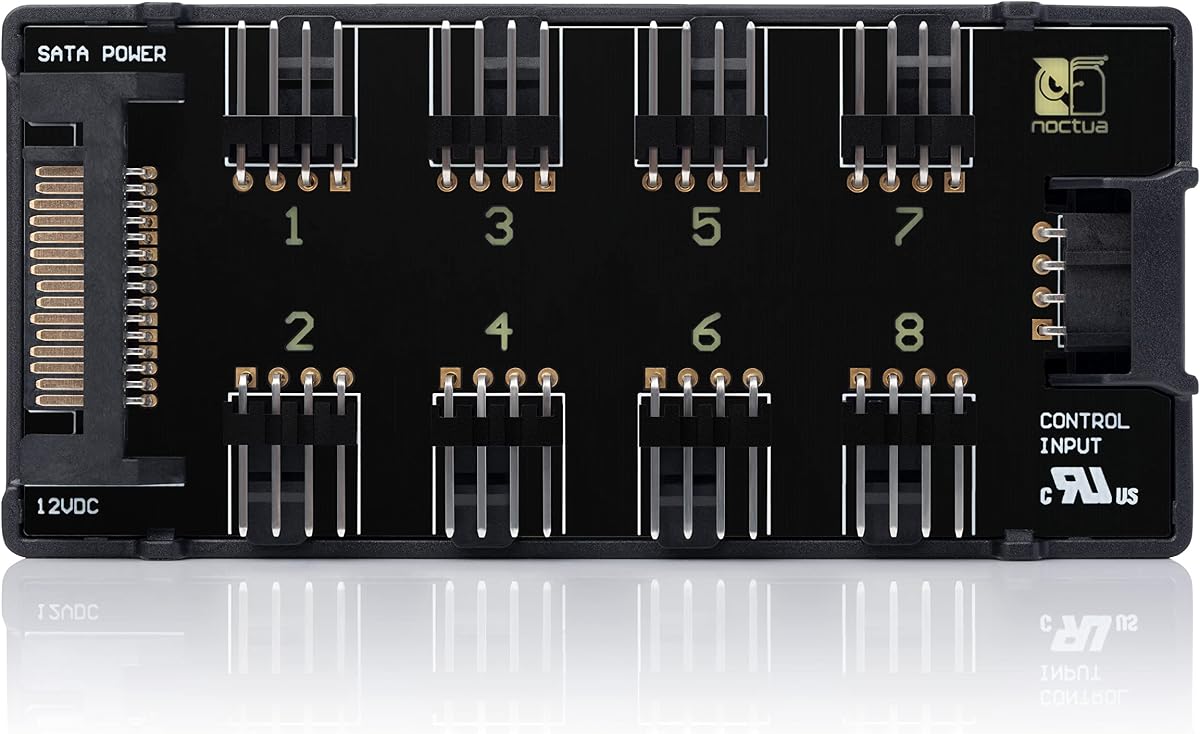
The Noctua NA-FH1 delivers premium build quality and safety features for serious PC builders. Rated at 4.6 stars, this hub allows you to connect up to eight fans with full PWM control while offering unique short circuit protection that cheaper alternatives often lack.
We may earn a commission when you buy through this link, at no additional cost to you.
Key strengths include the inclusion of safety fuses for both overcurrent and short-circuit scenarios, protecting your motherboard and fans from electrical faults. The hub supports simultaneous SATA and 4-pin inputs, giving flexibility in how you route power and signals. Noctua backs this product with a six-year warranty, reflecting their commitment to durability.
The main trade-off is the higher price compared to generic hubs. However, for those prioritizing long-term reliability and component safety, this cost is justified. The magnetic mounting system is robust, ensuring the hub stays secure inside any standard steel chassis without slipping.
This hub is perfect for professionals or anyone who values peace of mind in their cooling setup. If you want a fan hub that prioritizes safety alongside performance, the NA-FH1 remains a gold standard in the industry.
Built-in fuses guard against electrical faults, preventing potential damage to your expensive PC components during power surges.
You can use both SATA power for fans and a standard header for PWM signals simultaneously for maximum compatibility.
We may earn a commission when you buy through this link, at no additional cost to you.
The ARCTIC Case Fan Hub offers exceptional value for builders needing to expand their fan count without overspending. With a strong 4.7 rating, it simplifies cable management by replacing multiple Y-splitters with a single centralized unit that connects directly to your power supply.
We may earn a commission when you buy through this link, at no additional cost to you.
Its primary strength is cost-effectiveness combined with reliability. It synchronizes all ten fans to the speed of one reference fan, ensuring balanced airflow across your case. The SATA power input prevents voltage loss at full load, keeping fans running smoothly even when cooling demands are high.
The main limitation is that it lacks individual fan control, meaning all attached fans move at the same speed. For users who do not need precise tuning, this is an acceptable trade-off. The compact design fits easily into most cases without obstructing other components or airflow paths.
This hub is ideal for budget-conscious gamers or casual users upgrading their cooling. If your goal is simply to add more fans cleanly and affordably, this model provides the best performance per dollar in the category.
Eliminate messy cables by using one hub to manage ten fans, reducing clutter and improving airflow inside your PC case.
Powered via SATA directly from the PSU, ensuring consistent voltage delivery without draining your motherboard headers.
We may earn a commission when you buy through this link, at no additional cost to you.
The Thermalright ARGB Fan HUB is designed for builders who want to unify their lighting and cooling cables in one neat package. Rated at 4.5 stars, this unit expands your motherboard connectivity to eight fans while providing a dedicated controller for ARGB addressable fans.
We may earn a commission when you buy through this link, at no additional cost to you.
Its key strength is the dual-function design that handles both PWM power and ARGB lighting. The strong magnetic suction ensures the hub stays firmly in place, preventing loose wires. It synchronizes lighting effects across all connected devices, creating a unified aesthetic look throughout your case.
A critical trade-off is that it does not control fan speeds independently; it only expands the header connections. Users must also pay careful attention to the ARGB plug direction to avoid damaging components. However, for those needing reliable light synchronization, this is a robust solution.
This hub is perfect for RGB enthusiasts who value a clean interior setup. If you have multiple ARGB fans and want to reduce cable clutter while keeping lights in sync, this model delivers solid performance at a reasonable price.
Connect multiple ARGB fans to one header for synchronized color effects without using additional motherboard ports.
Strong double-sided adhesive and magnets keep the hub fixed securely, even on steel chassis panels with strong vibration.
We may earn a commission when you buy through this link, at no additional cost to you.
The Thermalright X12 IR White Hub is tailored for large-scale builds requiring maximum fan expansion. With a rating of 4.4 stars, it supports up to twelve fans, addressing the limitations of standard motherboards that often offer only three or four headers.
We may earn a commission when you buy through this link, at no additional cost to you.
Its standout feature is the high-capacity design that manages both PWM cooling and ARGB lighting simultaneously. The white finish complements modern aesthetic builds, while the direct SATA power input ensures stable operation even when all twelve fans are running at full speed.
While effective, the hub requires careful cable management due to the volume of connections. Additionally, like other hubs in this line, it does not offer independent speed control for each fan. However, for users needing to fill a large chassis with cooling, the capacity is unmatched.
This hub is ideal for workstation builders or enthusiasts with extensive cooling needs. If you need to connect more than ten fans without overloading your motherboard, this hub provides the necessary expansion and power reliability.
Connect up to twelve fans to a single header, allowing for extensive airflow management in massive custom cases.
Direct SATA power ensures no voltage drop, keeping all twelve fans running efficiently without performance throttling.
We may earn a commission when you buy through this link, at no additional cost to you.
The upHere PWM & ARGB Fan Hub offers a convenient solution for managing both fans and lights with a included remote. Rated at 4.6 stars, it supports nine ports and includes a physical controller, making it easy to switch colors or effects without touching your PC case.
We may earn a commission when you buy through this link, at no additional cost to you.
Its primary strength is the combination of remote control and stable power delivery via SATA. The magnetic mounting allows flexible placement inside the case, and the remote syncs the lighting panel with your fans for a cohesive look. This makes it an excellent choice for users who prefer hardware controls over software.
The main trade-off is that the lighting effects are limited compared to advanced motherboard software like Mystic Light. Additionally, it only synchronizes fans by speed rather than offering individual control. However, for those seeking simplicity and immediate visual feedback, this is a solid option.
This hub is perfect for casual builders or gaming setups that need quick lighting adjustments. If you want easy-to-use RGB management alongside reliable fan cooling, this hub delivers both without complex software installation.
Use the included remote to change lighting modes instantly without needing to open your PC or launch software.
The hub links your fan lighting panel to connected fans, ensuring consistent color transitions across your entire system.
We may earn a commission when you buy through this link, at no additional cost to you.
The Thermalright Integrated Hub is a streamlined solution for expanding fan connectivity without cluttering your case. With a 4.6 rating, it provides ten ports for 12V fans, allowing you to manage wiring efficiently while maintaining stable performance under high load conditions.
We may earn a commission when you buy through this link, at no additional cost to you.
Its key advantage is the compact design that fits into tight spaces often found in smaller mid-towers or mini-ITX builds. The direct SATA input ensures fans receive adequate power without draining your motherboard headers. Additionally, the strong double-sided sticker or magnets keep the hub secure during operation.
A limitation is that it does not support RGB lighting, making it suitable only for cooling needs. It also synchronizes fans rather than allowing individual control. However, for users focused solely on airflow, this hub provides excellent reliability and space efficiency.
This hub is ideal for builders who prioritize clean cable management and performance. If you need to connect multiple fans to a single header without sacrificing power stability, this model offers a simple and effective solution.
The small physical footprint allows placement in tight corners, reducing cable obstruction and improving overall internal airflow.
Direct SATA power connection prevents voltage drop, ensuring all connected fans run at their rated speeds consistently.
We may earn a commission when you buy through this link, at no additional cost to you.
The Thermalright X8 Hub serves as a practical middle ground between budget and premium options. Rated at 4.5 stars, it supports eight groups of fans and integrates both PWM and ARGB connectivity, allowing for a neat cable setup that keeps both lighting and power organized.
We may earn a commission when you buy through this link, at no additional cost to you.
Its primary strength is straightforward functionality without unnecessary complexity. The unit allows you to connect fans and lighting to separate headers, synchronizing speeds and colors easily. The stable output design ensures that your system remains efficient even under high thermal loads.
Trade-offs include the lack of advanced features like individual fan control or temperature-based automation. However, for standard builds, these features are often unnecessary. The hub's compact size and black finish also help it blend seamlessly into most gaming rigs.
This hub is perfect for builders seeking a reliable balance of cooling and aesthetics. If you want to manage both PWM and RGB devices cleanly without overpaying, this model offers a solid and straightforward solution.
Organize both lighting and power cables with one unit, reducing clutter and improving airflow inside your PC chassis.
Plug and play setup allows you to connect up to eight fans and lights quickly without complex wiring diagrams.
We may earn a commission when you buy through this link, at no additional cost to you.
The upHere Fan HUB provides versatile control options for managing your system's cooling and lighting. Rated at 4.4 stars, it supports ten ports and includes both an RF remote and a chassis key for adjusting lighting modes without needing software or software.
We may earn a commission when you buy through this link, at no additional cost to you.
Its strength lies in the flexibility of control methods. You can use the remote for quick changes or rely on the chassis key for permanent settings. The magnetic suction and SATA power ensure the hub stays secure and operates stably under full load, preventing voltage drops.
While it supports ARGB, the lighting features are more basic compared to motherboard integrated software. Additionally, the hub syncs fan speeds rather than offering individual control. However, for users who want physical control over their setup, this adds significant convenience.
This hub is ideal for users who prefer hardware over software for lighting adjustments. If you need to manage ten fans and lights with multiple control methods, this hub offers a practical and flexible solution.
Switch between RF remote and chassis key control to manage lighting effects based on your personal preference.
SATA direct input ensures stable performance for ten connected fans, avoiding the limitations of standard motherboard headers.
We may earn a commission when you buy through this link, at no additional cost to you.
The Thermalright Fan ARGB HUB is an entry-level solution for integrating cooling and lighting without breaking the bank. With a strong 4.6 rating, it supports eight groups of fans and allows you to control both PWM speeds and ARGB lights from a single hub unit.
We may earn a commission when you buy through this link, at no additional cost to you.
Its main benefit is the ability to expand limited motherboard headers while maintaining synchronization. The direct SATA input ensures stable power delivery, and the black finish blends well with most builds. It is a reliable choice for those looking to tidy up internal cables effectively.
The hub does not allow independent speed control or lighting adjustments beyond synchronization. Also, ensure you have a spare SATA power cable ready as it is not included. Despite these minor limitations, it remains a solid option for standard cases.
This hub is perfect for builders looking to add RGB fans to a system with limited headers. If you want an affordable way to manage cooling and lighting cleanly, this hub provides excellent value and reliability.
Expand your fan count affordably while adding ARGB capabilities without needing multiple expensive headers or controllers.
Keep cables neat by consolidating power and signal wires into one compact hub, reducing clutter inside your PC case.
We may earn a commission when you buy through this link, at no additional cost to you.
Selecting the right fan control hub requires understanding your motherboard's limitations and your cooling needs. This guide breaks down the critical factors to help you make an informed decision.
Consider how many fans you need to connect and how many headers your motherboard provides. If you are building a high-airflow system with multiple radiators or case fans, look for hubs offering at least eight to ten ports. This allows you to utilize your full cooling potential without running out of motherboard connections.
Ensure the hub supports the exact number of fans you plan to install to avoid bottlenecks in your airflow strategy.
Fan hubs generally draw power from the motherboard headers or a direct SATA connection. SATA-powered hubs are more stable as they do not drain your motherboard headers, preventing potential voltage drops. Check the total current limit of the hub to ensure it can handle all your fans simultaneously without overheating.
Always opt for a hub with a direct SATA power input for better stability and performance reliability.
Determine whether you need speed control or lighting control. PWM hubs manage fan speeds to reduce noise and improve cooling efficiency. ARGB hubs manage lighting effects. Many modern hubs support both, allowing you to synchronize speeds and colors through a single device.
Verify that your motherboard headers match the hub's requirements for both PWM signals and RGB lighting.
Mounting flexibility helps you secure the hub inside the case without blocking other components. Hubs with magnetic backing are ideal for steel cases, while adhesive options work for non-metal surfaces. A secure mount prevents cables from shifting during installation or transport.
Choose a mounting method that suits your specific case material to ensure a tidy and safe build.
Some hubs offer manual control via remotes or chassis buttons, while others rely on software. Software control is flexible but requires drivers. Manual controls are immediate but limited. If you dislike software dependencies, look for hubs with physical remotes included.
Decide between software flexibility and physical convenience based on your workflow preferences.
Reliability is crucial since the hub manages power for cooling fans. Look for reputable brands with warranties of at least two years. Higher-end models often include safety fuses to protect against power surges. A durable build ensures long-term performance without electrical failures.
Prioritize hubs with established brand reputations to minimize the risk of component damage.
Hubs reduce clutter by centralizing multiple fan connections into a single cable for the motherboard. Look for models that offer organized outputs and clean connectors. Good cable management improves airflow and makes future upgrades easier.
Choose a hub that simplifies your wiring to keep the inside of your PC case clean and functional.
Advanced hubs offer individual speed control for each fan, while basic models synchronize all fans to one speed. Individual control allows for precise noise management but costs more. Synchronized control is simpler and sufficient for most cooling needs.
Assess if you need granular control or if simple synchronization meets your performance goals.
Begin by checking your motherboard manual to identify available PWM and ARGB headers. Connect the hub's input cable to the motherboard headers carefully ensuring correct pin orientation to avoid damage. Always verify the direction of ARGB plugs before connecting them as 5V and 12V standards are not compatible.
Route the SATA power cable from your power supply to the hub securely to prevent accidental disconnection during cleaning or component changes. Ensure that the hub is mounted away from heat sources or obstructing airflow to maintain its operational efficiency and prevent overheating.
Regularly dust the hub to ensure proper ventilation around the connectors and circuits. If using a hub with software control, keep drivers updated to maintain compatibility with your operating system. Periodically check that all fan connectors are seated firmly to maintain stable signal transmission.
Most modern fan hubs draw power directly from the PSU via a SATA cable to prevent overloading motherboard headers. This ensures stable voltage for all connected fans. The motherboard connection is typically used only for the PWM signal or RGB lighting sync.
No, ARGB hubs use 5V 3-pin connectors while standard RGB hubs use 12V 4-pin connectors. Connecting the wrong type can damage the fans permanently. Always check the voltage rating of your fans before purchasing a hub.
Basic hubs synchronize all fans to one speed profile. Advanced controllers like the Arctic Fan Controller offer individual port control. This feature is useful if you need different speeds for intake and exhaust fans.
Not strictly, but hubs still help organize cables and consolidate power. They reduce clutter inside the case, which improves airflow and aesthetics. Hubs also provide a single point of control for multiple fans.
Many hubs do not include SATA power cables, so check the product specifications before buying. Some models include fan extension cables, but others require you to reuse existing cables. Always verify what is included in the box.
Ensure the voltage of your fans matches the hub's ports. Use the correct pins for PWM and RGB. Never force plugs into connectors if they do not fit easily. Consult your fan's manual for pinout details.
Our top picks range from the highly versatile Arctic Fan Controller to the budget-friendly Arctic Case Fan Hub. The Noctua NA-FH1 remains a standout for those prioritizing safety and warranty coverage. Each model offers distinct advantages depending on your need for lighting versus cooling control.
Prioritize a hub that matches your motherboard's header types and your desired number of fans. If you need software integration, choose a hub with driver support. For pure simplicity, a SATA-powered hub with magnetic mounting is often the easiest to install.
Prices for these hubs fluctuate based on market demand and availability. Always check the current pricing and customer reviews before purchasing. This ensures you get the best value and the latest version of the product for your build.