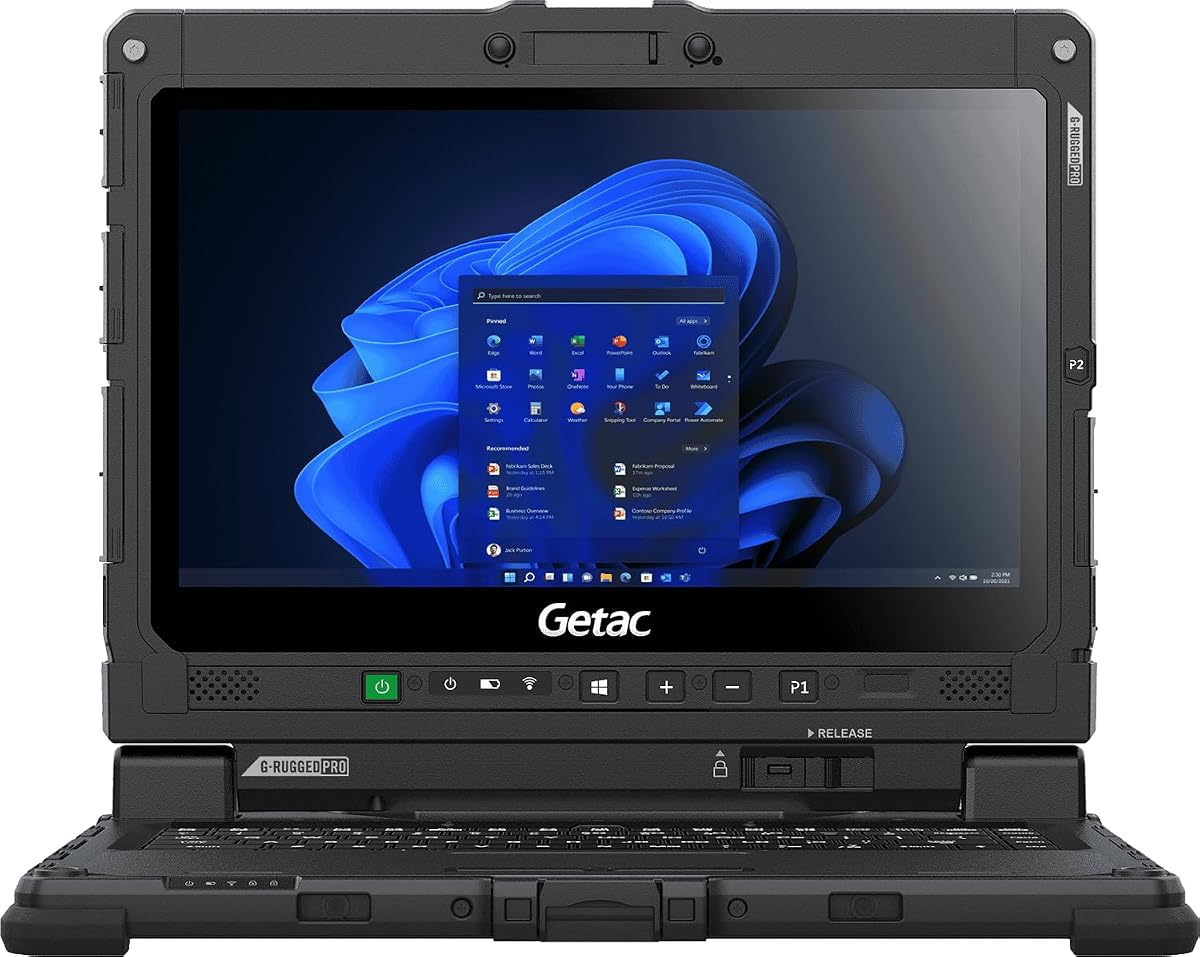
Getac Renewed K120
5.0Editor score
1200 Nits Brightness
Mil-Std-810H Certified
Windows 11 Pro Included
Finding a laptop that remains visible under direct sunlight is critical for field workers, engineers, and outdoor professionals. Standard screens often glare or become unreadable in bright environments, hindering productivity and safety. We evaluated top models with high brightness displays and rugged builds to ensure clear visibility in any condition.
Our analysis focused on sunlight-readable screens, durable chassis designs, and reliable performance in extreme environments. We compared technical specifications, real-world usability, and professional feedback to identify the most capable devices. Each entry in this list offers distinct advantages for users working outdoors or in high-light industrial settings.
Every product review includes key specifications, pros and cons, and specific use cases to help you make an informed decision. Note that availability and pricing can change rapidly, so verify current details before purchasing. Our goal is to provide accurate, data-driven insights to match your specific outdoor computing needs.
5.0Editor score

4.1Editor score

As an Amazon Associate we earn from qualifying purchases.
This table provides a side-by-side comparison of all ten rugged and high-brightness laptops evaluated in this guide to help you quickly identify the best fit for your specific outdoor computing requirements.


The MUNBYN IRX17 stands out as a top choice for professionals who need reliable visibility under direct sunlight. With a 1000-nit display and robust industrial design, it ensures clear visuals even in harsh outdoor conditions. Its high rating among field users reflects its ability to handle demanding workflows without screen compromise.
We may earn a commission when you buy through this link, at no additional cost to you.
This laptop excels in performance and durability, featuring an Intel i7-1255U processor and 32GB of DDR5 RAM. These specs allow for smooth operation of complex software like AutoCAD or MATLAB. The IP65 certification guarantees protection against water jets and dust, making it ideal for construction sites or oil rigs.
While the device is heavy and costs more than typical laptops, these trade-offs are necessary for its intended use. The dual battery system extends operational time in remote locations where charging is limited. Privacy is also addressed with a physical camera switch, adding a layer of security for sensitive field operations.
Buyers seeking a high-performance machine that thrives in bright environments should strongly consider the MUNBYN IRX17. It balances computational power with rugged durability and sunlight-readable display technology. This makes it an excellent investment for engineering, surveying, or military applications requiring unwavering reliability.
The 1000-nit screen ensures that content remains crisp and legible even under direct overhead sunlight or harsh glare conditions.
IP65 ratings and MIL-STD-810H standards mean this device can withstand drops, rain, and dusty environments without performance degradation.
We may earn a commission when you buy through this link, at no additional cost to you.
The Getac K120 offers outstanding value for those needing a certified rugged laptop without breaking the budget. Its 1200-nit display is one of the brightest available, ensuring visibility in extreme outdoor lighting. The renewed status provides access to enterprise-grade hardware at a significantly lower cost point.
We may earn a commission when you buy through this link, at no additional cost to you.
Despite its older generation processor, the K120 handles field applications effectively thanks to 16GB of fast RAM and a responsive SSD. The LumiBond touchscreen remains functional even when wearing heavy gloves, which is essential for cold-weather operations. Military-grade durability ensures it can survive drops and shocks common in field work.
The main limitation is its age, which may affect longevity for very long-term deployments. However, the brightness and build quality remain relevant for immediate use. Users should be prepared for smaller storage but can manage files externally if needed. The 90-day warranty on the renewed unit offers added peace of mind.
This model is ideal for organizations needing multiple field units on a tight budget. The combination of top-tier brightness and military certification makes it a strong contender. For temporary projects or secondary field devices, the Getac K120 delivers reliable performance and clear visibility without premium pricing.
With 1200 nits, this display cuts through direct sunlight better than most competitors, ensuring legibility in open environments.
The Amazon Renewed process ensures the unit is inspected and restored to full working condition, offering a cost-effective entry into rugged computing.
We may earn a commission when you buy through this link, at no additional cost to you.
The Getac S510 combines high-end processing power with rugged durability, making it a premium choice for demanding field tasks. The 1000-nit screen ensures clear visibility, while the Ultra 5 processor supports AI-driven workflows. This model is built for professionals who need both speed and resilience in equal measure.
We may earn a commission when you buy through this link, at no additional cost to you.
Its 32GB RAM and 1TB SSD provide ample resources for large datasets and complex simulations. The inclusion of a Copilot key reflects modern productivity needs, allowing quick access to AI tools. The device is designed to withstand vibrations and drops, ensuring data integrity during transport on rough terrain.
The trade-off is the higher price and weight, which may limit portability for some users. However, the performance benefits justify this for heavy industrial applications. The rugged design ensures the device lasts longer in harsh environments. It is a powerful tool for engineering and data-intensive field work.
Buyers looking for a top-tier solution with modern AI capabilities should choose the S510. It bridges the gap between enterprise mobility and industrial ruggedness. For organizations prioritizing performance and future-proofing, this laptop offers a compelling mix of brightness, power, and durability.
The Intel Ultra processor and Copilot key enable advanced on-device AI features that streamline complex field tasks and data analysis.
With 1TB storage and 32GB RAM, the S510 handles large files and multitasking without bottlenecks in challenging environments.
We may earn a commission when you buy through this link, at no additional cost to you.
The MUNBYN IRX16 provides a balanced option for users needing sunlight readability and durability without the highest performance tier. It features the same 1000-nit display as its flagship sibling, ensuring clear visuals in bright environments. The 2-year protection plan adds value for teams investing in field devices.
We may earn a commission when you buy through this link, at no additional cost to you.
Its i5 processor is suitable for standard CAD and mapping tasks while maintaining efficiency. The replaceable SSD allows for future expansion if storage needs grow. WiFi 6 support ensures reliable connectivity in busy work zones. This makes it a practical choice for general construction or logistics teams.
While it lacks the raw power of the i7 model, it still handles most industrial software effectively. The weight and bulk remain consistent with rugged standards. Users should consider the battery life limitations in remote areas. Overall, it offers strong value for mid-level field requirements.
This laptop is a smart choice for teams needing multiple units with consistent performance. The rugged design and high brightness make it reliable for daily outdoor use. For organizations seeking a balance between cost and capability, the IRX16 delivers essential features without unnecessary premiums.
The ability to replace the SSD allows for easy upgrades, extending the device lifespan as storage demands increase over time.
IP65 standards ensure protection against rain and dust, making it suitable for outdoor worksites where environmental hazards are common.
We may earn a commission when you buy through this link, at no additional cost to you.
The HP OmniBook 3 14 prioritizes mobility and battery efficiency, making it ideal for light outdoor work or travel. While not a rugged device, its OLED screen provides vibrant visuals. The Snapdragon processor supports AI tools and promises over 40 hours of battery life for all-day productivity.
We may earn a commission when you buy through this link, at no additional cost to you.
Its 2K OLED panel offers superior contrast compared to standard LCDs, which can be useful in controlled lighting. The Copilot key provides quick access to AI assistants for note-taking and summarization. This model is perfect for consultants or managers who need a portable machine rather than heavy machinery.
However, it lacks the 1000 nit brightness of dedicated sunlight laptops, so it may struggle in direct sun. Users should use it in shaded areas or indoors for best results. The lightweight build is great for travel but less durable against impacts. It fits specific use cases focused on office work.
Buyers needing a portable device with exceptional battery life should consider this model. The AI features enhance daily workflows significantly. For those who work mostly indoors or in shaded outdoor settings, the OmniBook offers a modern and efficient computing experience.
With up to 41 hours of life, this laptop supports long shifts without needing a power source or charger.
The built-in Copilot+ AI tools help automate tasks and streamline productivity for users on the go.
We may earn a commission when you buy through this link, at no additional cost to you.
The HP OmniBook 3 16 offers a spacious display ideal for multitasking or detailed work. While its brightness is standard, the larger screen helps users read content easily in various settings. The touchscreen adds an interactive layer for those who prefer touch input for navigation.
We may earn a commission when you buy through this link, at no additional cost to you.
Powered by an AMD Ryzen 3 processor, it handles basic productivity tasks smoothly. The 14-hour battery life supports most daily work sessions without charging. This device is suited for office environments or indoor use where screen size is a priority. It lacks rugged protections for heavy outdoor abuse.
The 8GB RAM might feel limiting for heavy multitasking but is adequate for standard workflows. The anti-glare coating helps somewhat with reflections though not direct sun. It is a practical choice for users needing a larger display without moving to a desktop setup.
Buyers looking for a cost-effective laptop with a large display should consider this model. It balances performance and screen real estate well for general consumers. For tasks requiring more space and moderate power, this OmniBook provides reliable and accessible computing.
The 16-inch screen provides ample space for side-by-side windows or detailed viewing of complex layouts.
The 2K touchscreen allows for direct manipulation of content, enhancing usability in presentation or design tasks.
We may earn a commission when you buy through this link, at no additional cost to you.
The Dell DC15250 is designed for everyday business tasks with a focus on comfort and reliability. While it does not have high brightness for outdoor use, its ComfortView feature helps reduce eye strain during long sessions. It is a standard laptop for office or indoor work environments.
We may earn a commission when you buy through this link, at no additional cost to you.
Its Core i5 processor handles routine data processing efficiently. The ergonomic hinges and keypad improve typing comfort. Service support ensures quick resolution of hardware issues. This device is a solid option for general business needs where portability and ease of use are key.
It lacks the brightness needed for direct sunlight, making it less ideal for outdoor field work. Users should work indoors or in shaded areas to maintain visibility. The service warranty adds value for professional users who cannot afford downtime. It serves well as a secondary office machine.
Buyers needing a dependable workhorse for general tasks should consider this model. It offers balanced performance with useful ergonomic features. For environments where visual comfort and support matter, the Dell DC15250 provides a reliable and practical solution.
ComfortView reduces harmful blue light emissions to help keep eyes comfortable during extended screen usage.
Lifted hinges provide a comfortable typing angle, reducing wrist strain for prolonged work sessions.
We may earn a commission when you buy through this link, at no additional cost to you.
The HP 17-cp3000 offers a massive screen for users needing extra visual space. The anti-glare coating helps reduce reflections, though it is not designed for bright sun. Its large storage and memory make it great for media editing or database work in indoor settings.
We may earn a commission when you buy through this link, at no additional cost to you.
The Ryzen 5 processor provides solid performance for daily tasks and media consumption. Privacy features like the camera shutter add security for remote work. This model is suited for users who prioritize screen size over portability. It serves well as a desktop replacement for home offices.
The weight and dimensions limit its use in field environments. It is not built for durability against drops or water. Users should consider it for stationary work where screen quality matters. For office tasks requiring detailed visuals, it provides excellent value.
Buyers wanting a large screen for home or office use should look at this model. It combines size with solid specs for a reasonable price. For those needing ample workspace and storage, the HP 17 offers a capable and practical choice.
The 17.3-inch display provides ample room for multiple applications and detailed content viewing.
The physical webcam shutter allows for easy privacy protection during calls and meetings.
We may earn a commission when you buy through this link, at no additional cost to you.
The Panasonic Toughbook FZ-55 is a legendary device known for rugged reliability. With a 1000-nit display, it maintains visibility in bright outdoor settings. The renewed status makes this high-end model more accessible while retaining core durability features. It has received strong ratings for field performance.
We may earn a commission when you buy through this link, at no additional cost to you.
Its i7 processor and 16GB RAM handle professional workflows efficiently. The package includes essential accessories like a stylus and adapter, adding value. MIL-STD certification ensures it can withstand shocks and harsh environments. This makes it a trusted choice for law enforcement or emergency services.
The older generation limits its speed compared to newer chips, but it remains capable for many tasks. Users should note the weight and size impact on portability. Battery life may be limited, so extra cells might be needed for long trips. Still, it delivers robust performance.
Buyers needing a proven rugged solution at a lower price point should consider this model. Its brightness and durability are standout features. For field operations requiring a reliable and bright display, the FZ-55 offers a practical and powerful option.
Toughbook standards ensure the device survives drops, vibration, and harsh weather without failure.
Inclusion of stylus and accessories simplifies field deployment and reduces extra purchasing needs.
We may earn a commission when you buy through this link, at no additional cost to you.
The Dell 16 DC16251 focuses on business efficiency with a large 16:10 display. This aspect ratio offers more vertical space for documents and web browsing. ComfortView Plus reduces eye strain during long work hours. It is a solid device for corporate or indoor professional settings.
We may earn a commission when you buy through this link, at no additional cost to you.
The Core 7 processor delivers fast performance for multitasking and data analysis. The camera supports high dynamic range for better video calls in varying light. Adaptive thermals ensure the system runs efficiently during peak usage. This laptop is designed for productivity in controlled environments.
It is not suitable for bright sunlight due to standard brightness levels. Users should work in shaded areas to avoid glare. The lack of rugged protection means it requires careful handling outdoors. For office professionals, it offers a balanced and powerful tool.
Buyers needing a large, efficient business laptop should consider this model. Its aspect ratio and performance support productive workflows well. For tasks prioritizing screen real estate and speed indoors, the Dell 16 provides a reliable and capable solution.
The taller screen provides more vertical space, reducing scrolling and increasing content visibility.
Wide dynamic range ensures clear video call quality even in challenging lighting conditions.
We may earn a commission when you buy through this link, at no additional cost to you.
Selecting a laptop for outdoor use requires balancing display brightness, durability, and performance to ensure visibility and reliability in bright environments.
Brightness measured in nits determines how visible the screen is under direct sunlight. For outdoor work, a brightness of 1000 nits or higher is essential to overcome glare and maintain readability. Lower brightness levels around 300 nits may work in shaded areas but will fail in open sunlight.
Always check the nits specification before purchasing to ensure the display matches your working conditions. High brightness ensures that text and graphics remain clear even when the sun is directly overhead.
Field laptops should meet military-grade standards like MIL-STD-810H to survive drops and vibrations. IP ratings such as IP65 protect against dust and water ingress which are common in construction or outdoor sites. These certifications ensure the device remains functional during physical stress.
Prioritize models with these certifications if your work involves rough terrain or exposure to the elements. Durability is as important as brightness for ensuring device longevity in harsh environments.
Selecting the right processor depends on the complexity of your field software. For CAD, mapping, or data analysis, an Intel i7 or Ultra 5 processor is recommended to handle large datasets smoothly. For lighter tasks like email and maps, an i5 or Ryzen 3 may suffice.
Match the CPU to your software requirements to avoid slowdowns or lag in the field. Adequate processing power ensures your workflow stays efficient without interruptions.
At least 16GB of RAM is recommended for multitasking and running professional applications simultaneously. For storage, an SSD is necessary for fast boot times and quick file access in the field. Look for replaceable storage options to allow for future upgrades as data grows.
Ensure the device has enough capacity to store essential field data without external drives. Adequate memory and storage prevent bottlenecks during complex field operations.
Long battery life is crucial when access to power outlets is limited in remote locations. Look for devices offering at least 8 hours of real-world use or consider models with dual battery options. Fast charging support can also help minimize downtime during work breaks.
Check battery specifications carefully to ensure they match your daily shift length. Reliable power sources keep your work continuous without constant recharging needs.
Wi-Fi 6 or 6E support ensures fast and stable internet connections in crowded field environments. Consider devices with 4G LTE capabilities if cellular data is needed for remote sites. Also check for necessary ports like USB-C and HDMI for connecting external displays or accessories.
Reliable connectivity is key for data transfer and communication in the field. Ensure the laptop has the ports and wireless standards your workflow requires.
A backlit keyboard is useful for low-light conditions or early morning field work. Touchscreens should be capacitive and glove-compatible if you wear protective gear. These features improve usability and efficiency in varied environmental conditions.
Test the keyboard and touch response if possible to ensure they meet your tactile needs. Input options should support your workflow regardless of weather or gear.
Consider long-term costs such as warranties and potential accessory needs like extra batteries or cases. Rugged laptops may have higher upfront costs but can save money by reducing damage and replacement frequency. Check if extended warranties are available for field environments.
Evaluate the total investment rather than just the purchase price. A slightly higher initial cost may offer better value and reliability over the device's life.
Keep your screen clean with a soft microfiber cloth to maintain optimal visibility and prevent scratches. For rugged models, ensure all port covers are securely closed to maintain water and dust resistance. Regular cleaning prevents buildup that can block vents or connectors.
Store the laptop in a protective carrying case when not in use to shield it from physical damage. Avoid leaving the device in direct sunlight for prolonged periods to prevent overheating and battery degradation. Always power down the device when moving between extreme temperature zones.
Update firmware and drivers regularly to ensure compatibility with field applications and security standards. Monitor battery health and calibrate the battery occasionally for accurate charge readings. If using dual battery systems, rotate them to extend their overall lifespan evenly.
For reliable outdoor use, look for a display with at least 1000 nits of brightness. Lower levels may work in shade, but high brightness is essential for direct sunlight visibility. This ensures text and graphics remain clear even in the brightest conditions.
If you work in environments with dust, rain, or risk of drops, a rugged laptop with MIL-STD certification is recommended. It protects your data and hardware from damage. For office work, a standard laptop is sufficient but not built for harsh conditions.
Many rugged models allow SSD upgrades, but you should check the specific product documentation. Some sealed designs restrict user access. Replaceable storage offers flexibility for future expansion when working with large datasets.
Reduce screen brightness to the lowest readable level, disable unused wireless features, and use battery saver modes. Carrying extra batteries or a power bank can extend operational time significantly during long field shifts.
Many rugged laptops are rated for a wide temperature range, but always check the manufacturer's specs. Standard laptops may not perform well in extreme heat or cold. Proper thermal management is essential for consistent performance.
Yes, most laptops have HDMI or USB-C video outputs for external displays. For outdoor visibility, ensure the external monitor also has high brightness. Using a monitor shade can help reduce glare on standard screens.
Some rugged laptops include cellular options, but many require a SIM card or USB modem. Check if your model supports WWAN or 4G LTE before purchase for seamless connectivity in remote areas without Wi-Fi.
Clean the screen daily to remove dust and oils that affect visibility. Use a soft, dry cloth to avoid scratching the surface. In sandy environments, avoid wiping immediately if there is abrasive debris to prevent scratches.
Choosing a laptop for bright sunlight requires balancing display brightness with rugged durability and performance. The top picks offer high nits displays and MIL-STD certified designs suitable for demanding field environments. Consider your specific workflow needs to select the right balance of power and portability.
Prioritize sunlight-readable screens and long battery life to maintain productivity in remote locations. Durability certifications are critical for protecting your investment against environmental hazards. Ensure the device matches the software complexity and physical conditions you face daily.
Remember to check current prices and availability before making a final decision. Specifications and promotions can change frequently, so verify details for the best value. Your chosen laptop should empower you to work efficiently in any lighting condition.