
ASUS TUF Gaming GT502
4.6Editor score
Dual chamber internals
Tool-free side panels
High-speed connectivity
This guide compares the top dual system PC cases for 2026, evaluating airflow, design, and compatibility to help you choose the perfect chassis for your build.
Finding the right chassis for your project requires careful consideration of space and thermal dynamics. A dual system PC case offers unique flexibility for enthusiasts who need to run two separate machines or isolate components effectively within a single footprint.
We evaluated ten leading models based on airflow efficiency, cable management tools, and structural integrity. Our comparison looks at real-world usability, cooling potential, and how well each design supports modern hardware standards for high-performance computing tasks.
Each pick highlights specific strengths like modular designs or enhanced ventilation. Prices fluctuate often due to market demand and retailer promotions. Always verify current listings before purchasing to ensure you get the best value for your investment today.
4.6Editor score
4.5Editor score

4.8Editor score
This side-by-side comparison details the key specifications and unique features of each selected dual system PC case to help you make an informed decision based on your specific build requirements.


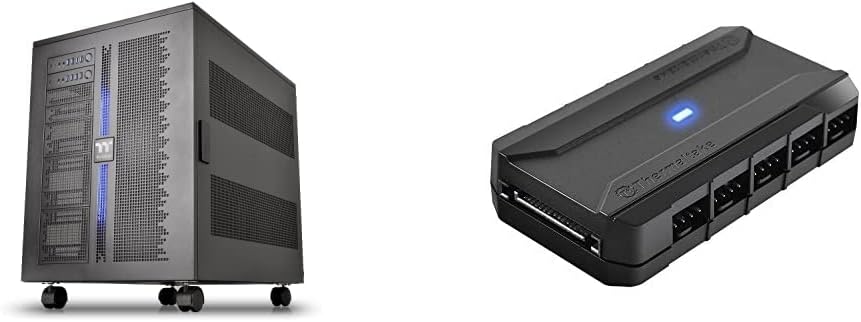
The Thermaltake Core W200 stands out as a true dual system PC case designed for enthusiasts who need to run two separate machines. It supports installing two independent systems in a back-to-back configuration with dedicated power supplies and video cards. This design offers unparalleled flexibility for testing or rendering workloads.
We may earn a commission when you buy through this link, at no additional cost to you.
Its fully modular design allows for complete breakdown and reassembly which makes cleaning and upgrading incredibly easy. The included Commander FP hub powers up to ten PWM fans simultaneously to ensure optimal cooling performance. You can install up to 600mm radiators for full custom liquid cooling builds.
While the chassis is massive it offers great cable management with reusable ties and velcro tabs included. The trade-off is the significant desk space required which might not suit smaller rooms. However for dedicated workstations this level of functionality is hard to match.
This case is perfect for professionals needing parallel compute power or hobbyists who love complex builds. It delivers top-tier versatility and cooling potential for those willing to invest in premium hardware.
Running two systems in one chassis saves space while doubling compute potential for rendering or testing.
Support for massive radiators ensures even overclocked components stay cool under heavy sustained loads.
We may earn a commission when you buy through this link, at no additional cost to you.
The NZXT H9 Flow RGB+ features a dual-chamber design that separates main components from the PSU and drives for better thermal performance. This separation keeps cables tidy and improves airflow efficiency significantly. It includes pre-installed RGB fans and an NZXT Control Hub for easy management.
We may earn a commission when you buy through this link, at no additional cost to you.
With a ten-fan capacity you can customize your cooling setup extensively across the top front and bottom. The panoramic glass view showcases every detail of your build with wraparound tempered glass paneling. It also supports back-connecting motherboards for a clean cable-free look.
The chassis supports large radiators and GPUs but bottom intake options are somewhat limited by the PSU shroud design. Cable management tools like extra-wide channels and velcro straps make the process very straightforward. Overall it balances aesthetics and function well.
This case is ideal for builders who want a clean aesthetic and excellent airflow. It handles high-performance components with ease while keeping the look professional and modern.
Separating the PSU chamber reduces heat soak on other components for better overall system stability.
Compatibility with new back-connect motherboards future proofs your build against cable clutter.
We may earn a commission when you buy through this link, at no additional cost to you.
The ASUS TUF Gaming GT502 offers a versatile dual-chamber design that divides internals into main and rear chambers. This allows for independent cooling zones for the CPU and GPU which enhances thermal management. It includes a vertical GPU mount to showcase your card proudly.
We may earn a commission when you buy through this link, at no additional cost to you.
Tool-free side panels make access simple by just pressing a button on the rear of the chassis. Panoramic views are provided by tinted tempered glass panels on both front and sides. High-speed connectivity includes USB 3.2 Gen 2 Type-C and two USB 3.0 ports.
While it supports high-end builds the weight of the chassis can make moving it difficult. The RGB button is useful but may not suit setups with external controllers. Cable management remains strong with clear paths and tie-down points.
This case is excellent for gamers wanting a balance of style and performance. It supports vertical mounting and offers great airflow for high-end components.
Vertical mounting options allow you to display your graphics card design without sagging issues.
Tool-free panels save time during maintenance or upgrades without needing extra screwdrivers.
We may earn a commission when you buy through this link, at no additional cost to you.
The Cooler Master HAF II 500 focuses heavily on high airflow with oversized 220mm front intake fans. Low airflow resistance design uses large ventilation openings to improve throughput significantly for performance builds. It supports up to two GPUs with a dual-mode holder for stability.
We may earn a commission when you buy through this link, at no additional cost to you.
Split-level cable management optimizes routing space and creates room for oversized rear exhaust cooling. Flexible storage cage supports different drive orientations based on PSU length to save space. MasterRail mounting system supports various fan and radiator sizes easily.
While the size is large the cooling potential is immense for demanding setups. Some users might find the dust filtration less robust than other options. Still the raw airflow numbers are impressive for thermal management.
This case suits users who prioritize cooling efficiency over compact size. It handles multiple GPUs and high-end CPU coolers with ease.
220mm front fans push a huge volume of air through the case for superior cooling performance.
Adaptive storage cage allows you to configure drive bays based on your specific PSU choice.
We may earn a commission when you buy through this link, at no additional cost to you.
The Antec Flux Pro combines metal glass and wood to create a high-quality texture that stands out visually. Multi-directional vent design supports up to 12 fans simultaneously including pre-installed PWM units for immediate cooling. It features an innovative iShift PSU mount for cleaner cable routing.
We may earn a commission when you buy through this link, at no additional cost to you.
Removable cooling brackets on the top front and PSU shroud allow flexible configuration. Support for simultaneous 420mm and 360mm radiator installs enables extreme liquid cooling setups. A CPU GPU dual temperature display provides quick thermal monitoring at a glance.
The wood texture adds warmth but might require more careful cleaning. While versatile the unique shape might limit some standard accessory compatibility. However it offers a distinct look for custom setups.
This case is perfect for enthusiasts wanting a premium aesthetic with high cooling potential. It handles complex builds with unique hardware mounts.
Combining wood with metal offers a unique premium look distinct from standard gaming cases.
Twelve fan slots allow extensive customization for airflow and noise balance in large builds.
We may earn a commission when you buy through this link, at no additional cost to you.
The ASUS ROG Strix Helios II is designed for showcase builds with a premium aluminum front panel and diamond-grille design. It supports EATX motherboards and graphics cards up to 450mm long for maximum compatibility. Cable management tools include a multifunction cover with holders for a tidy look.
We may earn a commission when you buy through this link, at no additional cost to you.
Pre-installed four 140mm fans deliver ultimate airflow and thermal performance out of the box. Advanced I/O panel features two USB 20Gbps Type-C ports for high-speed connectivity. A graphics card slot clamp and PSU bracket assist with stability and organization.
While the price is high the build quality and features justify the cost for enthusiasts. The weight of the glass panels makes transport difficult but enhances the visual appeal. It remains a top choice for high-end systems.
This case is best for builders wanting premium materials and top-tier support. It accommodates large components and offers excellent I/O options.
Support for 450mm graphics cards ensures future-proofing for next-generation high-end hardware.
High-speed Type-C ports allow fast data transfer for external storage and peripherals.
We may earn a commission when you buy through this link, at no additional cost to you.
The HAVN HS 420 uses a hybrid dual-chamber design to direct cool air onto the GPU from the bottom intake. It supports up to 420mm radiators on its top right and bottom for extensive cooling options. The Heat-Formed UniSheet Glass Panel offers a clear continuous view inside.
We may earn a commission when you buy through this link, at no additional cost to you.
SimpliCable routing system cleanly routes cables top to bottom for a pristine appearance. A 3-way adjustable support bracket handles a wide range of graphics card sizes and shapes. All fan brackets have flexible rubber pads to isolate vibration effectively.
While the design is unique assembly may require extra care compared to standard cases. Limited bottom fan options might restrict some extreme cooling setups. However the GPU cooling focus is a strong selling point.
This case suits builders wanting optimized airflow and unique cable management. It handles various GPU sizes and radiator configurations well.
Hybrid design ensures targeted airflow hits the GPU for better temperatures under load.
SimpliCable guides help hide cables neatly for a professional finished look inside the case.
We may earn a commission when you buy through this link, at no additional cost to you.
The Thermaltake Capo X delivers parallel operation for two independent mATX systems from a single chassis. This allows for minimal desk impact while opening extra space for tools. Each system features its own I/O panel for power reset and audio ports.
We may earn a commission when you buy through this link, at no additional cost to you.
Configurable cooling supports up to thirteen 120mm fans and 420mm radiators for high performance. Hidden connector support allows use with motherboards like ASUS BTF for cleaner cable routing. Detachable GPU braces provide top and bottom support for graphics cards.
This chassis is limited to mATX motherboards which might reduce GPU or PCIe slot options. However the dual system capability is unmatched for multi-PC needs. It supports unique builds effectively.
This case is ideal for testers needing two machines in one box. It balances power and space efficiency well.
Dual independent systems let you run two tasks simultaneously without needing separate towers.
Separate I/O panels for top and bottom systems prevent cable confusion during use.
We may earn a commission when you buy through this link, at no additional cost to you.
The NZXT H6 RGB+ features a dedicated secondary chamber that isolates power and cables from your main build. This design delivers targeted airflow directly to your hottest components. A seamless curved glass panel provides minimal distortion for a clean look.
We may earn a commission when you buy through this link, at no additional cost to you.
Ultra-fine mesh across top front and right panels improves airflow without restricting intake. Ships without fans so you can fully customize your cooling and lighting to preference. Standardized mounts across top and bottom allow flexible cooling options.
While compact it limits some large GPU configurations but includes a strong anti-sag bracket. Lack of included fans increases initial cost but offers customization freedom. It remains a stylish choice.
This case suits small to mid-builds needing clean cable separation and sleek looks. It handles modern GPUs well with anti-sag support.
Seamless curved glass makes every component visible and adds a modern visual flair to your desk.
Secondary chamber ensures power heat does not interfere with CPU or GPU cooling directly.
We may earn a commission when you buy through this link, at no additional cost to you.
The Thermaltake View 380 features a dual chamber case with pillarless front and side tempered glass panels. It supports hidden-connector motherboards to help hide cables for a cleaner build aesthetic. Four Hydraulic Bearing 120mm ARGB Lite Fans are pre-installed for immediate use.
We may earn a commission when you buy through this link, at no additional cost to you.
I/O ports include USB 3.2 Type-C for fast connectivity needs. Max radiator size supports 360mm which is suitable for most custom cooling setups. The price point makes it accessible for budget-conscious dual-chamber enthusiasts.
While cooling is standard the aesthetic value is high due to the glass panels. Cable management space is less generous than larger options. Still it offers great value for the price.
This case is perfect for builders on a budget wanting clean visibility and modern connectivity. It handles standard high-end components comfortably.
Front and side glass without pillars offers an unobstructed view of your custom build inside.
Hidden-connector compatibility reduces visible cables for a professional and tidy appearance.
We may earn a commission when you buy through this link, at no additional cost to you.
Selecting the right chassis involves evaluating specific features that align with your hardware needs and desk space. This guide explains critical factors to help you make a confident choice.
True dual system cases allow two independent motherboards and power supplies in one chassis. This is vital for testers or multi-taskers needing parallel processing power without separate desks.
Verify that each system has separate I/O and mounting points for a functional setup.
Look for cases with large fan mounts and open mesh panels to reduce heat buildup. Dual chambers help separate hot PSU air from CPU and GPU components effectively.
Ensure support for your desired radiator size to maintain safe temperatures under load.
Dual system cases involve more cables so deep channels and Velcro straps are essential. Look for dedicated PSU shrouds and rear tie-down points to keep the interior clean.
Good routing tools prevent dust traps and improve overall airflow efficiency significantly.
Modern GPUs are large so check supported lengths and anti-sag brackets. Some cases allow vertical mounting which saves space and looks impressive.
Ensure clearance for both CPU coolers and graphics cards to avoid fitting issues.
Thick steel panels and durable hinges ensure longevity. Premium materials like glass or wood add aesthetic value but require careful handling.
Look for sturdy construction that reduces vibration noise during operation.
Ensure enough USB ports and Type-C support for your peripherals. Some cases offer unique I/O setups for independent systems.
High-speed ports are essential for modern storage and device transfers.
Dual system cases often have large dimensions. Measure your desk space to ensure it fits comfortably without obstruction.
Consider desk weight limits if you move the PC frequently.
Tempered glass panels offer visibility while steel mesh offers better airflow. RGB headers and control hubs enhance customization options.
Choose a style that matches your room setup and personal taste.
Always check compatibility of your hardware components before assembly. Ensure that each motherboard and GPU fits comfortably within the designated zones.
Keep dust filters clean by vacuuming them regularly to maintain optimal airflow performance. Use compressed air to clear internal dust buildup carefully.
Manage cables using the provided straps and routing guides to prevent overheating. Regularly check for loose screws on side panels and GPU braces.
A dual system PC case is designed to house two separate computer systems in a single chassis. It provides mounting points and I/O for both motherboards independently to maximize desk space efficiency.
Many dual system cases feature dual-chamber designs that isolate power supply heat from components. This separation often improves airflow but verify fan capacity before buying for high-end parts.
Yes most support multiple GPUs with long clearance and stability braces. Some even allow mounting across both systems for advanced rendering or mining workflows.
Yes many models support modern gaming components with RGB and airflow features. They offer unique aesthetics for gamers wanting to showcase complex builds on a desktop.
Use the built-in Velcro straps and deep channels provided in the case. Route cables behind the motherboard tray to keep the viewing area clean and organized.
Some models support E-ATX while others are limited to ATX. Always check specifications to ensure your specific motherboard size fits before purchasing the case.
We reviewed ten excellent options ranging from high-end Thermaltake models to affordable choices. Each offers unique features tailored to enthusiasts needing extra hardware flexibility.
Prioritize airflow and cable management features based on your specific component needs. Consider physical footprint to ensure the case fits your workspace comfortably.
Prices for these specialized cases change often so verify current listings before buying. Investing in the right chassis ensures long-term stability for your computing setup.