
Netgate 1100
4.1Editor score
Pre-loaded pfSense+ software
650 Mbps firewall throughput
Compact and silent
This guide compares the top hardware firewalls for businesses and home users, evaluating performance, security features, and ease of management for network
Hardware firewalls provide a critical line of defense for your network by filtering incoming and outgoing traffic before it reaches your devices. They offer robust protection against threats that software solutions might miss.
We evaluated ten top-rated appliances based on throughput, security features, scalability, and ease of deployment. Our analysis focuses on real-world performance and vendor support to help you make an informed choice.
Each pick highlights key strengths and ideal use cases for different network sizes. Note that availability and configurations may vary, so always verify current specs with the vendor before purchasing.
4.1Editor score
4.2Editor score

4.0Editor score
This side-by-side comparison highlights key specifications and capabilities across the top ten hardware firewall appliances to help you identify the best fit for your network needs.


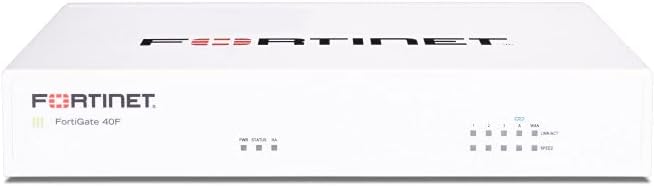
The FortiGate-40F is a compact appliance designed for small businesses needing reliable protection. It offers robust throughput and integrates AI-driven threat detection for proactive security.
We may earn a commission when you buy through this link, at no additional cost to you.
Its purpose-built security processor delivers industry-leading performance even for encrypted traffic. The fanless design ensures quiet operation, making it ideal for desktop placement in office environments.
While the appliance provides excellent hardware, security services require a separate subscription. Users must account for ongoing costs when planning their total security budget for this model.
This unit is recommended for small offices seeking a balance of performance and manageability. Its ease of deployment and strong threat protection make it a top choice for basic network defense.
FortiGuard Labs integration identifies unknown threats using AI to maintain robust network security continuously.
The user-friendly console provides network automation and visibility, simplifying deployment with Security Fabric integration.
We may earn a commission when you buy through this link, at no additional cost to you.
The Netgate 1100 is a powerful budget-friendly gateway featuring pre-loaded pfSense+ software for quick setup. It is designed for secure edge networking needs with solid routing capabilities.
We may earn a commission when you buy through this link, at no additional cost to you.
Its dual core ARM processor delivers near gigabit routing performance for common traffic types. The compact design allows it to run silently on a desktop or wall, saving valuable space.
While it offers great value, users should note the adult signature requirement for delivery. Additionally, the throughput may not suffice for very high bandwidth environments requiring heavy traffic processing.
This appliance is ideal for small offices or home users wanting professional-grade security at a lower cost. Its ease of use and reliable support make it a strong contender for budget-conscious buyers.
Business-ready pfSense+ updates included for the product lifetime ensure continuous security improvements without extra fees.
Three separate 1GbE ports allow flexible configuration for WAN, LAN, and optional traffic segmentation.
We may earn a commission when you buy through this link, at no additional cost to you.
The Zyxel USGFLEX100H delivers impressive throughput and flexible port options for businesses needing scalable security. It supports offline updates and integrates well with cloud management tools for ease of use.
We may earn a commission when you buy through this link, at no additional cost to you.
Its SPI firewall throughput reaches 4000 Mbps, allowing efficient handling of large data flows. The Nebula portal simplifies configuration and policy sync across multiple devices or sites effectively.
Users should note that the Entry Defense Pack restricts some advanced features like anti-malware. Upgrading to the Gold Security Pack unlocks full UTM capabilities for comprehensive protection.
This appliance is a great fit for growing offices that require future-proof security without hardware changes. Its flexible ports and cloud management make it a premium choice for modern networks.
Firmware can be updated offline via FTP while keeping the web interface accessible for uninterrupted network management.
Eight ports can be assigned as WAN or LAN supporting load balancing and link aggregation for resilient links.
We may earn a commission when you buy through this link, at no additional cost to you.
The SonicWall TZ280 provides high-speed inspection and threat prevention for small to medium businesses. Its patented engine allows rapid processing of data packets without compromising security or performance.
We may earn a commission when you buy through this link, at no additional cost to you.
With 2.5 Gbps firewall inspection capacity, it handles modern network loads efficiently. The zero-touch deploy feature simplifies management via on-box or cloud-based tools for IT administrators.
Hardware-only sales mean security services must be purchased separately to activate full protection. Users should factor in subscription costs to ensure the device delivers its promised security capabilities.
This appliance is excellent for businesses prioritizing throughput and quick deployment. Its robust engine and desktop design make it a reliable option for distributed sites needing strong protection.
Reassembly-Free Deep Packet Inspection engine ensures fast and thorough analysis of traffic for threats.
Support for SD-WAN and VPN keeps remote workers secure while maintaining consistent policy enforcement.
We may earn a commission when you buy through this link, at no additional cost to you.
The FortiGate-70G offers extensive port density and advanced SD-WAN features for branch offices. It integrates deeply with Fortinet devices to simplify management and ensure consistent security across the network.
We may earn a commission when you buy through this link, at no additional cost to you.
Its 10 Gigabit Ethernet ports provide ample connectivity for various network segments. Deep visibility tools help administrators govern encrypted traffic effectively for better control and compliance.
While highly capable, this appliance is a significant investment targeted at specific network environments. Users should ensure their infrastructure benefits from the additional ports and advanced management features offered.
This unit is ideal for offices requiring robust, unified security with minimal complexity. Its seamless integration and high port count make it a standout choice for growing branch networks.
Improves cloud and SaaS performance while maintaining consistent security policies across multiple connections.
Integration with switches and APs creates a unified secure network without requiring separate management tools.
We may earn a commission when you buy through this link, at no additional cost to you.
The Sophos XGS 128 is engineered for high performance in enterprise networks with massive throughput capabilities. It features dedicated hardware for visibility and reliable operation even under heavy load conditions.
We may earn a commission when you buy through this link, at no additional cost to you.
With over 19 Gbps throughput, it handles demanding traffic efficiently while providing detailed monitoring. The 2.5 GE ports ensure fast connectivity for modern network speeds across various segments.
Users should note the hardware-only model requires a separate subscription to enable full protection features. This is a strategic choice for larger networks needing scalable and powerful security infrastructure.
This appliance is best suited for enterprises prioritizing speed and traffic management. Its intelligent routing and high performance make it a robust solution for complex and growing network environments.
Provides resilient connectivity and intelligent routing across multiple WAN links for better uptime.
Nine 2.5 GE ports allow extensive connection options for diverse network needs and segmentation.
We may earn a commission when you buy through this link, at no additional cost to you.
The Zyxel USGFLEX700 is a powerful firewall bundle with UTM services included for comprehensive protection. It supports up to 500 users, making it ideal for mid-size offices needing strong security without separate subscriptions.
We may earn a commission when you buy through this link, at no additional cost to you.
Its 5400 Mbps SPI firewall and 1600k session capacity handle heavy network loads effectively. The Nebula Cloud Management system simplifies monitoring and configuration for easy administration tasks.
This appliance requires a larger investment and space due to its robust capabilities. Users should consider if their traffic volume justifies the premium price and extensive feature set offered.
It is a solid choice for businesses needing reliable, all-in-one security solutions. The high throughput and user support make it a standout option for growing office networks.
Includes anti-malware, ransomware blocking, and web filtering to protect against diverse threats.
Twelve GbE and two fiber ports allow flexible network setup and high-speed local access.
We may earn a commission when you buy through this link, at no additional cost to you.
The SonicWall TZ680 delivers 5 Gbps inspection speed and advanced threat protection for high-end small businesses. Its RFDPI engine ensures fast processing while maintaining thorough security checks on all traffic.
We may earn a commission when you buy through this link, at no additional cost to you.
This unit supports zero-touch deployment and includes support for Secure SD-WAN. The Cloud Secure Edge feature keeps distributed sites protected while allowing flexible remote access management.
Users must buy a subscription separately to activate full protection features like anti-malware. This appliance is best for businesses with specific high-throughput needs and existing security strategies.
It is a strong choice for SMBs needing robust security performance. Its high speeds and flexible connectivity make it ideal for organizations managing complex network traffic.
The engine inspects packets without reassembly to improve speed and reduce latency during high traffic.
Secure SD-WAN and Zero-Trust policies ensure distributed sites stay protected effectively.
We may earn a commission when you buy through this link, at no additional cost to you.
The FortiGate 60F includes three years of unified threat protection and premium support in one package. It is tailored for medium-sized businesses needing robust security without managing separate subscriptions.
We may earn a commission when you buy through this link, at no additional cost to you.
Advanced filtering technologies secure against botnets and advanced threats effectively. The included support ensures high-quality service continuity, making maintenance simpler for IT teams.
While the upfront cost is higher, the bundled services provide long-term value and convenience. Users should plan for subscription renewals to maintain the full protection features over time.
This unit is a practical choice for businesses wanting a complete security solution. Its support and protection package make it reliable for managing medium network environments.
Combines web filtering and anti-botnet technologies to secure against diverse online threats.
FortiCare Premium ensures reliable service continuity and access to expert assistance when needed.
We may earn a commission when you buy through this link, at no additional cost to you.
The Cisco ASA5525-X is a renewed appliance offering reliable firewall capabilities for budget-conscious users. It features standard Cisco architecture with eight Gigabit ports for versatile connectivity.
We may earn a commission when you buy through this link, at no additional cost to you.
Its proven hardware design ensures stability for basic network security needs. The renewal status provides cost savings while maintaining essential functionality for small environments.
Users should expect limited documentation and verify service support options for renewed units. It is best for those familiar with Cisco systems needing a functional entry-level firewall.
This unit is a suitable choice for businesses seeking reliable hardware at a lower price. Its simplicity and port count make it practical for basic security setups.
Delivers trusted security functions familiar to users managing Cisco network infrastructure.
Renewed hardware offers a budget-friendly entry point into enterprise-grade firewall technology.
We may earn a commission when you buy through this link, at no additional cost to you.
Selecting the right hardware firewall requires evaluating several factors to ensure your network remains secure and efficient.
Throughput determines how much data the firewall can inspect without slowing down your network. Look for units that exceed your internet speed and local traffic volume by at least 20 percent.
Choose a model with higher throughput than your current needs to accommodate future growth and security features.
Modern firewalls include IPS, anti-malware, and web filtering to stop threats before they reach devices. Ensure the appliance supports the necessary features for your organization's security requirements.
Verify that subscription services enable these features since most appliances sell hardware without active protection packages.
Assess the number and type of ports needed for your network setup. Some units offer flexible assignments allowing WAN and LAN ports to be configured for specific needs.
Ensure the ports match your devices' speeds and types, such as Ethernet or SFP, to avoid bottlenecks.
The interface you use to configure policies impacts how easily you can manage security. Cloud management simplifies remote oversight while local consoles provide control for smaller setups.
Select an interface that matches your IT team's skill level and remote access needs.
Choose a firewall that can grow with your business to avoid frequent hardware replacement. Consider models that support additional units or cloud expansion for larger networks.
Scalable appliances reduce long-term costs and ensure consistent policy enforcement as your network expands.
Regular firmware updates and vendor support are vital for maintaining security against new threats. Check what warranties and technical support options are included with the hardware.
Prioritize vendors with responsive technical teams to resolve issues quickly during critical security events.
Consider where you will place the appliance, such as a desktop or rack. Compact, fanless units are ideal for office spaces needing quiet operation.
Ensure the power requirements fit your electrical setup and that physical space is available for installation.
Look beyond the initial hardware price to account for subscription services and maintenance costs. Total cost of ownership should include all ongoing fees required for protection.
Budget for both hardware and service renewals to ensure uninterrupted security coverage over time.
Begin by connecting the appliance to your network according to the manual. Assign IP addresses to WAN and LAN ports to establish a secure gateway for traffic inspection.
Configure security policies based on your organization's needs. Enable features like intrusion prevention and web filtering through the management console to activate protection.
Regularly update firmware to patch vulnerabilities. Monitor system logs for unusual activity and ensure physical connections remain stable to maintain optimal performance.
Yes, most hardware firewalls require a subscription to activate advanced security features like IPS and anti-malware. The hardware alone provides basic routing, but full protection needs these services. Always check what is included before purchasing.
Absolutely, a hardware firewall sits at the network edge before wireless access points. It protects all devices connected to your Wi-Fi by filtering traffic before it reaches them. You can integrate it with most modern routers.
This depends on the model's session capacity and user limits. Small units support a few dozen users while enterprise models handle hundreds. Check specifications for maximum concurrent sessions to match your network size.
Using both provides layered security for comprehensive protection. The hardware firewall secures the network perimeter while software firewalls protect individual devices from internal threats. This approach is recommended for most business environments.
You should update firmware at least monthly or whenever critical patches are released. Regular updates ensure protection against emerging vulnerabilities. Set up alerts to track when updates are available for your appliance.
If the firewall fails, traffic may bypass inspection unless you have redundancy. High-end models support failover to secondary appliances. Always have a recovery plan to minimize downtime during critical outages.
Our top picks cover a range of needs from budget-friendly units to high-end enterprise solutions. Each offers unique strengths in performance and management for different network environments.
Prioritize throughput and security features that match your specific traffic volumes. Ensure the appliance supports necessary tools like cloud management for ease of use in your setup.
Remember that hardware is only part of the solution and verify subscription requirements for full protection. Always check current availability and vendor support options before finalizing your purchase decision.