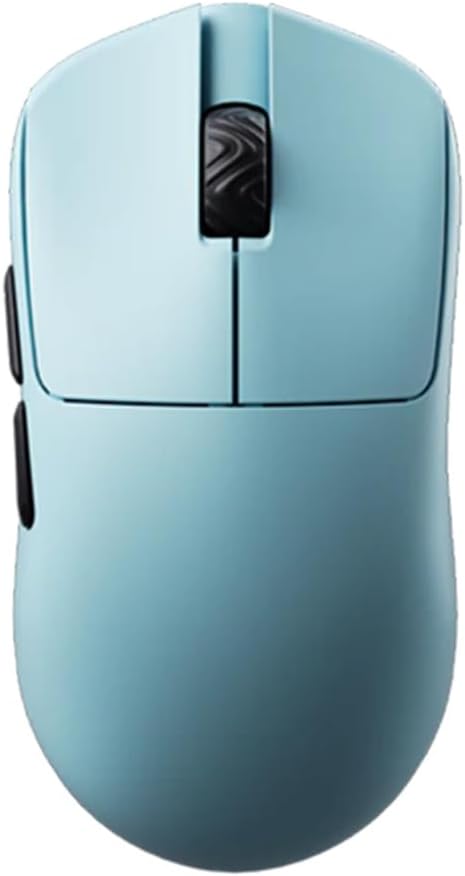
V6 Gaming Mouse
4.6Editor score
40g lightweight honeycomb shell
PixArt PAW3950 chip
Web-based driver included
This guide compares the top claw grip gaming mice for small hands to help you find the perfect lightweight ergonomic option for precision and comfort.
Finding the right claw grip gaming mouse for small hands is essential for competitive players who demand precision. A well-designed mouse reduces strain and improves control during intense sessions. We focus on lightweight models that support aggressive grip styles without sacrificing durability.
Our team evaluated ten leading options based on sensor performance, build quality, and ergonomic design. We prioritized mice with symmetrical or tailored shapes that accommodate smaller hand sizes comfortably. Each entry underwent rigorous analysis to ensure it meets the needs of serious gamers.
Each pick highlights key strengths and potential trade-offs to help you make an informed decision. While prices may fluctuate, the features and performance ratings remain reliable indicators of value. We recommend checking current availability before purchasing to secure the best deal for your setup.
4.6Editor score

4.6Editor score

4.3Editor score
Here is a detailed side-by-side comparison of all ten selected mice to help you weigh their specifications and features quickly.


The Lamzu Atlantis Mini stands out as the Editor's Choice for small hands seeking top-tier performance. With a 4.6 rating, it delivers exceptional precision and comfort for claw gamers who need speed. Its wireless design ensures freedom of movement without latency issues.
We may earn a commission when you buy through this link, at no additional cost to you.
Key strengths include the PixArt PAW3950 sensor which supports up to 30,000 DPI and 750 IPS tracking. The optical switches provide fast response times while the dustproof encoder ensures long-term reliability. These features make it ideal for competitive esports environments.
While the price is higher than budget models, the build quality justifies the cost. Users should note that customization requires specific software which may take time to learn. However, the performance gains often outweigh this minor inconvenience for serious players.
We recommend this mouse for anyone prioritizing sensor accuracy and wireless speed. It suits small to medium hands well with its symmetrical shape. For competitive gamers ready to invest, this model offers the best blend of features currently available.
The Nordic 52840 MCU ensures fast response times and accurate motion detection without any delays in gameplay.
An hourglass symmetry design with a broad back helps prevent finger cramps during long gaming sessions.
We may earn a commission when you buy through this link, at no additional cost to you.
The V6 Gaming Mouse earns our Best Budget award by offering high-end specs at an accessible price. It achieves a 4.6 rating thanks to its impressive PAW3950 chip and lightweight 40g design. This makes it a strong contender for budget-conscious gamers.
We may earn a commission when you buy through this link, at no additional cost to you.
Its symmetrical shape supports both claw and palm grips comfortably. The web-based driver allows easy adjustments without installing heavy software. Users also get an 8K Dongle included which enhances polling rates for faster response times.
However, build quality may vary slightly compared to premium brands. Some users might find the shell less rigid than more expensive models. Despite this, the performance per dollar remains exceptional for those new to competitive gaming setups.
Choose this mouse if you want top specs without breaking the bank. It is perfect for players transitioning from office mice to gaming gear. The value proposition here is hard to beat in the current market.
Adjust settings easily through a browser without needing to install bulky software on your computer.
Weighing only 40g it reduces hand fatigue during long sessions and enables faster precise movements.
We may earn a commission when you buy through this link, at no additional cost to you.
The BenQ Zowie S2-C offers a premium experience focused on simplicity and reliability. With a 4.3 rating, it appeals to pros who prefer driverless setups for consistency. Its small symmetrical shape is tailored specifically for claw and palm users.
We may earn a commission when you buy through this link, at no additional cost to you.
It features a reliable 3360 optical sensor with adjustable DPI levels that suit most gaming needs. The included paracord cable minimizes drag allowing smooth movement across surfaces. Build quality is robust ensuring longevity even with daily intense use.
While the DPI range is lower than competitors, it remains sufficient for most competitive play. The lack of wireless options might deter some but ensures zero latency. This trade-off is acceptable for those prioritizing pure performance over convenience.
This mouse is ideal for players seeking a no-nonsense reliable tool. It works out of the box without complex configuration. If you value stability and brand reputation Zowie is a safe choice for your setup.
Optimized settings work directly without needing to install software saving time and reducing potential errors.
A paracord cable allows freedom of movement minimizing drag or pull on any surface for better control.
We may earn a commission when you buy through this link, at no additional cost to you.
The Gwolves Skoll Mini brings a lightweight wireless experience to a mid-range price point. It scores a 4.4 rating for its 50g honeycomb design that appeals to claw gamers. The shape provides ergonomic support for small hands during extended sessions.
We may earn a commission when you buy through this link, at no additional cost to you.
Its PixArt 3389 sensor offers reliable tracking up to 16,000 DPI. PTFE skates ensure smooth gliding on various surfaces. This combination makes it suitable for FPS titles requiring quick movements without lag.
However, being wired limits its freedom compared to wireless models. Dust might collect in the honeycomb holes over time requiring occasional cleaning. Still the price-performance ratio makes it a viable choice for many gamers.
We suggest this for those who want a light mouse without premium pricing. It balances comfort and performance effectively. For casual and semi-competitive players it delivers reliable results consistently.
The honeycomb design reduces weight significantly while maintaining structural integrity for better maneuverability.
Ergonomic contours support small hands comfortably allowing for precise control during long gaming sessions.
We may earn a commission when you buy through this link, at no additional cost to you.
The Pulsar X2H Mini offers a compact wireless solution designed for aggressive claw grips. With a 4.1 rating it features a higher hump and narrower waist for better stability. This shape helps prevent fatigue during intense gaming periods.
We may earn a commission when you buy through this link, at no additional cost to you.
Its PixArt PAW3395 sensor supports up to 26,000 DPI with Motion-Sync technology. Optical switches provide precise clicks while the Nordic MCU ensures efficient battery usage. These features make it a solid choice for portable gaming needs.
Since this model is renewed quality may vary slightly from brand new units. Some users report battery life issues but most find it sufficient for daily use. The structural improvements over previous models are noticeable and appreciated.
Choose this if you prefer a smaller mouse with good specs. It suits those who want wireless freedom without excessive size. Ensure you check the seller ratings before purchasing to avoid potential issues.
An elevated rear hump and narrower waist offer improved stability for those who adopt a more aggressive claw grip.
PixArt's PAW3395 sensor with Motion-Sync delivers 650 IPS speed and 50g acceleration for precise tracking.
We may earn a commission when you buy through this link, at no additional cost to you.
The Pulsar X3 LHD redefines lightweight gaming with an unbelievable 43g weight. It achieves a 4.3 rating for its hybrid ergonomic shape that suits palm-claw styles. This model is particularly notable for left-handed users seeking a premium option.
We may earn a commission when you buy through this link, at no additional cost to you.
It uses an exclusive XS-1 sensor with 32,000 DPI resolution and 750 IPS tracking. Optical switches minimize unintended double clicks while DOT skates offer low friction gliding. These features ensure peak performance even in the most demanding games.
The price is high and availability can be limited in some regions. Left-handed gamers may find it hard to find alternatives with such specs. However the build quality and durability justify the investment for those who need it.
We recommend this for left-handed competitive gamers needing top specs. It delivers heavyweight results with a nearly weightless feel. If available in your region it is a fantastic upgrade for any serious setup.
The X3 combines palm and claw grip into a RelaxClaw shape offering a balance of comfort and control.
Enhanced mouse control with DOT skates delivers exceptional low friction for smooth gliding on any surface.
We may earn a commission when you buy through this link, at no additional cost to you.
The Pulsar X2H White Edition brings a sleek aesthetic to small-hand gaming. With a 4.2 rating it matches the performance of its black counterpart while offering a fresh look. Its mini shape is ideal for claw users needing precision and agility.
We may earn a commission when you buy through this link, at no additional cost to you.
It features the PixArt PAW3395 sensor with Motion-Sync for accurate tracking. The Nordic MCU ensures battery life extends up to 100 hours at 1000Hz. Optical switches provide consistent clicks without double-click issues over time.
The white finish looks great but requires regular cleaning to stay looking new. Dust shows more easily on lighter surfaces requiring maintenance. Still the performance and reliability remain high for this specialized design.
Select this if you want style without compromising performance. It suits gamers who value aesthetics alongside function. For those who keep their gear clean it is a stylish and effective choice.
Experience up to a remarkable 100 hours of usage all at a hyper-responsive 1000Hz polling rate.
Ensuring shell rigidity and consistent satisfying clicks with a sturdier structure for long-term use.
We may earn a commission when you buy through this link, at no additional cost to you.
The V8 Gaming Mouse impresses with its ultra-lightweight 36g design ideal for fast-paced gaming. It earns a 4.5 rating for its symmetrical shape and high-performance PAW3950 chip. Users appreciate the lack of need for heavy software installation.
We may earn a commission when you buy through this link, at no additional cost to you.
Its optical micro switches provide instant actuation with near-zero debounce delay. The stable 2.4GHz wireless connection ensures responsive performance for daily use. An included 8K Dongle supports high polling rates for competitive scenarios.
While the web-based driver is convenient it lacks advanced customization compared to desktop apps. Some users may prefer traditional software for complex macros. Still the lightweight build and sensor quality make it a strong contender.
Choose this if speed and ease of use are your priority. It works well for both casual and esports gameplay. For those seeking minimal setup with maximum agility this mouse delivers effectively.
Equipped with Kailh optical switches the V8 offers instant actuation with near-zero debounce delay compared to mechanical switches.
Stable 2.4GHz wireless connection ensures responsive lag-free performance for both gaming and daily use.
We may earn a commission when you buy through this link, at no additional cost to you.
The Bloody V7 targets users needing robust macro support and ergonomic comfort. With a 4.4 rating it features eight programmable buttons for automation and scripting. This makes it a practical choice for gamers who need custom commands.
We may earn a commission when you buy through this link, at no additional cost to you.
Its rubberized black coating provides a secure grip even during sweaty sessions. The optical sensor offers precise tracking up to 3200 DPI. While lower than modern standards it remains adequate for most casual and MMO players.
The design is heavier than newer lightweight models which may cause fatigue over time. Limited DPI might hinder competitive FPS play requiring quick aim adjustments. However its macro capabilities and affordability offer unique value.
Consider this if you need programmable buttons on a budget. It suits MMO players and those valuing comfort over speed. For traditional gamers this mouse provides reliable performance for various genres.
Bloody 6 software allows CPI and Report Rate adjustments for different levels of responsiveness and automation.
A rubberized black coating provides a secure grip for comfort during extended gaming sessions.
We may earn a commission when you buy through this link, at no additional cost to you.
The Corsair IRONCLAW SE offers a feature-rich experience for gamers seeking versatility. It holds a 3.9 rating with ten programmable buttons and impressive battery life. The ergonomic asymmetric shape is designed for right-handed palm users.
We may earn a commission when you buy through this link, at no additional cost to you.
It includes a CORSAIR MARKSMAN sensor with 26K DPI and surface calibration for adaptability. RGB lighting adds customization while iCUE software enables deep customization. These features appeal to those wanting a fully tailored peripheral.
However the heavier build may not suit small-handed claw users preferring agility. The asymmetrical shape limits suitability for left-handed players. Still the battery life and connectivity options are strong points for long-term use.
Choose this if you need many buttons and long battery life. It suits those comfortable with heavy software ecosystems. For larger hands wanting feature depth this mouse offers reliable performance and utility.
Up to 285 hours of battery life over 2.4GHz ensures more than enough power for marathon gaming sessions.
Customize the scroll wheel logo and front grill with your lighting preferences to match your setup.
We may earn a commission when you buy through this link, at no additional cost to you.
Choosing the right gaming mouse requires balancing weight, sensor, and shape. These factors determine comfort and performance during long sessions.
Lightweight mice under 60 grams reduce hand fatigue and allow faster movements. For claw grips look for a design that balances lightness without feeling cheap. Heavy mice can cause strain over time especially for smaller hands.
Prioritize a weight between 40g and 60g for optimal agility. This range supports quick flicks without sacrificing stability during aim.
A top-tier sensor ensures accurate tracking without acceleration issues. Modern optical sensors like PAW3950 or 3395 are industry standards for precision. Avoid older models with high jitter or inconsistent DPI steps.
Check for high IPS and acceleration specs to ensure the mouse keeps up with fast movements. Reliable tracking prevents lost shots in competitive games.
Claw users benefit from mice with a higher back and narrower waist. This design supports the fingertips while keeping the palm lightly rested. Symmetrical shapes often fit small hands better than aggressive ergonomic designs.
Look for mice labeled as mini or small to ensure a proper fit. Testing shape ergonomics online through reviews is essential before buying.
Wireless mice offer freedom but require battery management. Wired options ensure zero latency and continuous power. Choose based on your need for mobility versus convenience.
Modern wireless tech has minimized latency making it suitable for most competitive play. If latency is a concern a wired connection remains the safest option.
Optical switches prevent double-clicking issues common in mechanical switches. They provide faster actuation which benefits rapid-fire clicking scenarios. Mechanical switches offer tactile feedback but degrade over time.
Consider durability needs when choosing between switch types. Optical switches are generally better for long-term reliability in gaming.
Standard two-button mice suit most competitive games while MMOs benefit from extra buttons. Ensure side buttons are accessible for claw users without changing grip. Customizable layouts enhance productivity.
Avoid mice with bulky extra buttons if you prefer minimalism. Clean layouts help avoid accidental clicks during intense moments.
Good software allows DPI and polling rate adjustments. Look for lightweight apps that do not consume system resources. Some brands offer driverless setups for plug-and-play simplicity.
Ensure the software is easy to install and use. Complex tools can hinder your experience if setup is difficult.
A sturdy shell ensures the mouse survives drops and daily wear. Lightweight materials should not compromise rigidity. Check user reviews for reports of creaking or flexing.
Durable construction means fewer replacements over time. Investing in quality saves money and frustration in the long run.
Proper hand placement is key for claw grip success. Rest your palm lightly on the rear while curving fingers to tap buttons. Keep wrists straight to avoid unnecessary strain during play.
Clean your mouse regularly to maintain performance. Use a dry cloth to remove dust from the body and skates. For honeycomb designs use compressed air to clear debris from holes.
Adjust DPI settings based on your monitor resolution. Higher DPI helps on larger screens while lower DPI offers precision for aiming. Experiment with polling rates to balance battery and responsiveness.
A claw grip mouse is designed for users who arch their fingers to tap buttons. It usually features a higher back and a narrower waist. This shape allows for quicker clicks and better control in competitive games.
Wireless mice offer freedom but battery life can vary. Wired mice ensure zero latency and constant power. For small hands wireless is often preferred to reduce cable drag if the latency is minimal.
Measure your hand from wrist to middle finger tip. Compare this to mouse dimensions listed online. Mice labeled mini or small typically suit hand sizes under 18cm.
Modern lightweight mice use strong materials like PBT or reinforced plastic. Honeycomb designs reduce weight but remain robust if made correctly. Check user reviews for long-term durability reports.
Most gamers find 400 to 1600 DPI sufficient for small hands. High DPI allows faster cursor movement with less wrist motion. Adjust based on your playstyle and monitor resolution.
Optical switches typically last longer than mechanical ones. They often exceed 70 million clicks before failure. This makes them a reliable choice for daily gaming users.
We highlighted ten top picks ranging from budget to premium options. Each model was selected for its ability to support small-handed claw gamers. Performance and comfort remain the core priorities in our selections.
Focus on sensor quality and weight when making your final decision. A reliable sensor ensures accuracy while lightness reduces fatigue. Choose a shape that feels natural during long use.
Prices change frequently so verify current deals before purchasing. We hope this guide helps you find the perfect mouse for your needs. Happy gaming and stay sharp!