
HDMI to RCA Older TV Adapter
4.3Editor score
Supports PAL and NTSC
Plug and play setup
Compact portable design
This comprehensive guide compares the best HDMI to RCA adapters for old TVs, evaluating signal conversion quality, compatibility, and ease of use for legacy
Finding the right adapter to connect modern devices to older televisions can be challenging. You need reliable signal conversion that preserves quality while ensuring compatibility with your specific setup and legacy equipment standards.
We evaluated ten top-rated adapters based on user feedback, technical specifications, and real-world performance. Our comparison focuses on signal fidelity, power requirements, and how well they handle different input sources and output formats effectively.
Each pick highlights unique strengths for specific use cases. Remember that availability and pricing change frequently. Check the links for the most current stock and deals before making your final decision for your home theater needs.
4.3Editor score

4.4Editor score
4.1Editor score
The following table provides a side-by-side comparison of all ten adapters. Use this overview to quickly identify key specifications and features that matter most for your specific connection needs.


The Tengchi adapter converts analog composite signals to HDMI 1080p. It ranks highly for reliability and straightforward setup. The included cables make it ready to use right out of the box for most setups.
We may earn a commission when you buy through this link, at no additional cost to you.
Its ability to handle PAL, NTSC, and SECAM formats ensures compatibility with global legacy devices. The external USB power ensures stable operation without signal drops during extended use sessions at home.
While it does not support 3D or 4K, it handles standard definition inputs well. The USB power requirement adds a minor setup step but prevents instability common in unpowered adapters.
Buy this if you need a reliable converter for game consoles or VCRs on modern TVs. It balances performance and cost effectively for most home theater needs today.
Supports multiple analog standards ensuring your old content displays correctly on modern screens.
Includes RCA HDMI and USB cables so you do not need to buy extras.
We may earn a commission when you buy through this link, at no additional cost to you.
This adapter connects modern HDMI devices like Fire Stick to older RCA TVs. It supports both PAL and NTSC formats which is crucial for regional compatibility. Setup is quick and requires no software installation.
We may earn a commission when you buy through this link, at no additional cost to you.
The N/P switch allows users to adjust color issues if the image appears black and white. Its small form factor makes it easy to hide behind a TV or mount discreetly on a wall.
It does not support 4K or 3D which is expected at this price point. The USB power requirement means you need a spare port or adapter to run it consistently.
Ideal for budget-conscious buyers needing a simple connection for streaming sticks. It delivers solid performance for its cost without unnecessary extra features.
The physical switch lets you correct color issues instantly without technical knowledge.
One of the lowest priced options that still maintains reliable signal conversion quality.
We may earn a commission when you buy through this link, at no additional cost to you.
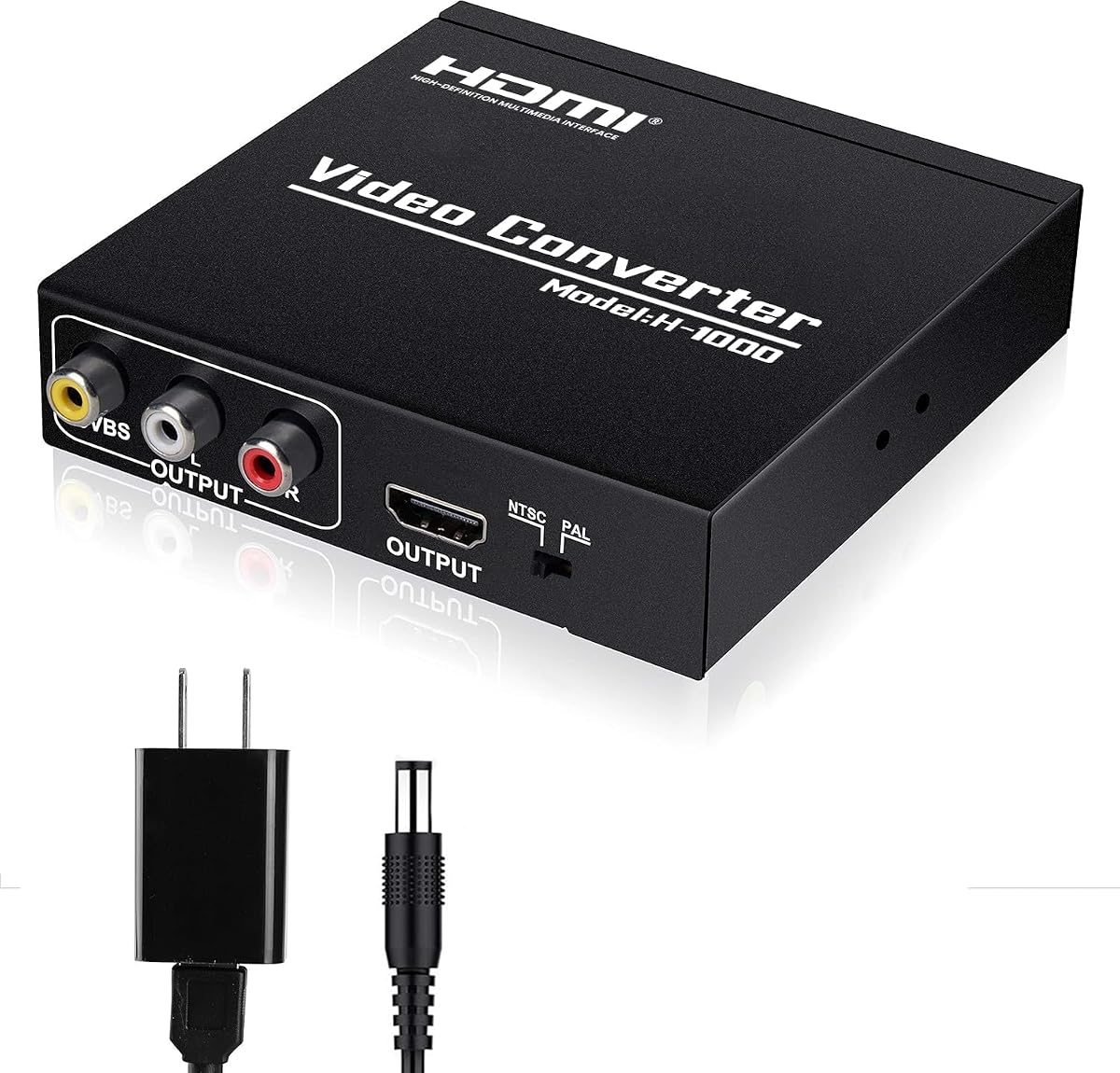
This unit splits one HDMI signal into both HDMI and RCA outputs simultaneously. It comes with a power adapter which simplifies setup compared to USB-only powered models. The built-in chip ensures stable video and audio transmission.
We may earn a commission when you buy through this link, at no additional cost to you.
Users can send signals to a modern TV and an older projector at the same time. This is useful for events where multiple displays are needed. The supported formats cover most common legacy standards.
The price is higher than single-function adapters but justified by the dual output capability. Ensure your HDMI source supports the resolution to avoid signal issues on the analog output.
Best for setups requiring simultaneous display on multiple screens. It offers convenience and reliability for presentations or parties with mixed generation TVs.
Send video to two different displays instantly without needing multiple devices.
The included adapter saves time and ensures stable power without extra purchases.
We may earn a commission when you buy through this link, at no additional cost to you.
This converter changes HDMI signals to RCA for older televisions. It includes a switch to toggle between NTSC and PAL formats easily. Users report clear video quality when used with streaming devices like Roku.
We may earn a commission when you buy through this link, at no additional cost to you.
The micro USB power connection ensures the converter has enough energy to process the signal properly. It supports up to 1080p input but downgrades output for analog displays effectively.
It is unidirectional so it cannot convert RCA to HDMI. This is important if you have old game consoles you want on a new TV as it will not work for that direction.
Good for connecting modern streaming boxes to vintage TVs. It provides stable performance for media consumption without complicated technical requirements.
Specifically optimized to work well with popular streaming sticks and boxes.
Delivers a sharp picture on older screens when configured correctly.
We may earn a commission when you buy through this link, at no additional cost to you.
This adapter is designed to connect modern devices like Xbox or Spectrum boxes to old TVs. It supports high input resolutions but outputs composite video. Users should ensure the source device resolution is compatible.
We may earn a commission when you buy through this link, at no additional cost to you.
It requires a separate power adapter which might not be included in the package. This allows the device to handle more complex signal conversions without overheating or dropping frames.
Some users report color stripes if the input resolution is too high. Lowering the source resolution can fix this. The adapter includes an N/P switch for format adjustment.
Use this for gaming consoles or cable boxes on older screens. It offers broad compatibility for a range of digital sources.
Works with a variety of consoles and media boxes out of the box.
Accepts high-definition inputs but outputs to analog standards effectively.
We may earn a commission when you buy through this link, at no additional cost to you.
This converter helps you connect VHS players or old game consoles to modern HDMI TVs. It supports 720p and 1080p output with a physical switch. The included cables make setup very easy.
We may earn a commission when you buy through this link, at no additional cost to you.
The USB power ensures the conversion chip runs smoothly. It is unidirectional so it only works for analog to digital conversion. This is perfect for retro gaming setups.
Video quality depends on the original source but the conversion is clean. Users appreciate the included HDMI and RCA cables which save extra costs.
Best for retro gaming enthusiasts. It allows you to play classic games on today's high-definition screens easily.
Specifically tested and compatible with many classic game consoles.
All required cables are included so you can start playing immediately.
We may earn a commission when you buy through this link, at no additional cost to you.
This adapter includes a 3.5mm audio port for connecting headphones or speakers. It connects HDMI sources to older TVs with RCA inputs. It supports both PAL and NTSC formats for global compatibility.
We may earn a commission when you buy through this link, at no additional cost to you.
It uses USB C power which is becoming more common. Users can connect external speakers easily through the audio jack. This is great for private listening or better sound quality.
It does not work with mobile phones or iPads. Ensure you have a compatible HDMI source. The setup is straightforward and requires no software drivers.
Ideal for those needing flexible audio options. It enhances the viewing experience on older TVs with modern sound solutions.
Add external speakers or headphones directly through the included port.
Uses modern USB C power for easier integration with other chargers.
We may earn a commission when you buy through this link, at no additional cost to you.
This kit comes with all cables needed to connect old devices to new TVs. It supports a wide range of consoles and devices. The cables are detachable for flexible placement in tight spaces.
We may earn a commission when you buy through this link, at no additional cost to you.
The USB power is required for operation. It supports common analog TV formats. Users appreciate the included cables which save time and money.
It is unidirectional so it only converts analog to digital. This is perfect for retro setups but not for streaming sticks to old TVs.
Best for those setting up a retro gaming station. The included cables and warranty make it a safe purchase choice.
Everything you need for a full setup is inside the box.
Includes an 18-month warranty for peace of mind on your purchase.
We may earn a commission when you buy through this link, at no additional cost to you.
This adapter offers precise signal processing for better colors and resolution. It comes with RCA and HDMI cables for immediate use. The plug and play design means no setup software.
We may earn a commission when you buy through this link, at no additional cost to you.
It supports multiple input formats including PAL and NTSC. Users report good stability during playback. The USB power ensures consistent performance without flickering.
It is designed for analog sources to digital displays. Mobile devices are not supported. This is ideal for game consoles and DVD players.
Great for users wanting reliable performance. The included cables and simple design make it accessible for everyone.
Advanced processing ensures colors and details look their best.
All necessary cables are included to save you extra buying.
We may earn a commission when you buy through this link, at no additional cost to you.
This kit includes a dedicated HDMI cable making setup complete. It transforms digital signals to analog for older displays. The included HDMI cable works independently for other uses.
We may earn a commission when you buy through this link, at no additional cost to you.
It supports common streaming devices and Blu-ray players. Users appreciate the zero software setup. The micro USB power connection is reliable for continuous use.
Ensure you have a power adapter for the USB port. It is not included but common adapters work fine. The signal output is consistent for movies and games.
Best for a simple all-in-one solution. It removes the need to buy extra cables for your connection.
Includes an HDMI cable so you have everything for a full setup.
The HDMI cable can be used separately with other electronics too.
We may earn a commission when you buy through this link, at no additional cost to you.
Choosing the right adapter requires understanding signal direction, power needs, and format support to ensure your devices communicate correctly.
It is vital to confirm the direction of conversion. If you connect old consoles to new TVs you need RCA to HDMI. If you connect streaming sticks to old TVs you need HDMI to RCA. Buying the wrong direction means the device will not work.
Check your source device output first. Ensure the adapter converts that signal to the TV's input format to avoid incompatibility.
Many adapters require external power via USB or an AC adapter. Without sufficient power signal quality drops or the device stops working. Verify if a power adapter is included or if you need to source one separately.
Always check power needs before buying to ensure you have a spare port or plug available for stable operation.
Legacy TVs use specific color formats like NTSC or PAL. If the adapter does not match the TV format the image may appear black and white. Most adapters have a physical switch to toggle between these standards.
Ensure the device supports the format common in your region to get a proper color image without manual intervention.
Some kits come with HDMI and RCA cables while others are adapter only. Having cables included saves time and money. Check the package contents to avoid unexpected extra purchases.
Look for complete kits if you do not already have the necessary cables for your setup to simplify installation.
Modern sources often output 1080p while analog displays do not support high resolution. The adapter should downscale signals correctly. Some adapters allow you to select output resolution via a switch.
Choose an adapter that supports the input resolution of your source to ensure the signal is processed correctly.
Not all adapters work with all devices. Some exclude mobile phones or specific tablet models. Check compatibility lists to ensure your streaming stick or console is supported.
Read device compatibility notes to avoid returns due to unsupported source hardware.
Audio may be handled differently by various adapters. Some split audio out for external speakers while others rely on RCA audio. Ensure your audio setup matches the adapter's output capabilities.
Consider if you need external audio support and choose an adapter that provides the necessary audio ports.
Some manufacturers offer warranties or customer support for their adapters. This can be helpful if the device fails or requires setup help. Check what support is included with the purchase.
Look for models with at least a one-year warranty to protect your investment against defects.
First connect the source device to the adapter using the correct cable. If your source is a TV stick plug the HDMI cable into the adapter. If your source is a VCR plug the RCA cables into the adapter matching colors.
Next connect the adapter to your TV using the appropriate input. For old TVs use the RCA inputs matching colors. For new TVs use the HDMI port. Connect the USB power cable to a power source before turning devices on.
Turn on the TV and set the input to the port connected. Use the physical switch on the adapter to adjust if the image is black and white. Keep the adapter in a well-ventilated area to avoid overheating.
Most adapters do not support mobile phones directly. You usually need a specialized dock or MHL cable to connect a phone. Check the product specifications for mobile support before purchasing.
This is usually a format mismatch between the adapter and TV. Use the N/P switch on the adapter to toggle between NTSC and PAL. Once the format matches the TV should show color.
No the adapter only converts signals without improving resolution. Low quality footage like VHS will not become high definition. The video quality depends on the original source material.
Some kits include a power adapter while others require you to source one. Check the package contents to see if a power supply is included. Most require a standard 5V USB power source.
Yes most adapters work with Xbox 360 systems that use RCA outputs. Ensure the console outputs an analog signal for the adapter to process correctly. Check your specific console cables for compatibility.
Adapters typically support one input at a time. To switch devices you may need to unplug and replug cables. For multiple inputs consider a video switcher before the adapter.
Selecting the right adapter bridges the gap between legacy gear and modern displays effectively. Our top picks cover most common needs from budget options to kits with extra cables.
Focus on signal direction and power requirements first to ensure compatibility with your specific setup. Check supported TV formats to avoid color issues on your older display.
Remember that prices and availability change over time. Check the links for the most current options and deals before finalizing your purchase for your home theater.