
Large Aluminum Heat Sink 150x93mm
4.7Editor score
Pre-applied adhesive tape
294 cooling fins included
Passive cooling design
This guide compares the top 10 GPU backplates for cooling, protection, and sag support to help you choose the right model for your graphics card setup.
GPU backplates serve as essential protective and cooling components for modern graphics cards. They shield the PCB from physical damage while helping dissipate heat generated during intensive workloads or gaming sessions.
We evaluated ten distinct backplate options based on material quality, thermal performance, and compatibility with various GPU models. Our analysis focuses on passive heat spreaders, active coolers, and structural support brackets.
Each pick highlights specific strengths like airflow design, build rigidity, or ease of installation. Keep in mind that product availability and pricing may fluctuate over time as supply chains evolve.
4.7Editor score

4.0Editor score

4.2Editor score
The following table provides a side-by-side comparison of all ten selected GPU backplates. Review the specifications and key features to identify which option aligns best with your specific hardware requirements.

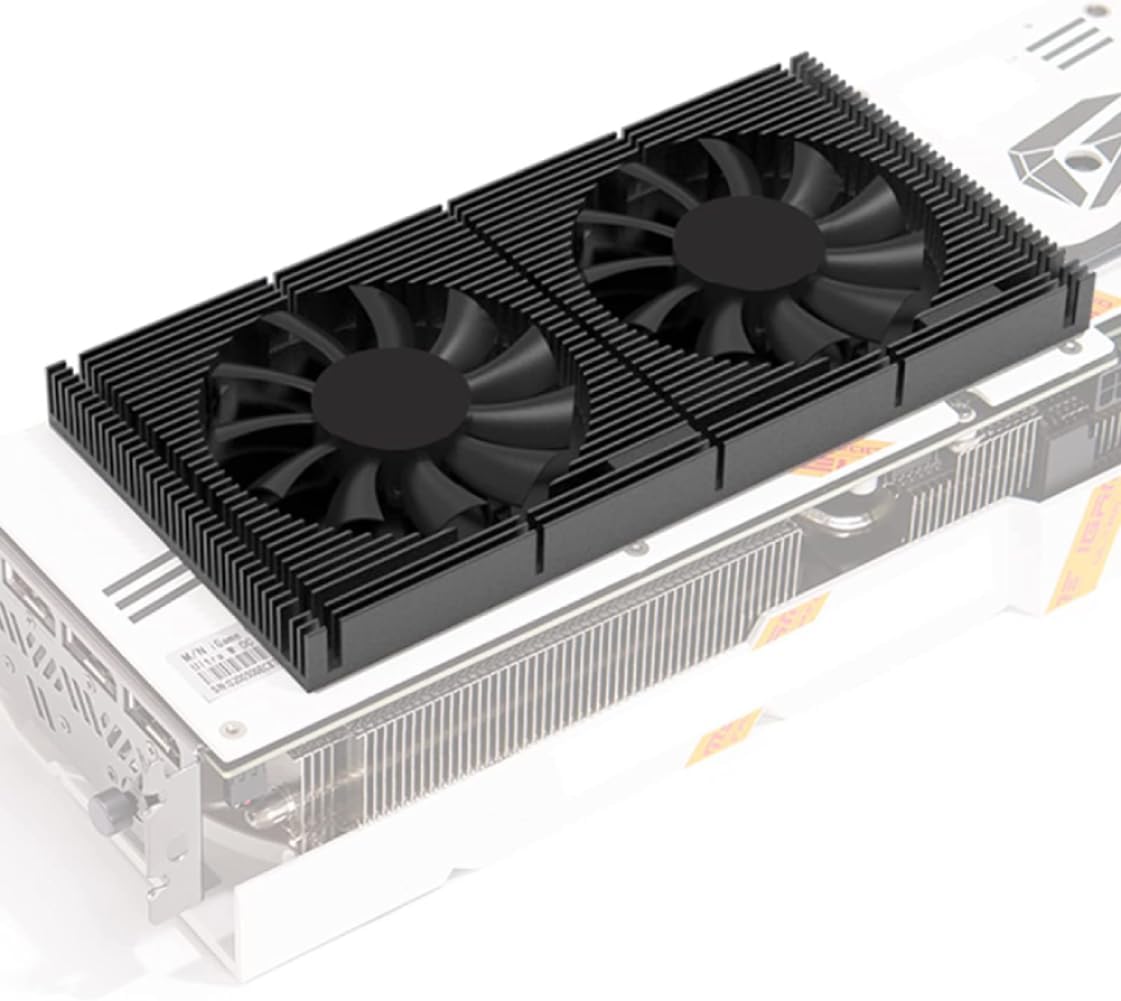


This large aluminum heat sink offers an affordable passive cooling solution with a high fin count. It holds a strong 4.7 rating from users who appreciate its substantial thermal mass.
We may earn a commission when you buy through this link, at no additional cost to you.
The design features 294 fins that increase surface area for better heat transfer. The pre-applied adhesive tape simplifies the attachment process for users seeking a quick DIY fix.
While effective for passive cooling, it lacks active fan integration. You must ensure the case airflow supports this type of radiator to avoid heat buildup during peak loads.
Ideal for budget builds or retrofits where cost is the primary constraint. It serves well for GPU backplate applications needing simple thermal protection without complexity.
The extensive fin network significantly boosts heat dissipation capability compared to flat metal plates.
At its price point, it provides significant thermal relief without requiring complex electrical connections.
We may earn a commission when you buy through this link, at no additional cost to you.
The GOWENIC radiator combines passive heatsink performance with an active fan interface for targeted cooling. It is a top contender for users seeking a balanced active passive solution.
We may earn a commission when you buy through this link, at no additional cost to you.
Constructed from sturdy aluminum alloy, it provides reliable heat dissipation. The standard fan design connects via a 4 pin interface for low noise operation when paired correctly.
Users should verify motherboard fan header availability before installation. The 15mm thickness may require case clearance checks, especially in compact enclosures.
Recommended for RTX 30 series users needing enhanced VRM and memory cooling. It delivers solid performance while maintaining a standard footprint for most cases.
The included fan connector allows you to leverage existing case cooling to reduce memory temperatures effectively.
Anodized black CNC machining ensures durability and resistance to long-term wear and tear.
We may earn a commission when you buy through this link, at no additional cost to you.
This backplate is engineered exclusively for GIGABYTE RTX 5060 and 5050 Low Profile cards. It focuses on structural reinforcement rather than advanced thermal features.
We may earn a commission when you buy through this link, at no additional cost to you.
Precision CNC cutting ensures no ports are blocked during installation. The thick aluminum provides rigidity to protect against cable pressure and accidental damage during transport.
The rating reflects its niche utility; it is not a universal solution. If you own the specific card listed, it offers unmatched fit quality and protection against sag.
Ideal for users with these specific Low Profile GPUs needing reliable hardware support. It simplifies installation with pre-drilled holes for a secure, permanent fix.
Designed to align perfectly with the PCB layout of specific Low Profile models for zero interference.
Adds necessary rigidity to prevent bending over time in compact or vertical mounting setups.
We may earn a commission when you buy through this link, at no additional cost to you.
The Hilitand radiator shares core features with other models in this category, focusing on aluminum durability and active fan support. It is a solid alternative for RTX 30 series users.
We may earn a commission when you buy through this link, at no additional cost to you.
The 4 pin fan connector facilitates low noise operation when connected properly. Its thickness and included thermal pad ensure effective heat transfer to the cooling fins.
Users should plan for cable routing to connect the fan to the motherboard. It is a practical choice for those needing extra cooling without replacing existing GPU coolers.
Best for builders seeking a reliable mid-range active backplate. It balances cost and functionality well for standard high-end graphics card cooling needs.
Supports both standard and vertical mounting configurations for diverse case setups.
Anodized black CNC machining ensures the backplate resists wear over long-term use.
We may earn a commission when you buy through this link, at no additional cost to you.
This radiator offers a standard active cooling solution for RTX 30 series graphics cards. It features a robust aluminum body designed to dissipate heat efficiently.
We may earn a commission when you buy through this link, at no additional cost to you.
The high user rating suggests reliable performance in real-world scenarios. It connects easily via a 4 pin fan interface for low noise operation and quick heat transfer.
Compatibility is focused on popular RTX 30 series cards, limiting broader use. Ensure your case supports the 15mm thickness and fan cable routing for a smooth setup.
Recommended for users needing an affordable active solution for memory cooling. It provides consistent thermal performance without complex installation requirements.
Thermal pad ensures consistent contact between the backplate and heat sources for better efficiency.
Standard 4 pin fan connector makes it simple to integrate with existing motherboard headers.
We may earn a commission when you buy through this link, at no additional cost to you.
Unlike traditional backplates, this bracket focuses purely on structural support for heavy graphics cards. It is ideal for users dealing with long RTX 30 series or similar models.
We may earn a commission when you buy through this link, at no additional cost to you.
The aluminum build provides strong resistance to sag and damage over time. Height adjustability ensures it fits various cases and GPU configurations seamlessly.
Installation is tool-free, making it accessible for beginners. However, it does not assist with cooling, so it should be paired with a dedicated backplate if thermal management is needed.
Best for heavy GPU owners needing extra protection for the motherboard slot. It effectively reduces bending risks without adding significant bulk to the system.
Adjustable height accommodates different case sizes and GPU configurations effectively.
Tool-free installation allows for quick adjustments without requiring screwdrivers or tools.
We may earn a commission when you buy through this link, at no additional cost to you.
This large heat sink offers a versatile passive cooling solution for GPU backplate applications. It features a high fin count that maximizes surface area for heat transfer.
We may earn a commission when you buy through this link, at no additional cost to you.
The 310g weight provides sufficient thermal mass to stabilize temperatures during heavy workloads. Users appreciate the pre-applied tape that simplifies attachment without additional adhesives.
It does not include fan integration, making it reliant on case airflow. This makes it best suited for cases with good ventilation or users looking to lower fan count.
Ideal for budget builds needing passive thermal stability. Its versatility allows use across various hardware types, including GPUs and other high-power components.
The extensive fin network significantly increases the surface area for passive cooling efficiency.
No moving parts means no noise or wear, offering a quiet and maintenance-free option.
We may earn a commission when you buy through this link, at no additional cost to you.
This bracket focuses on protecting the external slot area of specific EVGA graphics cards. It provides a durable cover that shields sensitive connectors from dust and damage.
We may earn a commission when you buy through this link, at no additional cost to you.
Made from sturdy zinc alloy, it ensures long-lasting durability for users with compatible EVGA RTX models. The precise fit ensures it does not interfere with case panels or connectors.
While it offers physical protection, it lacks thermal management capabilities. It is best used as a supplemental piece for aesthetic or slot protection rather than cooling.
Recommended for EVGA RTX 30 series users needing slot protection. It secures the card externally and prevents dust accumulation in the rear bracket slots.
Designed specifically to secure and protect the external bracket area of compatible EVGA graphics cards.
The zinc alloy material provides excellent resistance to physical wear over long-term use.
We may earn a commission when you buy through this link, at no additional cost to you.
This backplate is engineered specifically for ZOTAC RTX 5060 and 5050 Solo models. Its perfect fit and high rating highlight exceptional attention to detail in manufacturing.
We may earn a commission when you buy through this link, at no additional cost to you.
Ventilation cutouts ensure that cooling airflow is not restricted by the backplate. It maintains factory-like fit without interfering with ports or mounting holes.
The anti-sag support adds crucial rigidity to these specific cards. Users appreciate the pre-drilled holes and included hardware that make installation straightforward and safe.
Ideal for ZOTAC Solo owners needing precise protection. It delivers superior fit and stability compared to generic alternatives for these specific models.
Strategic ventilation cutouts ensure the backplate does not block airflow or original cooling systems.
High-quality machining ensures zero interference with ports and a factory-like finish for ZOTAC cards.
We may earn a commission when you buy through this link, at no additional cost to you.
This premium backplate stands out with dual 70mm PWM fans for superior cooling power. It targets RTX 30 series users who need maximum thermal relief for memory and VRMs.
We may earn a commission when you buy through this link, at no additional cost to you.
The aviation aluminum 6061 body is thicker than competitors, offering better heat dissipation. The 1500-2800 RPM range allows users to tune fan speeds based on workload needs.
Installation requires sufficient case space for the dual fans. The included 1.2mm thermal pad ensures efficient heat transfer to the cooler without additional purchases.
Best for enthusiasts needing high-performance active cooling. It delivers significant thermal improvements at the cost of additional power consumption and space.
Dual 70mm PWM fans provide significantly higher cooling capacity than single fan alternatives.
1.5mm thick aviation aluminum ensures superior rigidity and heat storage compared to thinner options.
We may earn a commission when you buy through this link, at no additional cost to you.
Selecting the right GPU backplate depends on your specific needs for thermal management, structural support, and aesthetic preferences. This guide outlines the key factors to consider before purchasing.
Look for aluminum or aluminum alloy construction to ensure efficient heat dissipation and resistance to bending. High-quality materials like aviation aluminum 6061 offer better rigidity and longevity than cheaper alternatives.
Prioritize backplates with robust build quality to protect your card's sensitive components over time.
Decide between passive heat spreaders and active radiators with fans. Passive designs rely on case airflow, while active coolers use fans to force air through the fins for better thermal relief.
Check for included thermal pads or adhesive tape to ensure efficient heat transfer from the PCB to the backplate.
Verify that the backplate dimensions match your GPU model and case clearance. Specific models are designed for particular cards, while others offer universal fits that may require DIY modification.
Ensure the backplate does not block ports, M. connectors, or PCIe slots when installed.
Choose backplates that include structural reinforcement or separate brackets to prevent heavy GPUs from sagging. This is crucial for long-term stability, especially with heavy RTX 30 series models.
Look for adjustable mounting options to accommodate different case configurations and card weights.
Consider whether the backplate requires drilling or specialized tools. DIY-friendly options with pre-drilled holes and included hardware simplify the setup process.
Ensure you have the necessary cables and case clearance to connect any included fans to the motherboard.
Opt for designs with strategic ventilation cutouts to maintain airflow within the case. Solid plates without airflow holes may trap heat if used alongside active GPU coolers.
Ensure the backplate design complements your case's airflow plan rather than obstructing it.
Select a backplate that matches your build's theme, such as black CNC machining or specific finishes. Some models offer additional features like I/O shielding for a cleaner look.
Balance visual appeal with functional requirements to ensure the backplate supports both style and performance.
Before installation, power down your PC and disconnect all cables. Remove the GPU from the motherboard and clean the back surface to ensure proper contact with thermal pads or adhesive.
Align the backplate with the PCB mounting holes and secure it using the provided hardware. If the backplate includes fans, connect them to a 4 pin fan header on your motherboard for control.
Regularly check for dust accumulation on the fins and clean them using compressed air. Ensure the fans are spinning freely and cables are secure to maintain consistent cooling performance.
Yes, backplates improve cooling by dissipating heat from the VRMs and memory modules on the back of the GPU. Passive plates spread heat, while active coolers use fans to remove it more effectively.
There are passive heat spreaders that rely on airflow, active radiators with fans, and structural support brackets. Some combine cooling with anti-sag features for comprehensive protection.
Most backplates are designed for DIY installation with pre-drilled holes and included hardware. Ensure you have the necessary tools and clearance before attempting to mount them.
Not all backplates are universal. Some are designed for specific brands like ZOTAC or GIGABYTE, while others offer general fits that require checking dimensions before purchase.
Active backplates typically use a 4 pin fan connector to link with motherboard fan headers. This allows for speed control and integration with existing cooling software.
Most high-quality backplates come with thermal pads included to ensure efficient heat transfer. Verify this before installation to avoid poor thermal performance.
Ensure the backplate does not exceed case clearance limits. Look for specific low-profile models that align perfectly with PCB layout and do not block ports.
We reviewed ten top GPU backplates ranging from budget passive designs to premium active cooling solutions. Our top picks highlight versatile options like the GOWENIC radiator and specific models for ZOTAC and GIGABYTE users.
Prioritize compatibility and thermal needs when choosing. Ensure you need active cooling for VRM stability or prefer simple protection against sag and physical damage.
Prices and availability change frequently, so verify current offers before buying. Check your case clearance and motherboard connectivity to ensure a smooth installation experience.