
AULA F75 Pro Wireless Mechanical Keyboard
4.6Editor score
Tri-mode connection support
Hot-swappable base design
PBT side-printed keycaps
Discover the top keyboard for Fortnite options ranked by performance features and value to help you dominate the battle royale with precise and reliable input.
Finding the right keyboard for Fortnite can drastically change how you perform in battle royale matches. A responsive board ensures your builds land and your edits are seamless.
We compared ten top-rated keyboards based on switch type layout design and connectivity to find the best options for competitive play. Each product offers unique strengths.
Each pick highlights specific benefits like macro keys or rapid trigger mode. Note that pricing fluctuates frequently so verify the current rate before making your final decision.
4.6Editor score
4.5Editor score

4.5Editor score
The following table provides a side-by-side comparison of all ten keyboards evaluated in this guide to help you quickly identify the best fit for your setup.






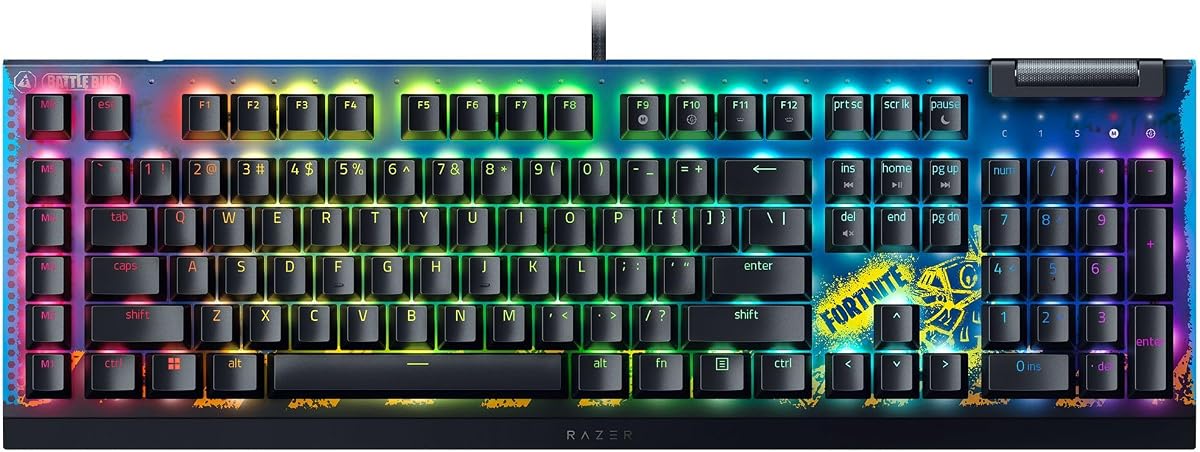
The Razer BlackWidow V4 X Fortnite Edition stands out as the top choice for players seeking a blend of performance and customizability. With a rating of 4.5 stars, this keyboard features Yellow mechanical linear switches designed for speed and silence. It includes six dedicated macro keys and per-key Chroma RGB lighting.
We may earn a commission when you buy through this link, at no additional cost to you.
Its standout quality lies in the rapid-fire inputs achieved by the 1.2mm actuation point and low 45g force requirement. The six macro keys are programmable to optimize skill rotations and building sequences instantly. The sound dampeners ensure these fast presses remain quiet during intense matches or stream sessions.
While the price is higher than budget options, the durability and control justify the investment for serious competitors. The doubleshot ABS keycaps ensure labels never wear off, maintaining aesthetics over years of play. Some users may need to download Razer Synapse to unlock full macro functionality.
This keyboard is perfect for Fortnite players who need fast reliable inputs without sacrificing style. Whether you are pushing aggressively or holding angles, the tactile feedback and customizable macros give you a distinct edge. We highly recommend it as the ultimate choice for your gaming setup.
The six dedicated macro keys allow you to bind complex building patterns or weapon swaps to single keystrokes for faster reactions.
Built-in sound dampeners reduce noise significantly so your teammates and viewers are not disturbed during rapid key presses.
We may earn a commission when you buy through this link, at no additional cost to you.
The SteelSeries Apex 3 offers exceptional value for those prioritizing comfort and durability over mechanical feedback. With a 4.6 rating, it features whisper quiet gaming switches and a premium magnetic wrist rest. The IP32 water resistance protects against accidental spills during long sessions.
We may earn a commission when you buy through this link, at no additional cost to you.
Its quiet nature makes it ideal for dorm rooms or shared living spaces where noise can be an issue. The dedicated multimedia controls allow you to adjust volume on the fly without leaving your game. The ten-zone RGB illumination adds a vibrant look without high costs.
While it lacks the speed of mechanical switches, the membrane keys still offer low friction for 20 million keystrokes. The wrist rest provides full palm support reducing fatigue during marathon gaming sessions. Some competitive players might miss dedicated macro keys for complex builds.
We recommend this keyboard for casual gamers or those who need a quiet reliable input device. It is a robust choice for Fortnite players who want comfort and protection without breaking the bank. Ensure compatibility with your specific console or PC setup before purchasing.
The IP32 water resistance rating means accidental spills will not immediately damage the internal electronics of the keyboard.
A premium magnetic wrist rest is included to provide full palm support and reduce strain during long gaming sessions.
We may earn a commission when you buy through this link, at no additional cost to you.
The Redragon S101-3 PRO delivers an unbeatable value package for new gamers needing both keyboard and mouse. With a 4.5 rating, this combo includes a full-size RGB backlit keyboard and a precision mouse. It features independent macro record keys and anti-ghosting technology.
We may earn a commission when you buy through this link, at no additional cost to you.
Its main strength is the inclusion of macro recording which allows you to save complex sequences for building or editing. The RGB lighting offers six vibrant modes that can be customized via software. The included ergonomic wrist rest ensures comfort during extended play sessions.
While the membrane switches do not offer the tactile click of mechanical keys, they remain responsive and quiet enough for most environments. The anti-ghosting ensures every key press registers even during intense rapid building. Users must download the software to unlock the full macro potential.
This set is ideal for students or first-time Fortnite players looking to upgrade from basic peripherals. It provides everything needed for a functional gaming station at an affordable price point. Verify your operating system compatibility before installing the necessary software.
This all-in-one combo provides a full-size RGB keyboard and a high-precision mouse for an organized and affordable setup.
Five dedicated macro keys allow you to record and play back complex command sequences for a competitive edge.
We may earn a commission when you buy through this link, at no additional cost to you.
The GEODMAER 65% Gaming Keyboard is designed for users who need to save desktop space without losing functionality. Rated 4.3 stars, it features a compact mini design with separate arrow keys and no numpad. It connects via a detachable Type-C cable for stable low latency input.
We may earn a commission when you buy through this link, at no additional cost to you.
Its primary benefit is freeing up desk space which is crucial for low-sensitivity mouse movements in Fortnite. The 26-key no-conflict system ensures multiple simultaneous key presses register accurately. Despite being membrane, it offers an imitation mechanical feel that is satisfying to type on.
While it lacks dedicated media keys, the FN lock and backlight controls are sufficient for basic adjustments. The keycaps are UV coated to prevent fading over time. The price is extremely low making it accessible for students or those with limited budgets.
We recommend this for compact setups or portable gaming stations where desk space is at a premium. It provides reliable performance for Fortnite builds and edits without the bulk of a full-size keyboard. Check if the compact layout fits your typing habits before buying.
The 65% design saves significant desktop space while retaining separate arrow keys essential for navigation in games.
A detachable Type-C connection ensures a stable link and allows for easy transport in a backpack.
We may earn a commission when you buy through this link, at no additional cost to you.
The AULA WIN60 HE brings cutting-edge magnetic switch technology to the market with a focus on speed. Rated 4.5 stars, it features Rapid Trigger mode with an ultra-low RT step distance of 0.02mm. This allows for lightning-fast response times ideal for complex building combos.
We may earn a commission when you buy through this link, at no additional cost to you.
Its standout feature is the adjustable actuation point which lets you customize how deep a key must be pressed. The 8000Hz polling rate ensures commands take effect instantly giving you a competitive edge. The web-based driver allows customization without bulky software downloads.
While the 60% layout saves space, it may take getting used to if you rely on function keys frequently. The magnetic switches are durable and prevent wear and tear associated with physical contacts. Some users may find the setup slightly complex compared to standard boards.
This keyboard is perfect for competitive Fortnite players chasing the absolute fastest input possible. It is designed for those who want to optimize their build speed and positioning with precision. We highly recommend it for anyone interested in Hall Effect switch technology.
Rapid Trigger mode enables a keystroke to reset immediately upon release allowing for faster repeated presses.
Each key can be personalized to the smallest unit allowing you to tailor sensitivity to your specific playstyle.
We may earn a commission when you buy through this link, at no additional cost to you.
The AULA F75 Pro is a versatile wireless mechanical keyboard that offers extensive customization for gamers. With a 4.6 rating, it supports Bluetooth 5.0, 2.4GHz wireless, and USB wired connections. It includes a hot-swappable base allowing you to change switches easily.
We may earn a commission when you buy through this link, at no additional cost to you.
Its main strength is the combination of portability and feature-rich design. The side-printed PBT keycaps offer a unique look and durability against sweat. The multi-function knob lets you adjust brightness or volume with a simple rotation. The 4000mAh battery ensures long usage without constant charging.
While the wireless connection is stable, competitive players might prefer the wired option for absolute zero latency. The hot-swap base means you can upgrade switches later to suit changing preferences. The layout retains arrow keys making it usable for gaming and typing.
We recommend this keyboard for users who want a premium feel and wireless freedom without sacrificing build quality. It is a solid choice for Fortnite players who also use their keyboard for work on multiple devices. Check the driver options before finalizing your purchase.
The hot-swappable base supports 3-pin or 5-pin switch replacements allowing beginners to easily DIY their own keyboard.
You can connect up to five devices and switch between them easily using shortcut keys or the side button.
We may earn a commission when you buy through this link, at no additional cost to you.
The AULA WIN68 HE delivers professional gaming performance with its advanced Hall Effect magnetic switches. Rated 4.5 stars, it offers an industry-leading 8,000Hz polling rate and 0.3ms latency. The rapid trigger mode ensures your commands take effect instantly for a competitive edge.
We may earn a commission when you buy through this link, at no additional cost to you.
Its standout quality is the customizable actuation point which can be set to the smallest unit of 0.1mm. The web driver allows you to adjust settings without installing bulky software on your system. The 60% compact design saves desktop space while retaining arrow keys.
While it offers incredible speed, the lack of MAC support limits its compatibility for some users. The detachable USB cable ensures a stable connection which is vital for competitive play. The LED backlighting provides 16.8 million colors to match your setup aesthetic.
We recommend this for gamers seeking the fastest response times available in a compact form factor. It is perfect for those who want to fine-tune their keyboard sensitivity to match their exact habits. Verify your operating system before downloading the web driver.
The fast trigger keyboard ensures instant command execution with ultra-low latency giving you an edge in games.
A professional web driver allows users to customize key mapping and RGB lighting without downloading additional software.
We may earn a commission when you buy through this link, at no additional cost to you.
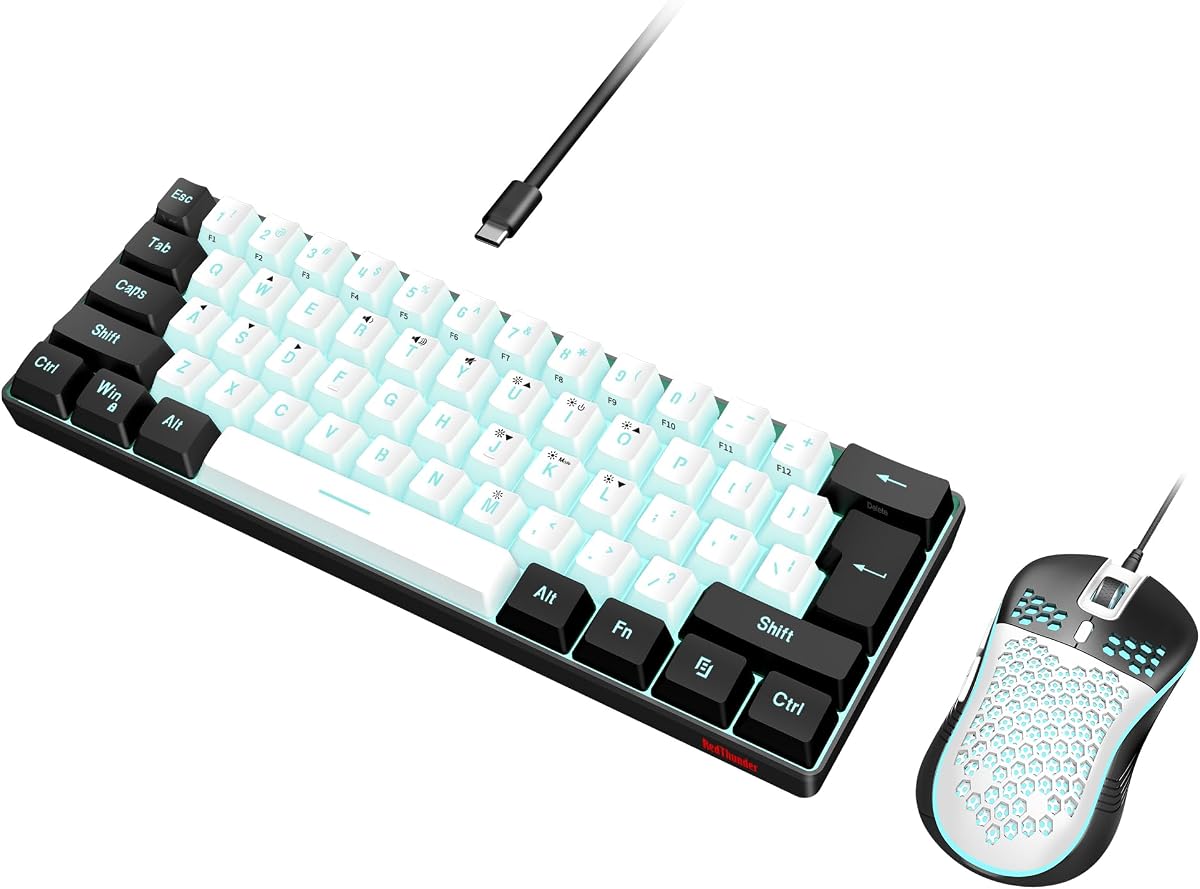
The RedThunder 60% Gaming Keyboard and Mouse Combo offers an organized solution for minimalists. Rated 4.3 stars, it features an ultra-compact 61-key layout that leaves ample space for mouse movements. The keyboard is water-resistant and the mouse is a lightweight honeycomb design.
We may earn a commission when you buy through this link, at no additional cost to you.
Its main benefit is the complete setup which includes a high-precision optical mouse with 7200 DPI. The anti-interference magnet ring and gold-plate interface guarantee stable data transmission during intense battles. The RGB backlit keyboard allows adjustments for brightness and breathing speed.
While it lacks dedicated macro keys, the compact layout is often preferred by FPS gamers who need mouse space. The lightweight mouse can reach up to 65 grams making it flexible and comfortable for long sessions. Some users may find the build quality slightly less robust than heavy boards.
We recommend this combo for gamers who want a neat organized desk without sacrificing core functionality. It is a great choice for portable setups or those new to compact layouts. Ensure the mouse weight suits your grip style before purchasing.
The ultra-compact layout makes your desktop neat while leaving space for mouse movements essential in FPS games.
Water-resistant keyboard design with waterproof braid USB cables guarantees stable transmission and prevents spill damage.
We may earn a commission when you buy through this link, at no additional cost to you.
The Logitech G PRO TKL is built specifically for esports athletes who need competition-level performance. Rated 4.6 stars, it features durable GX Blue Click switches that deliver an audible tactile click. The tenkeyless design frees up table space for maximum mouse movement.
We may earn a commission when you buy through this link, at no additional cost to you.
Its standout quality is the onboard memory storage allowing you to program lighting patterns for tournament systems. The detachable micro USB cable is robust and designed for safe transport in travel bags. LIGHTSYNC technology lets you highlight keys without needing G HUB installed.
While the clicky switches are satisfying, they may be too loud for quiet environments or streaming. The lack of a numpad makes it ideal for gaming but less useful for typing numbers. You must use Logitech G HUB software to access full macro functionality.
This keyboard is perfect for competitive players attending tournaments or wanting professional-grade gear at home. It balances portability with high performance making it a trusted choice for serious gamers. Verify switch preferences before buying as the click is distinct.
Built with and for esports athletes this keyboard is designed to withstand the rigors of tournament use.
Program lighting patterns to onboard memory so you do not need software installed on tournament systems.
We may earn a commission when you buy through this link, at no additional cost to you.
The ATTACK SHARK X68 HE combines magnetic switches with dynamic keystroke functions for ultimate flexibility. Rated 4.6 stars, it features adjustable hall effect magnetic switches with a rapid trigger function. The top mount structure ensures a quiet and stable typing operation.
We may earn a commission when you buy through this link, at no additional cost to you.
Its standout feature is the ability to bind four different functions to one key based on pressing depth. The web driver link requires no installation allowing you to remap keys and adjust actuation points easily. The solid pure color PBT keycaps are durable and offer clear lettering.
While the 60% layout is compact, it retains separate arrow keys which are essential for navigation. The curved wrist rest and non-slip mat provide ergonomic support for long gaming sessions. Some users may need to adapt to the unique dynamic keystroke configuration.
We recommend this for enthusiasts who want full control over their typing and gaming behavior. It is designed for those who need ultra-accurate keystrokes to minimize latency in fast-paced games. Check compatibility with your operating system before purchasing.
You can bind four different functions to one key based on different pressing degrees for unique control.
The top mount structure and aluminum alloy positioning plate enhance gaming efficiency with a stable typing operation.
We may earn a commission when you buy through this link, at no additional cost to you.
Choosing the right keyboard involves weighing several factors including switch type layout and connectivity to match your gaming style.
Switch type determines the tactile feedback and speed of your input. Mechanical switches are generally faster and more durable than membrane ones.
For Fortnite, linear switches often allow for rapid building without the resistance of tactile bump clicky switches.
Layout refers to the physical arrangement of keys. Full-size keyboards include a numpad while compact layouts like 60% save desk space.
Choosing a compact board leaves more room for mouse movement which is critical in low sensitivity setups common in battle royales.
Connectivity determines how the keyboard connects to your device. Wired keyboards offer the lowest latency while wireless offer flexibility.
Most competitive players prefer wired options to ensure zero lag but high-end wireless keyboards have largely closed this gap.
Macro support allows you to program complex sequences to a single key press. This can speed up building and editing significantly.
Ensure the keyboard comes with software that allows you to save these macros to onboard memory for tournament use.
Durability is key for long-term use. Look for keyboards with high-rated keystrokes lifespan and durable keycaps like PBT.
Strong construction ensures the keyboard withstands aggressive gaming sessions without keys sticking or fading over time.
Budget considerations often drive the decision between high-end mechanical boards and budget-friendly membrane options.
Determine if the extra speed and customization of premium keyboards justify the cost for your specific skill level and needs.
Connect your keyboard to the PC and install any necessary software or drivers to unlock full features. Ensure all cables are securely plugged in.
Adjust the lighting and macro settings to match your personal build strategies. Practice building sequences on the macro keys to improve muscle memory.
Regularly clean dust from keycaps with compressed air and avoid placing liquids near the device to maintain its longevity.
While not strictly necessary, mechanical keyboards offer faster actuation and durability which can improve your reaction time in intense matches. However, high-quality membrane keyboards can also perform well depending on your budget.
The 60% or 65% layouts are often preferred by Fortnite players because they free up more desk space for low sensitivity mouse movements. However, a TKL layout offers a balance between space and key availability.
Modern high-end wireless keyboards with 2.4GHz technology have minimal latency making them viable for competitive play. Ensure the battery is charged to avoid connection drops during critical moments.
Macros allow you to bind complex building or editing sequences to a single key. This reduces the number of keystrokes needed to execute a move giving you a speed advantage over opponents.
Rapid Trigger is a feature in advanced Hall Effect keyboards that resets a key instantly upon release rather than waiting for a fixed reset point. This allows for faster repetitive inputs which is useful for rapid building.
To extend the lifespan, keep your keyboard clean of dust and debris and avoid exposing it to liquids. Using a keyboard cover or storing it in a case when traveling can also prevent physical damage.
We have reviewed ten top-rated keyboards ranging from the Razer BlackWidow V4 X to the AULA WIN60 HE to help you find the perfect match for your needs.
Prioritize speed and comfort when making your final decision as these factors directly impact your building efficiency and performance in game.
Remember to check current pricing and availability before buying to ensure you get the best deal for your chosen model.