
VSD Mini Macro Pad
4.1Editor score
Six customizable LCD keys
Compact RGB light bars
USB powered operation
Discover the top macro pads for streaming in 2026. This guide compares features, compatibility, and performance to help you choose the best stream controller.
Streaming demands fast responses and precise control over your software. A macro pad for streaming gives you dedicated keys to manage scenes, audio, and alerts without touching your keyboard or mouse.
We evaluated ten current models based on key count, customization options, and software support. Each device offers unique layouts from compact six-key units to full fifteen-key decks with audio knobs.
Each pick highlights core strengths and ideal use cases for creators. Please note that product details and availability may change over time so verify specs before purchasing your final setup.
4.1Editor score

4.8Editor score

4.4Editor score
This table provides a quick side-by-side overview of the ten selected macro pads. Review the key specifications and features to identify which model aligns best with your streaming workflow needs.


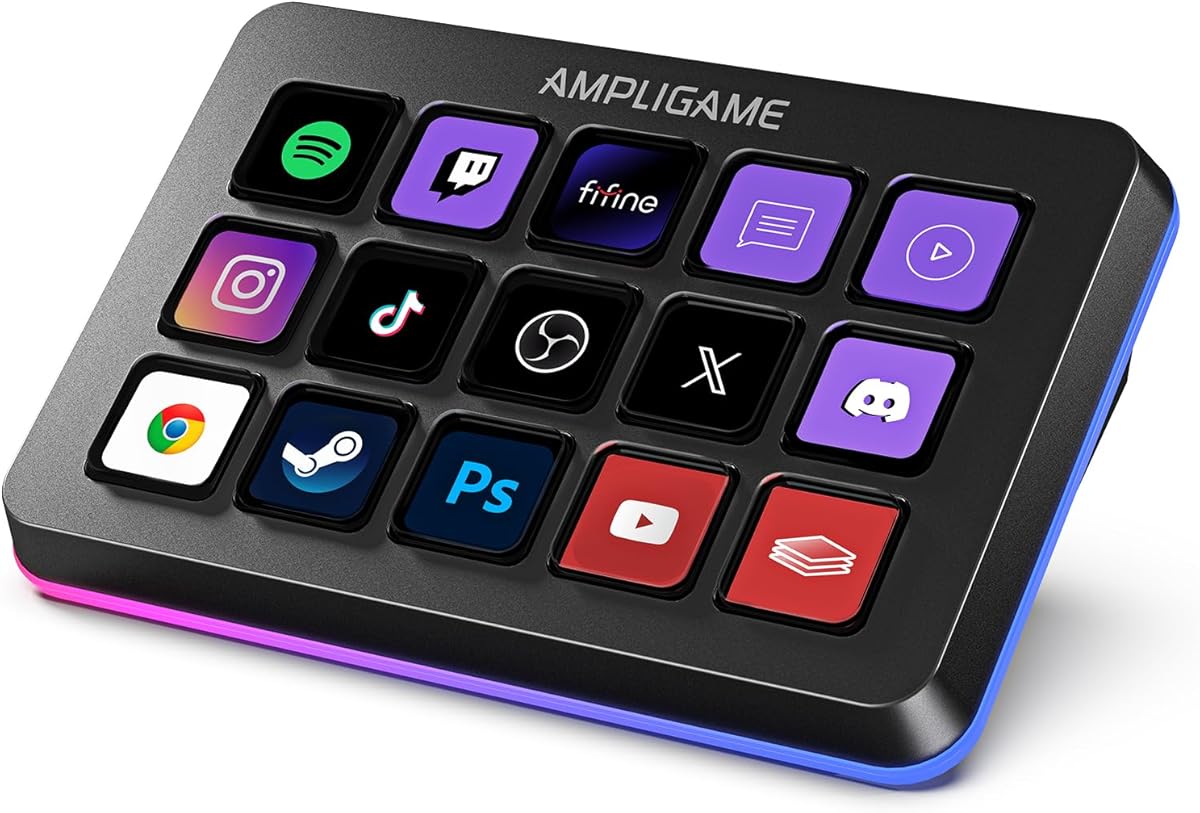


The VSD M18 Macro Pad stands out as a robust option for streamers needing extensive control. It offers eighteen programmable keys with visual LCD customization to streamline your broadcasting workflow effectively.
We may earn a commission when you buy through this link, at no additional cost to you.
Its LCD keys support images and animations which makes identification intuitive during live sessions. Users can trigger macros with single taps and manage complex sequences without interrupting their flow.
While it lacks native Linux support the device works seamlessly with Windows and Mac systems. The RGB light ring adds ambiance though custom RGB tones require firmware upgrades which may not suit all.
This model is ideal for creators who want many keys without a high price tag. The balance of features and affordability makes it a strong choice for most streaming setups today.
Each LCD key accepts JPG, PNG, and GIF images allowing you to label functions clearly.
Single tap commands let you launch apps or switch scenes instantly during broadcasts.
We may earn a commission when you buy through this link, at no additional cost to you.
The Stream Dock N1 distinguishes itself with a vertical layout that saves valuable desk space. It includes three switchable modes including a calculator mode that works independently of other software.
We may earn a commission when you buy through this link, at no additional cost to you.
Its fifteen LCD keys allow you to drag files apps and images for one-click access. The device supports Windows and macOS and offers a plugin market to optimize your workflow efficiently.
Users appreciate the high rating likely due to its ergonomic design for left-hand operation. However relying on software for customization means initial setup takes time before you reach full potential.
This deck is perfect for those with limited desk space who need extra versatility. The combination of shortcut keys and calculator functions adds utility beyond standard streaming tasks.
Traditional horizontal controllers take up more room than this vertical layout option.
Download ready-made plugins from the SPACE STATION to control mainstream apps easily.
We may earn a commission when you buy through this link, at no additional cost to you.
The VSD M18 Stream Controller provides an immersive experience with its surrounding RGB light ring. It features eighteen customized keys that allow individual or series action assignments for workflow streamlining.
We may earn a commission when you buy through this link, at no additional cost to you.
Efficiency is central to this design as you can launch macros or switch OBS scenes instantly. The one-click multi-hotkey macro pad helps gamers execute combos and creators handle editing tasks rapidly.
Quality materials ensure long-lasting performance and the RGB ring enhances the desktop atmosphere. Yet users should note that advanced features require software and Linux support is limited to SDK use.
This controller suits creators who prioritize visual appeal alongside functional depth. The combination of ambient lighting and extensive macro options makes it a great desktop companion for streaming.
The surrounding RGB ring cycles colors automatically or via custom settings for style.
Operation Follow feature allows multiple macro steps to run in sequence or simultaneously.
We may earn a commission when you buy through this link, at no additional cost to you.
The VSD Mini Macro Pad is an excellent entry-level choice for those needing basic control. It comes with six fully customizable LCD keys ideal for simple triggers and daily operations.
We may earn a commission when you buy through this link, at no additional cost to you.
Its dual side custom RGB light bars add style while keeping the design minimalist. The unit is USB powered so it draws power directly from your computer without needing batteries.
While limited to six keys it covers essential needs for beginners on a budget. The portable size saves desk space making it suitable for smaller setups or shared workspaces easily.
This pad is best for streamers who want a low-cost way to automate tasks. The balance of price and performance makes it a strong value option for new creators.
Designed in mini portable size it saves desk space while retaining macro functions.
Freely set custom images and GIF animations on each LCD key for recognition.
We may earn a commission when you buy through this link, at no additional cost to you.
The VSD N4 Pro stream controller blends tactile knobs with LCD keys for precise control. It supports fully configurable hotkeys and interactive touch bar making it tailored for gaming creators.
We may earn a commission when you buy through this link, at no additional cost to you.
Its USB sound deck feature lets you trigger sound effects and switch audio with one tap. The device stores unlimited scene presets so you can skip repeated setup during long sessions.
Premium features like the passive USB dock and ergonomic stand add to its utility. The carbon-fiber panels and haptic keys also provide a premium feel and typing feedback.
This controller is ideal for producers needing both visual and audio adjustments. The high cost is justified by the extensive customization and professional-grade features it offers.
Four RGB knobs give you precise control over volume and media playback directly.
Built-in passive USB dock adds ports for mice and storage drives for convenience.
We may earn a commission when you buy through this link, at no additional cost to you.
The fifine D6 RGB macro-keyboard offers fifteen customizable buttons for multi-tasking needs. It features a glowing RGB ring with nine controllable modes to match your gaming setup.
We may earn a commission when you buy through this link, at no additional cost to you.
You can see the application on the touchscreen and press to control directly. This visual operation keypad streamlines your workflow and improves efficiency without opening windows manually.
With a wide range of plugins and icons users can customize their setup easily. The device ensures both firmware and software are updated for smooth initial operation and best performance.
This keyboard suits creators who need a blend of gaming aesthetics and utility. The high user rating reflects its reliable performance and visual appeal in daily tasks.
Visual feedback tells you your demands have been satisfied with each key press.
Create folders to generate different programs and process individual scenes independently.
We may earn a commission when you buy through this link, at no additional cost to you.
The TreasLin VSDinside N1 supports dynamic animated icons beyond static images. It offers eighteen macro keys and three operation modes including calculator and numeric keypad modes.
We may earn a commission when you buy through this link, at no additional cost to you.
By pressing and turning the knob you can switch between modes easily. Key icons can be customized by drag and drop taking screenshots or selecting images for personalization.
The extensive plugin marketplace offers thousands of options to control apps like Discord and Twitch. This deck transforms your desktop into a highly efficient tool for daily workflows.
This device is great for users who value unique visual interfaces. The ability to use favorite animations adds personality to your setup while maintaining functional utility.
Supports dynamic animated icons to create vibrant custom scenes for your device.
Turn the knob to switch between shortcut calculator and numeric keypad modes.
We may earn a commission when you buy through this link, at no additional cost to you.
The Streonor S15 includes three status display panels for at-a-glance system info. These panels show data like weather temperature or GPU status so you stay informed while working.
We may earn a commission when you buy through this link, at no additional cost to you.
You can create preset control pages for different scenarios such as streaming or editing. The software allows action flows that trigger multiple commands with one key press.
With over a hundred plugins and icons packs users can personalize their workflow. The device supports Windows and macOS ensuring broad compatibility for most users needing these tools.
This controller is suited for creators who need real-time monitoring alongside control. The extra status panels provide critical data without needing to switch to system monitors.
Display supported data such as weather time or system performance in panels.
Build dedicated layouts for streaming editing office or gaming needs easily.
We may earn a commission when you buy through this link, at no additional cost to you.
The Streonor S10 brings together LCD keys a touchscreen and rotary knobs in one console. It is designed for those who need instant commands and precise adjustments during work.
We may earn a commission when you buy through this link, at no additional cost to you.
Assign the knobs to volume or media playback and use the touchscreen for supported info. This setup reduces window switching and keeps important tools accessible during demanding sessions.
With a perfect user rating this deck is known for reliability and high performance. It supports over a hundred plugins and custom layouts to tailor your streaming experience.
This model is ideal for creators prioritizing audio control and touch interaction. The combination of tactile knobs and screen access provides superior flexibility for workflows.
Assign knobs to volume microphone levels and media playback for direct adjustments.
Assign several supported actions to one key and trigger them in sequence.
We may earn a commission when you buy through this link, at no additional cost to you.
The Elgato Stream Deck MK.2 is widely recognized as a pro standard in the industry. It features fifteen customizable LCD keys to instantly control apps tools and platforms.
We may earn a commission when you buy through this link, at no additional cost to you.
One-touch operation lets you trigger multiple actions or adjust audio and lights. Visual feedback confirms that your command has been executed providing confidence during streams.
Its plugin ecosystem includes support for OBS Twitch YouTube Twitter Discord and Philips Hue. The build quality is reliable ensuring it handles daily tasks with durability over time.
This deck is perfect for professionals who value stability and extensive integration. While it costs more the investment is justified by the robust software support and ease of use.
Know that your command has been executed through clear visual indicators.
Access powerful plugins for OBS Twitch YouTube Twitter Discord and more.
We may earn a commission when you buy through this link, at no additional cost to you.
Choosing the right macro pad for streaming involves considering several factors beyond price. Review key features like key count customization and software support to find the best fit.
The number of keys determines how many shortcuts you can access simultaneously. A larger deck offers more capacity but consumes more desk space. Consider your typical workflow to decide if a compact six-key model or a fifteen-key model suits you best.
Choose a layout that fits your desk and reach needs.
LCD keys allow you to display images or animations for each shortcut. This visual feedback helps you identify functions quickly without memorizing labels. Look for models that support GIFs or custom icons for enhanced recognition.
Prioritize models with image support for better workflow clarity.
Ensure the macro pad works seamlessly with your streaming software like OBS or Twitch. Some devices offer extensive plugin libraries while others rely on basic scripts. Check system requirements to confirm support for Windows or macOS.
Verify software compatibility before purchasing to avoid setup issues.
RGB lighting adds visual appeal to your streaming setup and can match your theme. Some models feature rings or side bars that cycle through colors. This feature enhances ambiance but is not essential for functionality.
Use RGB features to enhance your visual streaming environment.
If you manage audio frequently look for a model with knobs or soundboard features. Tactile controls allow you to adjust volume or mute without software menus. This is crucial for professional productions requiring real-time adjustments.
Choose audio features if sound management is frequent.
A durable build ensures the device withstands frequent use during long streams. Check for sturdy materials and stable construction. Quality builds reduce wear and maintain performance over years of daily operation.
Select a sturdy device for reliable long-term use.
If you move setups often a compact and light device is preferable. Mini macro pads save space and are easier to transport. Consider your physical setup needs when deciding on size.
Prioritize portability if you travel with your equipment.
Balance your budget against the features you need most. Basic pads offer essential controls at lower prices while premium decks offer extensive customization. Assess which features add value to your specific workflow.
Align your budget with your essential feature requirements.
Set up the macro pad by connecting it to your computer via USB and installing the provided software. Follow the on-screen guide to map specific shortcuts to each key for your preferred applications.
Customize the LCD keys with icons or GIFs that clearly represent each function. Organize keys by frequency of use to improve efficiency during live streaming sessions.
Clean the surface regularly with a soft dry cloth to prevent dust buildup. Avoid spills and extreme temperatures to maintain the longevity of the device and its electronic components.
A macro pad for streaming allows you to automate repetitive tasks with single key presses. You can use it to switch scenes in OBS launch alerts or control audio levels without interrupting your stream.
No most modern macro pads come with intuitive software that does not require coding. You can assign actions through drag and drop interfaces to configure your shortcuts easily.
Most models support both Windows and macOS but you should verify the product page for specifics. Some devices have different software versions for each operating system.
The number of keys depends on your workflow complexity. Six to ten keys suit basic tasks while fifteen or more provide extensive control for professional production needs.
Yes LCD-based macro pads allow you to upload custom images or animations for each key. This visual customization helps you identify functions quickly during live sessions.
Most macro pads require installing dedicated software to enable full customization. This software manages the mapping and allows you to save your profiles for different applications.
We reviewed ten macro pads for streaming ranging from budget-friendly mini pads to professional studio controllers. Each model offers unique strengths such as RGB lighting visual icons or audio controls.
Prioritize compatibility with your existing streaming software and the physical layout of your desk. Choosing the right balance of features ensures your setup enhances productivity without distraction.
Always verify current pricing and availability before purchasing to ensure you get the best deal. This guide helps you make an informed decision based on your specific streaming requirements.