
KPXOS OSU3X Custom Gaming Keyboard
3.4Editor score
Magnetic Switches with Calibration
Visual Feedback Display
Plug and Play Setup
Discover the top keyboards for Geometry Dash players. This guide compares rapid trigger, magnetic switches, and compact designs to help you find the perfect
Finding the right keyboard for Geometry Dash requires precision and speed. Players need responsive inputs to navigate complex levels without missing a beat. This guide explores top models designed for rhythm and platforming games.
We compared ten keyboards based on switch type, polling rate, and custom features. Each product offers unique benefits for competitive play. Our analysis focuses on reliability and performance to ensure smooth gameplay experiences.
Each pick highlights key strengths and potential trade-offs for buyers. Prices and availability may change over time. We recommend checking current listings before making a final decision to secure the best value.
3.4Editor score
4.7Editor score

4.5Editor score
This side-by-side comparison highlights the key specifications of each keyboard. We evaluate features like switch technology, polling rates, and custom controls to help you choose the right model for your gaming needs.





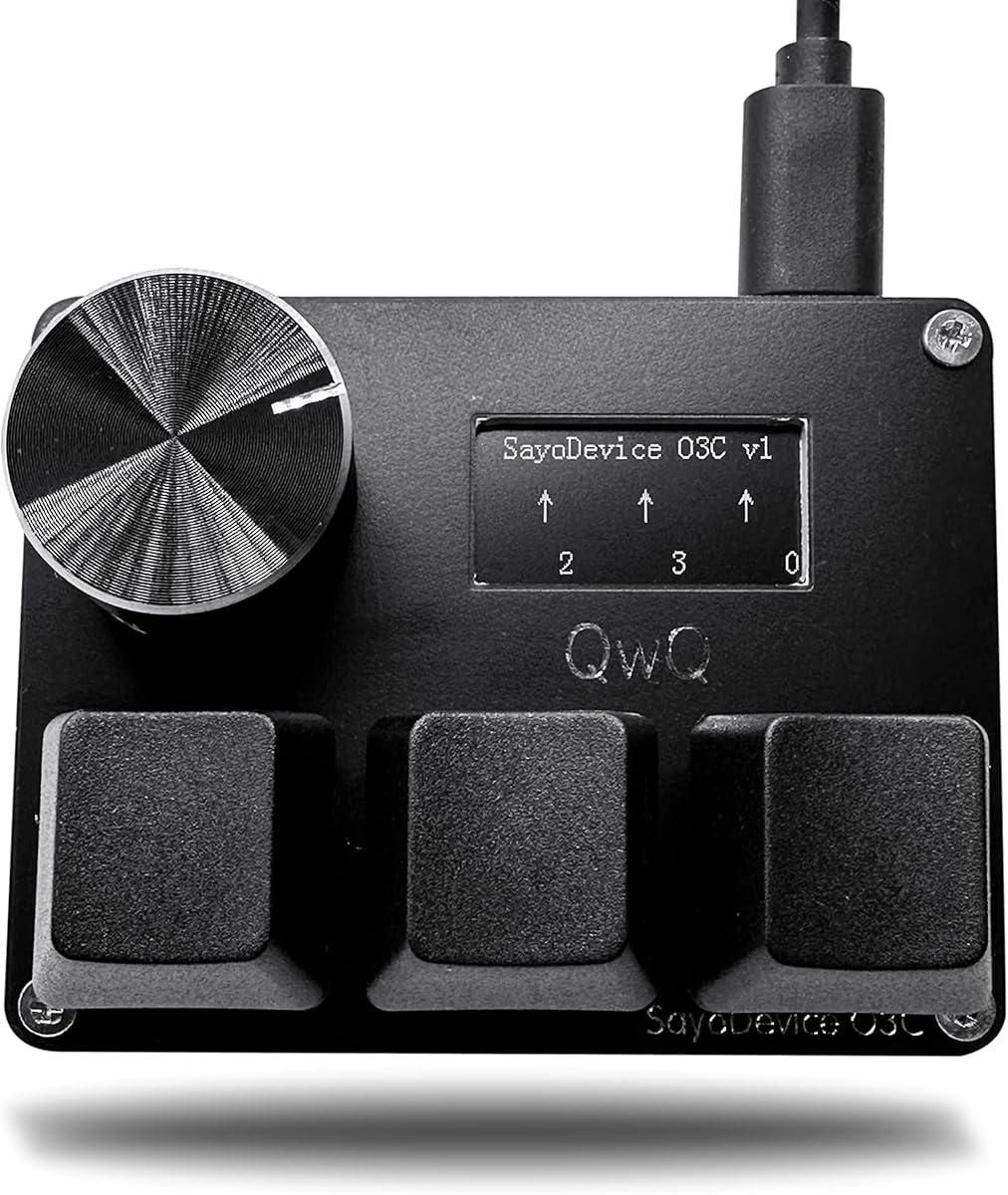
This keyboard stands out as a top choice for Geometry Dash players. It features a 4.7 rating for its rapid trigger and magnetic switch technology. The built-in screen and knob add unique customization options not found in standard boards.
We may earn a commission when you buy through this link, at no additional cost to you.
The Hall magnetic linear switches allow for adjustable actuation and rapid triggering. This ensures every keypress registers instantly. The 0.96-inch IPS screen displays key counts and allows custom text like your player ID. You can set the knob to scroll songs or trigger macros.
Calibration is required before first use. While this adds a setup step, it ensures accuracy. The hot-swap capability lets you try different magnetic switches. This flexibility is great for users who want to tweak their feel.
Buyers seeking precision and unique features will love this model. It is ideal for OSU and Geometry Dash where timing is critical. We recommend it for players who value customization and speed.
Rapid trigger technology resets keys immediately when lifted. This reduces latency and allows for faster repetition of inputs.
The screen displays real-time stats. The knob can be programmed for media or macro functions.
We may earn a commission when you buy through this link, at no additional cost to you.
This model offers a budget-friendly entry into magnetic switch keyboards. It supports rapid trigger and macro functions essential for rhythm games. The visual feedback display helps users monitor key travel in real time.
We may earn a commission when you buy through this link, at no additional cost to you.
Each key supports independent calibration down to 0.05mm. This level of precision is rare at this price point. The device allows you to modify startup screens and key names via software. You can also record keystrokes in multiple languages.
The rating is moderate compared to higher-end models. Some users may find the software less polished. However, the core functionality of rapid trigger remains effective. The minimalist design includes a customizable rotary knob.
It is a strong choice for those on a tight budget. The plug-and-play setup makes it easy to start. We suggest it for players who want rapid trigger without a high cost.
You can adjust the trigger distance for every single key. This allows for a personalized feel across the keypad.
The display shows key counts and travel status. This helps you understand how hard you are pressing.
We may earn a commission when you buy through this link, at no additional cost to you.
This variant shares core features with the first pick. It is designed for rapid trigger and Hall magnetic switches. The inclusion of a screen and knob makes it versatile for gaming shortcuts. It maintains a strong 4.7 rating.
We may earn a commission when you buy through this link, at no additional cost to you.
The keyboard supports any Hall magnetic switches via hot-swap. This means you can change the feel without soldering. The screen can show custom text like your game ID. The knob can be set to scroll song lists or act as a key.
Calibration steps are shown in images for easy setup. Sometimes firmware upgrades require re-calibration. This is a minor hassle but ensures accuracy. The 8000Hz polling rate provides smooth input.
Users who want to experiment with switches will appreciate this. The compact size fits well in small gaming spaces. We recommend it for those who value flexibility and speed.
You can remove and replace switches easily. This extends the lifespan and allows for upgrades.
The first line of the screen text is editable. This adds a personal touch to your setup.
We may earn a commission when you buy through this link, at no additional cost to you.
This keyboard is tailored for OSU and Geometry Dash. It features professional magnetic switches with a rapid trigger mode. The screen supports custom animations which adds a unique visual element. It holds a 4.6 rating for reliability.
We may earn a commission when you buy through this link, at no additional cost to you.
You can set custom trigger release from 0 to 4.000mm. This allows for a wide range of sensitivity. The screen shows key range and button counting in real time. The knob and keys can be set to any combination like ctrl/alt/shift.
The design is robust with replaceable switches. However, the calibration notice is important to follow. Firmware upgrades may require you to re-calibrate the device. This ensures consistent performance over time.
It suits players who want visual feedback and animation support. The ability to mix keys is powerful for macros. We suggest it for advanced users who need specific key combinations.
The screen shows exactly how far you press a key. This helps in perfecting your finger technique.
Keys can be mapped to complex combos. This is useful for executing macros in games.
We may earn a commission when you buy through this link, at no additional cost to you.
The WIN60 HE is a high-performance keyboard for FPS and rhythm games. It features self-developed magnetic switches that eliminate physical contact wear. The web-based driver offers seamless customization without bulky software. It has a 4.5 rating for its reliability.
We may earn a commission when you buy through this link, at no additional cost to you.
With an 8000Hz polling rate, this keyboard ensures fast input. The 0.02mm RT step allows for lightning-fast response times. The 60% design saves desk space while keeping essential functions. RGB lighting enhances the visual setup with 16.8 million colors.
The web-based driver is unique but requires internet access. Some users might prefer local software. However, the ease of use is high. The compact size is perfect for travel or minimal desks.
Buyers wanting a premium feel and fast response should consider this. The magnetic switches provide a consistent experience. We recommend it for competitive gamers who value speed.
You can customize keys and RGB via a web page. This avoids system compatibility issues with local software.
Rapid Trigger allows keys to reset quickly. This is essential for complex combos in games.
We may earn a commission when you buy through this link, at no additional cost to you.
This wireless keyboard offers flexibility with triple mode connection. You can switch between Bluetooth, 2.4G, and wired modes. The gasket design provides a comfortable typing feel with shock absorption. It carries a 4.2 rating.
We may earn a commission when you buy through this link, at no additional cost to you.
The 1.14-inch TFT screen displays various information. You can adjust volume or RGB via the CNC knob. The hot-swap PCB supports 3-pin or 5-pin switches. This makes it easy to swap switches without soldering.
Battery life lasts about 48 hours with backlight. The side-printed keycaps save space but may be tricky to read. It is more focused on general use and comfort than rapid trigger gaming.
It is a great choice for those needing wireless freedom. The gasket design offers a premium feel. We suggest it for players who want a versatile all-in-one keyboard.
Switch devices by flipping switches on the top. This is useful for multi-device setups.
Gasket design reduces vibration and hollow sound. It creates a softer and more comfortable keystroke.
We may earn a commission when you buy through this link, at no additional cost to you.
This keyboard features Hall Effect switches with adjustable actuation. The 0.01mm adjustment allows for precise control. It includes DKS and SOCD features for advanced gaming. It has a strong 4.7 rating.
We may earn a commission when you buy through this link, at no additional cost to you.
The 8000Hz polling rate reduces delay during intense matches. The web-based driver allows customization without software installation. The gasket structure cushions keystrokes and eliminates vibration. The RGB PBT keycaps offer durability and shine-through.
The web driver does not support macOS. This is a limitation for Mac users. However, the 1-year warranty adds peace of mind. The compact design retains arrow keys within a small footprint.
It is suitable for competitive gaming on PC. The adjustable actuation is a major advantage for precision. We recommend it for players who need advanced features.
These features allow complex key combos. They improve control in fighting and FPS games.
High scan rates ensure fast input processing. This reduces latency for faster responses.
We may earn a commission when you buy through this link, at no additional cost to you.
This gaming keyboard offers industry-leading polling rates. The Fast Trigger Mode ensures commands take effect instantly. It features Hall Effect magnetic switches with adjustable actuation. It holds a 4.5 rating for quality.
We may earn a commission when you buy through this link, at no additional cost to you.
The web driver allows customization of RT and DKS functions. You can adjust actuation points from 0.02mm to 3.44mm. The 16.8 million RGB colors enhance the setup visual. The 60% layout saves desktop space significantly.
Mac support is not available for the web driver. Windows users will have full access. The wired connection provides stability during gameplay. The detachable cable adds to portability.
It is ideal for PC gamers needing fast response. The customization options are deep for enthusiasts. We recommend it for those who prioritize performance over wireless.
This mode reduces latency to 0.3ms. It is faster than traditional mechanical keyboards.
You can set the actuation point per key. This allows for a tailored playstyle.
We may earn a commission when you buy through this link, at no additional cost to you.
This white variant offers visual feedback on key travel. It helps users monitor their key counts and status. The design is minimalist with a focus on functionality. It has a 3.0 rating indicating room for improvement.
We may earn a commission when you buy through this link, at no additional cost to you.
The display shows key travel and status in real time. Each key supports independent calibration and trigger distance. The startup screen can be customized via software. Multi-language key recording is available for a smooth experience.
The lower rating suggests some quality issues. However, the core magnetic switch features work well. It is suitable for basic use but lacks advanced customization. The layout is compact for small setups.
Buyers looking for a visual feedback tool may like this. It is a budget option with specific features. We suggest it for casual players who value simplicity.
The screen shows key travel and counts live. This helps in analyzing your input accuracy.
You can personalize the startup screen. This adds a touch of personalization.
We may earn a commission when you buy through this link, at no additional cost to you.
This keypad is designed for OSU and FNF games. It features rapid trigger and magnetic switches. The customizable boot interface allows you to set device names. It has a 3.1 rating.
We may earn a commission when you buy through this link, at no additional cost to you.
The screen supports key travel and status display. Calibration is simple with a single button press. The keyboard supports key combinations like one-click copy and paste. The high-speed USB ensures minimal latency.
Build quality is basic compared to other models. It is functional but lacks polish. The 2m cable provides decent reach. It is suitable for specific game needs.
It is a strong budget choice for FNF players. The rapid trigger helps with rhythm timing. We recommend it for those needing a simple keypad.
This keypad is tuned for Friday Night Funkin. It supports rhythm-based inputs well.
Customize the boot text via software. This allows for unique branding.
We may earn a commission when you buy through this link, at no additional cost to you.
Selecting the right keyboard involves considering several key factors. This guide breaks down what to look for in a Geometry Dash gaming keyboard.
Magnetic switches with rapid trigger are ideal for Geometry Dash. They eliminate physical contact wear and provide consistent actuation. Look for models that support Hall effect sensors for precision.
Prioritize magnetic switches for reliable and fast inputs.
A high polling rate ensures your inputs are registered quickly. 8000Hz is a great standard for competitive play. Lower rates may cause input lag during fast sequences.
Choose a keyboard with at least 1000Hz for smooth gameplay.
Adjustable actuation points allow you to set how deep a key must be pressed. This customization helps match your playstyle. Some keyboards offer ranges from 0.01mm to 4.000mm.
Select a model with adjustable actuation for flexibility.
Geometry Dash players often benefit from compact layouts. A 60% or mini keypad design saves desk space. However, ensure you retain essential keys for macros and navigation.
Opt for a compact size to maximize mouse movement.
Features like screens and knobs can enhance the gaming experience. Custom screens can display key counts or your ID. A programmable knob can control volume or scroll song lists.
Look for customizable screens or knobs for added utility.
Easy-to-use software is essential for macros and key remapping. Web-based drivers offer convenience without system bloat. Ensure the software supports your operating system.
Choose a keyboard with intuitive and accessible software.
Gaming keyboards undergo heavy use. Magnetic switches generally have a longer lifespan than mechanical ones. Check the warranty period and customer support options for peace of mind.
Pick a product with a solid warranty for protection.
When you first receive the keyboard, check the calibration instructions. Some models require a calibration step to ensure accuracy. Follow the on-screen prompts or software guides to set up the switches.
Use the software to map your preferred key combinations. This allows for macros like copy and paste to streamline your workflow. You can also customize the screen text or knob settings.
Keep the keyboard clean by using a brush or compressed air. Avoid liquid spills to prevent damage. If the device has a warranty, register it online to ensure you are covered.
Magnetic switches are often better because they offer rapid trigger. This allows for faster key resets which helps with precise timing. They also tend to last longer than mechanical switches.
Rapid trigger technology resets a key the moment you lift your finger. This reduces the time between presses. It is ideal for games requiring fast repetitive inputs like Geometry Dash.
Some keyboards like the AULA models have drivers that support Mac. Others may be limited to Windows. Check the product description to ensure compatibility with your operating system.
Many models with screens allow you to customize the text. You can display your player ID or game status. The specific software usually provides options to edit this text easily.
Most rapid trigger keyboards are wired to ensure low latency. However, some models like the RedThunder K95 offer wireless modes. Wired connections generally provide the fastest performance.
Calibration steps are usually shown in the guide or images. You may need to press specific keys or use software. Follow the steps carefully to ensure accurate key registration.
A polling rate of 8000Hz is excellent for competitive games. It ensures the computer registers your inputs very quickly. Higher rates reduce delay and improve response times.
We have reviewed ten top keyboards for Geometry Dash players. Each offers unique features like rapid trigger and magnetic switches. The BTXETUEL SayoDevice O3C stands out for its overall performance.
When choosing prioritize models that support rapid trigger and adjustable actuation. These features ensure precise timing which is critical for high scores. Wireless options are rare but available for flexibility.
Prices and availability may change over time. We recommend checking current listings before making a final decision. This ensures you get the best value and current features.