
CENMATE Aluminum 8 Bay Hard Drive Enclosure
4.3Editor score
Supports hot swappable drives
USB 3.0 connectivity
Tool-free installation design
Finding the right storage solution is critical for professionals and enthusiasts who manage large datasets. An 8 Bay Hardware RAID Enclosure provides the capacity and redundancy needed for serious workloads. These units support multiple drives and often include hardware RAID capabilities for improved performance.
We evaluated ten leading models based on build quality, connectivity options, and feature sets. Our analysis covers everything from budget-friendly DAS units to high-end Thunderbolt arrays. Each product offers unique advantages depending on your specific workflow and budget constraints.
Each pick below highlights key strengths and potential trade-offs to guide your decision. Remember that prices and availability can change frequently across different retailers. Always verify current stock and support details before making your final purchase decision for your system.
4.3Editor score

5.0Editor score

3.7Editor score
As an Amazon Associate we earn from qualifying purchases.
The following table provides a side-by-side comparison of all ten reviewed units. It highlights key specifications such as interface type, drive support, and unique features to help you differentiate between options quickly.



The CENMATE Aluminum 8 Bay Hard Drive RAID Enclosure stands out for its comprehensive hardware RAID support. It offers eight distinct RAID modes allowing users to tailor storage redundancy and performance to their specific needs. The enclosure is constructed from durable aluminum alloy which helps dissipate heat effectively during operation.
We may earn a commission when you buy through this link, at no additional cost to you.
Its cooling system includes two fans designed to maintain safe operating temperatures for installed drives. The tool-free design simplifies the process of installing or swapping hard drives without needing specialized screwdrivers. Connectivity is handled via USB A and C 3.0 ports providing decent transfer speeds for most desktop applications.
Users should note that switching RAID modes requires a specific reset procedure which can be technical. Additionally the fan noise may not be ideal for quiet office environments. These trade-offs are acceptable given the robust feature set and capacity support it offers to users.
This enclosure is best suited for individuals or small enterprises needing flexible storage configurations. It supports up to 160TB total capacity making it a strong candidate for large data archives. We recommend reviewing the manual thoroughly before initial setup to avoid data loss.
The eight supported modes allow users to balance speed and redundancy effectively based on workload needs.
Built-in fans and aluminum construction work together to keep drive temperatures within safe limits.
We may earn a commission when you buy through this link, at no additional cost to you.
The SanDisk Professional G-RAID Shuttle represents a premium solution for demanding creative workflows. It comes pre-configured with RAID 5 for a balance of performance and data protection right out of the box. The inclusion of eight enterprise-class Ultrastar drives ensures reliability for mission-critical footage storage.
We may earn a commission when you buy through this link, at no additional cost to you.
Performance is exceptional with read speeds up to 1900MB/s and write speeds up to 2000MB/s via Thunderbolt 3. This makes it ideal for multi-stream 4K and 8K video editing tasks. The enclosure supports daisy chaining allowing users to expand their workspace with additional Thunderbolt devices easily.
The unit is transportable despite its large capacity which is beneficial for on-location shoots. However the weight and size make it less portable than smaller desktop units. The investment is justified for professionals who need guaranteed performance and data security.
This array is perfect for video editors and content creators requiring high throughput. It integrates seamlessly with Mac systems via Power Delivery reducing the need for extra chargers. The removable drive design simplifies maintenance and replacement without full unit removal.
The 40Gbps interface ensures minimal bottlenecks during large file transfers and real-time editing.
Removable drives allow for easy upgrades or replacement without returning the entire unit.
We may earn a commission when you buy through this link, at no additional cost to you.
This CENMATE enclosure offers a budget-friendly entry point for users needing high capacity without RAID features. It functions as a Direct Attached Storage unit meaning drives appear individually to the host system. The hot swappable design allows users to replace drives without powering down the system.
We may earn a commission when you buy through this link, at no additional cost to you.
Constructed from aluminum alloy with two cooling fans it maintains decent thermal performance under load. Connectivity is provided via USB A and C 3.0 ports compatible with Windows and Mac OS. The tool-free design makes initial setup and drive insertion straightforward for non-technical users.
The lack of hardware RAID means data redundancy must be handled by software or backups. Additionally the fan noise may be distracting in quiet environments. These factors are acceptable for users prioritizing cost and capacity over advanced redundancy.
Ideal for personal media libraries or general data backup tasks. The daisy chain expansion feature allows connecting up to three devices for increased storage potential. It supports drives up to 20TB each making it future-proof for growing storage needs.
Users can swap drives while the system is running which increases workflow efficiency.
Connecting multiple enclosures expands total storage capacity without needing new host ports.
We may earn a commission when you buy through this link, at no additional cost to you.
The OWC ThunderBay 8 provides eight universal drive bays suitable for both 2.5 and 3.5 inch SSDs or HDDs. It connects via dual Thunderbolt 3 ports allowing for daisy chaining up to six units. This design supports massive storage capacity expansions for power users.
We may earn a commission when you buy through this link, at no additional cost to you.
Quick drive swaps are facilitated by thumb screw release trays for easy access to installed drives. The enclosure is plug-and-play ready without requiring additional drivers for Mac or Windows systems. It includes a Thunderbolt cable to get started immediately upon purchase.
Users must purchase drives separately which adds to the overall investment cost. The dual Thunderbolt ports are essential for chaining but may occupy ports on newer laptops. These factors are acceptable for users needing expandable high-speed storage.
This unit is excellent for workstation setups requiring large scratch disks or media archives. The compact design fits well under a desk while providing significant capacity potential. Compatibility with Mac and Windows ensures broad utility across different ecosystems.
Daisy chaining allows users to build massive storage arrays without complex networking.
The unit works with both SATA SSDs and HDDs offering flexible storage options.
We may earn a commission when you buy through this link, at no additional cost to you.
This enclosure offers faster transfer speeds via USB 3.2 Gen 2 reaching up to 10Gbps under UASP control. It supports both 2.5 and 3.5 inch drives with a total capacity up to 160TB. The hot swappable design allows for easy maintenance without powering down the system.
We may earn a commission when you buy through this link, at no additional cost to you.
Like other models in its series it features an aluminum build with two cooling fans. The fan noise remains around 40-50 decibels which may be noticeable in quiet rooms. The tool-free design simplifies drive installation significantly for users without technical expertise.
Users relying on RAID must handle redundancy through software as this unit is DAS only. The improved interface speeds make it better than USB 3.0 models for large file transfers. The power supply ensures stability for high-speed transmission across all connected drives.
Ideal for users needing fast external storage without complex RAID configurations. It supports Windows Mac and Linux making it versatile for mixed environments. The daisy chain option allows expanding capacity with additional compatible enclosures.
The Gen 2 interface doubles the speed of standard USB 3.0 for faster file access.
Plug-and-play functionality ensures compatibility with Windows Mac and Linux systems.
We may earn a commission when you buy through this link, at no additional cost to you.
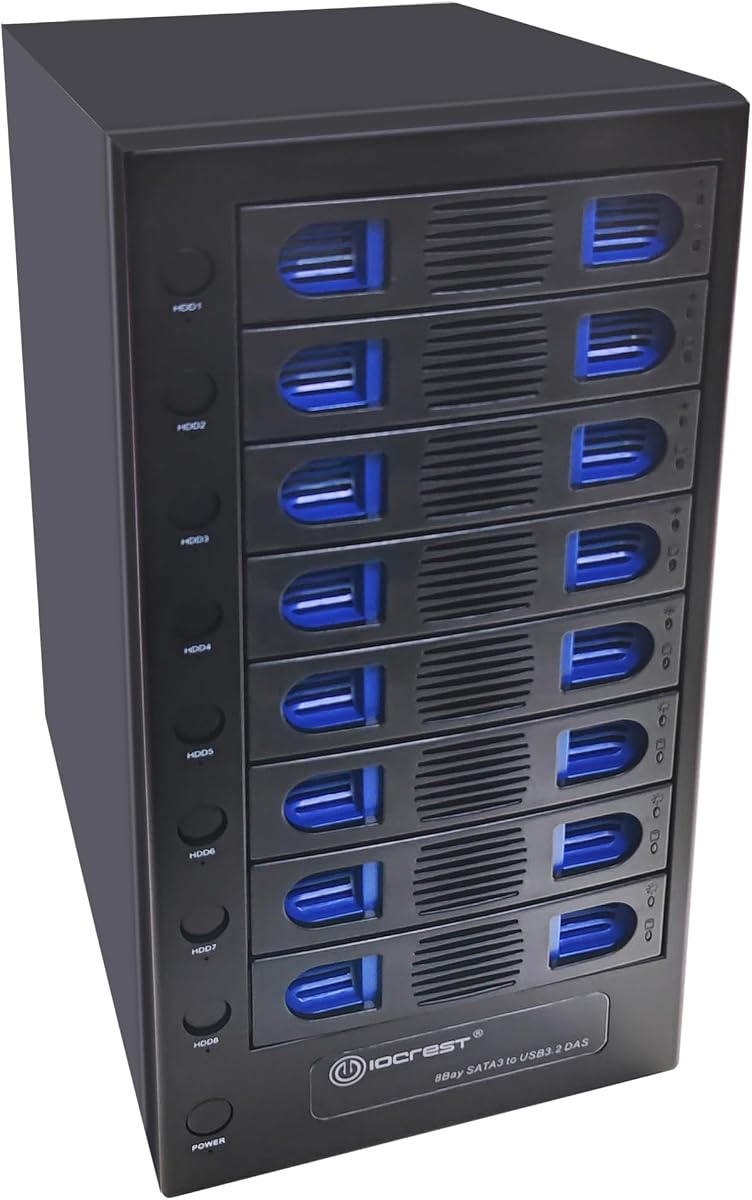
This enclosure features independent control switches for each drive allowing individual power management. The smart fan function adjusts speed based on thermal sensor data to optimize cooling. It supports up to 22TB per drive making total capacity very high for an 8-bay unit.
We may earn a commission when you buy through this link, at no additional cost to you.
The USB 3.2 10Gbps connection ensures fast transfer speeds for large media files. The steel housing helps dissipate heat but adds weight to the unit. Quiet fans are integrated to reduce noise while maintaining safe temperatures inside.
Users may find the switch layout slightly confusing at first glance. The support for leading operating systems ensures broad compatibility without needing extra drivers. Independent switches are particularly useful for troubleshooting specific drive issues without affecting others.
This unit is great for advanced users needing granular control over storage hardware. The ability to power off individual drives saves energy and reduces noise. It is a solid choice for home labs or media servers requiring flexible management.
Fan speeds adjust automatically based on drive temperature to balance cooling and noise.
Supporting 22TB drives allows massive storage density in a compact desktop form.
We may earn a commission when you buy through this link, at no additional cost to you.
This unit combines storage with PCIe expansion capabilities making it unique among enclosures. The top four bays support U.2 SSDs allowing for high-speed cache or scratch disk configurations. A PCIe x16 slot allows adding video cards or hardware RAID controllers inside the enclosure.
We may earn a commission when you buy through this link, at no additional cost to you.
Front mounted USB-C and USB-A ports provide convenient access for peripherals and mobile devices. The SoftRAID software helps manage advanced RAID sets with monitoring and notifications. It supports up to 144TB of capacity using a mix of drive technologies.
The complexity of managing both storage and PCIe expansion can be a barrier. SoftRAID is powerful but may require learning for users unfamiliar with RAID concepts. The versatility is unmatched for creative workstations needing internal expansion power.
Ideal for video editors needing both storage and capture card functionality. The future-ready design supports emerging storage standards like U.2. It maximizes connectivity by bringing internal PCIe options to an external Thunderbolt chassis.
The built-in PCIe slot allows for internal GPU or capture card installations.
Front SD and CFexpress readers offer quick access to camera media without adapters.
We may earn a commission when you buy through this link, at no additional cost to you.
This enclosure is designed to expand storage for QNAP NAS systems directly. It supports Direct Attached Storage mode for Windows Mac and Linux workstations. The free JBOD Manager utility helps monitor drive health and manage configurations easily.
We may earn a commission when you buy through this link, at no additional cost to you.
USB 3.2 Gen 2 Type-C port delivers up to 10Gbps speeds for rapid file access. It supports both 3.5 and 2.5 inch SATA drives for flexible capacity options. The tower design fits well on a desktop without taking up excessive space.
While it integrates well with QNAP systems it functions standalone for basic backup needs. The lack of complex RAID reduces overhead but limits advanced redundancy options. Users should verify drive compatibility before installation to avoid potential issues.
Perfect for expanding existing NAS storage without buying a new system. It also serves well as a standalone backup solution for workstations. The utility provides good insight into drive status without needing a full server OS.
The included software utility simplifies health checks and configuration for connected drives.
Works with Windows macOS and Linux for broad compatibility across systems.
We may earn a commission when you buy through this link, at no additional cost to you.
This case is designed for DIY NAS builds supporting Mini ITX and Micro ATX motherboards. It features eight hot swap drive bays allowing easy replacement without shutting down the system. Dual independent air channels separate heat dissipation for drives and motherboard.
We may earn a commission when you buy through this link, at no additional cost to you.
The steel chassis provides sturdy protection and includes indicator lights for drive status. Silent fans maintain low noise even during non-stop operation. Front USB 3.0 ports allow easy connection of peripherals for daily tasks.
Users must provide their own motherboard CPU and power supply which adds complexity. Assembly is straightforward but requires time and technical knowledge. The flexible assembly options allow customizing the internal layout to fit specific parts.
Ideal for enthusiasts building custom Plex servers or private cloud solutions. The design supports high flexibility without strict limitations on CPU coolers or power supplies. It is a cost-effective way to build a high-capacity NAS from scratch.
Separate air ducts prevent motherboard heat from affecting hard drive temperatures.
Drive bays allow adding or removing drives without powering down the server.
We may earn a commission when you buy through this link, at no additional cost to you.
This backplane cage fits into a standard external 5.25 inch drive bay. It supports up to eight 2.5 inch SATA HDDs or SSDs with locking trays. The full metal structure provides durability and secure mounting within a desktop tower.
We may earn a commission when you buy through this link, at no additional cost to you.
Locking trays ensure drives stay securely in place during transport or vibration. It is designed for SATA and SAS interfaces supporting single channel SAS connections. The external access allows easy maintenance without opening the main PC case.
Users are limited to 2.5 inch drives which means using adapters for 3.5 drives. Installation requires opening the PC case to mount the cage in the drive bay. These constraints are acceptable for users seeking compact high-density storage.
Best for IT professionals needing quick access to server or storage drives. The locking mechanism adds security for sensitive data environments. It converts standard bays into efficient 2.5 drive racks for maximum density.
Locking trays prevent accidental drive removal during operation or transport.
Full metal construction ensures longevity and protects drives from physical damage.
We may earn a commission when you buy through this link, at no additional cost to you.
Selecting the right enclosure involves balancing interface speed capacity needs and RAID capabilities. We break down the critical factors to consider before making your purchase.
Connectivity options determine how fast data moves between your computer and the drives. USB 3.0 offers 5Gbps while USB 3.2 Gen 2 provides 10Gbps. Thunderbolt 3 offers 40Gbps for maximum performance. Match the interface to your computer ports and transfer needs.
Prioritize Thunderbolt for high-speed editing or USB 3.2 for general storage tasks.
Hardware RAID allows the enclosure to manage drive redundancy without host software. Direct Attached Storage (DAS) presents drives individually to the operating system. RAID protects against drive failure but adds complexity to setup and data recovery.
Choose RAID for critical data redundancy and DAS for simpler backup workflows.
Check the maximum capacity per drive supported by the enclosure. Some models support up to 20TB or 22TB per drive. Total capacity is the sum of all bays multiplied by max capacity per drive.
Ensure the enclosure supports your desired drive size to avoid compatibility issues.
Multiple drives generate significant heat during operation. Look for enclosures with built-in fans or passive cooling designs. Fan noise levels vary and may impact user experience in quiet environments.
Active cooling is necessary for continuous operation to maintain drive longevity.
Hot swapping allows replacing drives without powering down the system. This is essential for servers or workstations that cannot afford downtime. Check if the model explicitly states hot swappable support for your OS.
Hot swap support increases workflow efficiency and simplifies maintenance tasks.
Daisy chaining allows connecting multiple units to expand storage. This is common with Thunderbolt and USB-C interfaces. Verify the maximum number of units supported to plan for future growth.
Expansion capability ensures your storage needs can grow without replacing the unit.
Materials like aluminum or steel affect durability and heat dissipation. Tool-free designs improve usability for frequent drive swaps. Robust construction protects data against physical shock and vibrations.
Invest in durable materials to ensure long-term reliability and drive safety.
Verify operating system compatibility for your specific use case. Some units include management software for health monitoring. Ensure plug-and-play functionality if you prefer minimal configuration.
Broad compatibility reduces setup friction across different computing environments.
Start by inserting drives into the bays ensuring they are fully seated. For hardware RAID units set the mode using the dip switch before powering on. Follow the manufacturer instructions for initializing the array properly to prevent data loss.
Keep the enclosure in a well-ventilated area to avoid overheating. Clean fans and vents periodically to remove dust buildup. Ensure power cables are securely connected to prevent accidental disconnection.
Monitor drive health using included utilities or system tools. Replace failing drives immediately if RAID redundancy is active. Regular backups remain essential regardless of hardware configuration.
Most 8-bay enclosures support both sizes using adapters or specific caddies. Check the product details to confirm tray compatibility. Using mixed sizes may affect total capacity calculations.
Hardware RAID enclosures require a host computer to access data. They do not function as standalone network storage without additional software or NAS hardware. The drives are managed externally by the connected system.
Switching modes often requires a physical reset via dip switches or software tools. Powering down is usually necessary before changing settings. Data may be lost so back up before switching modes.
Most require an external 12V 20A power adapter for stable operation. Internal enclosures may use standard PSU power connectors. Ensure the wattage matches the total drive requirements to avoid instability.
Many Thunderbolt 3 units support Thunderbolt 2 via adapters or direct compatibility. Check the specific model specs to confirm backward support. This allows mixing older peripherals with newer setups.
Fan noise usually ranges between 40 and 50 decibels. This is moderate and acceptable for office environments. Some users may find it noticeable in very quiet rooms.
Yes if the enclosure supports hot swapping or allows powering down. Ensure the host system recognizes new drives properly. Some RAID levels require rebuilds when adding drives to arrays.
We reviewed ten options ranging from budget DAS units to premium Thunderbolt arrays. Each model offers distinct advantages depending on speed redundancy and build requirements. Selecting the right unit ensures your data remains safe and accessible.
Prioritize interface speed and RAID features based on your workflow needs. High-performance creative work demand Thunderbolt while general storage may suffice with USB. Consider thermal management and noise levels for your workspace environment.
Verify current stock and specifications before purchasing as offerings change regularly. Always backup important data before configuring new storage arrays. The right enclosure will serve as a reliable foundation for your data management.