
Zalman CUBIX M-ATX Micro-ATX Compact Desktop
4.5Editor score
17.1 Liter Total Volume
Perforated Front Panel
Sturdy Steel Construction
This guide compares the top cube shaped PC case models for 2026, evaluating airflow, compatibility, design, and build quality to help you choose the perfect
Cube shaped PC cases offer a unique aesthetic and compact footprint for modern gaming setups. They balance style with functionality, allowing builders to showcase components while saving desk space. Choosing the right one requires considering airflow, motherboard support, and cable management features.
We evaluated ten leading cube shaped PC case options based on design, cooling potential, and compatibility. Our analysis focuses on real-world performance metrics and user feedback to ensure reliable recommendations. Each product was reviewed for its ability to handle high-performance hardware efficiently.
Each pick highlights specific strengths like glass panels, fan count, or modular interiors. Note that prices and availability change frequently, so check current listings before buying. This guide helps you find a chassis that fits your budget and technical needs perfectly.
4.5Editor score
4.7Editor score

4.7Editor score
This side-by-side comparison reviews ten cube shaped PC case models to highlight their unique strengths and limitations. We focus on key specifications like motherboard support, fan configurations, and physical dimensions to help you make an informed decision for your build.



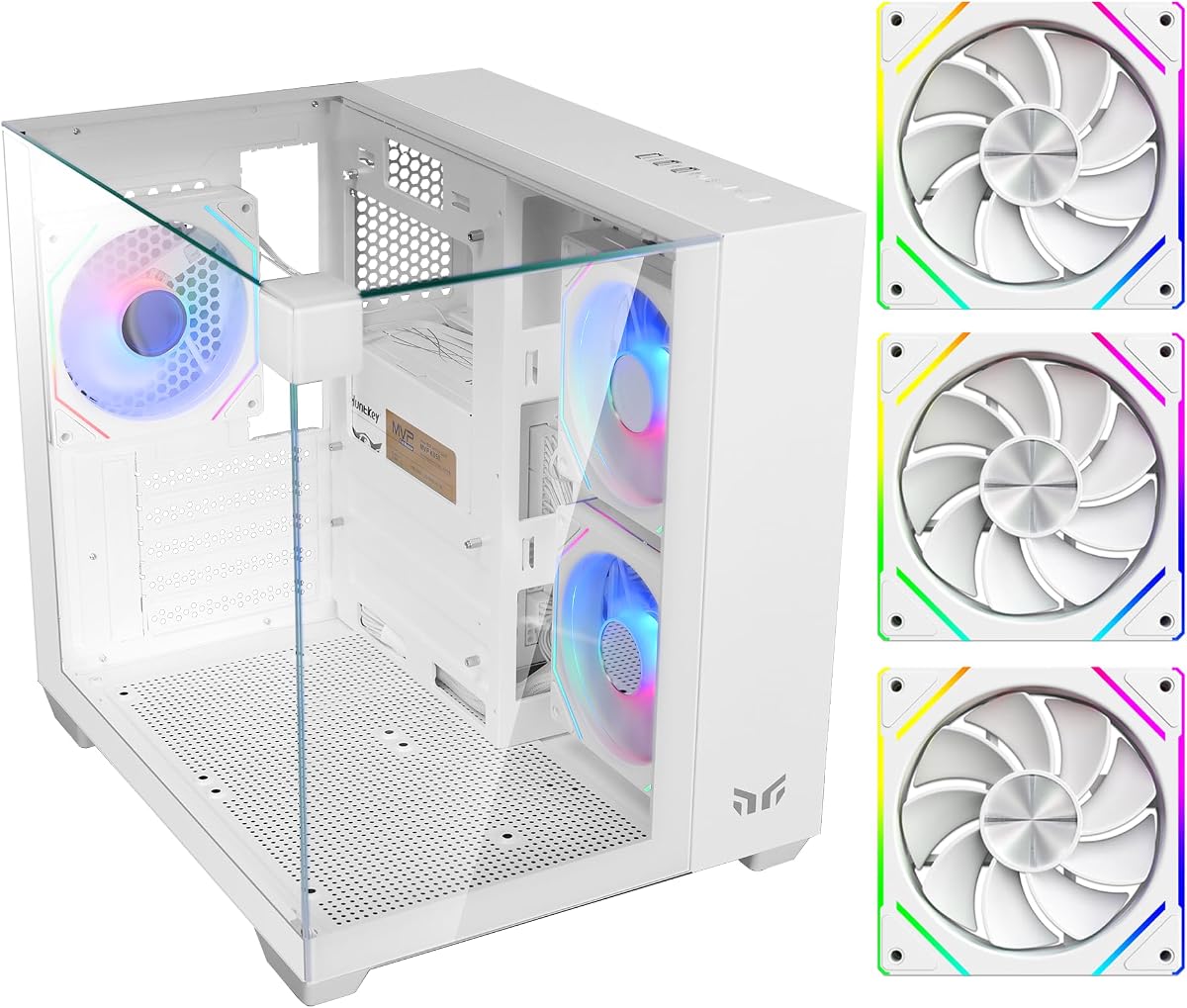
The Cube Gaming PC Case stands out with its 270° tempered glass design, creating a stunning visual centerpiece. It features three tempered glass panels and a pillar-less layout to showcase components. This case supports Mini-ITX and Micro-ATX motherboards with a 28.5L footprint.
We may earn a commission when you buy through this link, at no additional cost to you.
It comes with three pre-installed 120mm ARGB fans for immediate cooling and aesthetics. The optimized layout supports up to five 120mm fans and a 240mm side liquid cooler. Cable management is simplified with a dedicated routing design and a PSU shroud to hide wires.
While it offers a clean look, fans use 3-pin DC connectors rather than 4-pin PWM. The limited motherboard support might not fit large ATX boards. However, the durable SPCC steel construction ensures reliability. RGB sync is controlled via a top switch for easy adjustments.
This case is perfect for builders wanting a compact, show-stopping setup without complex assembly. The balance of glass and airflow makes it a strong choice. If you prioritize aesthetics in a small space, this model delivers significant value and style.
The 270° glass panels wrap around the components, providing a wide viewing angle. This design minimizes visible bezels and maximizes the impact of internal RGB lighting.
Despite its small size, the internal layout allows for significant cooling options. You can fit multiple fans and even liquid cooling radiators to maintain stable temperatures.
We may earn a commission when you buy through this link, at no additional cost to you.
The Cooler Master QUBE 540 is engineered for versatility, allowing horizontal and vertical positioning. Its reversible I/O panel and movable handles let you customize the layout. This supports ITX, ATX, and E-ATX motherboards within a compact footprint.
We may earn a commission when you buy through this link, at no additional cost to you.
A full front mesh panel maximizes airflow, paired with a pre-installed SickleFlow fan. It offers up to 415 mm GPU clearance for large graphics cards. Connectivity includes USB 3.2 Gen1 and Gen2 Type-C ports for modern peripherals.
Switching orientation requires some adjustment to handles and I/O. The fixed fan placement might limit airflow optimization in one orientation. However, the E-ATX support provides rare flexibility. The design balances modern features with practical adaptability.
Choose this if you need a case that adapts to your desk setup. It handles large GPUs and boards well. For users who value airflow and orientation options, this case offers solid performance and build quality.
The flexible orientation design lets you place the case horizontally to save vertical space or vertically for airflow. Handles make repositioning easy without tools.
Front access includes USB Type-C for fast data transfer. This ensures compatibility with newer devices without needing adapters or internal hubs.
We may earn a commission when you buy through this link, at no additional cost to you.
The Apevia Prism-WH features a dual chamber layout for better cable hiding and visibility. It includes five 120mm ARGB PWM fans pre-installed for instant RGB. The case supports graphics cards up to 340mm and CPU coolers up to 155mm.
We may earn a commission when you buy through this link, at no additional cost to you.
Fans have 366 RGB modes via a top switch. Pressing the button for five seconds syncs with ARGB motherboards. It includes USB 3.0 and 2.0 ports. A magnetic dust filter on the top reduces dust accumulation.
You need an ARGB motherboard for full sync. The fixed color scheme might not suit all builds. However, the dual chamber helps keep cables organized. The screw-in PCI-E covers simplify GPU installation for users.
This is a budget-friendly dual chamber option. The fan count is high for the price. If you want RGB and cable separation without a large footprint, this model fits well.
The top switch offers 366 lighting modes directly. For synced colors, you need an ARGB motherboard connector. This flexibility allows both standalone and integrated lighting.
The layout separates the motherboard from the PSU area. This helps hide cables and improves airflow efficiency between components.
We may earn a commission when you buy through this link, at no additional cost to you.
The Zalman CUBIX-G is a space-saving case ideal for budget gaming. It features three preinstalled FRGB fans with optimized airflow out of the box. It fits GPUs up to 280mm and ATX PSUs up to 140mm.
We may earn a commission when you buy through this link, at no additional cost to you.
It includes USB Type-C for fast connectivity. The design supports up to three 2.5 inch and one 3.5 inch drive. This helps keep the desktop clean with a smaller footprint. The black and white panda style is modern.
Fixed FRGB fans lack PWM control. Drive bays are limited compared to larger cases. However, it is a sturdy budget choice. The inclusion of USB Type-C is a nice touch for newer devices.
Choose this for simple builds needing minimal size. It is great for entry-level gaming. If you need a small case without compromising PSU size, this fits well.
The front I/O includes USB Type-C for modern devices. This ensures you can charge or transfer data without adapters.
The panda color theme offers a distinct look. It is simple yet stylish enough for a desk setup.
We may earn a commission when you buy through this link, at no additional cost to you.
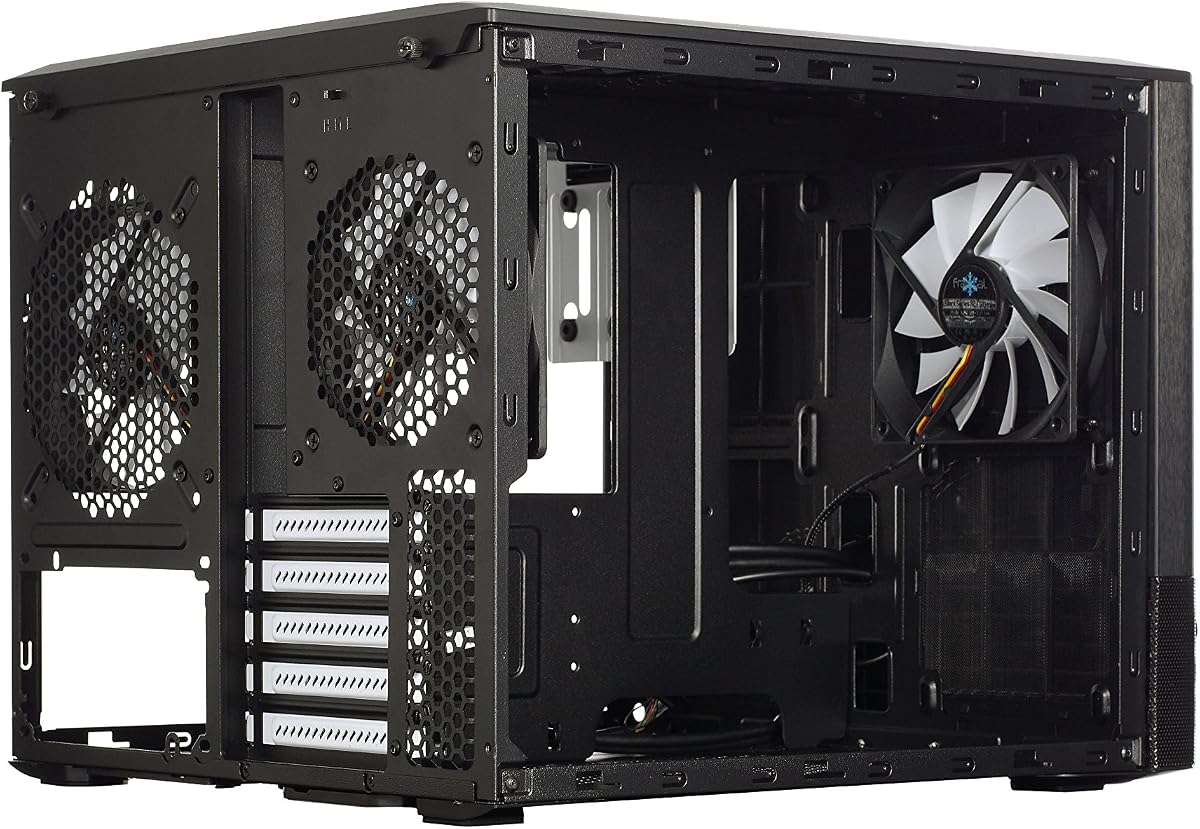
The Fractal Design Node 804 features a dual chamber layout for efficient cooling. It has a minimalistic design with a brushed aluminum front panel. It supports up to 8 x 3.5 drives and includes 3 Silent R2 fans.
We may earn a commission when you buy through this link, at no additional cost to you.
Water cooling is ready with space for 4 radiators. It includes dust filters on all intakes. The modular interior helps with cable management. This case supports up to 8 fans total. It focuses on airflow over glass panels.
The price is higher than budget options. It lacks USB Type-C on the front panel. However, the build quality is excellent. The dual chamber design is effective for thermal management.
Pick this if you prioritize airflow and modularity. It suits large storage or liquid cooling builds. If you want a reliable, durable case, this is a top choice.
It supports up to 8 3.5 inch drives. This makes it ideal for media servers or large NAS builds.
The case supports multiple radiators simultaneously. You can fit extensive liquid cooling loops inside.
We may earn a commission when you buy through this link, at no additional cost to you.
The Apevia Prism-Elite includes seven 120mm PWM ARGB fans. It features a dual chamber design for cable management. It supports GPUs up to 400mm and water cooling up to 360mm. The RGB fans have 366 modes via a top switch.
We may earn a commission when you buy through this link, at no additional cost to you.
You can switch to motherboard sync via a button. It includes USB Type-C on the top panel. Screw-in PCI-E covers simplify installation. A large magnetic filter covers the top intake. This design prioritizes airflow and airflow.
The fan count may be loud without PWM control. You need an ARGB motherboard for full sync. However, 360mm cooling support is excellent. This case is powerful for performance builds.
Choose this for maximum airflow on a budget. The fan count saves buying extras. If you need extensive cooling and RGB, this model fits well.
Fans offer 366 modes directly. Syncing with a motherboard requires ARGB headers. This offers flexibility for different budgets.
The case supports large radiators. You can fit 360mm coolers for effective CPU heat management.
We may earn a commission when you buy through this link, at no additional cost to you.
The Zalman CUBIX M-ATX has a total volume of 17.1 liters. It features a perforated front panel for airflow. It supports standard ATX PSUs and GPUs up to 260mm. The design is minimal yet mighty for small builds.
We may earn a commission when you buy through this link, at no additional cost to you.
It includes a single 80mm fan. This is basic compared to larger cases. The case uses durable 0.8T steel. Front I/O includes USB 3.0. The construction is robust for the price.
The single 80mm fan offers limited cooling. You may need upgrades. However, the steel ensures durability. For tight budgets, it is a reliable entry.
Pick this for very small setups. If you want a robust budget case, this is a solid choice.
The 0.8T steel construction is sturdy. This ensures the case remains stable and secure over time.
At 17.1 liters, it saves significant space. This helps keep desks clean and organized.
We may earn a commission when you buy through this link, at no additional cost to you.
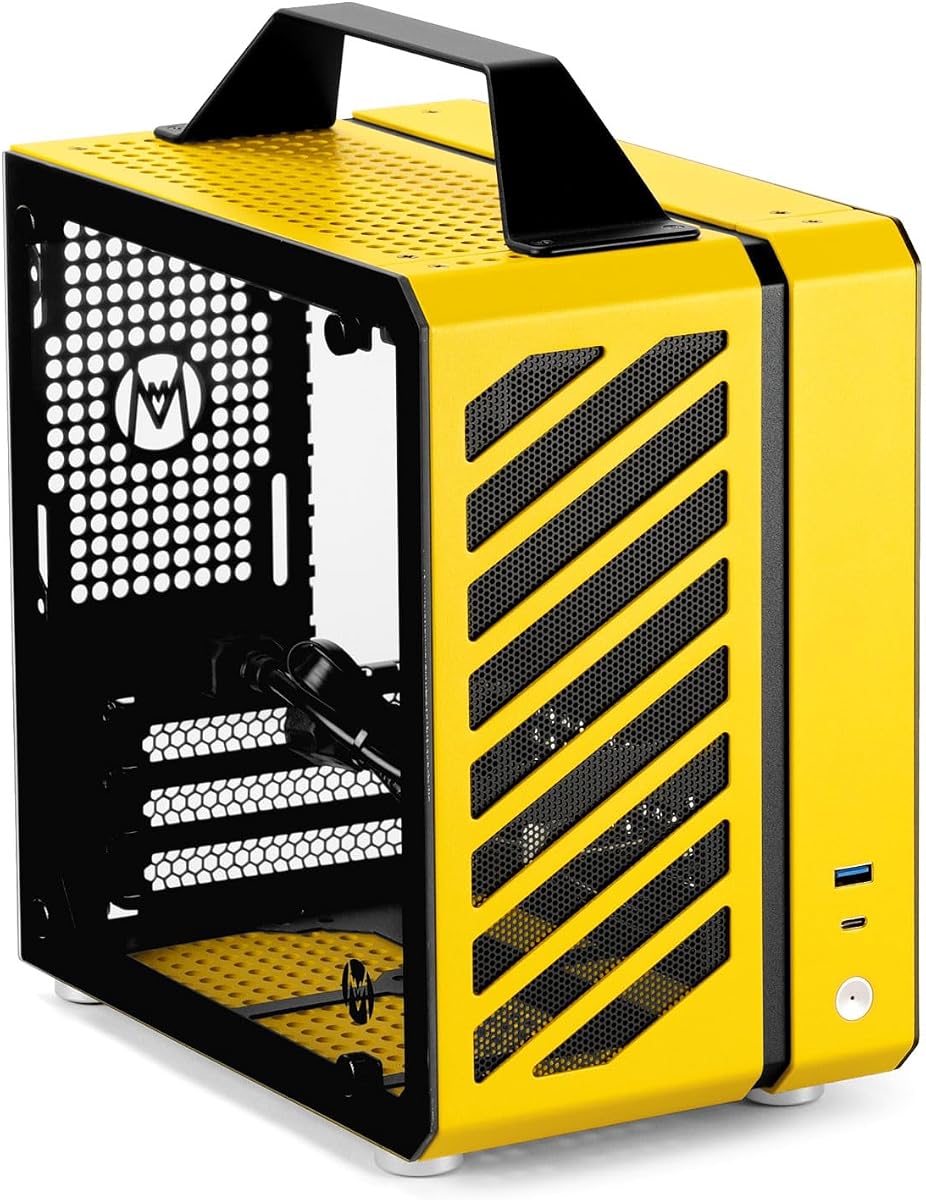
The Mechanic Master C24 is a 9.9L ultra-small form factor. It includes an aluminum handle for easy carrying. It supports ITX/DTX motherboards and SFX PSUs. Cooling allows multiple fans for optimized airflow.
We may earn a commission when you buy through this link, at no additional cost to you.
The aluminum-steel hybrid frame offers durability. Panels are detachable for tool-free installation. It includes dust filters and SSD mounts. This case is ideal for portable builds. It supports GPUs like RTX 3060 series.
You need an SFX PSU for power. The GPU length is limited. However, the portability is unmatched. The build quality feels premium and durable.
Choose this for a portable high-end build. If you want to carry your PC, this fits well.
Detachable panels allow easy access. Tool-free installation simplifies maintenance. This helps keep the build simple.
Multi-fan support ensures airflow. You can fit multiple fans for optimal cooling.
We may earn a commission when you buy through this link, at no additional cost to you.
The Fractal Design Node 804 No PSU is a MicroATX Cube Case. It is made from aluminum and steel. It supports MicroATX and Mini-ITX boards. This case supports up to 8 x 3.5 drives.
We may earn a commission when you buy through this link, at no additional cost to you.
The build quality is high with durable materials. It allows extensive storage for media. The cube design fits well on desks. It supports many bays for storage.
It costs more than budget options. It lacks modern I/O features. However, the build is premium. This is for storage-focused users.
Choose this if you need storage. If you want a durable case, this fits well.
It supports up to 8 drives. This helps for large storage needs.
Aluminum and steel ensure strength. The materials are high quality.
We may earn a commission when you buy through this link, at no additional cost to you.
The Cooler Master Qube 540 Moonstone is a compact ATX case. It features a white Moonstone color. The design allows flexible orientation. High airflow mesh ensures cooling.
We may earn a commission when you buy through this link, at no additional cost to you.
The case supports large GPUs and boards. It has a modern look. The build is sturdy. This version focuses on aesthetics.
User ratings are slightly lower. The price is higher. However, it fits white builds well. The airflow is efficient.
Choose this for a white aesthetic. If you need a compact ATX, this fits well.
The Moonstone white looks clean. It suits modern setups.
The flexible design allows positioning. Airflow is optimized.
We may earn a commission when you buy through this link, at no additional cost to you.
Selecting the right cube shaped PC case requires evaluating several technical and aesthetic factors. We outline key aspects to ensure your chosen chassis meets your performance and design goals.
Check if the case supports your motherboard form factor like Mini-ITX, Micro-ATX, or ATX. Some cube cases only support smaller boards while others support full ATX. This determines if your components fit.
Ensure your motherboard size matches the internal dimensions before buying. This avoids compatibility issues during assembly.
Look for pre-installed fans and slots for additional ones. Good airflow is critical for small cases to prevent overheating. Consider water cooling support if you have high-performance parts.
Prioritize cases with mesh panels and multiple fan mounts for efficient heat dissipation.
Cube cases vary in volume from 10 liters to over 30 liters. Smaller volumes save space but limit components. Larger volumes support more parts and better airflow.
Select a volume that fits your desk space and component count.
Good cable management features keep the interior clean and airflow unblocked. Look for dedicated routing holes and spaces behind panels. Dual chamber designs help hide power supplies.
Choose cases with ample space for routing cables without tension.
Materials like SPCC steel and aluminum ensure durability and stability. Steel cases are strong but heavier. Aluminum offers better heat dissipation.
Prioritize materials that fit your budget and weight requirements.
Check maximum GPU and PSU length limits. Large graphics cards might not fit in smaller cube cases. Standard ATX PSUs may not fit if the case specifies SFX.
Ensure your hardware fits within the maximum length specifications provided.
Glass panels and RGB lighting impact the visual appeal. Some cases offer panoramic views while others are fully enclosed. Decide if you want RGB fans and tempered glass.
Choose features that match your desktop theme and lighting preferences.
Front I/O ports determine how you connect devices. USB 3.0 and Type-C are essential for modern peripherals. Audio jacks are also important for convenience.
Ensure the port options meet your connectivity needs.
Install components carefully by following the motherboard and PSU manual. Use the provided tool-free trays for easy access. Secure all connections to avoid loose cables inside.
Clean dust filters regularly to maintain airflow. Use compressed air to remove dust from fans and radiators. This prevents overheating and extends component life.
Ensure the case is stable on your desk. Avoid placing it in humid areas. Check cable ties periodically to keep internal wiring organized.
Yes, many cube shaped PC cases are excellent for gaming. They often feature mesh panels and ample fan support for cooling. Look for models that fit your GPU and motherboard size.
It depends on the specific model. Some cube cases support ATX while others only support Micro-ATX. Always check the motherboard compatibility listed in the product data.
Many cube cases support liquid cooling. Some allow radiators up to 360mm. Check the radiator support section in the specifications to confirm.
ARGB allows individual LED control for more lighting effects. RGB controls all LEDs at once. ARGB offers more customization if your motherboard supports it.
Some cube cases like the Mechanic Master C24 are portable with handles. Others are larger and heavier. Consider size and weight if you plan to move your PC.
Most cube cases have magnetic or removable dust filters. Slide them out and rinse with water or use compressed air. Let them dry before putting them back.
Cases with pre-installed fans save money and time. They usually come with good airflow out of the box. If you plan to upgrade fans, extra slots are useful.
Dual chamber designs separate components to hide cables. This improves airflow and aesthetics. It helps keep the build looking clean and organized.
This guide reviewed ten top cube shaped PC case options ranging from budget to premium. The Cube Gaming PC Case offers the best panoramic view while the Fractal Node 804 leads in modularity.
Prioritize cooling and motherboard support when choosing. Small cases require efficient airflow to maintain performance. Look for cases with mesh panels and multiple fan slots.
Always verify current availability and prices before purchasing. These specifications change over time. Choose the model that fits your build needs and aesthetic style.