
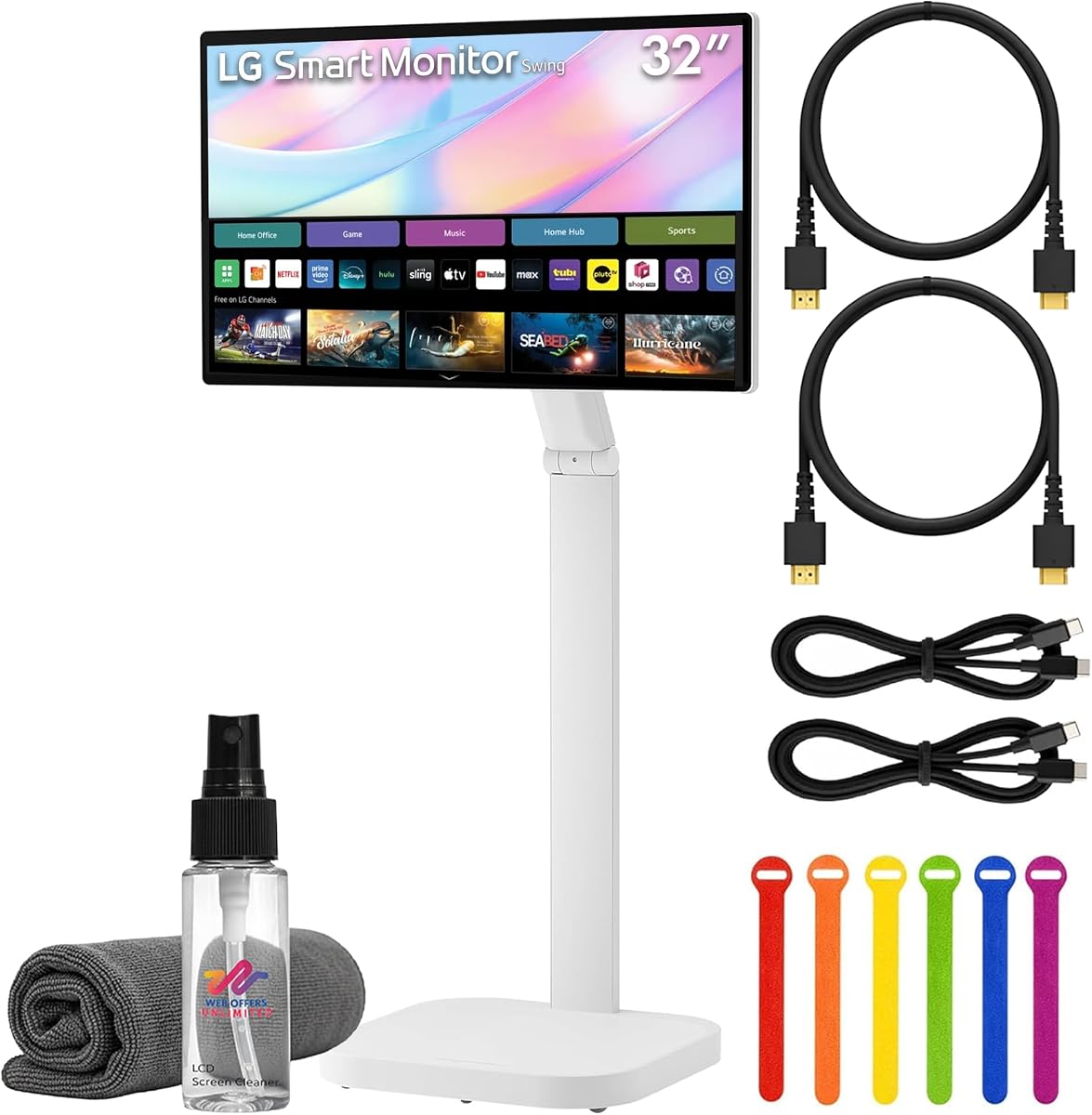
LG Smart Monitor Swing 32U889SA-W
4.1Editor score
Built-in webOS streaming platform
Rolling wheeled base mobility
Multi-device connectivity options
Discover the ultimate interactive experience with our guide to the best 32 inch touchscreen monitors available today for professionals and creators.
We evaluated these models based on touch accuracy, display resolution, connectivity options, and ergonomic features to help you find the perfect fit.
Each pick highlights unique strengths and trade-offs so you can choose confidently. Note that pricing and availability may change frequently online.
4.1Editor score

5.0Editor score

4.2Editor score
As an Amazon Associate we earn from qualifying purchases.
Explore this detailed side-by-side comparison of the top ranked 32 inch touchscreen monitors featuring key specs and unique capabilities.



This monitor delivers an exceptional experience for users seeking high resolution and smooth motion in a large touchscreen package.
We may earn a commission when you buy through this link, at no additional cost to you.
The 144Hz refresh rate combined with 4K resolution ensures crisp visuals and fluid interactions ideal for creative work and gaming.
While the power sequence is important to note the 10-point touch support provides intuitive navigation across complex software interfaces.
It stands out as the top choice for professionals needing a large interactive display with premium features and ergonomic adjustability.
The 3840×2160 resolution provides stunning detail for design work and media consumption on a 32-inch canvas.
A 144Hz refresh rate eliminates motion blur ensuring seamless scrolling and navigation during intensive tasks.
We may earn a commission when you buy through this link, at no additional cost to you.
This model redefines flexibility with a rolling stand and built-in smart features that work independently of a computer.
We may earn a commission when you buy through this link, at no additional cost to you.
The webOS platform allows streaming and office tasks directly on the screen while the wheeled base offers unmatched mobility.
Although it carries a premium price the integration of smart features and mobility makes it ideal for dynamic workspaces.
It is the perfect choice for users who want a standalone interactive display that can move easily between rooms.
Run apps and access cloud services directly through the built-in webOS without needing a connected PC.
The hidden adapter and wheeled base ensure you can move the monitor smoothly while keeping cables organized.
We may earn a commission when you buy through this link, at no additional cost to you.
Offering a balance of performance and price this monitor provides a solid foundation for interactive tasks and design work.
We may earn a commission when you buy through this link, at no additional cost to you.
The 100Hz refresh rate ensures fluid motion while the IPS panel delivers accurate colors for creative professionals on a budget.
Users should note that touch is incompatible with certain gaming consoles which may limit its use for entertainment setups.
For those seeking an affordable large touchscreen without compromising on resolution this model delivers excellent value and performance.
Get 1440p resolution and wide color gamut at a price point accessible for students and hobbyists.
Adjust the stand to suit your seating position ensuring comfort during long sessions of interactive work.
We may earn a commission when you buy through this link, at no additional cost to you.
This monitor provides a reliable experience for general tasks offering good resolution and responsiveness for everyday use.
We may earn a commission when you buy through this link, at no additional cost to you.
The 10-point capacitive touch enables intuitive interaction with software and applications without the need for external tools.
While it lacks the premium features of higher models it remains a robust choice for offices and educational environments.
It is best suited for users prioritizing functionality and connectivity over smart features or ultra-high-end build quality.
Works seamlessly with Windows and Linux systems ensuring broad compatibility for office and industrial applications.
The capacitive touch screen responds accurately to multiple inputs for smooth navigation and design tasks.
We may earn a commission when you buy through this link, at no additional cost to you.
This bundle offers the convenience of having all necessary accessories included making setup quick and hassle free immediately.
We may earn a commission when you buy through this link, at no additional cost to you.
The 4K UHD panel ensures vibrant visuals while the bundled cables and cleaning kit add value to the initial purchase.
Although heavy to move the rolling stand allows you to position it exactly where needed for presentations or meetings.
It is an excellent option for businesses needing a ready-to-use interactive display with minimal setup time.
Get everything you need to start using the monitor right out of the box with included cables and accessories.
Enjoy vibrant 4K visuals with HDR support ensuring rich colors and deep contrasts for media consumption.
We may earn a commission when you buy through this link, at no additional cost to you.
Designed for high traffic environments this signage solution offers durability and reliability essential for public displays.
We may earn a commission when you buy through this link, at no additional cost to you.
The built-in IoT control allows easy integration into smart building systems for efficient management across multiple sites.
While expensive it provides the peace of mind that comes with UL safety certification and industrial grade construction.
It is the definitive choice for businesses needing a tough and reliable touchscreen for retail or lobby applications.
Built to operate continuously without failure ensuring your digital signage is always active and visible.
UL-60950 compliance ensures the hardware meets strict safety standards for public and commercial use.
We may earn a commission when you buy through this link, at no additional cost to you.
While lacking touch functionality this model offers solid performance for users needing a large display for general tasks.
We may earn a commission when you buy through this link, at no additional cost to you.
The IPS panel ensures that colors remain consistent even when viewed from the sides making it good for collaboration.
It serves well as a secondary screen or for basic multimedia use where touch is not a strict requirement.
For users who prioritize image quality over interactive features this monitor provides reliable performance at a budget.
Delivers consistent brightness and color across the screen ensuring comfortable viewing from any angle.
A straightforward monitor that gets the job done without unnecessary features or complex setup procedures.
We may earn a commission when you buy through this link, at no additional cost to you.
This commercial grade display combines Samsung reliability with robust construction suitable for demanding professional environments.
We may earn a commission when you buy through this link, at no additional cost to you.
The touch response is accurate and consistent making it ideal for detailed work and interactive presentations in meetings.
While it requires specific drivers to function fully the quality of the build ensures long term durability in busy offices.
It is a solid investment for businesses needing a durable and responsive display for training or kiosk applications.
Built to withstand heavy daily use ensuring that the unit remains functional even in demanding conditions.
Samsungs reputation for quality ensures consistent performance and accurate colors for professional business tasks.
We may earn a commission when you buy through this link, at no additional cost to you.
This standard LCD panel offers a balance of resolution and refresh rate suitable for general professional tasks.
We may earn a commission when you buy through this link, at no additional cost to you.
The black finish design fits well in most office environments while the standard resolution ensures compatibility with all software.
While it lacks advanced features it provides the essential performance needed for daily workflows and video calls.
It is a dependable choice for users needing a reliable large screen without the need for extra smart features.
The 75Hz refresh rate ensures smooth enough motion for everyday office tasks and multimedia viewing.
Standard resolution and ports make it easy to integrate into existing hardware setups without issues.
We may earn a commission when you buy through this link, at no additional cost to you.
This mobile smart monitor brings 4K resolution and wireless sharing capabilities to any room with ease of movement.
We may earn a commission when you buy through this link, at no additional cost to you.
The rolling stand allows you to move the display between workstations or conference rooms effortlessly without disconnecting cables.
While user feedback is mixed the feature set offers significant value for environments requiring flexibility and wireless streaming.
It is a strong candidate for collaborative spaces where mobility and connectivity are more important than raw performance.
AirPlay 2 allows you to cast content directly from Apple devices without needing physical HDMI connections.
The stand allows tilt and swivel adjustments so you can find the perfect viewing angle for any task.
We may earn a commission when you buy through this link, at no additional cost to you.
Selecting the right 32 inch touchscreen monitor involves evaluating several critical factors to ensure it meets your professional needs.
Resolution determines the level of detail you can see on the screen. For a 32 inch display 4K resolution is ideal for tasks requiring sharp text and detailed graphics.
Higher resolution ensures that images and text remain crisp even when viewed up close which is essential for design work and detailed editing.
Capacitive touch screens offer a smoother and more responsive experience compared to resistive options. Ensure the monitor supports multiple touch points for gestures like pinch to zoom.
Check compatibility with your operating system as some monitors may have limited touch support on macOS or mobile devices.
A higher refresh rate ensures smoother motion which is important for gaming or scrolling through fast moving content. Look for models with at least 60Hz for basic use and 100Hz or higher for smoother interactions.
This factor is crucial for reducing eye strain and ensuring that animations feel natural during daily use.
Ensure the monitor has the ports you need such as HDMI DisplayPort and USB-C. USB-C is particularly useful for single cable setups that deliver video power and data simultaneously.
Versatile connectivity reduces cable clutter and makes it easier to connect various devices like laptops and tablets directly to the screen.
A good stand should offer height adjustment tilt and swivel features. These adjustments help you position the screen at the optimal height to prevent neck strain.
Look for VESA mount compatibility if you plan to use a monitor arm to further customize your workspace setup.
For creative professionals color accuracy is non-negotiable. Look for monitors with high sRGB or DCI-P3 coverage to ensure colors are rendered accurately.
Accurate colors are vital for graphic design and video editing where even small discrepancies can impact the final output quality.
Brightness is measured in nits and higher values ensure visibility in well lit rooms. Aim for at least 350 nits for indoor use.
High brightness prevents glare from washing out the display and ensures that text remains readable in various lighting conditions.
Not all touch monitors work seamlessly with every operating system. Verify that the driver support matches your device whether it is Windows Linux or macOS.
Proper driver support ensures that touch features work as intended without requiring complex configuration or third party software.
Clean the screen regularly using a soft microfiber cloth to avoid scratching the surface. Do not use harsh chemicals that could damage the coating.
Connect the monitor to a computer via HDMI or USB-C and install the necessary drivers to enable full touch functionality.
Use the adjustable stand to position the monitor at eye level to maintain good posture during long work sessions.
Yes but touch functionality is often limited to 2-point touch on macOS. Full multi-touch support is usually available on Windows systems. Check the product specifications for specific OS compatibility before purchasing.
Yes especially if they have high refresh rates like 144Hz. This ensures smooth motion and reduces input lag which is critical for competitive gaming.
Usually you need to connect a USB data cable in addition to the video cable. This allows the computer to communicate with the touch sensor on the screen.
Most models support VESA mounting which allows you to attach the monitor to a wall or arm. Always check the weight capacity of the mount.
Yes most touch monitors require specific drivers to function correctly. These are usually available on the manufacturers website for download.
Yes some models like LG Smart Monitor come with built-in operating systems allowing you to stream content without a PC.
The top picks range from high performance models like the 32 Inch 4K Touch Monitor to versatile options like the LG Smart Monitor Swing.
Prioritize resolution and touch responsiveness based on whether your workflow involves design precision or general navigation.
Prices and stock fluctuate frequently so check current listings before finalizing your purchase to ensure you get the best deal.