
SUPVAN E10 Bluetooth Label Maker
4.3Editor score
Rechargeable battery lasts one month
40 fonts and 30 frames
Waterproof laminated tape support
Finding the right handheld label maker can transform how you organize your home, office, or school supplies. These portable devices allow you to create custom labels quickly without needing a computer or messy ink. A good model offers durability, clear text, and an intuitive interface for everyday tasks.
We evaluated ten highly rated handheld label makers based on user feedback, feature sets, and build quality. Our analysis focuses on portability, ease of use, and the variety of label options each device supports. This list helps you find a tool that fits your specific organizational needs.
Each selection below highlights unique strengths such as Bluetooth connectivity, rechargeable batteries, or professional-grade durability. Note that availability and stock levels may change over time. Use the links provided to check current details and confirm compatibility with your preferred label types.
4.3Editor score

4.7Editor score

4.3Editor score
As an Amazon Associate we earn from qualifying purchases.
This side-by-side comparison highlights the key specifications and unique capabilities of each handheld label maker featured in this guide to help you make an informed decision.





The Brother P-Touch PTH110BP stands out as a top choice for those needing durable, professional labels without complexity. With a rating reflecting high user satisfaction, it balances performance and ease of use effectively for home or small business tasks.
We may earn a commission when you buy through this link, at no additional cost to you.
Its standout feature is the ability to print laminated, water-resistant labels that withstand harsh conditions like moisture or outdoor exposure. The one-touch keys simplify common tasks such as cable wrapping, making organization faster. Including four tapes in the bundle means you can start labeling immediately.
While the device excels in print quality, the proprietary tapes may cost more than generic alternatives over time. Additionally, it lacks Bluetooth connectivity for smart app design. However, the built-in keyboard and memory function compensate well for users who prioritize quick, standalone operation.
This model is ideal for users who need reliable labels for storage bins, files, or equipment that may face wear. If you value durability and ease of use, the PTH110BP is a strong investment that delivers consistent results.
The laminated tape construction ensures labels remain legible even in humid kitchens or damp garages.
One-touch keys allow for rapid creation of common label types like cable flags or faceplates.
We may earn a commission when you buy through this link, at no additional cost to you.
The Brother P-Touch PT-N10 offers a unique approach to labeling with its focus on personalization and color. It is perfect for users who want to express creativity while organizing spaces like dorm rooms or student desks.
We may earn a commission when you buy through this link, at no additional cost to you.
It uses exclusive Btag tapes available in many colors, allowing labels to stand out visually. The full QWERTY keyboard makes typing long text easy, while the built-in cutter ensures clean edges every time. Saving up to ten labels helps frequently used items like room names.
A limitation is that it only works with Btag tapes, which may limit size options compared to standard tape widths. There are also fewer print styles available. Despite this, the expressive design and ease of use make it a fun choice for casual users.
If you need labels that are both functional and vibrant, this device delivers. It is best suited for personal or light organizational tasks where aesthetics matter as much as clarity.
With seventeen colorful tape options, you can color-code spaces visually without extra markers.
The integrated cutter removes the need for separate scissors, keeping your workspace tidy.
We may earn a commission when you buy through this link, at no additional cost to you.
The SUPVAN E10 offers exceptional value for budget-conscious buyers needing reliable labeling for home or school. It combines a low cost with modern features like Bluetooth connectivity and a free app, making it accessible for tech-friendly users.
We may earn a commission when you buy through this link, at no additional cost to you.
Its app provides forty fonts and thirty frames for customization without hidden fees. The laminated tapes are waterproof and oil-proof, suitable for kitchen jars or bathroom containers. With three tapes included, you can start immediately without additional purchases.
The app interface can take some time to master compared to physical keyboards. Hardware features are basic, focusing on core functionality rather than advanced options. However, for general use, the balance of price and performance is impressive.
This device is perfect for students, homeowners, or teachers needing frequent labels on a budget. If you want Bluetooth features without high costs, the E10 is a smart starting point.
Laminated tape ensures labels stay intact even in wet environments like sinks or showers.
Access dozens of icons and frames via the free app for custom designs on any device.
We may earn a commission when you buy through this link, at no additional cost to you.
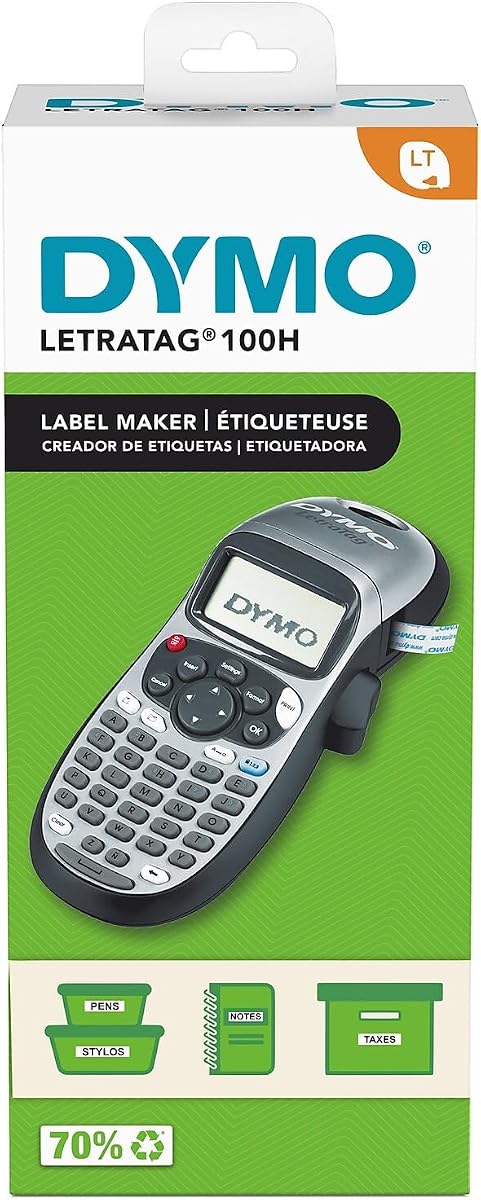
The DYMO LetraTag 100H Plus is a classic portable label maker known for simplicity and speed. It is ideal for quick office tasks or home organization where you need to label items on the go.
We may earn a commission when you buy through this link, at no additional cost to you.
A graphical display lets you preview text effects before printing, reducing errors. You can choose from five font sizes and eight box styles to match different needs. The auto-off function helps preserve battery life during sporadic use.
It lacks a full keyboard, which slows typing longer labels. It also only supports half-inch tape width, limiting text area. Despite these constraints, it remains a reliable tool for short labels and frequent small tasks.
For those who prioritize simplicity and portability over advanced features, this model works well. It is a great addition to office desks or workbenches for quick identification needs.
The graphical screen shows exactly how your label will look before you spend tape.
Auto-off technology ensures power is not wasted when the device is left idle.
We may earn a commission when you buy through this link, at no additional cost to you.
The DYMO LabelManager 160 provides a balanced mix of features for users who need more than basic labels. Its large display and keyboard make it comfortable for longer labeling sessions in home offices or workspaces.
We may earn a commission when you buy through this link, at no additional cost to you.
One-touch smart keys allow for quick text adjustments or style changes without navigating menus. The bundle includes three cassettes, ensuring you have enough tape for initial projects. Its professional print quality results in crisp, readable text every time.
The device is somewhat bulkier than ultra-compact models, which might limit pocket storage. Some users find the auto-off feature interrupts flow if typing is paused briefly. However, the usability advantages generally outweigh these minor inconveniences.
If you value a clear display and full keyboard for regular use, this model is a strong candidate. It is well-suited for organizing shelves, files, or lab equipment with detailed text.
The large display ensures that even complex text and symbols are easy to review.
Three included cassettes mean you can start labeling immediately without extra purchases.
We may earn a commission when you buy through this link, at no additional cost to you.
The SUPVAN E11 offers flexibility with both keyboard and Bluetooth options for label design. This dual approach serves users who prefer quick typing on-device or custom designs via smartphone apps.
We may earn a commission when you buy through this link, at no additional cost to you.
It prints labels with minimal margin, conserving tape while maintaining legibility. The rechargeable battery lasts up to a month on a single charge, reducing downtime. Support for seventeen languages makes it useful for multilingual environments.
App support varies by region, which might limit access to certain features. While efficient, the frame options are fewer compared to other models. These trade-offs do not significantly impact core performance for standard labeling tasks.
This device is excellent for organizations with diverse labeling needs or frequent users. It combines efficiency with connectivity to handle both simple and complex projects.
Minimal margin design uses less tape per label, lowering long-term operating costs.
Support for multiple languages ensures labels can be read by diverse teams.
We may earn a commission when you buy through this link, at no additional cost to you.
The SUPVAN E12 improves on its predecessor with a backlit display, making it usable in dim workshops or storage areas. It retains the dual input flexibility for both keyboard and Bluetooth app design.
We may earn a commission when you buy through this link, at no additional cost to you.
With a rechargeable battery and minimal margin printing, it balances efficiency and cost over time. The large font library and icon set allow for diverse label customization. It is ideal for varied environments from offices to garages.
The screen brightness may not be adjustable, which could be an issue in very bright sunlight. Some users may rely heavily on the app for advanced designs. However, the hardware reliability and usability are strong for regular use.
If you need a label maker for low-light conditions or varied settings, the E12 is a practical choice. It offers modern features in a compact, easy-to-handle form factor.
The backlit screen ensures you can read text clearly even in dark storage rooms.
Rechargeable battery and minimal waste printing reduce electronic and paper waste.
We may earn a commission when you buy through this link, at no additional cost to you.
The DYMO LetraTag 100H Silver is a sleek, lightweight option for quick identification tasks. It is designed for users who value simplicity and portability above advanced customization or durability.
We may earn a commission when you buy through this link, at no additional cost to you.
Thermal printing allows for fast label creation without messy ribbons or inks. The graphical display helps you preview changes before printing. Its small size fits easily into pockets or toolboxes for on-the-go use.
The included paper tape is not durable for wet or harsh environments. It also has fewer design options than other models. These limits are acceptable for light use but may frustrate those needing tough labels.
This label maker is best for office files, pantry items, or name tags where durability is not critical. If you want something light and easy to use, it is a solid choice.
Thermal printing technology delivers instant labels without waiting for ink or ribbon.
Its small profile makes it easy to carry anywhere without taking up much space.
We may earn a commission when you buy through this link, at no additional cost to you.
The Brother P-Touch PT-N20 is similar to the PT-N10 but features a larger display for easier text review. It is designed for personal spaces where creativity and color add value to organization.
We may earn a commission when you buy through this link, at no additional cost to you.
The sixteen-character screen makes it easier to see full labels before printing. Like the PT-N10, it supports colorful Btag tapes and saves favorite labels. The built-in cutter keeps edges clean without extra tools.
It is limited to Btag tapes and lacks advanced connectivity. For users wanting only basic, colorful labeling, this is fine. If you need wider tape options, other models may be better.
This model works well for dorm rooms, home workshops, or student desks. If you want a compact, creative tool that saves frequently used text, it fits the bill.
A larger screen makes it easier to edit and preview longer text labels.
Saving ten labels allows you to reprint favorite text without retyping.
We may earn a commission when you buy through this link, at no additional cost to you.
The Brother P-Touch PTH111 Pro is designed for professionals needing durable labels for electrical panels and equipment. Its specialized keys simplify common tagging tasks in industrial or workshop settings.
We may earn a commission when you buy through this link, at no additional cost to you.
It supports multiple tape widths and adhesive types, making it versatile for cables and machinery. A detachable wrist strap ensures secure handling in active environments. The graphical screen helps preview labels accurately.
It is more expensive than home models, and tapes are sold separately. For general home use, it may be overkill. But for serious labeling needs, it offers features that save time and improve reliability.
This device is best for electricians, warehouse staff, or technicians. If you need tough labels and quick specialized formats, the PTH111 Pro is a reliable workhorse.
One-touch keys like Cable Wrap simplify common electrical labeling tasks.
Support for multiple widths ensures labels fit different sized cables and panels.
We may earn a commission when you buy through this link, at no additional cost to you.
Choosing the right handheld label maker depends on your specific organizational needs, environment, and budget. This section outlines key factors to consider before making a purchase.
Different devices support different tape widths and materials. Some use specialized colorful tapes, while others accept standard black-on-white tapes. Consider whether you need waterproof laminated tape or simple paper labels.
Select a model that supports the tape type you need for your environment.
Some label makers offer only a physical keyboard, while others add Bluetooth app support. Physical keyboards are faster for quick labels, while apps allow complex designs. Decide which workflow suits your style.
Choose the input method that matches your labeling frequency and design needs.
Devices use batteries or rechargeable internal packs. Battery models can run longer between charges but may need frequent replacements. Rechargeable units reduce waste but limit use while charging.
Pick a power source that aligns with your usage frequency and mobility needs.
Build quality varies by model. Rugged devices with reinforced casing survive drops and dust, while sleek ones suit office environments. Check material quality and warranty terms for confidence.
Opt for robust builds if using the device in workshops or outdoor areas.
Advanced features include memory to save labels, built-in cutters, and various fonts. These tools speed up repetitive tasks and improve consistency. Basic models may lack these conveniences.
Look for design features that reduce manual effort for frequent labeling.
Larger displays make it easier to preview text and adjust styles. Clear screens reduce mistakes and frustration during long sessions. Smaller screens save space but may limit visibility.
Prioritize clear, readable displays for better labeling accuracy.
Consider the ongoing cost of tapes and accessories. Some brands sell proprietary tapes that cost more than generics. Bundles that include initial tapes can offer better initial value.
Factor in long-term tape costs when comparing device prices.
User-friendly interfaces with intuitive keys or menus reduce setup time. Some models offer one-touch shortcuts for common tasks. Complexity can lead to frustration for casual users.
Choose a model that is easy to operate for your skill level.
To begin using your label maker, insert the tape cassette according to the manual's instructions. Ensure the tape feeds smoothly through the guide slots to avoid jams. Power on the device and select your desired font or style from the menu.
Type your text using the provided keyboard or app interface. Preview your label on the display to catch any errors before printing. Use built-in cutters or scissors to trim labels to your preferred length after printing.
To maintain your device, store it in a cool, dry place away from direct sunlight. Clean the exterior with a soft cloth and keep the display free of dust. Regularly check battery levels or recharge to prevent unexpected power loss during use.
Most handheld label makers use disposable tapes that are cut and adhered permanently. Some specialized Btag tapes allow peel-and-stick repositioning. Check product specifications to confirm if reusable options are available for your model.
Handheld label makers print flat labels that can be applied to curved surfaces. Flexible tapes conform better to rounded objects like bottles or cables. Choose flexible tape materials for best results on uneven surfaces.
Most handheld label makers use thermal printing or ribbon-based systems without liquid ink. Thermal models require no consumables beyond the tape. This reduces maintenance and avoids messy cartridge replacements.
Battery life varies by model and usage, ranging from days to months on a single charge or set of batteries. Rechargeable models often last up to a month under moderate use. Check battery specs to ensure your device fits your workflow.
Many modern handheld label makers allow basic icons and symbols via built-in libraries. Complex logos usually require a computer connection or app. Check if the device supports app-based design for custom graphics.
Use a dry lint-free cloth or cotton swab to gently clean the print head. Avoid liquids or abrasive cleaners that could damage the surface. Clean regularly to maintain print quality and prevent smudging.
Most brands provide limited warranties covering defects for a specific period. Warranty terms vary by manufacturer and model. Check the product details or manufacturer's site for exact coverage duration and claims process.
Some advanced handheld label makers include barcode font options in their symbol sets. However, support depends on the device capabilities. Verify if barcode functionality is included before purchasing for inventory use.
The ten handheld label makers featured here offer a range of options from budget-friendly to premium professional. Each model brings unique strengths in portability, durability, and design flexibility to help you stay organized.
When selecting a device, prioritize features that match your most common labeling tasks. Consider whether you need waterproof tapes, app connectivity, or just a simple tool for quick names.
Always verify current availability and specifications before purchase as details may change. Use the links provided to explore current offers and ensure you choose the right tool for your organizational needs.
