
Newmen GM326 Wired
4.4Editor score
Affordable entry price
Hot-swappable switches
RGB backlight modes
Explore our expert review of the top 75 percent mechanical keyboards for 2026, comparing features, switches, and connectivity to find your perfect typing
Finding the right keyboard can transform your daily workflow or gaming session. A 75 percent mechanical keyboard offers a compact layout that retains essential keys while freeing up valuable desk space for better mouse movement and ergonomics.
We have evaluated ten top models based on build quality, switch performance, connectivity options, and customization features. Each selection provides a unique balance of portability, sound profile, and premium details like gasket mounting or RGB lighting.
This guide highlights standout models ranging from budget-friendly options to feature-rich wireless boards. Keep in mind that pricing and availability can change frequently, so checking the latest details ensures you get the best current value.
4.4Editor score

4.6Editor score

4.7Editor score
The following comparison outlines key specifications for each model to help you quickly identify the most suitable option for your specific setup and typing preferences.



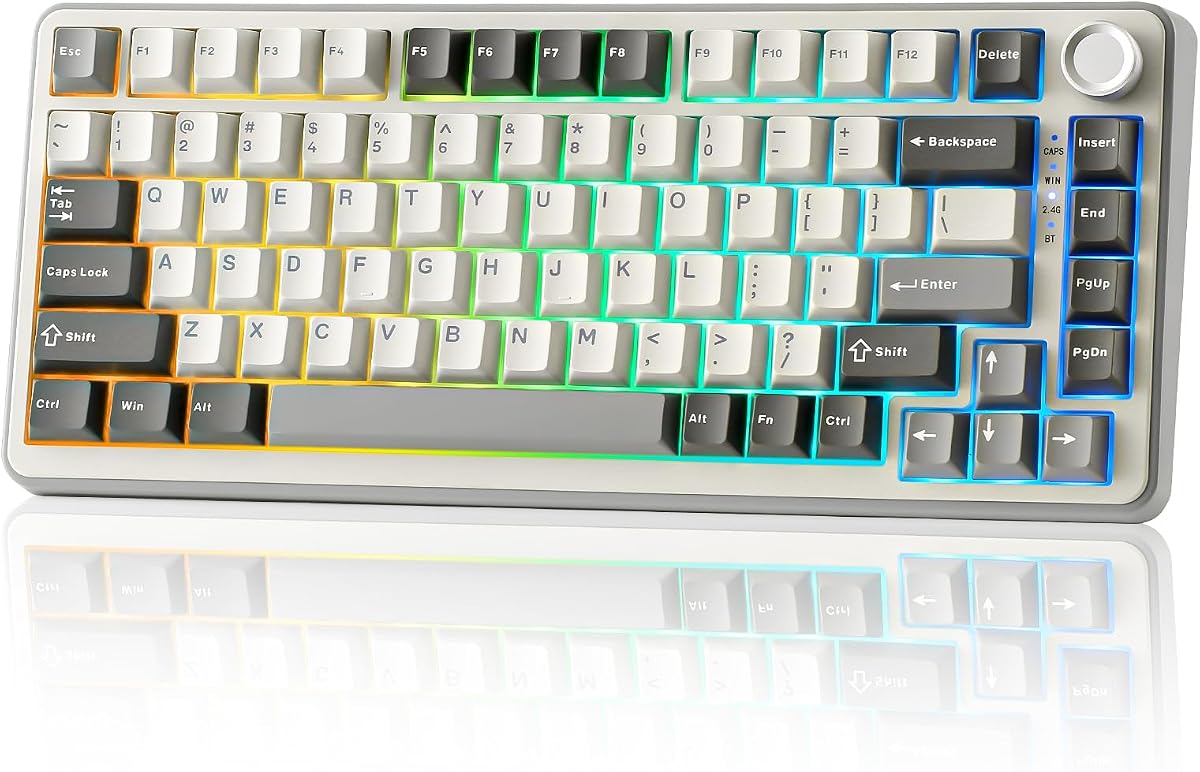
The AULA F75 Pro stands out as a versatile option for users seeking a premium typing experience without breaking the bank. With a strong rating and comprehensive feature set, this keyboard delivers a balanced mix of performance and aesthetics suitable for both work and play.
We may earn a commission when you buy through this link, at no additional cost to you.
Its tri-mode connection allows seamless switching between Bluetooth, 2.4GHz wireless, and wired USB modes. The pre-lubed Reaper switches offer a smooth, creamy feel that reduces friction and noise. Additionally, the five-layer filling and PCB slotting enhance stability and minimize hollow sounds during typing.
While the driver software offers deep customization, it is only available in wired mode on Windows systems. Users should also note that while side-engraved keycaps look unique, traditional prints might offer better long-term durability for heavy use.
This model is ideal for anyone wanting a modern, wireless 75 percent keyboard with high-quality switches and robust build. If you value a consistent sound profile and flexible connectivity, the F75 Pro is a top recommendation.
Connect up to five devices simultaneously and switch instantly using shortcuts or the side button for efficient multitasking.
The extended silicone pad and PCB slotting ensure the keyboard feels solid and responsive during intense typing or gaming sessions.
We may earn a commission when you buy through this link, at no additional cost to you.
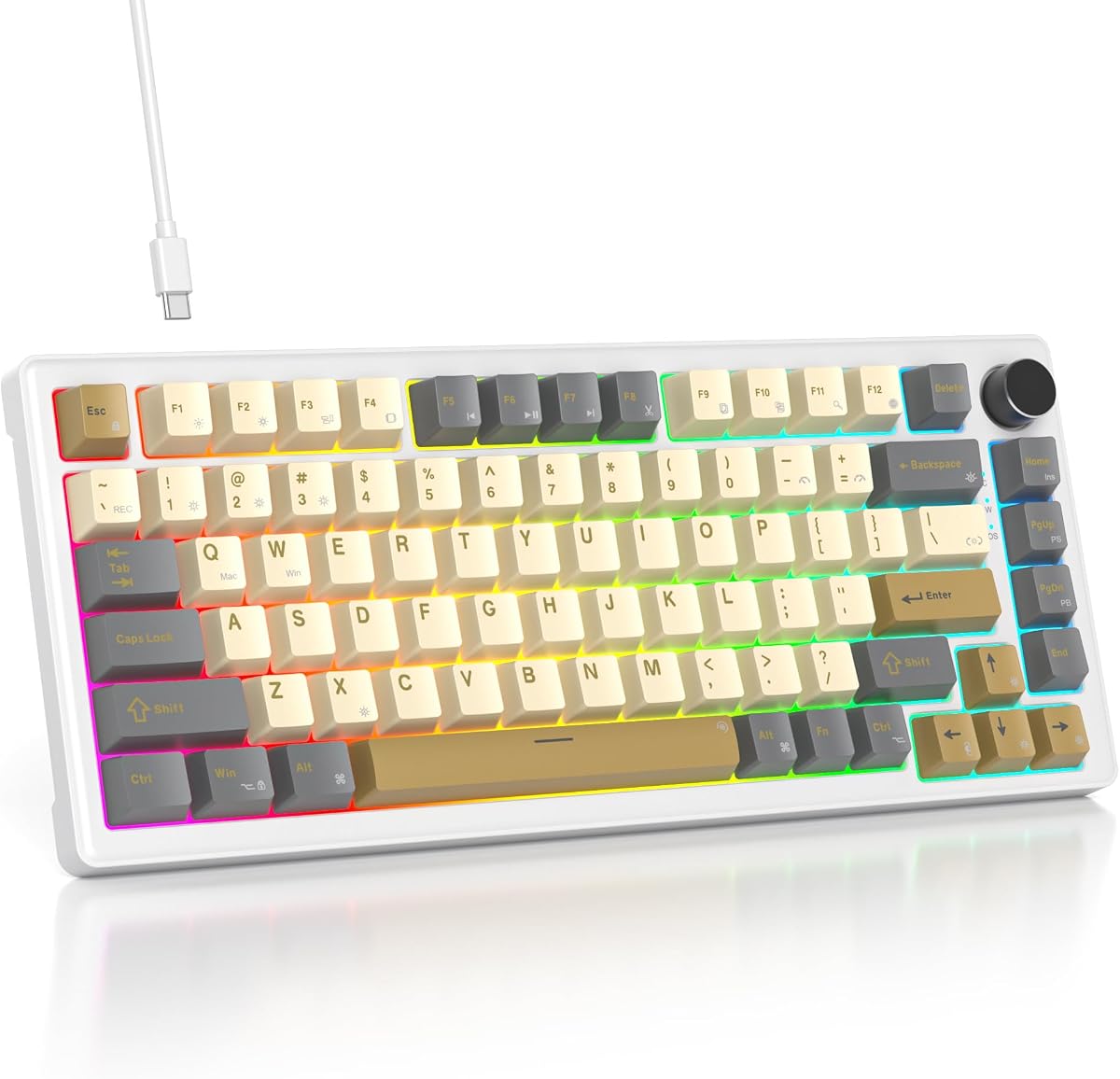
The Newmen GM326 offers an excellent entry point into the world of mechanical keyboards with its low cost and compact design. It retains all essential keys while saving desk space, making it a practical choice for small setups or budget-conscious users.
We may earn a commission when you buy through this link, at no additional cost to you.
Its hot-swap capability allows you to experiment with different switches without soldering. The linear red switches provide a smooth keystroke with minimal resistance, ideal for rapid typing or gaming. RGB backlighting adds a visual flair with multiple modes to choose from.
While ABS keycaps are common at this price, they may show shine over time compared to PBT alternatives. The lack of wireless connectivity limits portability but ensures a stable connection for competitive gaming.
Choose this keyboard if you want a reliable, customizable mechanical keyboard for a fraction of the cost. It is a solid foundation for those looking to build a custom setup later on.
Swap out switches effortlessly to tailor your typing feel without needing specialized tools or soldering skills.
Stepped keycaps and adjustable legs promote a natural typing posture for extended use sessions.
We may earn a commission when you buy through this link, at no additional cost to you.
The Womier SK80 distinguishes itself with a vibrant multimedia display that offers real-time feedback on system status and settings. This unique feature elevates the visual appeal while providing functional information at a glance for tech enthusiasts.
We may earn a commission when you buy through this link, at no additional cost to you.
Its gasket mount design ensures a soft, cushioned typing experience with reduced noise. The south-facing transparent light diffusers enhance the RGB brightness, creating an immersive lighting effect. The included Cherry profile keycaps add to the premium feel and comfort.
Full customization requires the driver software which must be accessed in wired mode on Windows. While this adds a minor inconvenience, the visual feedback and sound quality justify the effort for users seeking a standout desk setup.
This keyboard is perfect for those who prioritize aesthetics and unique features alongside performance. If you want a board that looks as good as it types, the SK80 is a compelling choice.
The integrated screen shows volume, connection mode, and custom GIFs, adding utility and style to your desk.
Flexible mounting reduces harshness and delivers a smoother sound profile during typing and gaming.
We may earn a commission when you buy through this link, at no additional cost to you.
The RK ROYAL KLUDGE R75 combines a premium gasket mount design with reliable wireless connectivity. It is designed for users who want a quieter, more satisfying typing experience without sacrificing performance or modern features.
We may earn a commission when you buy through this link, at no additional cost to you.
The cream switches are pre-lubed for smooth travel, and the PCB slotting minimizes noise. The CNC metal knob offers precise volume control and can even be replaced with extra switches for customization. The battery life is robust enough for extended usage.
While it supports only three devices, the connection remains stable across Bluetooth and 2.4GHz modes. Users should ensure they use the driver for advanced macro programming which is available on wired connections.
This is an excellent choice for anyone seeking a quiet, premium wireless board. The balance of sound, feel, and build quality makes it a strong contender in the market.
Pre-lubed switches and gasket mounting create a smooth, low-noise typing experience ideal for offices.
Metal knob and PBT keycaps ensure long-term resistance to wear and tear.
We may earn a commission when you buy through this link, at no additional cost to you.
The V500 Retro Gasket provides a high-quality gasket mount experience at an accessible price point. It focuses on delivering a solid, quiet typing feel with essential customization features for everyday productivity.
We may earn a commission when you buy through this link, at no additional cost to you.
Five layers of padding ensure stability and sound dampening. The white jade switches are smooth and silent, perfect for shared workspaces. You can program macros and utilize full-key rollover to handle complex tasks efficiently.
As a wired-only board, it lacks wireless flexibility but ensures consistent performance without battery concerns. The RGB lighting includes music rhythm modes for a fun visual touch during gaming.
Choose this model if you prioritize feel and sound quality over wireless options. It is a smart pick for those wanting a solid base without unnecessary extras.
Multi-layer padding creates a secure, cushioned typing platform that minimizes wobble and noise.
Full-key programmability allows tailored shortcuts for workflows or gaming strategies.
We may earn a commission when you buy through this link, at no additional cost to you.
The MageGee MK-STAR is a straightforward mechanical keyboard designed for users who want plug-and-play simplicity. It offers essential gaming features without complex setup requirements or software dependencies.
We may earn a commission when you buy through this link, at no additional cost to you.
Red switches provide a fast linear response suitable for gaming. The blue backlight adds a cool atmosphere with multiple static and dynamic modes. A metal plate ensures durability and stability during intense use.
While it lacks modern features like hot-swap or RGB, its reliability and low cost make it a practical choice for basic needs. It works seamlessly across major operating systems without extra drivers.
This is ideal for first-time mechanical keyboard users or those needing a spare board. It delivers essential functionality effectively while keeping costs minimal.
Anti-ghosting ensures accurate key registration even during complex command inputs.
No drivers needed; just connect via USB and start typing or gaming immediately.
We may earn a commission when you buy through this link, at no additional cost to you.
The 75% Gasket Carbon focuses heavily on delivering a quiet and pleasant typing experience. Its sound-absorbing pads and gasket construction minimize noise, making it ideal for shared environments or personal focus sessions.
We may earn a commission when you buy through this link, at no additional cost to you.
The hot-swap PCB allows easy switch changes. PBT keycaps ensure durability and texture retention. The RGB lighting can be customized using software to match your aesthetic preferences.
Users should note that full software features require wired connections and Windows systems. However, the core hardware provides a solid, quiet typing experience right out of the box.
This model is perfect for quiet office use or late-night gaming. If you prioritize sound quality and comfort, this is a strong candidate.
Sound-absorbing pads reduce hollow noise and create a softer, more solid typing sound.
Hot-swap sockets make it easy to upgrade or change switches without soldering.
We may earn a commission when you buy through this link, at no additional cost to you.
The AULA S75 PRO is a feature-packed wireless keyboard designed for power users who value customization. Its integrated LCD screen adds utility by displaying status info and allowing quick access to settings.
We may earn a commission when you buy through this link, at no additional cost to you.
With tri-mode connectivity, you can switch between devices effortlessly. The pre-lubed switches provide a smooth typing feel, and the side RGB lighting enhances visibility. The durable PBT keycaps maintain texture and resist sweat.
While advanced software is limited to wired Windows, the keyboard works standalone with shortcuts for basic control. The side engraving is stylish but may fade over time with heavy use.
Choose this model for a modern, interactive wireless experience. It is perfect for users who want a high-tech board that stands out visually and functionally.
Real-time info like battery and connection status keeps you updated without leaving your workspace.
Connect up to five devices and switch instantly to support a multi-device workflow.
We may earn a commission when you buy through this link, at no additional cost to you.
The Keychron K2 V2 is a proven choice for Mac users needing a compact mechanical keyboard. Its layout includes dedicated keys for macOS while remaining compatible with Windows systems seamlessly.
We may earn a commission when you buy through this link, at no additional cost to you.
Super Red switches deliver linear smoothness ideal for gaming or typing. The white LED backlight offers a clean aesthetic. The 4000mAh battery supports long usage periods without frequent charging.
It supports three Bluetooth devices, making it great for switching between a laptop, tablet, and phone. While it lacks hot-swap, the switches are reliable for everyday use.
This model is a top pick for Apple ecosystem users. Its layout and connectivity make it a reliable workhorse for office and light gaming tasks.
Includes extra keycaps and a layout designed specifically for macOS shortcuts.
Large battery capacity ensures weeks of use on a single charge with standard settings.
We may earn a commission when you buy through this link, at no additional cost to you.
The YUNZII B75 PRO represents a high-end option with premium materials and finish. Its Cocoa Cream V2 switches are tuned for smooth travel and a satisfying sound profile right out of the box.
We may earn a commission when you buy through this link, at no additional cost to you.
Five layers of padding and a gasket mount deliver a soft typing feel. The tri-mode connectivity supports up to three devices with a long-lasting battery. The RGB is south-facing for brighter visuals.
While slightly more expensive, the build quality justifies the cost. Software features require wired mode, but the hardware performance stands on its own for most daily tasks.
Select this if you want a premium feel and excellent sound. It is ideal for users who value build quality and typing experience above all else.
V2 switches offer improved lubrication and stability for a consistent typing feel.
High-capacity battery ensures extended wireless use for long workdays or gaming sessions.
We may earn a commission when you buy through this link, at no additional cost to you.
Selecting the right 75 percent mechanical keyboard involves weighing several key factors to ensure it meets your specific typing and workflow needs.
Decide between wireless and wired models based on your need for flexibility. Wireless boards offer clean desks and multi-device support but may introduce slight latency or battery concerns. Wired models ensure stable performance and zero latency but limit mobility.
If you switch between devices often, choose a tri-mode board with Bluetooth and 2.4GHz wireless. For competitive gaming, a wired connection often provides the most reliable signal.
Switches dictate the tactile and auditory experience of typing. Linear switches offer smooth travel ideal for gaming and fast typing. Tactile switches provide a bump for feedback, while clicky switches offer an audible snap.
Test switch samples before buying if possible. Pre-lubed linear switches are popular for a creamy feel, while tactile switches might help with accuracy for typists.
Gasket-mounted boards offer a softer feel and better sound dampening by using flexible mounts. Solid PCB mounts are more rigid and budget-friendly. Look for materials like aluminum or high-density plastic for durability.
A gasket mount reduces harshness and improves typing comfort. Prioritize boards with sound dampening foam to reduce noise during use.
PBT keycaps are more durable and resistant to shine than ABS caps. They also feel slightly textured. ABS caps are cheaper and may be better for RGB shine-through designs.
Choose PBT for longevity and comfort. Ensure keycaps are double-shot if you want legends that do not fade over time.
Some keyboards require software to unlock full RGB, macro, or lighting features. Others are plug-and-play with on-board memory for profiles. Check if the software supports your operating system.
If customization is a priority, choose a board with robust driver software. Note that some drivers only work in wired mode or on specific systems.
Wireless boards rely on built-in batteries. Look for capacities around 4000mAh or higher for week-long use. USB-C charging is standard now for convenience and speed.
A larger battery reduces charging frequency. Check if the device supports pass-through charging if you plan to use it wired while charging.
75 percent keyboards balance compactness and function by keeping arrow keys and a function row. This layout is ideal for users who need shortcuts without the bulk of a full-size board.
Ensure the layout matches your workflow. Some models include dedicated media keys or volume knobs which save space and improve usability.
Budget boards offer solid basics, while premium models add features like screens or hot-swap PCBs. Determine your must-have features versus nice-to-haves to find the best value.
Compare feature sets across similar price points. A higher price does not always mean better performance but often adds durability or unique functions.
Connect your keyboard to your device using the recommended cable or wireless pairing. If using Bluetooth, ensure the device is discoverable and follow the pairing instructions for stability.
Maintain cleanliness by using a can of compressed air to remove debris from the switches and keycaps regularly. For deeper cleaning, remove keycaps with a puller and wash them with mild soap and water.
Store the keyboard in a cool, dry place to prevent moisture damage. If wireless, charge the battery fully before long-term storage to maintain battery health and longevity.
A 75 percent keyboard saves significant desk space while retaining essential keys like arrows and a function row. This layout improves ergonomics by allowing you to move the keyboard closer to your body and providing more room for mouse movement.
Many models like the Keychron K2 offer dedicated Mac layouts. However, generic boards may require adjusting the key mapping. Always check product descriptions for OS compatibility before purchasing.
Modern wireless boards with 2.4GHz connectivity offer low latency suitable for gaming. Ensure the model supports a stable connection and high polling rates to avoid input lag during competitive play.
Tri-mode keyboards usually allow switching via shortcut keys or a physical side button. Refer to the manual for specific combinations. Some models save up to five devices and let you cycle through them instantly.
Yes, hot-swap boards allow you to change switches without soldering. You simply pull out the old switch and insert a new one. Ensure the PCB supports the pin type of the switches you intend to use.
PBT keycaps are more durable and resist oil and shine better than ABS. ABS keycaps are softer and often cheaper. For long-term use, PBT is generally preferred for texture retention and durability.
Basic models work without drivers. Advanced features like macros or complex RGB often require software. Check the product details to see if a driver is needed for full functionality.
Most quality mechanical switches last for 50 million keystrokes or more. Proper care and avoiding spills will extend their lifespan significantly over the years of daily use.
Our top picks include the AULA F75 Pro for all-around value, the Newmen GM326 for budget entry, and the Womier SK80 for premium features. Each model offers a distinct balance of performance, connectivity, and build quality.
When selecting your board, consider your primary use case. Gamers may prefer linear switches and anti-ghosting features while typists might prioritize sound dampening and comfortable keycaps. Connectivity needs should also guide your final decision.
Prices and stock can change rapidly so always verify the latest details on the product pages. We hope this guide helps you find the perfect 75 percent mechanical keyboard to enhance your daily computing experience.