
ASRock DeskMini X300 2.5G Series
4.2Editor score
Ultra-Compact 1.92L Size
AMD AM4 Socket Support
Triple Display Capability
This guide compares the top barebone PCs with AMD processors for gaming work and storage offering detailed specs reviews and buyer advice for informed choices.
Barebone PCs with AMD processors offer a flexible foundation for building custom mini desktops tailored to specific performance needs without the cost of pre-installed components.
We evaluated ten leading models based on processor architecture thermal design connectivity options and expandability to help you find the ideal barebone unit for your setup.
Each selection highlights key strengths and trade-offs so you can make an informed decision while keeping in mind that component availability and pricing may fluctuate over time.
4.2Editor score

4.0Editor score

3.1Editor score
The following comparison table provides a side-by-side overview of key specifications and features across all ten selected barebone AMD mini PCs.





The AOOSTAR MACO stands out as a high-performance barebone mini PC designed for users seeking serious compute power in a compact form. It features the Ryzen 7 PRO 8845HS processor paired with Radeon 780M graphics which deliver solid performance for demanding tasks.
We may earn a commission when you buy through this link, at no additional cost to you.
Its standout feature is the OCuLink port which allows for external GPU connections with minimal latency making it a viable option for gaming and professional graphics work. The inclusion of dual USB4 ports further enhances connectivity by supporting multiple high-resolution displays and fast data transfer.
While the lack of pre-installed components requires additional investment, the flexibility to choose your own RAM and storage ensures the system is tailored to your needs. The cooling design using vapor chamber technology keeps thermal levels manageable even under heavy workloads.
This model is ideal for enthusiasts and professionals who need a powerful and versatile desktop without sacrificing space. It balances performance and expandability better than many competitors in the current market.
The 8-core 16-thread architecture delivers smooth multitasking and handles demanding applications efficiently.
Dual USB4 and OCuLink ports provide future-proofing for high-speed peripherals and external graphics.
We may earn a commission when you buy through this link, at no additional cost to you.
The AOOSTAR GEM12+ offers impressive performance potential with its Ryzen 7 PRO 8845HS and Radeon 780M graphics making it a strong candidate for gaming and content creation in a compact case.
We may earn a commission when you buy through this link, at no additional cost to you.
Users benefit from extensive display capabilities with support for four 4K screens simultaneously which is perfect for multitasking setups. The OCuLink port allows connection to external GPUs without compromising on internal storage slots.
Thermal management is handled by a dual cooling system that includes a vapor chamber ensuring stable operation during prolonged use. However buyers should note the need to purchase RAM and storage separately which adds to total setup time.
This system is highly recommended for those seeking a balance between raw power and flexibility. It is particularly well-suited for home office or gaming environments needing multiple monitor support.
With support for four 4K displays this mini PC enhances workflow for designers and traders.
Vapor chamber cooling ensures consistent performance even under extended gaming sessions.
We may earn a commission when you buy through this link, at no additional cost to you.
Adding security features to a high-performance barebone the GEM12+ PRO is designed for users who value quick and safe access to their desktop.
We may earn a commission when you buy through this link, at no additional cost to you.
Its Ryzen 7 PRO 8845HS ensures that gaming and editing tasks run smoothly while fingerprint unlock simplifies login processes. The OCuLink port remains a critical feature for expanding graphics capabilities without internal slot restrictions.
Despite requiring manual installation of memory and storage the system's customizable display interface and robust cooling offer excellent user experience. It stands out in its class by integrating biometric security without sacrificing performance.
Ideal for home office setups where security and speed are priorities this model delivers reliability. It is a solid choice for anyone wanting a secure compact workstation with future expandability.
Fingerprint recognition provides fast secure access without compromising system performance or design.
Full control over component choices allows precise tuning for specific performance needs.
We may earn a commission when you buy through this link, at no additional cost to you.
ASRock DeskMeet X300 differs from most mini PCs by offering a desktop-like expandability in a compact chassis. It supports a wide range of AMD Ryzen AM4 processors making it versatile for different performance tiers.
We may earn a commission when you buy through this link, at no additional cost to you.
The inclusion of a PCIe 3.0 x16 slot and 500W power supply means users can install dedicated GPUs and other expansion cards without external docks. This makes it uniquely capable for users needing internal expansion in a small case.
While it requires a separately purchased CPU its high-quality motherboard design and compatibility with DDR4 memory make it a reliable long-term solution. It appeals to builders who want desktop flexibility in a mini footprint.
This kit is perfect for users needing internal expansion for GPUs or additional hardware without relying on external connections. It offers a robust foundation for a customized powerful compact desktop system.
PCIe x16 slot and included PSU allow internal upgrades typically not possible in mini PCs.
Support for Ryzen 5000 and 4000 series CPUs offers great upgrade paths.
We may earn a commission when you buy through this link, at no additional cost to you.
The MINISFORUM X1 Lite brings robust performance with its Ryzen 7 255 and Radeon 780M graphics making it a good candidate for portable gaming or workstation use.
We may earn a commission when you buy through this link, at no additional cost to you.
It features triple display outputs enabling users to connect multiple 4K screens easily for productivity. OCuLink support provides a path to external GPU upgrades though an adapter plate is required.
Efficient heat dissipation through large vents and PCM materials keeps the device cool under load. Users looking for a lightweight barebone with decent expandability will find it appealing.
While some feedback indicates variability in experience it remains a strong contender for compact setups needing multiple displays and GPU upgrade potential.
Multiple high-resolution outputs support enhanced multitasking and workflow efficiency.
Compact design paired with powerful APU makes it suitable for mobile workstations.
We may earn a commission when you buy through this link, at no additional cost to you.
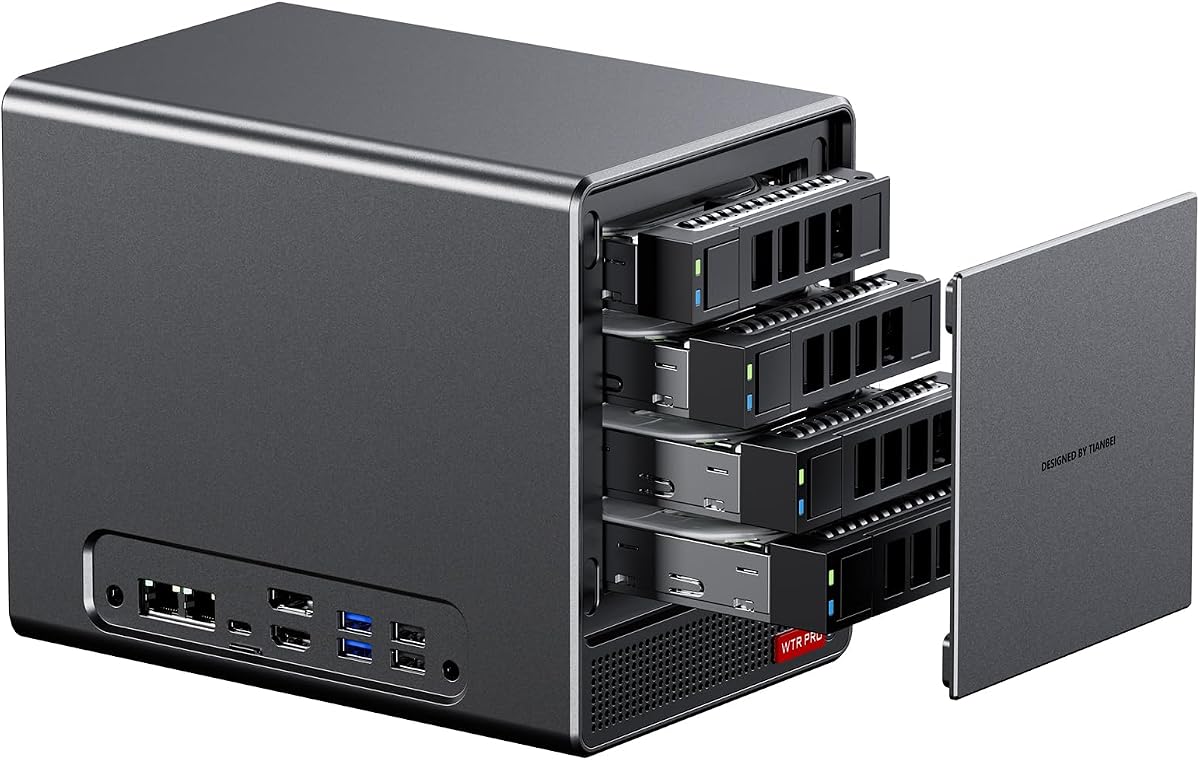
Designed specifically for storage tasks the AOOSTAR WTR PRO offers four 3.5 drive bays combined with two M.2 NVMe slots for massive expandability.
We may earn a commission when you buy through this link, at no additional cost to you.
Powered by a Ryzen 7 5825U it balances processing power with energy efficiency suitable for 24/7 server operation. The low power design ensures minimal electricity costs even when running continuously.
Its ability to support up to 96TB of storage makes it ideal for home labs or media servers needing significant capacity. The quiet cooling system keeps noise down during long hours.
This unit is highly recommended for NAS enthusiasts looking for a reliable barebone solution with ample storage bays and low running costs.
Supports up to 96TB with SATA and M.2 drives for extensive data storage.
Power-saving architecture minimizes electricity use for 24/7 server deployments.
We may earn a commission when you buy through this link, at no additional cost to you.
Offering excellent value the ASRock DeskMini X300 brings AM4 flexibility in a remarkably small 1.92L chassis making it ideal for budget builds.
We may earn a commission when you buy through this link, at no additional cost to you.
It supports a wide range of Ryzen processors from 2000 to 5000 series allowing buyers to choose performance tiers. Triple display support enhances its utility for office or light creative work.
With 2.5G LAN and DDR4 memory compatibility it covers essential connectivity needs without extra cost. Its compact footprint fits easily into tight spaces while offering reliable performance.
Best for users prioritizing affordability and size this model is a practical choice for basic to mid-level computing tasks.
Affordable pricing and flexible CPU options make it accessible for many budgets.
Compact 1.92L case fits easily on desks or shelves without clutter.
We may earn a commission when you buy through this link, at no additional cost to you.
ASUS ExpertCenter PN54 introduces advanced AI capabilities with its Ryzen AI 300 Series and XDNA2 NPU accelerating machine learning workloads significantly.
We may earn a commission when you buy through this link, at no additional cost to you.
Wi-Fi 7 ensures ultra-fast wireless performance suitable for high-bandwidth applications. Its ultra-thin 0.6L chassis is engineered for 24/7 operation with a toolless design for easy upgrades.
While more expensive than other barebones it targets professionals needing premium performance and connectivity. The inclusion of a three-year warranty adds value for enterprise or critical use.
Ideal for users needing next-level AI processing and connectivity this model offers future-proofing in a sleek compact form.
XDNA2 NPU enables faster AI tasks boosting productivity in modern workflows.
Wi-Fi 7 ensures ultra-fast wireless speeds ready for next-gen networks.
We may earn a commission when you buy through this link, at no additional cost to you.
Building on the previous model this WTR PRO adds two extra bays totaling six storage options ideal for large home labs and enterprise backups.
We may earn a commission when you buy through this link, at no additional cost to you.
Its dual 2.5G LAN ports support redundancy or load balancing essential for network reliability. Triple display output allows for detailed server monitoring setups.
The processor ensures efficient virtualization and multitasking while running 24/7 smoothly. Buyers should expect to handle Linux or Windows setup manually but gain flexibility.
For serious storage and server needs this barebone NAS offers robust scalability and performance with enterprise-level features in mini PC.
Six bays provide massive storage potential for diverse data needs.
Dual LAN ports support redundancy and faster data transfer.
We may earn a commission when you buy through this link, at no additional cost to you.
The PN54-S1 combines ultra-slim design with strong connectivity offering a 34mm chassis that fits anywhere without sacrificing Wi-Fi 7.
We may earn a commission when you buy through this link, at no additional cost to you.
Tool-free design simplifies component upgrades making maintenance straightforward. Its eco-conscious build ensures reliable 24/7 operation while minimizing environmental impact.
Ideal for business or office use where space is limited it provides solid performance for standard tasks. The long warranty adds confidence for professional deployments.
This model is recommended for users seeking a minimalist yet reliable barebone solution with modern wireless features.
Sleek 34mm chassis blends seamlessly into any workspace.
Tool-free upgrades save time and simplify future modifications.
We may earn a commission when you buy through this link, at no additional cost to you.
Selecting the right AMD barebone PC depends on your specific needs from gaming to server tasks and understanding key factors will streamline your decision.
Look for the latest Zen 4 or Zen 3 architectures which provide efficient multitasking and high clock speeds for demanding workloads.
Higher core counts and faster boost clocks improve performance in gaming and creative tasks while lowering power consumption.
Integrated Radeon graphics are sufficient for daily tasks but consider OCuLink support for external GPU expansion if gaming is a priority.
Check for display outputs supporting 4K or higher resolutions to match your monitor requirements.
USB4 and Thunderbolt ports enable fast data transfer and multi-monitor setups essential for productivity workflows.
Gigabit or 2.5G LAN ports ensure stable network performance for streaming or server operations.
Ensure support for sufficient RAM slots and speeds like DDR5 for future-proofing and smooth multitasking.
Multiple M.2 and SATA slots provide flexibility for expanding storage capacity according to your data needs.
Vapor chamber or advanced fan systems prevent overheating during sustained workloads improving longevity and performance.
Well-designed cooling keeps noise levels low which is crucial for home office environments.
Lower TDP ratings reduce electricity costs and heat output ideal for always-on applications like NAS or servers.
Look for 80 Plus certified power supplies to ensure reliable and efficient power delivery.
Consider the physical dimensions to ensure the unit fits your available desk or server space comfortably.
Toolless and durable chassis designs simplify maintenance and improve build quality for long-term use.
A longer warranty period provides peace of mind and protection against hardware defects for critical applications.
Responsive customer support ensures quick resolution of issues which minimizes downtime and frustration.
Begin by installing compatible DDR4 or DDR5 RAM and an M.2 or SATA SSD following the manufacturer guidelines for proper seating and alignment.
Install your preferred operating system via USB boot drive and configure BIOS settings such as fan curves and power management for optimal efficiency.
Keep the chassis ventilated by avoiding enclosed spaces and periodically clean dust from vents to maintain airflow and prevent overheating over time.
A barebone PC includes the case motherboard and power supply without RAM storage or CPU allowing flexible customization. AMD processors are popular for their cost effective multi-core performance and integrated graphics.
Some models feature OCuLink or USB4 ports which allow connection to external GPU docks for enhanced graphics performance useful for gaming or rendering tasks.
No, most barebone kits do not include an OS. You will need to purchase and install Windows or Linux separately using a USB drive or network install.
DDR5 5600MHz or DDR4 3200MHz RAM is recommended for best performance with Ryzen processors ensuring efficient memory bandwidth and multitasking capability.
Storage capacity varies by model with some supporting up to multiple terabytes via M.2 and SATA drives allowing extensive local data storage for media or backups.
While integrated graphics handle casual gaming well serious gamers may prefer models with OCuLink for external GPU support or dedicated GPU slots for higher frame rates.
Yes several models feature multiple drive bays and low power consumption making them excellent for NAS or server use with continuous operation and data redundancy.
Warranty periods range from one to three years depending on the manufacturer and model. Check product listings for specific coverage and support terms before purchase.
This guide highlights ten top-performing AMD barebone PCs offering flexibility power and compact design suitable for diverse user needs from gaming to enterprise use.
When selecting prioritize factors like processor generation connectivity options and cooling performance to ensure the unit meets your long-term requirements effectively.
Keep in mind that component availability and pricing may change so verify current specs and reviews before making your final purchase decision.