
Biometric Time Clock + Online Reports
4.1Editor score
Multiple biometric options
Cloud-based reporting
GPS geo-fencing
This guide compares the top biometric fingerprint scanner time clock models for small businesses, evaluating security features, reporting capabilities, and
Modern businesses need accurate time tracking to prevent errors and reduce costs. A biometric fingerprint scanner time clock offers a secure way to manage employee attendance without relying on paper cards or manual entry.
We analyzed ten leading models based on security features, ease of use, and reporting tools. Our comparison covers standalone devices, cloud-connected systems, and hybrid options suitable for various workplace environments.
Each pick highlights specific strengths like fingerprint speed, app control, or offline storage. Keep in mind that product availability and pricing can change frequently, so verify details before purchasing.
4.1Editor score

4.7Editor score

4.3Editor score
The following table provides a side-by-side overview of all ten models we reviewed. It highlights key specifications such as user capacity, connectivity options, and unique features to help you narrow down your choices.

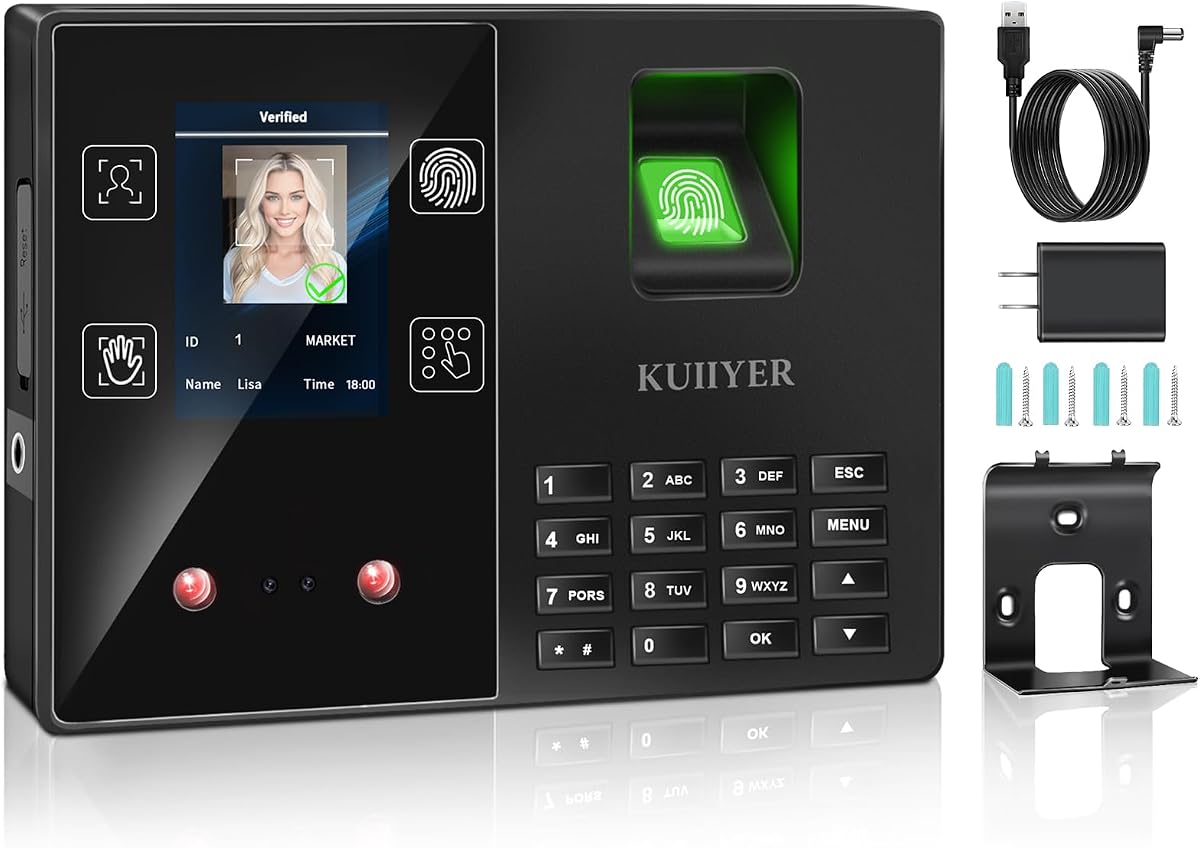


This system stands out as a comprehensive solution for businesses that prioritize maximum security and flexibility. It supports face, palm, fingerprint, badge, and PIN options, ensuring you can choose the best method for your team. The cloud-based reporting keeps management informed from anywhere, reducing administrative burden significantly.
We may earn a commission when you buy through this link, at no additional cost to you.
Key strengths include its ability to prevent buddy punching through diverse biometric scans. The mobile app adds convenience with geo-fencing and GPS coordinates, which is ideal for remote workers or field crews. Automated alerts for early or late punches help managers stay on top of attendance without constant monitoring.
While the subscription model adds a recurring cost, the peace of mind and automation it provides often outweigh the expense for growing teams. The lack of required software installation simplifies initial setup, though relying on cloud connectivity means internet stability is essential for full functionality.
Businesses seeking a robust, scalable attendance system should consider this model. It is particularly well-suited for companies that need detailed job tracking and the ability to monitor workforce location and attendance remotely.
Supporting multiple biometric and ID options ensures you can accommodate different employee preferences and security needs within a single system.
Real-time reporting and automated alerts streamline payroll processing and reduce the manual effort typically associated with tracking employee hours.
We may earn a commission when you buy through this link, at no additional cost to you.
The NGTeco Standalone Time Clock is an excellent choice for businesses that want simplicity and affordability without sacrificing essential features. It operates independently without needing WiFi or complex software, allowing you to start tracking attendance immediately after unboxing. Data is easily exported via USB, making integration with existing payroll systems straightforward.
We may earn a commission when you buy through this link, at no additional cost to you.
Its built-to-scale capacity supports up to 500 user profiles and 50,000 punch records, which is sufficient for many small to medium-sized businesses. The internal backup system ensures data remains secure even during unexpected power outages, providing reliability in various working environments. The industrial-grade materials also contribute to its longevity in high-traffic areas.
However, the lack of internet connectivity means you cannot access real-time data remotely. This device is strictly local, so management must physically retrieve data to update records. Additionally, there is no mobile app, which limits flexibility for managers who need to check attendance on the go.
This device is ideal for small businesses or retail counters that prefer a paperless, standalone solution. If you do not require remote access or cloud syncing, this model offers a reliable and cost-effective way to automate your time tracking.
By eliminating the need for WiFi or software installation, this clock simplifies setup and reduces technical overhead for small teams.
Cutting the costs associated with paper cards and ribbons while maintaining precise records helps improve your bottom line quickly.
We may earn a commission when you buy through this link, at no additional cost to you.
This model earns our top recommendation due to its balance of speed, ease of use, and reliable support. The fingerprint sensor is notably fast, authenticating users in about half a second, which minimizes wait times during shift changes. The accompanying mobile app allows for easy editing of punches and real-time syncing across the system.
We may earn a commission when you buy through this link, at no additional cost to you.
Key strengths include its ability to handle auto-calculated work hours and flexible payroll sync options. Managers can align tracked hours with various payroll cycles effortlessly. The US-based support and one-year warranty provide additional confidence for buyers who prioritize customer service and reliability.
While the app requires the same local network for editing, this is a minor limitation compared to full cloud dependency. The device focuses on core functionality without extra complexities, making it very user-friendly for teams that may not be tech-savvy. The design is versatile enough for various workplace settings.
We recommend this device for businesses that want a mix of modern convenience and straightforward operation. It suits companies that value quick access, responsive support, and a system that just works without demanding constant maintenance.
The 0.5-second scan speed ensures smooth traffic flow during busy clock-in periods, reducing employee frustration and delays.
Access to US-based technical support and a solid warranty helps resolve issues quickly, keeping your operations running smoothly.
We may earn a commission when you buy through this link, at no additional cost to you.
The uAttend JR2000 is designed for businesses that want a complete cloud-based solution to streamline their attendance and payroll workflows. It offers real-time data access from any device, allowing managers to track attendance trends and productivity remotely. The system is built to handle various reporting needs with in-depth analytics tools.
We may earn a commission when you buy through this link, at no additional cost to you.
Key strengths include its automated payroll capabilities and easy setup process. You can handle tax filings and time data in one place, reducing the chance of manual errors. The automatic cloud backup feature ensures your data is safe and retrievable at all times, which is crucial for business continuity.
However, the system relies on a subscription service for its premium features, which adds a recurring cost. The rating suggests some users may find certain features less intuitive or reliable compared to competitors. It is important to evaluate the long-term costs against the benefits of automation before committing.
This system is best suited for businesses that prioritize centralized management and seamless payroll integration. If you prefer a cloud-first approach and need robust reporting tools, this model offers a comprehensive suite of features to support your operations.
Access your data from anywhere to manage attendance and generate reports without being tied to a physical location.
Automated payroll tasks and tax filing support reduce administrative workload and help ensure accurate employee compensation.
We may earn a commission when you buy through this link, at no additional cost to you.
This model offers unique flexibility by supporting face, fingerprint, palm, and PIN options in a single device. It is built to handle up to 1,000 users, making it suitable for larger small businesses or those planning to grow. The TFT color LCD and intelligent voice announcement make it user-friendly for employees of various backgrounds.
We may earn a commission when you buy through this link, at no additional cost to you.
Key strengths include its offline nature and lack of monthly fees. You do not need to rely on a network or pay subscriptions to use the core features. The power loss protection ensures your attendance records are safe even if the electricity goes out, adding a layer of reliability.
However, the absence of network connectivity means data must be managed locally via USB. The device requires a specific USB format, which might be confusing for some users. The lower rating suggests there may be minor issues with software updates or customer responsiveness.
This device is ideal for organizations that need a high-capacity, offline solution without recurring costs. It works well in environments where network security is a concern or where simple, robust functionality is preferred over cloud features.
With four different ways to clock in, you can accommodate different preferences and ensure everyone can access the system quickly.
Operating without a network means you retain full control over your data and avoid dependence on internet stability.
We may earn a commission when you buy through this link, at no additional cost to you.
This USB device is designed for users who already have attendance software and need a dedicated fingerprint scanner. It offers fast and accurate recognition to verify user identity efficiently. The compact and lightweight design makes it easy to place on any office desktop without taking up much space.
We may earn a commission when you buy through this link, at no additional cost to you.
Key strengths include its compatibility with various attendance and access control software. This versatility allows it to integrate into existing workflows without needing a dedicated standalone unit. It supports multiple user enrollments and provides stable performance for daily verification tasks.
However, this device is not a standalone time clock. It requires a computer to function and depends entirely on the software installed on that machine. This limits its usability for businesses that prefer an independent system or do not have a dedicated PC for time tracking.
This scanner is best for companies that use specific software solutions and need a reliable hardware interface. If you need to control access to a computer or log time within an existing system, this device provides a secure and efficient way to do so.
The easy plug-and-play connection allows quick setup with most systems, making integration into existing workflows smooth and hassle-free.
Fast and accurate biometric verification helps prevent unauthorized access and ensures that only authorized personnel can use the system.
We may earn a commission when you buy through this link, at no additional cost to you.
The H3 model is an ideal choice for businesses that want a simple, offline time clock without hidden costs. It operates without WiFi, keeping data local and secure on the device. The system automatically calculates working hours, eliminating the need for manual calculations and reducing potential payroll errors.
We may earn a commission when you buy through this link, at no additional cost to you.
Key strengths include its comprehensive language support and the inclusion of RFID cards for alternative clock-in methods. This makes it accessible for diverse teams and adds flexibility for those who may not have fingerprints scanned. The step-by-step tutorial ensures you can get up and running quickly.
However, the lack of internet connection means you cannot manage data remotely. You must physically access the device or use a USB drive to export records. This might be inconvenient for managers who travel or prefer cloud-based oversight.
This device is perfect for small businesses that prioritize privacy and ease of use. If you want a reliable system that does not require subscriptions or network setup, this model offers a straightforward and cost-effective solution.
With no ongoing costs, this system provides a simple one-time purchase that fits well within tight operational budgets.
Keeping data local without internet access protects your workforce records from external cyber threats and unauthorized cloud access.
We may earn a commission when you buy through this link, at no additional cost to you.
This device stands out for offering free cloud services for core features like auto time calculation and basic reports. It supports multiple login modes and connects via WiFi or LAN, giving you flexibility in how you manage your workforce data. The AWS-powered storage ensures high security and compliance with global standards.
We may earn a commission when you buy through this link, at no additional cost to you.
Key strengths include customizable shift configurations and offline functionality that syncs automatically when the network is restored. This ensures no data loss even during connectivity issues. The ability to configure dual OT pay grades makes it adaptable for complex compensation policies.
However, while core features are free, advanced features require a subscription. The interface might feel more complex than standalone units for users seeking simplicity. Users should carefully review which features are available under the free plan to ensure it meets their needs.
This time clock is suitable for businesses that want cloud benefits without mandatory subscription fees. If you need remote access and secure data storage but want to avoid recurring costs for basic reporting, this model offers a balanced approach.
Access essential management tools and reports without paying a monthly fee, helping you save on operational costs.
Bank-grade encryption and secure cloud storage keep your employee data safe and compliant with industry regulations.
We may earn a commission when you buy through this link, at no additional cost to you.
This model focuses on core functionality without extra frills. It operates entirely offline, ensuring privacy and security by not requiring internet access. The system automatically totals hours, reducing the burden of manual calculations and eliminating paper-based methods.
We may earn a commission when you buy through this link, at no additional cost to you.
Key strengths include its simplicity and ease of use. You can get started with minimal setup and manage your data with a USB drive. The multi-language support ensures that it can be used effectively by diverse teams in various settings.
However, the basic feature set means you lack remote management capabilities or detailed analytics. It is strictly a local tracking tool. If your business needs to access data from multiple locations or integrate with external apps, this model might be too limited.
This device is best for businesses that need a reliable and straightforward way to track hours. If you prefer a no-fuss, one-time purchase solution that keeps data local, this is a solid and affordable choice.
By keeping data offline, you maintain full control over your employee information and avoid potential privacy risks.
The system handles calculations automatically, saving time and reducing errors associated with manual payroll preparation.
We may earn a commission when you buy through this link, at no additional cost to you.
This model combines reliable connectivity with advanced management tools. The dual-band WiFi support ensures stable connections in busy environments where interference might be common. Managers can access real-time reports and monitor attendance through a user-friendly app from anywhere.
We may earn a commission when you buy through this link, at no additional cost to you.
Key strengths include the 2000mAh battery backup that keeps the device running during power outages. This ensures continuous tracking without data loss. The flexible overtime rule configuration allows for precise payroll calculations that match your specific company policies.
However, like other cloud models, advanced features require a subscription. It also depends on internet connectivity to function fully. If your location has unreliable internet, you might face limitations unless you have a robust network backup.
This device is ideal for businesses that need modern connectivity and detailed reporting. If you want a balance of cloud convenience and reliable hardware performance, this model provides a strong platform for managing your team.
Dual-band WiFi support minimizes connection issues, ensuring that your attendance data is captured and synced consistently.
The built-in battery backup protects your data during outages, ensuring you do not lose critical attendance records.
We may earn a commission when you buy through this link, at no additional cost to you.
Selecting the right time clock requires understanding your business needs and technical preferences. This guide breaks down the critical factors to consider.
Decide whether you need a standalone device or a cloud-connected one. Standalone devices keep data local and require no internet, which is great for privacy. Cloud devices allow remote access and real-time reporting but depend on stable internet.
Choose cloud for remote management and standalone for simplicity and offline security.
Check how many employees the device can support. Some devices handle 500 users, while others support 1,000 or more. This ensures the system will grow with your team without needing a replacement soon.
Select a capacity that exceeds your current employee count to allow for future growth.
Look at the types of biometric scans available. Options include fingerprint, face, palm, or a combination. Multiple types provide flexibility for employees with different needs or environmental challenges like wet hands.
Choose models with multiple modes if you want maximum flexibility and reduced frustration.
Consider how you export and view attendance data. Some devices offer direct CSV exports or integration with payroll software. Advanced systems provide real-time alerts and detailed analytics for better workforce insights.
Prioritize devices that support easy data export and align with your payroll system.
Evaluate if the device has monthly fees or is a one-time purchase. Many standalone models have no ongoing costs, while cloud models may require subscriptions for premium features. This impacts your long-term budget.
Calculate the total cost of ownership including any subscriptions before buying.
Check if the device has a battery backup for power outages. This ensures that attendance records are saved even if the electricity fails. It is a critical feature for reliability in unstable environments.
Select devices with internal backup systems to prevent data loss during emergencies.
Look for strong after-sales support. A good warranty and responsive customer service can save you time and frustration if issues arise. Some brands offer US-based support which can be easier to reach.
Choose brands with positive reviews and clear support policies.
The device should be intuitive for both managers and employees. Features like voice announcements or easy app interfaces can reduce training time. Ensure the interface supports languages used by your staff.
Test user interfaces if possible to ensure smooth adoption.
Begin by setting up the device according to the manual. For standalone models, this usually involves powering it on and registering users via fingerprint or ID. For cloud models, connect to WiFi and create your admin account before adding employees.
Regularly update user data and maintain device cleanliness. Clean the fingerprint sensor with a soft, dry cloth to ensure accurate scans. Avoid exposing the device to extreme temperatures or moisture to prolong its lifespan.
Perform regular data exports to back up your attendance records. For standalone devices, use the USB drive to export reports. For cloud devices, ensure your internet connection is stable to sync data. Periodic maintenance ensures reliability and data integrity.
Most standalone time clocks allow you to export data via USB. You simply insert a USB drive into the device, select the export option, and then plug the drive into your computer. From there, you can save the CSV or Excel file to your payroll system. Some devices also support email exports if connected to a local network.
Yes, biometric data is generally secure because it is stored locally on the device or encrypted in the cloud. Standalone devices keep data offline, reducing external threats. Cloud devices use industry-standard encryption to protect your information. Always ensure your device has strong passwords to prevent unauthorized access.
Many devices offer multiple biometric options like face or palm recognition. If those fail, you can use PIN codes or RFID cards as a backup. This ensures that employees with unique physical challenges can still clock in without delays.
Standalone devices work perfectly without internet. However, cloud-based models require an internet connection to function. If you have connectivity issues, look for models that support offline data storage and automatic sync once the connection is restored.
Standalone devices cannot track remote employees directly. However, cloud models with mobile apps may offer GPS check-in features. This allows remote workers to clock in from their location. Check specific device specs for geo-fencing capabilities before buying.
Most standalone devices have backup batteries that last for hours or days during outages. Check the specific model specs for battery life. For devices without backup batteries, consider external power supplies to ensure continuous operation.
Standalone devices do not require extra software. They work independently. Cloud devices may have optional management software. Always check the product description to confirm if additional software is needed for full functionality.
Most modern devices support multiple languages. You can change the language settings via the device menu. This makes it easier for teams speaking different languages to use the system.
We have reviewed ten top models ranging from simple standalone units to advanced cloud systems. Each offers unique strengths depending on whether you prioritize cost, security, or remote access. The right choice depends on your business size and operational needs.
When choosing, focus on connectivity and data management features. If you value simplicity and privacy, standalone devices are excellent. For remote management and automation, cloud models provide better tools. Consider your budget and any subscription requirements.
Prices and availability change frequently so always check current listings before purchasing. Verify that the model you choose fits your specific environment and technical setup. With the right device, you can streamline payroll and secure your workforce data effectively.