
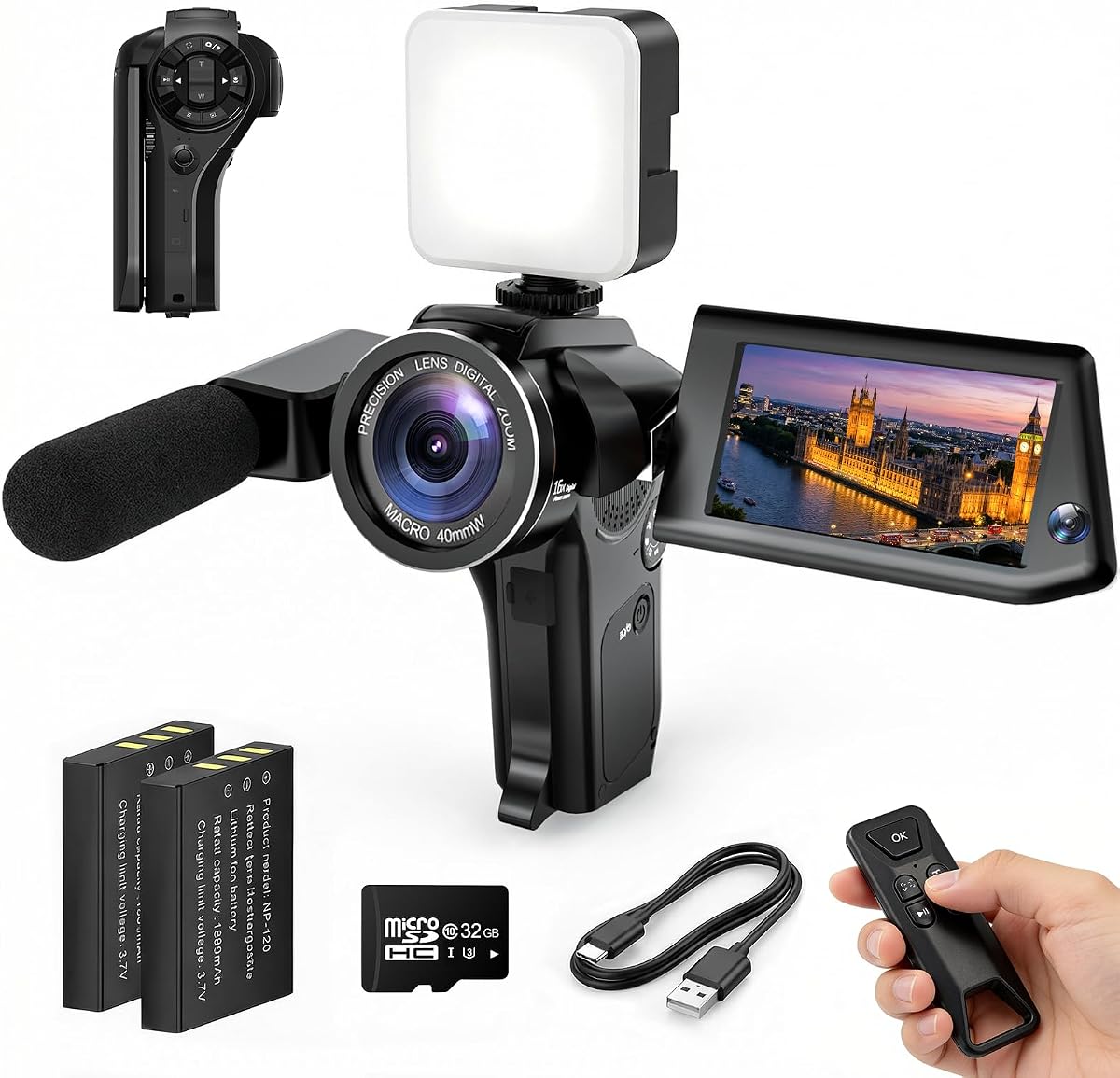
4K Vlogging Camera Pocket Digital Camera
4.4Editor score
330-degree rotating lens for flexible framing
Built-in WiFi for instant smartphone transfer
Includes accessories like tripod and memory card
Discover the top cameras for social media content creators in October 2026. This guide compares 10 models for vlogging, streaming, and high-quality video
Creating compelling social media content requires the right tools to capture attention and tell your story effectively. A quality camera ensures your videos and photos stand out on platforms like TikTok, Instagram, and YouTube where visual clarity matters.
We have evaluated ten top-rated cameras and kits designed specifically for content creators. Our comparison focuses on portability, video resolution, stabilization, and ease of use to help you find the perfect fit for your workflow.
Each pick highlights unique strengths from budget-friendly options to professional-grade gear. Remember that pricing and availability can change frequently so check current listings before making your final decision to secure the best value.
4.4Editor score

4.5Editor score

4.3Editor score
This table provides a side-by-side comparison of all ten products reviewed in this guide. Compare key specifications and features to determine which camera best matches your specific content creation needs.




The DJI Osmo Pocket 3 Creator Combo stands out as the top pick for serious content creators. With a one-inch sensor it delivers stunning image quality that rivals much larger cameras while remaining incredibly portable.
We may earn a commission when you buy through this link, at no additional cost to you.
Its rotating screen makes vertical shooting for TikTok and Instagram Reels effortless. The ActiveTrack 6.0 technology keeps you centered in the frame automatically so you never miss a moment even while moving.
While it carries a higher price tag the features justify the investment for professionals. The 10-bit color depth allows for rich grading options that make your content look cinematic and polished.
If you need reliability and top-tier image quality this camera is the best choice. It handles everything from vlogs to detailed tutorials with ease making it a versatile tool for any creator.
The large sensor captures more light allowing for clear footage even in dim environments without grainy noise.
Rotate the screen to switch orientations instantly saving time during editing and improving workflow efficiency.
We may earn a commission when you buy through this link, at no additional cost to you.
This compact camera offers excellent value for beginners starting their content creation journey. It captures 4K video and includes essential accessories like a tripod and memory card so you can start filming immediately.
We may earn a commission when you buy through this link, at no additional cost to you.
The 330-degree rotating lens allows you to frame yourself easily for vlogs without needing external equipment. It is lightweight and fits in a pocket making it perfect for travel and daily recording.
While it lacks advanced manual controls it simplifies the process for new users. The built-in WiFi helps you transfer files to your phone quickly for fast editing and sharing on social media.
For those on a tight budget this camera provides all the basics needed to produce quality content. It is a practical choice for anyone looking to improve their video quality without a heavy financial commitment.
Comes with a mini tripod and memory card reducing the need for additional purchases right out of the box.
The rotating lens enables creative angles and hands-free recording which is ideal for solo vloggers.
We may earn a commission when you buy through this link, at no additional cost to you.
The FlyFrost 8K Video Camera pushes boundaries with its high-resolution recording capabilities. It offers 8K video recording and 88MP photos which provides ample detail for cropping and editing in post-production.
We may earn a commission when you buy through this link, at no additional cost to you.
Features like IR night vision allow you to capture content in low-light conditions that other cameras might struggle with. The included microphone and stabilizer enhance the audio and video stability for a polished final product.
Although the 8K mode runs at 15 frames per second it is suitable for specific high-detail shots. The webcam mode adds versatility making it a dual-purpose device for both recording and live streaming sessions.
This camera is ideal for creators who prioritize resolution and versatility over ultra-portability. Its array of features makes it a powerful tool for producing detailed and high-quality visual content.
IR night vision expands your filming options into dark environments without relying on artificial lighting.
Switching to webcam mode allows direct connection to computers for video calls and streaming without extra gear.
We may earn a commission when you buy through this link, at no additional cost to you.
This camera is designed for creators who want high-resolution stills and video in a compact form. The 96MP resolution ensures your photos look crisp when uploaded to platforms that support high-definition imagery.
We may earn a commission when you buy through this link, at no additional cost to you.
The 3.5-inch flip screen provides a clear view for composing shots and reviewing footage on the go. Its eco-friendly materials make it durable for travel and outdoor use without adding significant weight to your kit.
HDR imaging helps balance exposure in challenging lighting conditions so your content looks natural. However the digital zoom may soften images compared to optical zoom which is worth noting for distant subjects.
It offers a solid balance of features for general content creation. If you need both excellent photography and video capabilities in one lightweight device this is a compelling option to consider.
The large flip screen makes it easier to frame shots accurately without guessing the angle.
Constructed with durable materials it withstands the rigors of travel while remaining easy to carry.
We may earn a commission when you buy through this link, at no additional cost to you.
For spontaneous recording this mini camcorder offers simplicity and convenience above all else. It fits in your pocket and starts recording with a single button press making it perfect for capturing quick moments.
We may earn a commission when you buy through this link, at no additional cost to you.
The seven-hour battery life ensures you can record for long periods without needing a recharge. This makes it ideal for travel or events where access to power outlets might be limited.
While it does not match DSLR quality its ease of use makes it accessible for anyone. The rotating lens helps with selfie angles although manual rotation is required for adjustments.
This camera is best suited for those who value portability and battery life over advanced specs. It is a practical backup tool for capturing memories without the complexity of larger systems.
A robust battery allows for all-day usage which is perfect for travel vlogs and daily recordings.
No app downloads or complex setup are needed allowing you to start filming immediately.
We may earn a commission when you buy through this link, at no additional cost to you.
This camera offers a blend of portability and key features for social media creation. The rotating lens allows you to switch between recording yourself and the scene around you with ease.
We may earn a commission when you buy through this link, at no additional cost to you.
WiFi integration lets you transfer clips to your phone quickly for immediate editing and posting. It comes with a kit that includes a tripod and card so you have everything needed to start.
While the interface is straightforward it may lack depth for more advanced users. The 4K quality is sufficient for most platforms ensuring your videos look sharp on mobile devices.
It is a solid choice for creators who want a simple tool that still delivers good results. The included accessories add value and make it ready to use right out of the box.
Built-in WiFi streamlines the workflow from camera to phone for faster content publishing.
The lens rotation helps maintain natural framing without needing external mounts or mounts.
We may earn a commission when you buy through this link, at no additional cost to you.
The Picture-in-Picture feature on this camera allows you to show your reaction while filming a subject. This dual-view approach adds a personal touch that enhances engagement in tutorials and family videos.
We may earn a commission when you buy through this link, at no additional cost to you.
You can record both the event and your expression simultaneously creating a more immersive viewing experience. It is especially useful for product reviews or reactions where your facial feedback is important.
While this feature might not be needed by everyone it is unique and well-implemented. The WiFi flip screen supports modern workflows by allowing easy monitoring and transfer of content.
If you often create content that relies on commentary or reactions this camera stands out. It helps you stay part of the story rather than just an observer behind the lens.
Recording your reaction alongside the main subject keeps viewers connected to your experience.
Shows both the process and your hands-free demonstration for clearer instructional content.
We may earn a commission when you buy through this link, at no additional cost to you.
This kit provides a comprehensive set of tools to elevate smartphone content to a professional level. It includes a wireless microphone and RGB light which are critical for clear audio and good lighting.
We may earn a commission when you buy through this link, at no additional cost to you.
The flexible tripod allows you to wrap the legs around objects for unique angles and stable shots. You can adjust the light color temperature to ensure your skin tones look accurate and natural.
Since it relies on your phone you benefit from its camera processing without extra gear weight. The kit is designed to be portable making it easy to take anywhere for spontaneous vlogging.
It is an excellent starting point for creators who want better quality from their mobile setup. With the right accessories your phone can compete with standalone cameras in terms of production value.
Wireless microphones ensure your voice is heard clearly without wind noise or background interference.
Adjustable RGB light helps you set the right mood and balance exposure in various environments.
We may earn a commission when you buy through this link, at no additional cost to you.
This kit introduces intelligent face tracking to allow hands-free recording without needing to move manually. The tripod uses gesture control so you can start or pause tracking with simple hand signals.
We may earn a commission when you buy through this link, at no additional cost to you.
Two wireless microphones are included which provide clear audio even when you are moving away from the camera. The 70-inch height allows you to shoot from higher angles for better composition.
It works directly with your phone so you do not need a separate camera device. This simplifies the setup for live streaming or recording talking head videos where stability is key.
For creators who need a reliable setup for daily uploads this kit is efficient and practical. It reduces the need for assistants by automating tracking and audio capture effectively.
Gesture control allows you to manage recording without touching the device so you stay focused on content.
Two microphones ensure you capture clear sound regardless of your position during a recording.
We may earn a commission when you buy through this link, at no additional cost to you.
The Logitech Brio 101 is a dependable webcam for creators who focus on streaming and live content. It delivers 1080p Full HD video and adjusts automatically to lighting conditions so you always look clear.
We may earn a commission when you buy through this link, at no additional cost to you.
Auto-Light Balance boosts brightness to reduce shadows on your face which is essential for home streaming setups. A built-in microphone ensures your voice is captured clearly without extra external hardware.
Privacy with a slide cover gives you peace of mind when the camera is not in use. It connects easily via USB-A making it compatible with most computers and streaming software right away.
If you prioritize stability and ease of use over portability this is a great choice. It is perfect for creators who stream regularly from a fixed desk or home studio environment.
Auto light balance handles varying lighting conditions so your image remains consistent throughout streams.
Plug and play functionality saves setup time so you can start recording or streaming immediately.
We may earn a commission when you buy through this link, at no additional cost to you.
Selecting the right camera involves weighing several factors that impact your workflow and final output. This guide breaks down the key elements to consider before making a purchase.
Video resolution determines the clarity of your content. Look for cameras that offer 4K recording to ensure your videos remain sharp when viewers zoom in or when content is resized for different platforms.
Higher resolution gives you more flexibility in post-production and future proofing your content against platform updates.
If you travel often or shoot on the go a compact camera is essential. Pocket-sized devices allow you to capture spontaneous moments without the burden of heavy gear in your bag.
A smaller form factor also makes it easier to keep the camera ready for quick shots during daily activities.
Smooth footage is critical for professional-looking content. Look for cameras with optical or mechanical stabilization to reduce shake when you are walking or moving during recording.
Effective stabilization eliminates the need for post-production smoothing and keeps viewers engaged with steady visuals.
Good audio is just as important as video quality. Check if the camera supports external microphones or has high-fidelity built-in mics to ensure your voice is clear.
Clear audio helps maintain audience attention and prevents distractions caused by background noise or muffled speech.
Long recording sessions require a reliable power source. Look for cameras with extended battery life or the option to use external power to avoid interruptions mid-shot.
Adequate battery life ensures you can record for hours without worrying about charging downtime.
WiFi and Bluetooth enable faster file transfers to your smartphone for quick editing. Seamless connectivity streamlines your workflow by reducing the time spent moving files between devices.
Instant transfer features are vital for creators who post content in real-time or near real-time.
An intuitive interface allows you to focus on creativity rather than technical settings. Cameras with simple menus and automated modes help beginners produce high-quality content quickly.
Simplified operation reduces the learning curve and lets you start recording valuable footage sooner.
Check if the camera supports standard mounts like 1/4 inch screw threads for tripods and lights. Compatibility with common accessories expands your creative possibilities without requiring proprietary gear.
Versatile mounting options make it easier to adapt the camera to different shooting scenarios.
Always start by charging your camera fully before a shooting session. Check that all lenses are clean and free from dust or fingerprints to ensure the best image quality.
Utilize the stabilization features by holding the camera steady or using a tripod when available. This prevents unnecessary shake that can make your footage look unprofessional.
Store your camera in a protective case when not in use to prevent scratches and impact damage. Regularly update firmware if available to keep features working at their best.
Beginners should look for compact cameras that offer 4K video and easy connectivity options. Models with rotating lenses or built-in WiFi make it simpler to frame shots and share content quickly.
While phones are often enough for basic posts a dedicated camera provides better low-light performance and stabilization. It is ideal if you plan to grow your audience and need higher production quality.
Audio quality is crucial because viewers often tolerate lower video quality more than poor sound. Using an external microphone or a camera with good built-in audio helps maintain viewer engagement effectively.
Yes webcams are suitable for live streaming and stationary content creation. They offer plug-and-play simplicity and good resolution but lack the portability of dedicated cameras for on-the-go shooting.
Rotating screens or lenses are essential for vertical shooting as they allow you to frame correctly in portrait mode. This saves time during editing compared to cropping horizontal footage later.
Ideally a camera should last at least four to six hours on a single charge to handle full vlogging sessions. Look for models with hot-swappable batteries or USB-C charging for extended use.
This guide highlights ten cameras ranging from budget-friendly options to professional tools. Each offers unique strengths designed to meet different creator needs and technical requirements.
When choosing prioritize features that match your specific workflow like resolution stabilization or portability. The best camera is one that fits your style and helps you create consistently.
Remember to verify current availability and pricing before finalizing your purchase. Checking recent reviews can also provide additional insight into long-term performance.