
GIGABYTE B550M K
4.4Editor score
AMD AM4 Socket Support
PCIe 4.0 Ready
Dual M.2 Slots
This guide compares ten top-rated cheap motherboards for AMD and Intel platforms, highlighting key features, compatibility, and performance to help you choose
Finding a reliable cheap motherboard does not mean sacrificing essential features or build quality. Modern budget boards offer robust power delivery, fast storage options, and solid connectivity for everyday computing needs without breaking the bank.
We compared ten real products based on chipset support, memory compatibility, expansion slots, and user feedback. Our analysis focuses on value, longevity, and how well each board supports current and near-future processor generations for cost-conscious builders.
Each pick shows specific strengths like VRM quality, M.2 support, or legacy port availability. Prices and availability change frequently, so verify current listings before purchasing to ensure you get the best deal for your specific build requirements.
4.4Editor score
4.5Editor score

4.5Editor score
This table provides a side-by-side overview of all ten selected motherboards, showing their core specifications, form factors, and key connectivity options to simplify your decision-making process.





The GIGABYTE B550M K stands out as a top budget option with a 4.4 rating. It supports modern AMD Ryzen processors and offers essential features like PCIe 4.0 without unnecessary extras that drive up costs.
We may earn a commission when you buy through this link, at no additional cost to you.
Its 3+3 power phase design ensures stable performance for mid-range CPUs. The dual M.2 slots allow for fast storage expansion, which is rare at this price point.
While it lacks premium audio or RGB lighting, these compromises keep the cost low. Most users will not miss these features for standard productivity or gaming builds.
If you need a reliable foundation for a Ryzen build on a tight budget, this board delivers excellent value and longevity for everyday computing tasks.
The digital VRM design maintains consistent power to the CPU even under load, preventing throttling during demanding workloads.
With two M.2 slots, you can install both a fast boot drive and a secondary storage drive without sacrificing SATA ports.
We may earn a commission when you buy through this link, at no additional cost to you.
This H61 motherboard targets users needing a replacement for legacy systems. With a perfect 5.0 rating in its niche, it supports older Core processors effectively for basic computing needs.
We may earn a commission when you buy through this link, at no additional cost to you.
It includes essential video outputs like HDMI and VGA, making it suitable for office machines or home media centers where high performance is not required.
The lack of DDR4 support and modern USB standards limits its use to older hardware. However, for repairs or very specific retro builds, it offers a functional solution.
Choose this only if you must reuse existing legacy components. For new builds, current platforms provide significantly better performance and upgrade paths.
Ensure your existing CPU supports integrated graphics to utilize the HDMI and VGA ports without needing a dedicated card.
While M.2 is supported via adapter, speeds are limited by the older chipset architecture compared to modern NVMe drives.
We may earn a commission when you buy through this link, at no additional cost to you.
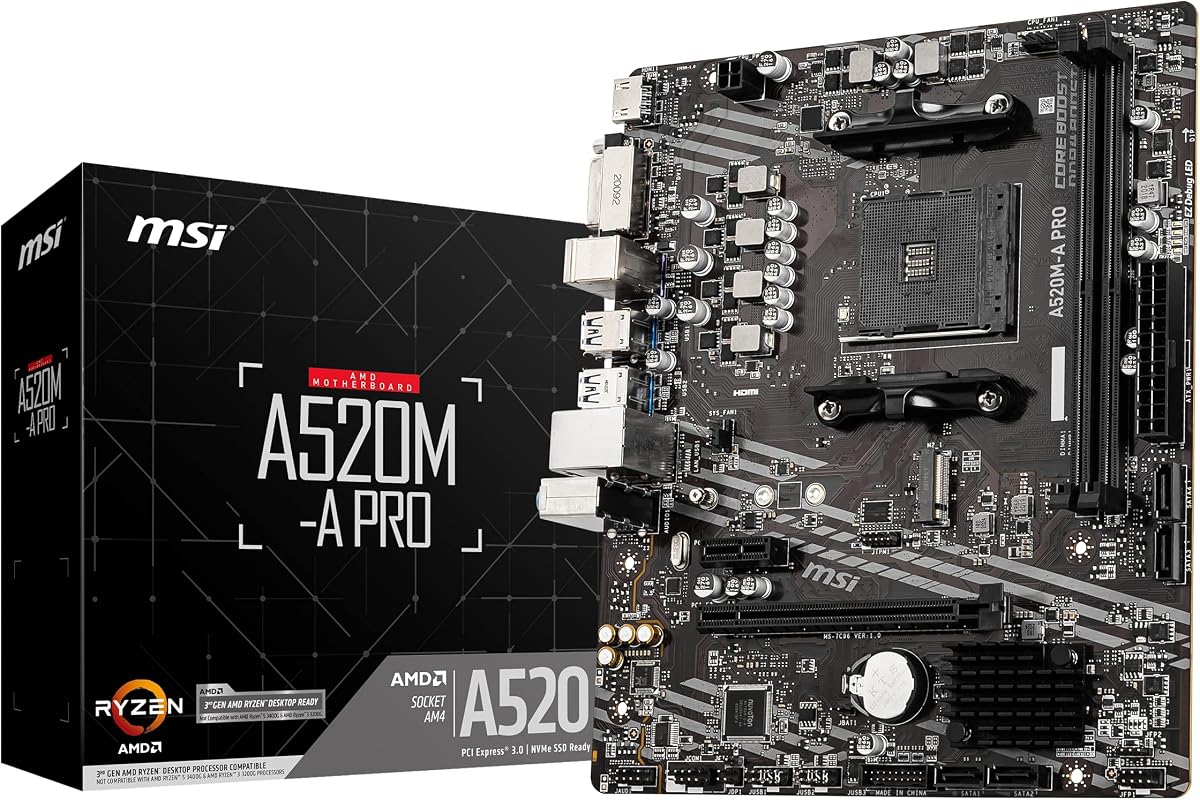
The MSI A520M-A PRO earns editor's choice for balancing cost and performance with a 4.5 rating. It supports Ryzen 5000 series and offers robust features for entry-level gaming setups.
We may earn a commission when you buy through this link, at no additional cost to you.
Its Turbo M.2 slot ensures fast storage speeds, while Audio Boost provides decent sound quality without external components. The compact size fits well in smaller PC cases.
Limitations include PCIe 3.0 which may bottleneck future high-end GPUs slightly. However, for current mid-range cards, the difference is negligible in real-world scenarios.
For builders seeking a trusted brand at a low price, this board is a smart investment. It handles daily tasks and gaming efficiently without unnecessary frills.
Supports high-speed DDR4 modules up to 4600MHz OC, allowing for optimized memory performance even on budget chipsets.
Dragon Center integrates system tuning tools in a user-friendly interface, simplifying performance adjustments for less experienced users.
We may earn a commission when you buy through this link, at no additional cost to you.
The ASRock B550M-HDV excels with multiple display options and a 4.5 rating. It supports high-speed DDR4 memory and provides reliable PCIe 4.0 connectivity for modern graphics cards.
We may earn a commission when you buy through this link, at no additional cost to you.
Its 6 power phase design with premium chokes ensures stable performance even under load. Full spike protection on ports guards against electrical issues during power fluctuations.
While it lacks wireless connectivity, the extensive wired options make it great for office or home setups. Video support covers HDMI, DVI, and VGA for broad monitor compatibility.
Pick this if you need legacy video ports alongside modern performance. It offers a unique blend of old and new features in a compact chassis.
Built-in protection on USB and audio ports helps prevent damage from static discharge or power surges, extending device life.
Supports overclocked memory speeds over 4700MHz, which can significantly boost Ryzen CPU performance in memory-dependent applications.
We may earn a commission when you buy through this link, at no additional cost to you.
The MSI PRO B550M-P focuses on thermal efficiency with a 4.3 rating. It features passive chipset heatsinks and AI cooling to adjust fan speeds based on system temperatures.
We may earn a commission when you buy through this link, at no additional cost to you.
Core Boost technology ensures precise power delivery for stable CPU performance. The dual M.2 slots support Gen4 and Gen3 drives for versatile storage configurations.
While audio and USB options are standard, the cooling features stand out for silent builds. It maintains good performance without loud fan noise during typical usage.
Ideal for users prioritizing low noise and stable thermals. This board provides reliable operation for both workstations and quiet home gaming PCs.
Passive cooling on the chipset reduces noise significantly, while the AI software optimizes active fans only when necessary.
The mix of Gen4 and Gen3 M.2 slots allows for a fast boot drive and a secondary high-capacity drive setup.
We may earn a commission when you buy through this link, at no additional cost to you.
The MSI B550M PRO-VDH WiFi stands out with integrated connectivity and a 4.5 rating. Its Flash BIOS Button allows updates without needing a CPU, which is great for compatibility.
We may earn a commission when you buy through this link, at no additional cost to you.
Studio-grade audio and premium thermal solutions ensure quality experiences. The inclusion of Wi-Fi and Bluetooth saves the cost of buying separate adapters.
The price is slightly higher than other B550 boards, but wireless support often justifies this. It remains a solid choice for builds where cables are inconvenient.
If you need Wi-Fi built-in, this board delivers strong performance and useful features. It balances cost effectively with premium convenience options.
Flash BIOS Button simplifies upgrades for new CPUs without needing the processor installed, saving time during troubleshooting.
Bluetooth and Wi-Fi provide wireless freedom for peripherals, eliminating cable clutter on the desk and around the PC.
We may earn a commission when you buy through this link, at no additional cost to you.
This board justifies its premium label with 10+3 power phases and RGB Fusion. With a 4.5 rating, it offers exceptional stability and aesthetics for advanced builders.
We may earn a commission when you buy through this link, at no additional cost to you.
Q-Flash Plus allows BIOS updates without any CPU, RAM, or GPU. This feature is a lifesaver when testing compatibility with newer processors.
The ATX form factor requires a larger case but provides better airflow. For high-end builds, the power delivery ensures you can push your CPU to limits.
Choose this for future-proofing and premium aesthetics. It offers features usually reserved for high-end models at a competitive price point.
Digital twin 10+3 power phases ensure extremely steady current delivery, which is critical for overclocking and stable performance.
Integrated I/O shield and clear labels make physical installation easier, reducing build time and risk of component damage.
We may earn a commission when you buy through this link, at no additional cost to you.
The Gigabyte A520M K V2 is designed for simple builds in compact enclosures. Its 4.4 rating reflects reliability for users needing basic AMD support.
We may earn a commission when you buy through this link, at no additional cost to you.
It supports DDR4 memory and modern HDMI outputs for media tasks. The micro-ATX format fits into small cases that standard boards cannot.
It lacks advanced features like high-speed overclocking or wireless connectivity. However, for office or home use, it is perfectly adequate.
Select this for space-constrained builds that do not need high performance. It is a no-fuss solution for entry-level computing needs.
The Micro-ATX design allows for smaller cases, saving desk space while still supporting modern memory and storage options.
DDR4 support ensures you can use existing or new RAM modules without needing specialized expensive memory types.
We may earn a commission when you buy through this link, at no additional cost to you.
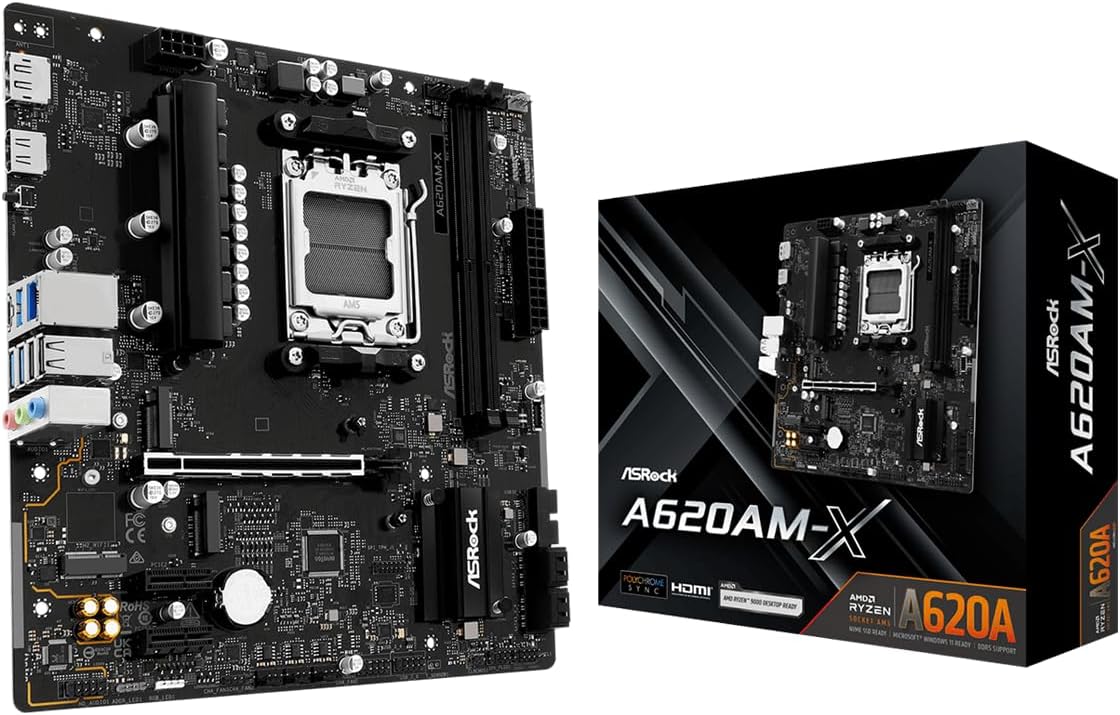
The ASRock A620AM-X offers an affordable entry to AM5 with DDR5 support. With a 4.5 rating, it provides modern features like 2.5G LAN and BIOS Flashback.
We may earn a commission when you buy through this link, at no additional cost to you.
It supports Ryzen 7000 and newer processors with high memory speeds up to 8000+. This prepares your system for future CPU upgrades without motherboard changes.
DDR5 memory costs more than DDR4 but offers better bandwidth. For a new build looking forward, this investment pays off over time.
Pick this for a fresh AM5 build. It balances current affordability with future upgrade paths effectively for savvy builders.
AM5 socket ensures you can upgrade to newer Ryzen CPUs for years without replacing the motherboard, extending system life.
2.5G LAN provides faster wired internet speeds than standard Gigabit, beneficial for large file transfers and low latency gaming.
We may earn a commission when you buy through this link, at no additional cost to you.
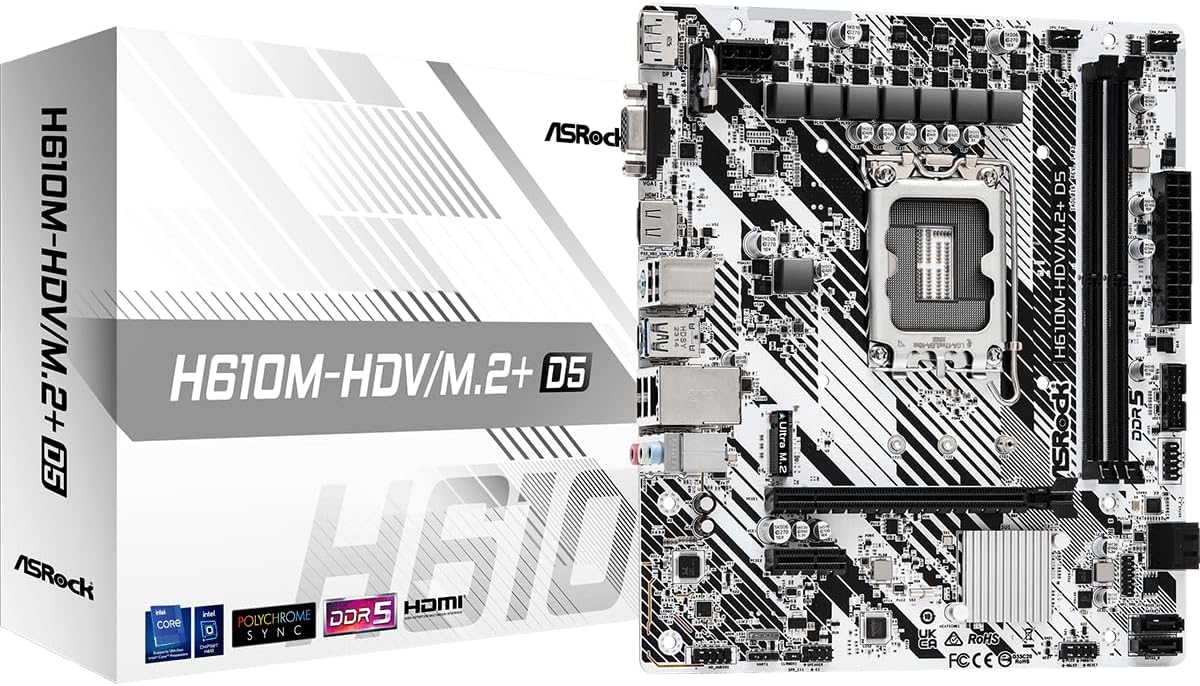
The ASRock H610M-HDV/M.2+ D5 is a top budget choice for Intel platforms. It supports 12th through 14th Gen CPUs with DDR5 support at a low cost.
We may earn a commission when you buy through this link, at no additional cost to you.
Its PCIe 4.0 x16 slot allows modern GPU support. This makes it a viable option for gaming builds using Intel processors.
VRM limits restrict it to mid-range CPUs. High-end i9 chips may throttle, but i3 or i5 CPUs work well for daily tasks.
Choose this if you prefer Intel architecture. It provides a cost-effective path to DDR5 and modern CPUs for general users.
Supports multiple Intel generations which helps when choosing the right CPU for your specific budget and performance needs.
Multiple video outputs like HDMI and DisplayPort ensure you can connect various monitors easily without extra adapters.
We may earn a commission when you buy through this link, at no additional cost to you.
Selecting a cheap motherboard requires balancing cost with necessary features. Below are key factors to consider before making your final purchase decision.
The socket type determines which CPU fits on the motherboard. Ensure you match your processor generation to the correct socket like AM4 or LGA 1700 to avoid incompatibility issues.
Always verify the socket supports your intended CPU before purchasing to guarantee physical and functional fit.
Cheap motherboards may support DDR4 or DDR5. DDR5 is faster but requires newer CPUs and costs more. Choose DDR4 if you need to save money on RAM costs.
Check if your preferred RAM type matches the board specifications to avoid extra upgrades or compatibility errors.
Voltage Regulator Modules handle power delivery to the CPU. A better VRM ensures stable performance under load. For budget boards, look for adequate cooling and phase counts.
Prioritize VRM stability if you plan to use powerful CPUs or want a longer system lifespan.
Micro-ATX boards are smaller and cheaper than standard ATX. Ensure your case supports the chosen size. A smaller case saves space but may limit expansion slots.
Confirm case dimensions match the motherboard size to ensure proper fit and airflow.
Modern cheap boards offer M.2 slots for SSDs. PCIe 4.0 is faster than 3.0. For budget systems, at least one M.2 slot is essential for boot drive performance.
Check for enough SATA ports if you plan to add many hard drives beyond the M.2 slot.
USB ports and LAN speeds vary across models. Budget boards often have fewer USB 3.2 Gen 2 ports. Ensure you have enough connections for your peripherals.
Check the rear panel layout to confirm it meets your daily connection requirements.
Many cheap motherboards lack built-in wireless. If you need Wi-Fi, check if it is included or plan to buy a separate card. This affects total system cost.
Choose a board with integrated wireless if cables are not an option for your setup.
PCIe slots support graphics cards and other devices. Ensure you have enough room for your GPU and any additional cards like sound or capture cards.
Verify slot availability to avoid physical clashes during assembly.
Install the motherboard in the stand-offs provided with the case to prevent short circuits. Secure it firmly with screws but avoid overtightening which can damage the board.
Update the BIOS immediately after installation to ensure compatibility with your CPU. Many boards have flash buttons that simplify this process without needing a CPU installed.
Clean the board regularly with compressed air to remove dust from slots and heatsinks. Avoid using liquids directly on the circuitry to prevent electrical damage.
A cheap motherboard typically cuts costs on features like RGB lighting, premium audio codecs, or extensive USB ports. However, it still maintains essential functions like reliable power delivery and modern connectivity.
Yes, many budget boards support modern CPUs well enough for gaming. As long as the VRM is stable, you can use mid-range GPUs without bottlenecking performance significantly.
Quality cheap motherboards from reputable brands last many years. They often use decent capacitors and protection features that ensure stability despite a lower price point.
Some boards allow CPU upgrades within the same socket generation. However, if the board is for a discontinued socket, you may need to replace the motherboard for future CPU upgrades.
ATX boards are larger with more slots and ports. Micro-ATX boards are smaller and cheaper but offer fewer expansion options. Choose based on your case size and needs.
Demand for budget components often exceeds supply due to market trends. Keeping an eye on stock alerts or choosing slightly higher models can help if your first choice is unavailable.
The GIGABYTE B550M K and MSI A520M-A PRO lead the list for value and features. They offer modern compatibility without unnecessary costs that increase the final price.
Prioritize compatibility and power stability over aesthetic features when on a budget. These elements ensure your system runs smoothly and lasts for years.
Always check current prices and stock levels before buying. Budget options fluctuate often, and a slightly different model might be on sale when you shop.