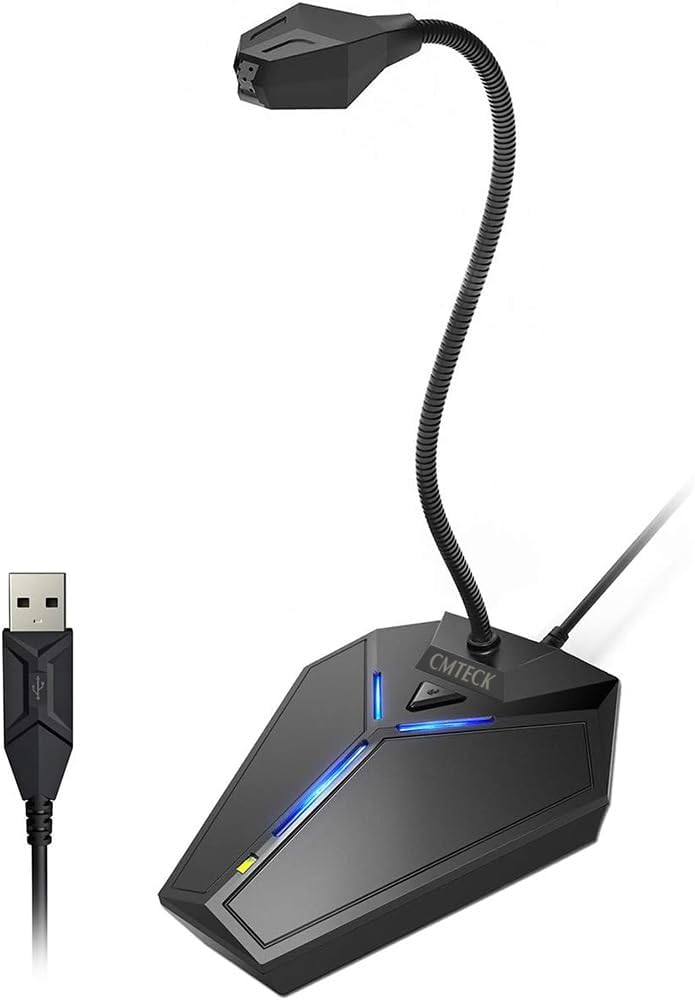
CMTECK USB Computer Microphone
4.4Editor score
Gooseneck design for flexible positioning
Mute button with LED indicator
Plug and play USB connection
Compare the top 10 dictation microphones for computer use, featuring noise cancellation, plug-and-play, and professional speech recognition compatibility.
Finding the right dictation microphone for computer use is essential for professionals who rely on voice-to-text software. A quality mic ensures accurate transcription, reduces background noise, and improves workflow efficiency across various applications.
This guide evaluates ten leading models based on sound quality, build durability, compatibility with major operating systems, and specific features like noise cancellation and ergonomic design. We prioritize products that enhance productivity without requiring complex setup.
Each pick highlights key strengths, limitations, and ideal use cases to help you decide which microphone fits your needs. Prices and availability may change, so verify details before purchasing to ensure you get the best value available today.
4.4Editor score

4.6Editor score

4.2Editor score
This side-by-side comparison highlights the core specifications and capabilities of each microphone to help you make an informed decision based on your specific workflow requirements.



The Logitech Blue Yeti stands out as a top choice for dictation needs due to its professional-grade audio quality and flexibility. It offers four distinct pickup patterns that allow you to tailor sound capture specifically for voice input or group meetings.
We may earn a commission when you buy through this link, at no additional cost to you.
Its custom three-capsule array ensures clear and powerful sound, which translates to better accuracy in speech recognition software. The onboard controls for pattern selection, instant mute, and mic gain put you directly in charge of every level of your audio recording.
One trade-off is that the microphone is highly sensitive and can pick up desk vibrations, so using a solid stand is important. However, this sensitivity is also what allows it to capture nuanced voice details essential for precise dictation.
This microphone is best for users who demand studio-level quality and versatility. If you need a single mic for dictation, streaming, and voice work, the Blue Yeti delivers consistent performance that justifies its investment.
Choose between cardioid, omni, bidirectional, or stereo patterns to optimize sound capture based on your specific recording environment and microphone placement.
Access essential audio settings like gain, volume, and instant mute directly on the mic body without needing to navigate complex software interfaces during use.
We may earn a commission when you buy through this link, at no additional cost to you.
The Philips LFH3500 SpeechMike Premium is engineered specifically for professional dictation workflows. Its free-floating, decoupled microphone design minimizes handling noise to ensure precise recordings that are critical for medical or legal transcription.
We may earn a commission when you buy through this link, at no additional cost to you.
Key strengths include a built-in motion sensor for device control by gestures and freely configurable function keys for personalized workflows. These features allow users to control software functions without needing to use a keyboard, streamlining the dictation process significantly.
While it is a premium-priced option, the investment pays off through higher transcription accuracy and enhanced productivity tools. The main limitation is that some features are optimized for specific dictation software environments.
This microphone is ideal for professionals who dictate daily and need reliable, high-accuracy audio input. It offers unmatched convenience and sound quality for those focused solely on document creation and dictation tasks.
The free-floating microphone design isolates the capsule from the base to prevent mechanical noise from interfering with your voice recordings and transcription accuracy.
Built-in motion sensors let you control device functions with simple hand gestures, reducing physical effort and keeping you focused on your content creation.
We may earn a commission when you buy through this link, at no additional cost to you.
The CMTECK USB Computer Microphone offers an excellent entry point for those needing reliable dictation capabilities without a high cost. It features a high-performance SMART CHIP that effectively suppresses background noise to ensure your voice comes through crisp and clear.
We may earn a commission when you buy through this link, at no additional cost to you.
Its flexible gooseneck design allows you to position the mic exactly where needed, whether on a home office desk or a living room setup. The USB plug and play functionality means no drivers are needed to start recording immediately.
The main trade-off is the simpler construction compared to premium models, which may not offer the same level of acoustic refinement. However, for basic voice input and recording tasks, the sound quality remains highly satisfactory.
This microphone is perfect for casual users, students, or small businesses looking for cost-effective voice recording solutions. It delivers solid performance and ease of use for everyday dictation needs.
Integrated SMART CHIP technology actively filters out ambient noise, keeping your voice clear and ensuring better recognition accuracy in standard environments.
The metal gooseneck tube lets you adjust the microphone angle precisely, ensuring optimal sound capture regardless of your seating position or desk layout.
We may earn a commission when you buy through this link, at no additional cost to you.
The FIFINE Mini Gooseneck USB Microphone is designed with portability in mind, making it ideal for travelers or those with limited desk space. Its tiny footprint allows it to take up minimal space while still delivering reliable recording performance.
We may earn a commission when you buy through this link, at no additional cost to you.
A flexible 5.7-inch gooseneck provides easy positioning, and the included windscreen helps reduce background noise to improve overall sound quality. The sturdy metal base and anti-slip rubber pad ensure stability during use.
One limitation is the relatively shorter cable length compared to other models, which might restrict positioning options on larger desks. However, its versatility for online communications and voice recordings makes up for this constraint.
This model suits users who need a flexible microphone for various tasks including dictation, conferencing, and tutorials. Its simplicity and ease of setup make it a practical choice for daily use.
Its mini form factor ensures it fits easily into travel bags and small workspaces without sacrificing essential recording capabilities or sound quality.
A dedicated windscreen is included to reduce unwanted noise and plosives, improving voice clarity and reducing the need for post-processing editing.
We may earn a commission when you buy through this link, at no additional cost to you.
The Philips LFH3200 SpeechMike III Pro is engineered specifically for professional dictation workflows requiring accurate speech recognition. Its noise-canceling technology ensures reliable results even in environments with some background noise.
We may earn a commission when you buy through this link, at no additional cost to you.
Designed primarily for Dragon Naturally Speaking software, this microphone features push button operation that simplifies control during transcription tasks. The advanced speaker design provides crystal-clear playback, allowing for easier editing and review.
While it offers excellent performance, it is sold separately from software and may require specific setup for best results. Its focus on legacy dictation environments limits broader compatibility with newer general-use applications.
This microphone is ideal for professionals who already use Dragon software and need a dedicated device for high-speed dictation. Its ergonomic design and clear audio output support efficient daily transcription workflows.
Tailored specifically for Dragon Naturally Speaking, this microphone ensures seamless integration and maximum recognition accuracy for users dependent on that platform.
Built-in noise-canceling technology actively filters out ambient sounds, improving transcription accuracy in typical office or home environments.
We may earn a commission when you buy through this link, at no additional cost to you.
The OLYMPUS RecMic II features a unique wired USB design with a trackball and push button functionality tailored for speech recognition. Its improved trackball allows for easier cursor control without needing a traditional mouse.
We may earn a commission when you buy through this link, at no additional cost to you.
Key features include Dragon preset button assignment for Windows and smooth UV coating that minimizes annoying contact noise. The two microphone systems are designed to enhance recording quality in noisy environments.
While innovative, the complexity of the controls might be a hurdle for casual users not used to specialized dictation hardware. The product also has a lower user rating, suggesting some variability in long-term reliability.
This model is best suited for users already familiar with Olympus products or those who specifically need trackball functionality for cursor control alongside dictation. It offers specialized features not found in standard microphones.
The integrated trackball allows you to navigate and control your computer with one hand, making it easier to switch between dictation and document editing.
Smooth UV coating and silent keys ensure that button presses and handling do not create distracting noise in your recordings.
We may earn a commission when you buy through this link, at no additional cost to you.
The ZealSound Podcast Microphone delivers studio-quality broadcast-level audio suitable for high-precision dictation. Its cardioid pickup pattern focuses on your voice while reducing unwanted background noise for clearer transcription.
We may earn a commission when you buy through this link, at no additional cost to you.
It features dedicated knobs for volume, monitoring, and echo adjustment, giving you hands-on control over your sound without software. Real-time zero-latency monitoring helps you hear exactly what is recorded for immediate feedback.
The main trade-off is its top-addressed design, meaning it must be placed directly in front of you to function optimally. This can limit flexibility if you have a tight desk setup or need to move around.
This microphone is great for creators who need quality audio across multiple uses including dictation, podcasting, and meetings. Its physical controls and compatibility with various devices make it a versatile tool for professional workflows.
Dedicated knobs for mic volume, monitoring, and echo allow you to adjust sound levels on the fly without navigating complex software menus during recording.
Real-time monitoring via the headphone jack ensures you hear your voice exactly as it is recorded without delay, helping maintain consistent audio quality.
We may earn a commission when you buy through this link, at no additional cost to you.
The Nuance PowerMic III combines a robust USB microphone with full PC mouse capabilities to avoid constant switching between devices. Its ergonomic thumb control operation simplifies dictation commands and improves overall productivity.
We may earn a commission when you buy through this link, at no additional cost to you.
Key strengths include a unidirectional microphone with noise cancellation that ensures higher accuracy even in noisy environments. The plug and play installation eliminates the need for soundcard enabled PCs, making setup straightforward.
While effective for its intended purpose, it requires specific software support and may be overly specialized for general dictation needs. The higher cost reflects its specialized features tailored for professionals using Dragon suites.
This microphone is best for professionals who use Nuance Dragon software and want a streamlined workflow combining dictation and device control. It offers ergonomic benefits that reduce fatigue during extended transcription sessions.
Full PC mouse capabilities built into the mic let you navigate and control your system without needing a separate mouse, increasing workflow efficiency.
Designed for comfortable thumb operation, this microphone reduces hand strain and allows for quick access to essential dictation commands.
We may earn a commission when you buy through this link, at no additional cost to you.
The TONOR Conference Microphone is designed primarily for small to medium meetings but works effectively for dictation tasks involving multiple speakers or group input. Its omnidirectional pickup pattern captures subtle sounds from all directions clearly.
We may earn a commission when you buy through this link, at no additional cost to you.
Key strengths include a wide 11.5 ft pickup distance and a convenient mute button with a blue indicator for checking status. The durable metal construction and anti-slip mat ensure stability during use on desktops.
While its wide pickup range is beneficial for group settings, it might capture too much ambient noise for solo dictation tasks requiring high precision. However, for collaborative dictation or transcription of meetings, it performs well.
This microphone is ideal for teams or individuals who need reliable audio capture for meetings and voice input. Its straightforward plug-and-play functionality ensures quick setup without technical hurdles.
A 360-degree pickup pattern ensures voices from all around the table are captured, making it useful for collaborative dictation or meeting transcription.
A convenient built-in mute button and clear indicator light allow you to control audio transmission quickly and confidently during use.
We may earn a commission when you buy through this link, at no additional cost to you.
This USB Microphone features a 360-degree adjustable gooseneck design that lets you position it precisely for optimal voice capture. It includes noise-canceling technology to reduce background noise and echo for clearer recordings.
We may earn a commission when you buy through this link, at no additional cost to you.
Key features include a built-in mute button with LED indicator and compatibility with Windows and macOS systems. The solid construction using metal pipe and heavy-duty ABS stand ensures durability during regular use.
While it lacks advanced digital controls, it offers reliable performance for standard dictation needs. The main limitation is that it is not compatible with Xbox, Raspberry Pi, or Android devices.
This model is a good budget-friendly option for basic voice input and recording. Its flexibility and noise reduction features make it suitable for everyday dictation tasks on desktop or laptop setups.
Adjust the microphone angle fully to find the best sound location for your specific workspace and input preferences.
Built-in noise-canceling helps filter out background sounds, keeping your voice clear and improving transcription accuracy in everyday environments.
We may earn a commission when you buy through this link, at no additional cost to you.
Choosing the right dictation microphone requires balancing sound quality, comfort, and software compatibility to match your specific workflow needs.
Sound quality is paramount for accurate speech recognition, so look for microphones with condenser technology and appropriate pickup patterns like cardioid or omnidirectional. Cardioid patterns focus on your voice reducing background noise which is ideal for solo dictation.
Ensure the microphone is compatible with your operating system and preferred speech recognition software such as Dragon or Windows Speech Recognition. Most USB microphones work across Windows and macOS without additional drivers.
Ergonomic designs including adjustable goosenecks and comfortable grips reduce fatigue during long sessions. Consider whether you need a desktop stand or a handheld device for your specific workflow environment.
USB connectivity is standard and preferred for plug-and-play convenience. Avoid models requiring external sound cards or complicated driver installations unless you have specific technical needs.
Active noise cancellation or advanced filtering helps reduce background noise ensuring better transcription accuracy in noisy environments. This feature is especially important for office or home settings with ambient sounds.
Check for solid construction materials like metal or reinforced ABS to ensure the microphone withstands daily use. A stable base prevents accidental movement which can affect audio quality.
Features like mute buttons, LED indicators, and configurable function keys add convenience and control during use. Some premium models include gesture controls or motion sensors for advanced workflows.
Price varies widely from budget options to professional-grade microphones. Determine your budget and prioritize features that directly improve your transcription accuracy and productivity for best value.
Connect the microphone directly to an available USB port on your computer and allow the system to recognize it. Check your sound settings to ensure the microphone is selected as the default input device.
Position the microphone close to your mouth but not too close to avoid distortion or plosive sounds. Adjust any goosenecks or stands to ensure the mic points directly at you for optimal sound capture.
Keep the microphone clean and dry to maintain its performance. Avoid exposing it to liquids or excessive dust and use a windscreen if provided to reduce unwanted noise during recording.
The Philips LFH3500 SpeechMike Premium and Nuance PowerMic III are specifically optimized for Dragon NaturallySpeaking due to their specialized controls and noise cancellation. These models offer features that integrate seamlessly with Dragon software for high accuracy.
Most USB dictation microphones are plug-and-play and do not require additional drivers on modern Windows and macOS systems. Simply plug the device into your computer and select it as the input device in your settings.
A cardioid pickup pattern is generally best for solo dictation because it focuses on sound coming from directly in front of the microphone. This reduces ambient noise and improves voice clarity during transcription.
Yes, many podcast microphones like the Logitech Blue Yeti work well for dictation due to their high-quality sound and flexible pickup patterns. However, they may require careful positioning to minimize background noise.
To improve accuracy, speak clearly and at a consistent pace while ensuring your microphone is positioned correctly. Use noise cancellation features if available and minimize background noise by recording in a quiet environment.
Most professional dictation microphones use wired USB connections for reliable performance. While wireless options exist, they may introduce latency or connectivity issues that can affect transcription accuracy.
Choosing the best dictation microphone depends on balancing professional sound quality, ergonomic comfort, and software compatibility. The Logitech Blue Yeti, Philips LFH3500, and CMTECK USB Computer Microphone represent excellent choices across different price and feature tiers.
Prioritize models with noise cancellation and appropriate pickup patterns if accuracy is your primary concern. Ensure the microphone supports your preferred operating system and speech recognition tools to avoid integration issues.
Remember to verify current availability and prices before purchasing as these details may change over time. Investing in a quality microphone will improve your transcription workflow and productivity in the long run.