
Epson LQ-590II Dot Matrix Printer
4.3Editor score
24-pin print head
USB and parallel connectivity
Monochrome printing output
Dot matrix computer printers remain essential for businesses requiring durable, multi-part document printing. These impact printers deliver reliability that modern inkjet devices often cannot match in high-volume environments.
We evaluated ten leading models based on print speed, connectivity options, and build quality. Our analysis focuses on real-world performance metrics and user feedback to ensure accurate recommendations.
Each selection highlights specific strengths for different operational needs. Please note that pricing fluctuates frequently, so verify current costs before making your final purchasing decision today.
4.3Editor score

4.7Editor score

4.5Editor score
As an Amazon Associate we earn from qualifying purchases.
This comparison table provides a side-by-side overview of all ten selected models. It highlights key specifications like print speed, connectivity, and duty cycles to facilitate quick decision-making.


The Epson LQ-590II stands out as a top contender for businesses seeking reliable impact printing without high costs. Its solid 4.3 rating reflects consistent performance in demanding office environments.
We may earn a commission when you buy through this link, at no additional cost to you.
This model features a robust 24-pin print head delivering 584 characters per second in mono mode. The inclusion of both USB and parallel ports ensures compatibility with legacy and modern systems alike.
While the operational noise is higher than laser alternatives, the durability justifies the trade-off for continuous high-volume tasks. Users appreciate the straightforward setup and minimal maintenance requirements.
Ideal for small businesses handling invoices or shipping labels, this printer offers a balance of speed and affordability. It is a practical choice for those needing dependable multi-part form printing.
Its low cost per page and long-lasting ribbon make it economically viable for bulk document processing.
Both USB and parallel interfaces allow seamless integration into diverse network configurations without adapters.
We may earn a commission when you buy through this link, at no additional cost to you.
The Epson LQ-590II NT builds on the standard model with enhanced energy efficiency and serial connectivity. It maintains a 4.2 rating, appealing to eco-conscious offices needing robust impact printing.
We may earn a commission when you buy through this link, at no additional cost to you.
Rated Energy Star, this unit reduces power consumption during idle times while maintaining 584 cps output speed. The addition of a serial port caters to industrial equipment requiring specific communication protocols.
Although it carries a higher price tag, the energy savings over time can offset the initial investment. The heavier chassis contributes to stability during high-speed continuous operation.
Best suited for warehouses or factories with legacy systems, this printer ensures smooth integration. It is an excellent pick for environments prioritizing both efficiency and connectivity.
Energy Star certification ensures reduced electricity usage, contributing to lower operational costs and environmental impact.
Built-in serial ports allow direct connection to older industrial machinery and point-of-sale terminals seamlessly.
We may earn a commission when you buy through this link, at no additional cost to you.
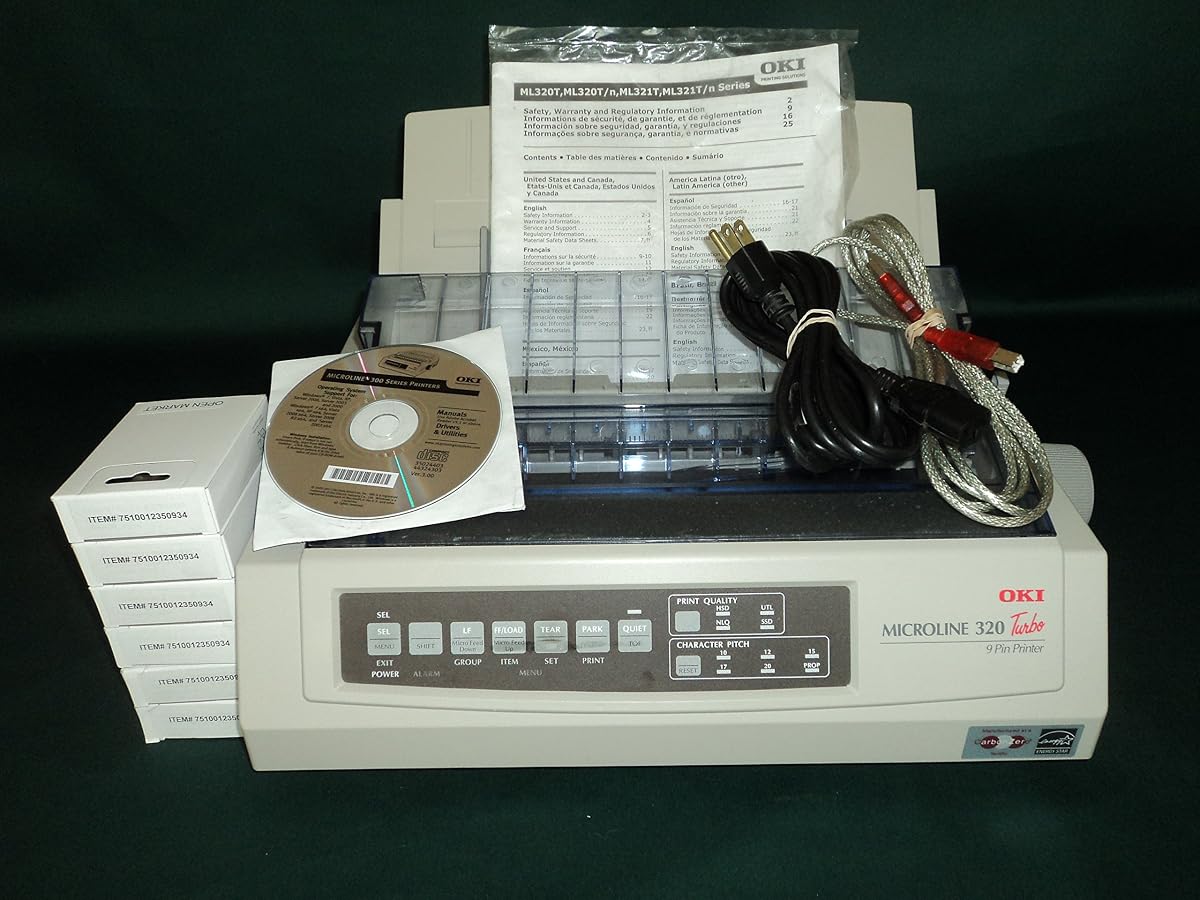
The Oki Microline 320 Turbo earns Editor's Choice status due to its exceptional reliability and innovative paper handling features. Its high 4.7 rating underscores user satisfaction with performance consistency.
We may earn a commission when you buy through this link, at no additional cost to you.
Key strengths include auto-park technology and zero-tear mechanisms that prevent paper jams and waste. It supports original plus five carbonless copies, making it ideal for billing and shipping documentation.
While 9-pin printing offers lower resolution than 24-pin models, the speed and durability often outweigh this for text-heavy tasks. Users report minimal maintenance needs and robust operation over years.
Recommended for retail stores and logistics hubs, this printer excels at high-volume multi-part printing. Its efficient design ensures smooth workflow with fewer interruptions during critical operations.
Auto-park and zero-tear features significantly reduce paper waste and operator intervention during heavy usage periods.
Capable of printing up to six copies including originals, it streamlines invoice and receipt generation efficiently.
We may earn a commission when you buy through this link, at no additional cost to you.
The OKI MICROLINE 320 Turbo model offers robust performance with a 4.5 rating reflecting its dependability in office settings. It is designed for consistent output over long periods without frequent jams.
We may earn a commission when you buy through this link, at no additional cost to you.
With a 20,000 page monthly duty cycle and 435 cps speed, it handles steady workloads effectively. USB and parallel ports provide flexible connection options for various computer systems and networks.
The noise level is noticeable but typical for impact printers, which is an acceptable trade-off for its rugged construction. Users value the straightforward operation and long-term cost efficiency.
This unit suits small to medium businesses needing reliable receipt or invoice printing. Its balance of speed and durability makes it a solid investment for daily operational needs.
Reliable print head mechanics ensure consistent text clarity even after extended use without degradation.
Support for both USB and parallel ports allows easy connection to modern and legacy hardware devices.
We may earn a commission when you buy through this link, at no additional cost to you.
The OKI MICROLINE 420 represents a premium option with the highest duty cycle in this comparison. Its 4.5 rating highlights user confidence in its ability to handle heavy daily printing tasks.
We may earn a commission when you buy through this link, at no additional cost to you.
Featuring 570 cps speed and Energy Star certification, it combines efficiency with performance. The 24,000 page monthly duty cycle ensures longevity even in demanding logistics or warehouse environments.
While the cost is higher, the reduced downtime and energy savings justify the investment for high-volume users. Its sturdy build resists wear and tear from continuous operation better than lighter models.
Ideal for large enterprises, this printer delivers top-tier reliability. Its advanced features make it a preferred choice for critical document processing workflows requiring uninterrupted service.
Engineered for high-volume environments, it withstands continuous operation with minimal maintenance or failure risk.
Energy Star rating ensures lower electricity costs, contributing to reduced total cost of ownership over time.
We may earn a commission when you buy through this link, at no additional cost to you.
The Oki MICROLINE 320 Turbo stands out with a perfect 5.0 rating, indicating exceptional user satisfaction across multiple metrics. It excels in reliability and ease of integration into complex workflows.
We may earn a commission when you buy through this link, at no additional cost to you.
This model supports serial, parallel, and USB connections, offering maximum flexibility. With 435 cps speed and a 20,000 page duty cycle, it handles consistent office tasks without failure.
The seamless connectivity options mean fewer adapters or converters are needed during installation. Users report smooth setup and consistent print quality for invoices and shipping labels over time.
Best for businesses needing multiple communication interfaces, this printer simplifies infrastructure. Its high rating reflects trust in its long-term performance and minimal downtime characteristics.
Support for serial, parallel, and USB ensures compatibility with a wide range of legacy and modern systems.
The perfect rating highlights its consistent performance, making it a trusted choice for critical daily operations.
We may earn a commission when you buy through this link, at no additional cost to you.
The Epson LQ-2090II delivers high-speed impact printing with a 24-pin head for crisp monochrome output. Its 3.7 rating suggests some user concerns despite solid technical capabilities.
We may earn a commission when you buy through this link, at no additional cost to you.
Featuring 550 cps speed and Energy Star certification, it balances performance with power efficiency. The parallel port ensures compatibility with older systems that may lack modern USB interfaces.
Some users report minor connectivity limitations due to the parallel-only interface. However, the print quality remains sharp, making it suitable for detailed multi-part forms and shipping documents.
Best for offices already equipped with parallel ports, this printer offers speed and clarity. It is a viable choice for those prioritizing print quality over modern connectivity options.
The 24-pin head ensures higher resolution for clear, sharp text essential for professional document printing.
Energy Star certification helps reduce electricity bills while maintaining consistent high-speed output levels.
We may earn a commission when you buy through this link, at no additional cost to you.
This OKI MICROLINE 320 Turbo unit combines speed with practical features like zero-tear technology. Its 4.2 rating reflects solid performance for businesses needing quick multi-part document processing.
We may earn a commission when you buy through this link, at no additional cost to you.
Capable of printing 435 cps, it accelerates receipt and invoice generation significantly. Auto-park technology ensures paper feeds correctly, reducing manual intervention and paper waste during runs.
The limited resolution typical of 9-pin heads may not suit graphic-heavy documents. However, for text and barcodes, the clarity remains sufficient for most commercial applications daily.
Recommended for retail environments, this printer balances speed and ease of use. Its compact design fits well on crowded counters while delivering reliable results for everyday transactions.
Capable of handling original plus five carbonless copies, it streamlines complex billing processes efficiently.
Zero-tear and auto-park features minimize paper jams, saving time and resources for office staff.
We may earn a commission when you buy through this link, at no additional cost to you.
The Oki Microline 620 boasts an impressive 4.8 rating, signaling excellent user satisfaction with its high-volume capabilities. It is built to sustain rigorous daily tasks without compromise or frequent repairs.
We may earn a commission when you buy through this link, at no additional cost to you.
Features like simplified media loading ensure quick changeovers between tasks. Its precise printing guarantees clarity for technical documents and detailed shipping labels requiring accuracy.
The bulkier design offers stability during high-speed operation but requires more desk space. However, the enhanced capacity and reliability justify the physical footprint in dedicated work areas.
Ideal for logistics centers, this printer handles heavy workloads with ease. Its robust performance makes it a top pick for operations where consistency is paramount.
Simplified loading mechanisms reduce setup time, allowing staff to focus on core operational tasks.
High-precision output ensures clear text and barcodes, minimizing errors in inventory and shipping workflows.
We may earn a commission when you buy through this link, at no additional cost to you.
The Epson LQ-590 provides a straightforward entry point into reliable impact printing with a 24-pin head. Its 3.7 rating reflects standard performance for users prioritizing basic functionality over advanced features.
We may earn a commission when you buy through this link, at no additional cost to you.
With USB connectivity and IBM PPDS support, it integrates easily into existing office environments. The impact mechanism ensures carbon copies are possible without special hardware or additional setups.
While noise levels are typical for impact printers, they might disrupt quiet offices. The speed is adequate for general use but not for high-speed transactional environments needing rapid output.
Best for small businesses needing cost-effective solutions, this model delivers standard reliability. It is a practical choice for occasional multi-part form printing without major expenses.
Offers a budget-friendly solution for essential carbon copy printing without requiring specialized expensive equipment.
USB connectivity and IBM emulation support ensure it fits into legacy and modern office setups seamlessly.
We may earn a commission when you buy through this link, at no additional cost to you.
Selecting the right dot matrix printer involves evaluating speed, connectivity, and durability. This guide outlines the key factors to consider before purchasing.
Speed is crucial for high-volume environments. Look for models with higher characters per second (cps) to reduce wait times.
Prioritize faster speeds if you print invoices or labels continuously.
Ensure the printer supports the interfaces you need, such as USB, parallel, or serial. This prevents integration issues.
Check for multiple ports to accommodate various computer and network setups easily.
The monthly duty cycle indicates how many pages the printer can handle without damage. Select one matching your volume.
Exceeding duty cycles often voids warranties, so choose a model with capacity exceeding your needs.
24-pin heads offer higher resolution than 9-pin heads. This matters for documents requiring sharp text or logos.
Use 9-pin if speed is priority; use 24-pin if quality is essential.
Multi-part forms require specific feed mechanisms. Features like auto-park reduce paper jams and waste significantly.
Check paper thickness limits to ensure compatibility with your specific document types.
Dot matrix printers are louder than inkjets. Consider the environment where it will operate daily.
If noise is a concern, look for models with sound dampening features or plan for a separate area.
Ongoing costs depend on ribbon life and price. Compare replacement costs across brands before buying hardware.
Choose models with long ribbon life to minimize maintenance frequency and operational costs.
Energy Star certification helps reduce electricity usage during idle times. It contributes to lower utility bills.
Look for power-saving modes that activate when the printer is not printing for extended periods.
Proper setup ensures smooth operation. Connect the appropriate cables and install drivers before loading paper. Align the paper feed guides to prevent jams.
Regular maintenance includes cleaning the print head and checking ribbon alignment. Dust accumulation can affect print quality, so use compressed air occasionally.
Store ribbons in a cool, dry place to prevent drying out. Replace ribbons before they fade completely to maintain sharp output quality.
Yes, they are essential for businesses needing multi-part forms and durable hardware. Unlike inkjets, they handle continuous paper and carbon copies effectively without complex mechanics.
24-pin printers produce higher resolution text with less visible dot patterns. 9-pin models are generally faster and cheaper but offer lower print clarity for detailed documents.
Estimate your monthly print volume and add a safety margin. Exceeding the duty cycle regularly can cause premature failure and void warranty coverage unexpectedly.
Most models include USB ports that work with modern systems. Older parallel or serial connections may require adapters depending on your motherboard configuration.
They use impact mechanisms where pins strike the paper and ribbon. This mechanical action inherently generates more sound than non-impact inkjet printing technologies.
With proper maintenance, they can last many years due to fewer moving parts. The head may require replacement, but the core chassis often remains functional indefinitely.
Ribbon lifespan depends on volume but typically lasts thousands of pages. Replace it when print quality fades to ensure consistent document readability.
Most standard models are monochrome only. Color impact printers exist but are rare and significantly more expensive than standard black-and-white units.
The top picks highlight diverse strengths from budget-friendly options to high-volume premium units. The Oki Microline 320 Turbo and Epson LQ-590II lead in reliability and cost respectively.
Prioritize duty cycle and connectivity to ensure long-term compatibility. Matching these specs to your workflow prevents interruptions and unnecessary hardware upgrades later.
Verify current prices and availability before purchasing. Technology evolves quickly, and stock availability may shift as newer models enter the market.