
XIAOWTEK Wireless Earbuds
4.9Editor score
50 hours total playtime
Bluetooth 5.4 stability
4 ENC mic noise cancelling
This guide compares the top 10 earbuds for laptop conference calls based on microphone quality, noise cancellation, battery life, and connection stability for
Remote work demands clear audio during virtual meetings. Choosing the right earbuds ensures your voice is heard clearly while blocking out distractions. We evaluated ten top models to help you find the perfect fit for your daily conference needs.
Our selection process focused on microphone performance, connection stability, and comfort. We analyzed real-world specs, user feedback, and specific features like noise cancellation and multipoint connectivity. This list covers options for every budget and usage scenario.
Each pick highlights key strengths and potential trade-offs. We include detailed reviews, comparison data, and buying advice to streamline your decision. Prices and availability fluctuate, so verify details before purchasing to ensure the best value for your setup.
4.9Editor score

4.2Editor score
4.0Editor score
Compare the key specifications and features of the top ten earbuds designed for professional calls and laptop integration.



The Soundcore Liberty 5 Pro Max earns top marks for professional audio. It features 10 sensors and the Thus AI Chip for crystal-clear calls even in 100 dB noise. Its speech quality score is record-breaking by Guinness.
We may earn a commission when you buy through this link, at no additional cost to you.
Its standout feature is the AI Note-Taker. The charging case records in-person meetings and transcribes them locally. This ensures data privacy while summarizing action items. The case includes a large AMOLED screen for direct control.
Users should note the AI transcription requires a subscription after the free starter plan. The case is heavier than standard due to the screen. However, for business users prioritizing privacy and audio fidelity, the trade-off is manageable.
Buy this if you need secure, high-fidelity audio for confidential calls. It suits executives handling sensitive data. The combination of best-in-class microphones and local AI transcription makes it the ultimate office companion.
AES-256 encryption ensures conversations stay local and secure without cloud syncing.
The built-in mic records physical meetings and generates AI summaries automatically.
We may earn a commission when you buy through this link, at no additional cost to you.
XIAOWTEK offers outstanding performance for its low cost. It uses Bluetooth 5.4 for stable connectivity and boasts 50 hours of total playtime. Its 4 ENC microphones block 80% background noise effectively.
We may earn a commission when you buy through this link, at no additional cost to you.
The 13mm dynamic drivers deliver strong bass and clear vocals. Users appreciate the LED power display and the reliable connection within 15 meters. Touch controls manage playback and calls efficiently without accidental touches.
While it lacks a dedicated app, the hardware performs reliably for standard meetings. The earbuds might lack advanced customization, but the core audio quality remains high. Comfort is decent with the ergonomic design.
Choose this for affordable daily use without sacrificing clarity. It fits students and remote workers needing budget-friendly gear. The 50-hour battery means you rarely need to charge during work weeks.
Bluetooth 5.4 offers 30% lower power consumption and better signal penetration.
With 50 hours total playtime, a single charge lasts through many meetings.
We may earn a commission when you buy through this link, at no additional cost to you.
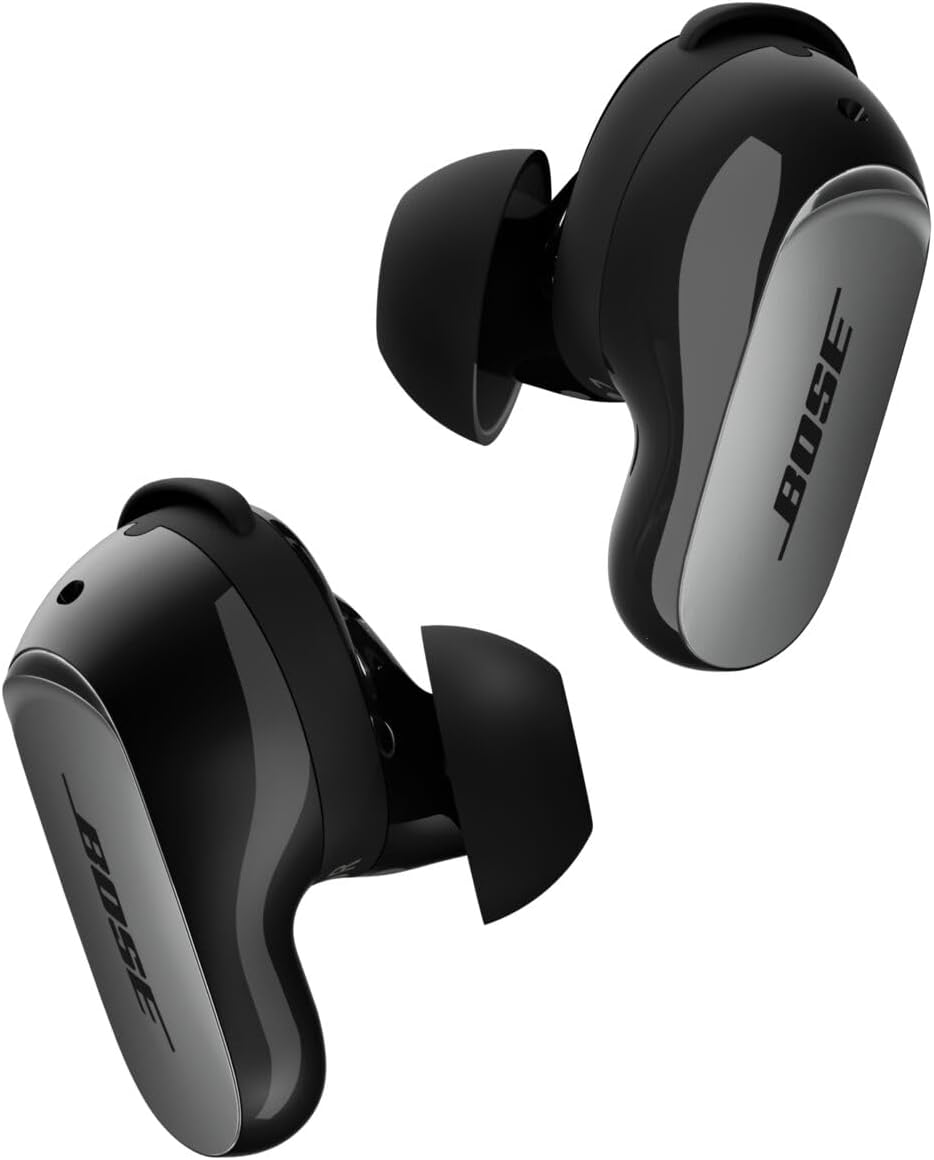
Bose delivers world-class noise cancellation with its CustomTune technology. It adapts sound to your ear shape for consistent quality. The Immersive Audio mode provides a spatial experience for media and calls.
We may earn a commission when you buy through this link, at no additional cost to you.
SpeechClarity technology ensures your voice stands out even in noisy environments. The fit is secure with stability bands and various eartip options. Multipoint connectivity allows seamless switching between laptop and phone.
Battery life is moderate at six hours, requiring case charges for long days. The price is premium compared to other options. However, the audio fidelity and comfort justify the cost for critical users.
Invest in this for superior comfort and active noise cancellation. It suits professionals needing total focus in busy offices. The advanced audio features enhance both work calls and leisure listening.
CustomTune analyzes your ears to adapt sound and cancellation specifically for you.
ActiveSense smooths sound spikes to keep distractions from interfering with calls.
We may earn a commission when you buy through this link, at no additional cost to you.
JLab Work Buds offer a unique detachable noise-canceling boom mic. This design allows easy switching between calls and music. The USB-C charging dock keeps earbuds organized and provides over 55 hours of playtime.
We may earn a commission when you buy through this link, at no additional cost to you.
Multipoint Bluetooth enables connection to two devices simultaneously. The boom mic is best for high-noise environments where built-in mics fail. It ensures clear voice transmission during critical business calls.
While general audio quality is standard, the focus is on utility. The battery life is impressive but the lack of active noise cancellation limits use in loud areas. Still, the boom mic is a strong differentiator.
Buy this for practical office use where mic quality matters most. It suits open offices with high background noise. The long battery life ensures uninterrupted work without constant recharging.
The detachable boom mic isolates voice better than standard in-ear sensors.
The charging dock keeps your desk organized and charges quickly.
We may earn a commission when you buy through this link, at no additional cost to you.
The Soundcore P30i stands out with its 2-in-1 charging case and phone stand. This feature supports hands-free viewing during virtual meetings. Active noise cancellation reduces noise by up to 42dB.
We may earn a commission when you buy through this link, at no additional cost to you.
AI-enhanced 4-mic calls ensure clear voice capture. The app allows customization of EQ and ANC settings. Transparency mode lets you hear surroundings without removing earbuds.
Battery life is strong but drops significantly with ANC on. The case stand is useful but adds size. Overall, it balances features and performance well for hybrid workers.
Choose this for flexible work setups needing visual support. It suits users who multitask between calls and content. The app control adds value for personalized audio experiences.
The phone stand allows for comfortable viewing of reference documents.
Adaptive ANC automatically adjusts noise blocking based on your environment.
We may earn a commission when you buy through this link, at no additional cost to you.
This model uses Bluetooth 5.4 for fast and stable signal transmission. It achieves low latency without interruption. The dual 14.2 mm drivers deliver immersive sound with AAC and SBC support.
We may earn a commission when you buy through this link, at no additional cost to you.
ENC call noise cancellation ensures clear voice quality in noisy environments. The LED display shows remaining battery for case and earbuds. Touch controls manage playback and calls hands-free.
Without advanced features, it focuses on core audio needs. Comfort is high with soft silicone tips. It is suitable for general office calls and daily commuting.
Select this for reliable connection without extra complexity. It suits users needing straightforward audio tools. The waterproofing adds durability for varied environments.
Bluetooth 5.4 ensures stable signal transmission with low latency.
ENC noise reduction filters background noise for clear voice calls.
We may earn a commission when you buy through this link, at no additional cost to you.
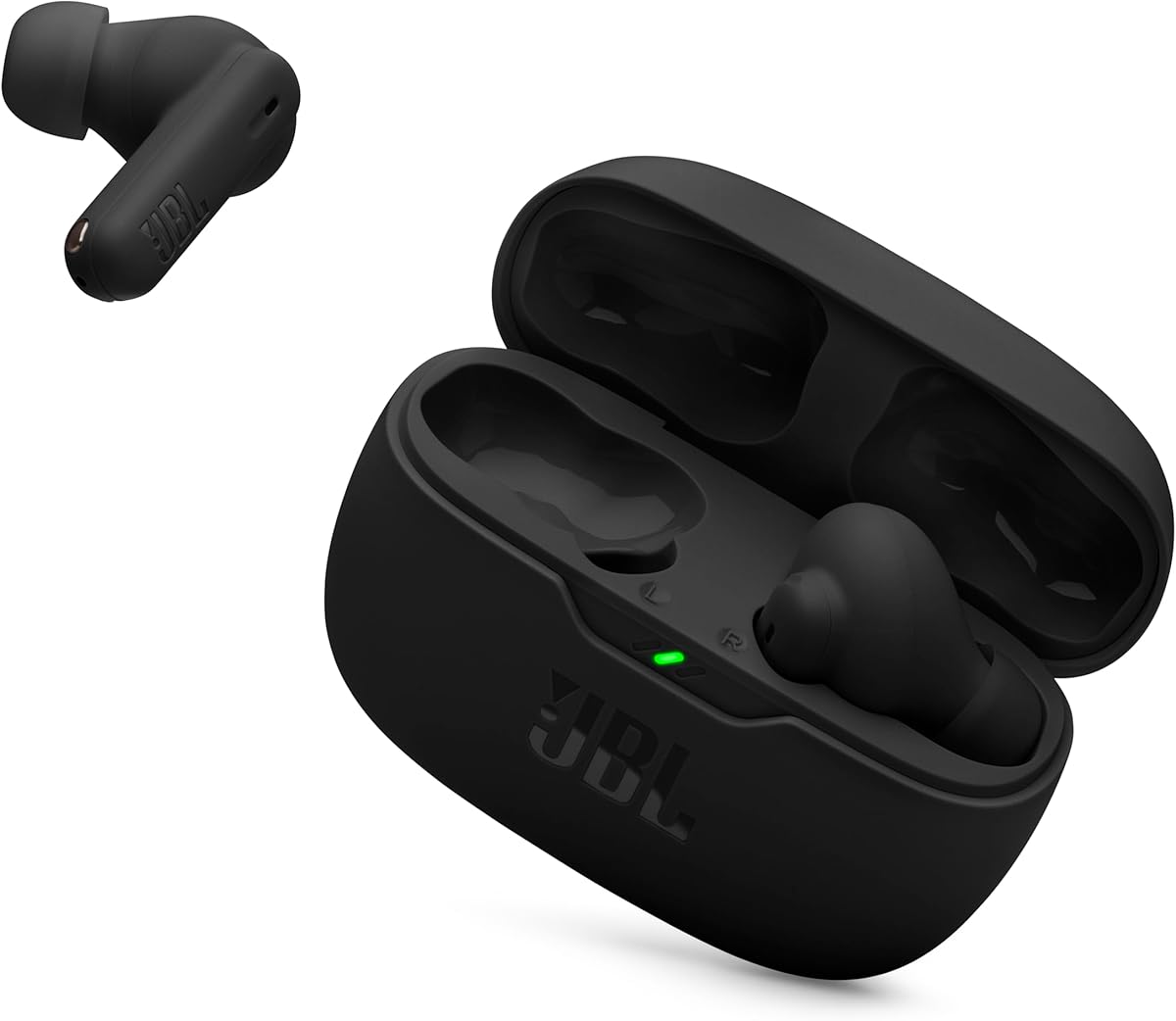
The JBL Vibe Beam 2 features signature Pure Bass sound with 8mm dynamic drivers. Active Noise Cancelling filters distracting noise effectively. Smart Ambient lets you control how much outside world to hear.
We may earn a commission when you buy through this link, at no additional cost to you.
Four microphones provide clear voice transmission for calls. The app allows EQ selection for personalized listening. A quick 10-minute charge offers three hours of playback time.
Users preferring deep bass may find the audio signature heavy. It suits creative professionals needing immersive sound. The battery life supports full workdays with the case.
Buy this for entertainment and work balance. It suits those who enjoy rich audio during media. The ambient mode ensures awareness during meetings.
JBL Pure Bass delivers powerful low-frequency response for immersive audio.
Smart Ambient lets you hear surroundings while keeping earbuds in.
We may earn a commission when you buy through this link, at no additional cost to you.
Designed for distraction-free communication, Dell Pro Plus EB525 offers AI-based noise-cancelling mic. Adaptive ANC helps recognize your voice to filter out background noise. It is ideal for any workspace environment.
We may earn a commission when you buy through this link, at no additional cost to you.
On-device touch controls make switching modes easy. Pinch to handle calls and swipe to adjust volume. The fit is designed for long comfort during extended work hours.
It lacks some consumer-focused features but excels at work clarity. The premium price reflects enterprise-level audio processing. It ensures best-in-class call quality for professionals.
Choose this for corporate environments needing reliable voice tech. It suits office workers prioritizing call clarity over music. The adaptive technology ensures consistent performance.
AI mic intelligently filters background noise to prioritize your voice.
Adaptive ANC adjusts focus based on your surrounding noise levels.
We may earn a commission when you buy through this link, at no additional cost to you.
Panasonic ErgoFit uses a 3.5mm wired connection for consistent audio. The ergonomic design with S/M/L earpads ensures a perfect fit. It provides tonally balanced audio with crisp highs and deep low notes.
We may earn a commission when you buy through this link, at no additional cost to you.
Integrated microphone and call controller enable hands-free use. Compatibility with laptops and phones is direct without pairing. It is ready immediately upon plugging into your device.
Wired limitations restrict movement range. There is no noise cancellation, relying on passive isolation. However, reliability and audio quality are strong for its cost.
Select this for stationary desk work without battery worries. It suits users needing simple plug-and-play audio. The ergonomic fit reduces ear fatigue.
Wired connection ensures audio without battery charging or pairing.
Three earpad sizes help achieve a secure and comfortable fit.
We may earn a commission when you buy through this link, at no additional cost to you.
Antool offers an ergonomic 45° inclined design for comfortable wear. The built-in microphone filters out noise for clear voice calls. It includes a multifunction remote for answering calls and adjusting volume.
We may earn a commission when you buy through this link, at no additional cost to you.
Two packs ensure you have a backup. The 3.5mm plug works universally across devices. Durability is ensured with wear-resistant copper and aluminum foil materials.
Cable limits restrict movement range. Mic quality is adequate but basic. The lightweight build minimizes discomfort during long sessions.
Choose this for budget reliability and backup needs. It suits students and remote workers needing spare pairs. The universal plug simplifies device compatibility.
Weighing only 3 grams per earbud ensures minimal discomfort.
Two pairs ensure you always have a functional backup available.
We may earn a commission when you buy through this link, at no additional cost to you.
Selecting the right earbuds requires balancing microphone quality, battery life, and connectivity stability for professional environments.
Microphone clarity is the most critical factor for conference calls. Look for models with multiple microphones and ENC (Environmental Noise Cancellation) technology to filter background noise. This ensures your voice remains clear even in noisy environments.
Prioritize earbuds with dedicated voice processing or boom mics for professional clarity.
Active Noise Cancellation (ANC) helps you focus on calls by blocking ambient sounds. Models with adaptive ANC automatically adjust to your surroundings for optimal performance. Transparency mode is also useful for hearing colleagues nearby.
Choose models with high-decibel reduction ratings for maximum focus during meetings.
Stable connectivity prevents dropouts during important calls. Bluetooth 5.3 or 5.4 offers better range and lower power consumption. Multipoint connectivity allows simultaneous connection to your laptop and phone.
Verify compatibility with your laptop's Bluetooth standards before purchasing.
Long battery life ensures uninterrupted work through the day. Look for earbuds offering at least six hours of continuous use on a single charge. Cases with quick charging provide extra power when needed quickly.
Prioritize total playtime including case charging for daily reliability.
Comfortable earbuds are essential for long meetings. Ergonomic designs with multiple ear tip sizes ensure a secure fit without fatigue. Lightweight materials reduce strain on ears during extended wear.
Test multiple sizes to find the best seal for noise isolation.
Intuitive controls and companion apps enhance usability. Touch sensors should be responsive without accidental activation. Apps allow customization of EQ settings and ANC modes for different environments.
Choose models with reliable app support for better feature management.
Durability protects your investment over time. IPX ratings indicate resistance to sweat and dust. Sturdy charging cases prevent damage during travel or storage.
Select higher IP ratings for active or varied work environments.
Clear audio playback aids in hearing others during meetings. Balanced sound profiles prevent distortion during loud voice commands. High-quality drivers ensure you catch every word of presentation details.
Look for balanced drivers rather than excessive bass for clarity.
Always ensure your earbuds are fully charged before starting important meetings. Proper placement in your ears optimizes noise isolation and microphone pickup. Adjust ear tips for a snug seal to enhance audio clarity.
Use companion apps to update firmware and customize settings for specific meeting environments. Regular cleaning of ear tips prevents wax buildup that affects sound quality. Keep the charging contacts clean for optimal charging performance.
Store earbuds in their case when not in use to protect them from physical damage. If using wired models, coil cables neatly to avoid tangling. Regularly check connections to ensure uninterrupted audio transmission.
Yes, wireless earbuds with Bluetooth 5.0 or higher work reliably for video conferences. They offer stable connections to laptops and include built-in microphones for voice transmission. Ensure your device supports the same Bluetooth profile for best performance.
Wired earbuds eliminate battery anxiety and connection lag, making them reliable for critical calls. Wireless options offer convenience and mobility. The best choice depends on your need for movement versus consistent connectivity.
Most modern earbuds work with laptops supporting Bluetooth 4.0 or above. If your laptop lacks Bluetooth, use a USB Bluetooth adapter. Always verify OS compatibility for pairing without errors.
Position your earbuds correctly to align the mic with your mouth. Reduce background noise by using noise cancellation features. Ensure the firmware is updated to optimize voice processing features.
A minimum of six hours on a single charge plus case charging is ideal for daily use. Look for models offering total playtime over 30 hours. Fast charging adds flexibility for longer days.
Yes, ANC earbuds are safe for daily use when used responsibly. They reduce the need for high volume in noisy environments. Always take breaks to let your ears rest during long sessions.
This guide highlights top earbuds balancing clarity, comfort, and stability. The Soundcore Liberty 5 Pro Max leads with AI privacy features. Budget-friendly XIAOWTEK offers impressive battery life.
Prioritize microphone quality and connectivity stability over extra features. Ensure the fit is comfortable for long meetings. Multipoint Bluetooth and noise cancellation are essential for professional environments.
Prices fluctuate frequently, so verify current deals before purchasing. Always read user reviews to confirm compatibility with your specific laptop. Choose the model that fits your daily workflow needs best.