
GE BigEZ OneTouch Remote
4.3Editor score
Backlit colorblind friendly buttons
Easy brand preset setup
US technical support included
This guide compares the top easy to use TV remote for seniors to find models with big buttons, simple layouts, and reliable compatibility for elderly users.
Finding the right control for an elderly family member can be challenging. A good remote needs large buttons, clear labels, and simple functions to reduce confusion and frustration during daily use.
We evaluated ten highly rated models based on button size, setup complexity, TV compatibility, and user feedback from caregivers. Our list covers universal remotes and brand specific options designed for accessibility.
Each pick shows key features, pros, and cons to help you choose confidently. Prices and availability change frequently so check current listings before purchasing to ensure you get the best value today.
4.3Editor score
4.2Editor score

4.4Editor score
This side by side comparison highlights the unique features and limitations of each remote. Use this table to quickly identify which model fits your specific TV brand and user needs.


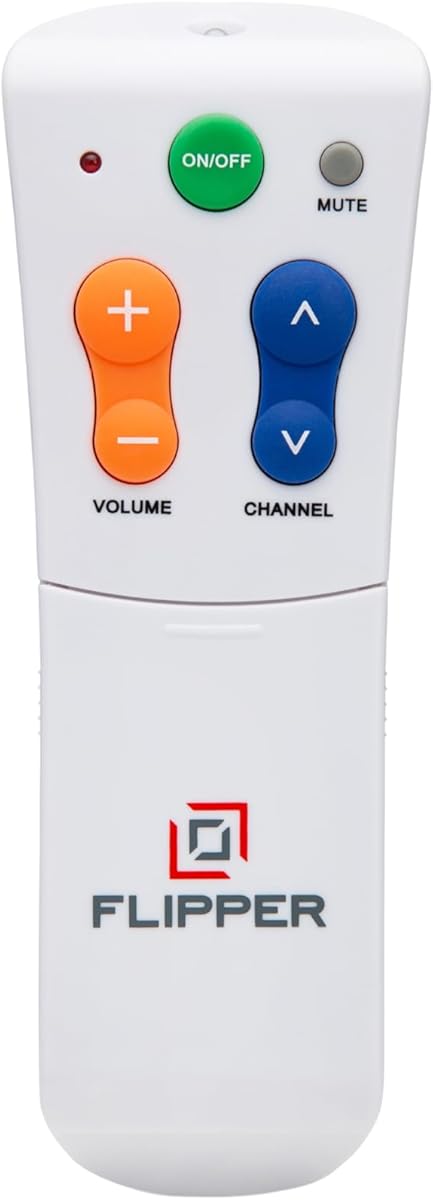
The Flipper Big Button TV Remote stands out with a unique design aimed at seniors with dementia or low vision. It simplifies the interface to just four main buttons while allowing hidden customization for favorite channels.
We may earn a commission when you buy through this link, at no additional cost to you.
This remote uses color coding to make navigation intuitive. Green handles power, orange manages volume, blue controls channels, and gray mutes audio. It also works with cable boxes which reduces the need for multiple remotes.
While it excels at basic TV control, it cannot navigate streaming apps like Netflix or YouTube. This limitation makes it best for traditional broadcast or cable setups rather than smart TV streaming interfaces.
Caregivers will appreciate the peace of mind this remote offers. By limiting options to essential functions, it reduces frustration and helps loved ones maintain independence in their entertainment habits.
Pre-programming up to twenty five favorite channels means users do not have to remember numbers or scroll through hundreds of unwanted options.
Oversized tactile buttons with clear labeling ensure that users with arthritic hands or vision challenges can operate the remote without stress.
We may earn a commission when you buy through this link, at no additional cost to you.
The GE BigEZ OneTouch Remote offers excellent value for those needing a straightforward replacement. It comes preset for five major brands and features backlit buttons to assist users with poor vision.
We may earn a commission when you buy through this link, at no additional cost to you.
Its white body makes it easy to spot on dark furniture. The blue volume and orange channel buttons help colorblind users distinguish functions quickly without confusion.
Setup is simple but requires inserting batteries and pressing brand buttons. The AUX button defaults to Roku but can be reprogrammed for other devices like DVD players.
This remote is ideal for households with standard TVs rather than complex streaming setups. The included U.S. technical support adds a layer of security for users who may need help.
Fully backlit buttons and a high contrast white remote make it easier to find and use in low light conditions.
Preset buttons cover Samsung LG Vizio Sony and Roku TVs which are common in many homes today.
We may earn a commission when you buy through this link, at no additional cost to you.
This remote is specifically engineered for Samsung TV owners who struggle with visibility. The buttons light up for thirty seconds after pressing which is perfect for viewing in dark rooms.
We may earn a commission when you buy through this link, at no additional cost to you.
The package includes a soft silicone cover to protect against drops and spills. A wall hook keeps the remote visible and accessible preventing it from getting lost in couch cushions.
Since it is designed for Samsung TVs it requires no programming. This plug and play experience reduces setup stress for users who may not be tech savvy.
Its ergonomic shape and textured grip make it comfortable to hold. The high signal range ensures reliable performance even when sitting far from the television.
Backlit keys allow users to see clearly without needing to turn on room lights which might disturb others.
The included cover and hook add extra value by protecting the remote and ensuring it is always within reach.
We may earn a commission when you buy through this link, at no additional cost to you.
The EZclicker Big Button Universal Remote focuses on tactile feedback to help users confirm presses. It is designed for seniors and those with limited dexterity who need physical confirmation of inputs.
We may earn a commission when you buy through this link, at no additional cost to you.
This remote features an extra-large enter button which is useful for selecting options on smart menus. The buttons are spaced to prevent accidental presses during use.
It is compact at seven inches long making it easy to grip. The black color is classic but might be harder to find on dark furniture compared to white options.
Setup involves holding mute and volume buttons until the remote programs. This process is straightforward but requires keeping the remote pointed at the TV during pairing.
Buttons provide a tactile snap that lets users know the command was registered without needing to look at the TV.
It works with many top TV brands but excludes streaming sticks and cable boxes which limits its scope.
We may earn a commission when you buy through this link, at no additional cost to you.
This remote prides itself on no setup. Once batteries are inserted it works with supported TVs immediately. This is a major benefit for users who struggle with complex pairing processes.
We may earn a commission when you buy through this link, at no additional cost to you.
It covers a wide range of brands including Samsung LG Vizio Sony Hisense Philips and Panasonic. This broad compatibility makes it a safe choice for many households.
However like many in this category it does not work with streaming devices or cable boxes. It is strictly for basic TV control functions like power volume and channel changing.
The manufacturer offers a ninety-day warranty and replacement service. This support provides peace of mind that if the remote fails users can get a replacement quickly.
Inserting batteries and pointing at the TV is all that is required to start using the remote right away.
Support for multiple major manufacturers means it is likely to work with whatever TV is currently in use.
We may earn a commission when you buy through this link, at no additional cost to you.
The Large Button TV Remote Control emphasizes ergonomic design and clear layout. It avoids clutter and focuses on essential buttons to reduce confusion for elderly users.
We may earn a commission when you buy through this link, at no additional cost to you.
Its buttons are extra-large to reduce misclicks. This is especially helpful for users with tremors or weak hands who need more surface area to press buttons accurately.
The remote works with most major TV brands and functions as a traditional replacement. It does not support voice commands or advanced smart features which keeps it simple.
Built with sturdy construction it is designed to withstand drops. The lightweight body ensures it does not feel heavy during extended use.
Extra-large buttons are spaced well apart to minimize accidental presses of wrong keys.
Sturdy construction ensures the remote lasts longer even in busy living rooms where drops may happen.
We may earn a commission when you buy through this link, at no additional cost to you.
Philips offers a remote with One Touch setup which simplifies the pairing process. It is designed for seniors who need a quick fix without navigating menus.
We may earn a commission when you buy through this link, at no additional cost to you.
The remote includes a backlit keypad and color buttons for visibility. It supports Roku boxes and soundbars making it slightly more versatile than basic TV remotes.
However it has a lower rating compared to other models. Users should note that it covers a specific list of brands and may not work with others.
U.S. based support is available for troubleshooting. This can be helpful if the remote does not pair correctly during the initial setup phase.
Programming involves inserting batteries and pressing a button to match your TV brand quickly.
The backlit keys help users find buttons in low light environments.
We may earn a commission when you buy through this link, at no additional cost to you.
This remote provides a straightforward solution for basic TV control. It features large buttons and a simple layout that reduces confusion for elderly users.
We may earn a commission when you buy through this link, at no additional cost to you.
It works with most major brands but excludes streaming devices and cable boxes. Users need to verify their setup before purchasing to ensure compatibility.
The tactile feedback on buttons helps users know they have pressed them. This is important for those who might not feel the click clearly.
While it has a lower rating it still serves as a functional replacement for traditional TVs. It is best for users who need a very simple tool without extra features.
By limiting functions to essential controls the remote avoids overwhelming the user with too many options.
It covers power volume and channel changes which are the primary needs for most seniors.
We may earn a commission when you buy through this link, at no additional cost to you.
This version of the EZclicker remote is designed to be extra simple. It maintains tactile feedback and large buttons but is more compact than some other models.
We may earn a commission when you buy through this link, at no additional cost to you.
The six inch size makes it easy to store or carry around the house. This is helpful for users who may not want a large bulky device.
It works with top TV brands but not cable or streaming boxes. This limitation should be considered if the user relies heavily on cable services.
The setup is similar to other EZclicker models using volume and mute buttons. It is a practical gift option for grandparents needing a simpler control.
Smaller dimensions make it easier to hold for users with smaller hands.
Tactile buttons provide physical feedback which increases confidence when pressing controls.
We may earn a commission when you buy through this link, at no additional cost to you.
The Anderic RR1004 remote features glow-in-the-dark keys which are useful in low light settings. It is often used in care facilities where simplicity is key.
We may earn a commission when you buy through this link, at no additional cost to you.
It has a minimalist design with only essential controls. This reduces the chance of accidental presses and confusion for residents.
Users can use a learning function to copy commands from another remote. However this requires line of sight and can be tricky for independent users.
Pre-programmed for LG TVs it works well with compatible models. Other brands may need setup which could be challenging without help.
Glowing keys ensure the remote is visible even when room lights are off.
The learning feature allows customization but requires careful setup to work correctly.
We may earn a commission when you buy through this link, at no additional cost to you.
Selecting the right remote involves considering button size, compatibility, and ease of setup. This guide breaks down the key factors to help you make an informed decision.
Large buttons are essential for seniors with limited dexterity or vision. Look for models with extra-large buttons that are spaced apart to prevent accidental presses. A simple layout without unnecessary functions reduces confusion and makes daily use easier.
Prioritize remotes with clear labeling and tactile feedback to help users confirm their inputs without looking closely at the device.
Check which TV brands the remote supports before purchasing. Some remotes are universal while others work only with specific brands like Samsung or LG. Ensure the remote matches your current TV and any cable boxes or streaming devices in use.
Remember that many simple remotes do not work with streaming apps like Netflix or YouTube so verify this if your TV relies heavily on streaming.
Seniors often benefit from remotes that require minimal or no setup. Models that come pre-programmed or use simple pairing processes save time and frustration. Avoid remotes that require complex code entry or multiple steps to program.
Look for features like one-touch setup or universal compatibility that allows immediate use after inserting batteries.
Backlit buttons or glow-in-the-dark keys are valuable for low light viewing environments. Color-coded buttons can also help distinguish functions like volume from channels quickly. High contrast designs ensure the remote itself is easy to spot on furniture.
Choose remotes with features that assist with night use to avoid the need to turn on additional room lighting.
A lightweight and ergonomic design reduces strain on the hands during use. The remote should be comfortable to grip and easy to hold for extended periods. Consider the shape and size to ensure it fits well in smaller hands.
Prioritize models that feel balanced and do not have sharp edges that could cause discomfort over time.
Seniors may accidentally drop remotes so a sturdy build is important. Look for remotes made from high-quality plastic or rubberized materials that can withstand impacts. Protective covers can also add an extra layer of safety.
Choose remotes with a durable construction to ensure longevity and reduce the need for frequent replacements.
Long battery life is convenient for reducing the frequency of battery changes. Most remotes use AA or AAA batteries so ensure replacements are readily available. Some models may offer better efficiency depending on usage habits.
Check the battery requirements and consider models that consume less power to minimize maintenance efforts.
Reliable customer support can be helpful if setup issues arise. Remotes with technical support or clear instruction guides add value. Warranty periods indicate the manufacturer's confidence in product durability.
Look for remotes that offer support options such as online videos or phone assistance for troubleshooting.
Start by inserting fresh batteries and following the setup instructions provided. Most remotes require pointing at the TV and pressing specific buttons to pair.
Keep the remote clean and dry to prevent damage from spills or dust. Store it in a visible spot like a table or wall hook to avoid losing it.
Test all buttons after setup to ensure they respond correctly. If issues arise contact customer support for troubleshooting assistance.
Many are compatible with basic TV functions like power volume and channel on Smart TVs. However they often cannot navigate streaming apps such as Netflix which may require a different controller.
Some remotes come pre-programmed and work out of the box. Others require simple steps like pressing brand buttons or holding volume buttons for pairing.
Check the compatibility list to ensure your TV brand is supported. If it is not listed you may need to find a different model that includes your brand.
Some remotes support cable boxes but others only work with TVs. Verify the product description to confirm if it supports your cable provider.
Locate the battery compartment on the back and slide it open. Insert new batteries matching the polarity marks and close the cover securely.
Many manufacturers offer warranties ranging from 90 days to a year. Check the product details for specific terms and replacement policies.
The Flipper GE BigEZ and Backlit Samsung remotes offer strong options depending on your specific needs. Each provides distinct features that simplify daily TV control for elderly users.
Prioritize button size and setup ease when choosing. These factors greatly impact comfort and usability for those with vision or dexterity challenges.
Prices change frequently so verify current availability before purchasing to ensure you get the best value for your choice.