
WD 2TB My Passport
4.6Editor score
Slim Durable Design
Password Protection
Included Backup Software
This guide compares the top 10 encrypted secure external hard drives available in October 2026 to help you find the perfect secure storage solution.
In an era where digital privacy is paramount, finding a reliable encrypted secure external hard drive is essential for protecting sensitive information from unauthorized access and theft.
We have carefully evaluated the market to compare ten leading models based on their encryption standards, durability, ease of use, and overall performance to provide you with an expert overview.
Each selection highlights unique strengths for different needs, and while we strive for accuracy, always check current listings for the most up to-date availability and pricing details.
4.6Editor score

4.5Editor score

4.0Editor score
The following comparison table provides a side-by-side look at the key specifications and features of the top ten encrypted secure external hard drives currently available.



The Apricorn 1TB Aegis Padlock stands out as a top choice for those needing robust security without software dependencies. It holds a strong rating from users who value its independence from host computer security. The hardware-based encryption ensures data remains safe even when connected to compromised machines.
We may earn a commission when you buy through this link, at no additional cost to you.
Its military-grade FIPS PUB 197 validated encryption algorithm provides a high level of trust for sensitive data storage. The USB 3.0 connection offers transfer speeds that are significantly faster than older standards. The sealed epoxy coating protects the drive from physical tampering and environmental hazards.
While the device is highly secure, the keypad can feel small for users with larger fingers. The price is higher than standard unencrypted drives but reflects the advanced security features included. The brute force self-destruct feature adds an extra layer of peace of mind.
This drive is ideal for professionals who need to transport sensitive data across various systems. If you require a balance of speed, portability, and high-grade security, this model is a reliable recommendation. It ensures your data remains protected wherever you go.
Since no software is required, the drive works securely on any computer without needing admin rights or installation.
The tough epoxy coating and brute force self-destruct mechanism protect the data against physical attacks and guessing.
We may earn a commission when you buy through this link, at no additional cost to you.
The Apricorn 2TB Aegis Padlock Fortress delivers enterprise-grade security with its FIPS 140-2 Level 2 validation. This makes it suitable for government or corporate environments where strict compliance is required. The 256-bit encryption ensures data is unreadable without the correct PIN.
We may earn a commission when you buy through this link, at no additional cost to you.
It features an integrated USB cable which reduces the risk of losing separate cables during travel. The design is rugged and made in the USA, which appeals to buyers looking for domestic manufacturing quality. The wear-resistant keypad ensures long-term usability.
The lack of software configuration might be a downside for users who want deep customization of security settings. The drive is physically larger than some competitors which might reduce portability. However, the robust build quality compensates for the size in many scenarios.
This is a great option for those who need to store large amounts of data securely while maintaining compliance with strict security standards. The hardware encryption provides a solid foundation for protecting intellectual property and confidential records.
The FIPS 140-2 Level 2 validation makes it easier to meet regulatory requirements for data security.
The integrated USB cable ensures you always have what you need to connect the drive securely.
We may earn a commission when you buy through this link, at no additional cost to you.
This drive is designed for maximum security with FIPS 140-2 Level 3 validation which offers the highest protection for portable storage. It supports separate admin and user modes allowing for different levels of access control on the same device. The 5TB capacity is perfect for large data backups.
We may earn a commission when you buy through this link, at no additional cost to you.
The two read-only modes provide an extra layer of safety by preventing accidental overwrites or unauthorized changes. Brute-force defense mechanisms ensure that repeated guess attempts are blocked effectively. The rugged design ensures it survives drops and rough handling during transit.
The high price is a significant barrier for average consumers but necessary for high-security applications. The weight and size might be cumbersome for daily commuters. However, for enterprise users, these factors are often secondary to the security benefits.
Choose this if you need to protect critical infrastructure data or require the highest level of government-standard encryption. It provides peace of mind knowing that even in the event of physical theft, the data remains inaccessible to attackers.
Separate admin and user modes allow administrators to manage the drive while users only access their permitted files.
With 5TB of space, you can store vast amounts of data without worrying about running out of room quickly.
We may earn a commission when you buy through this link, at no additional cost to you.
The WD 2TB My Passport is an excellent budget-friendly option for users who want basic password protection and hardware encryption. It holds a high rating due to its reliability and ease of use with standard home computers. The slim design makes it very easy to carry in a pocket.
We may earn a commission when you buy through this link, at no additional cost to you.
It includes backup software that helps defend against ransomware which is a critical feature for modern home users. The hardware encryption ensures that your files are secured even if the drive is lost. The 3-year warranty provides confidence in the longevity of the product.
While it does not offer the same level of military-grade encryption as other models, it is sufficient for general privacy needs. The software dependency means it might not work as easily on locked-down corporate systems. However for casual users this is often acceptable.
This is a top pick for anyone looking to secure their photos and documents without spending a fortune. It balances cost and security well making it a smart choice for personal backup needs.
The included management software makes it easy to back up files and protect them from malicious software attacks.
A 3-year limited warranty ensures that you are covered if the drive fails within the first three years.
We may earn a commission when you buy through this link, at no additional cost to you.
This larger capacity version of the My Passport offers the same security features in a spacious 5TB package. It is ideal for users who need to store massive media libraries while maintaining password protection. The hardware encryption adds a layer of security against unauthorized access.
We may earn a commission when you buy through this link, at no additional cost to you.
The included software helps protect your data from ransomware which is a growing threat for home and small business users. The slim durable design ensures it fits easily into a backpack or travel bag. It is compatible with USB 3.1 and 3.0 ports.
The cost per gigabyte is very low making this an economical choice for large storage needs. However it requires software installation to manage passwords which can be an inconvenience. The speed may vary based on how full the drive is.
If you need to store a large amount of data securely without paying enterprise prices this is a great fit. It offers a reliable way to keep your valuable files safe from accidental loss or theft.
With 5TB you can store thousands of videos and photos while keeping them protected with a password.
Even at this larger capacity the drive remains slim enough to carry around easily with your laptop.
We may earn a commission when you buy through this link, at no additional cost to you.
The Apricorn 2TB Aegis Padlock DT offers flexible security settings that can be configured to meet specific organizational needs. It features separate admin and user modes which help manage access levels effectively. The 256-bit encryption ensures strong protection for your stored data.
We may earn a commission when you buy through this link, at no additional cost to you.
You can configure the brute-force defense settings to decide how many attempts are allowed before the drive locks down. Data recovery PINs provide a way to access data if the main password is lost or forgotten. The USB 3.0 interface ensures decent transfer speeds.
The lack of a separate software utility means configuration happens directly on the device which is secure but less intuitive. The keypad requires accurate input which can sometimes be frustrating if you mistype. However it avoids software vulnerabilities on the host machine.
This drive is a strong option for businesses that want to enforce security policies on external devices. The ability to customize brute-force defense adds a tailored approach to security that many users appreciate.
The configurable brute-force defense allows you to set strict rules on how many guesses are allowed before a lockout.
Recovery PINs ensure you do not lose your data forever if you forget your primary access credentials.
We may earn a commission when you buy through this link, at no additional cost to you.
This desktop model brings the security of the Aegis Padlock family to a fixed location with a solid aluminum enclosure. It is FIPS 140-2 Level 2 validated ensuring it meets rigorous security standards for government and enterprise use. The TAA compliance makes it eligible for government procurement.
We may earn a commission when you buy through this link, at no additional cost to you.
The separate admin and user modes allow for flexible management of access permissions on the device. Data recovery PINs ensure that access is not permanently lost if the primary password is forgotten. The brute-force defense is programmable to suit security needs.
Because it is designed for desktop use it may not be as portable as other options. The need for a USB connection limits where you can place the drive. However the build quality and security features are robust for a stationary setup.
Use this drive if you need high security for a desktop computer in an office environment. It provides peace of mind with its hardware encryption and compliance certifications.
The solid aluminum enclosure protects the drive components from physical damage and tampering.
TAA Compliant and FIPS validated means it meets the strict requirements for government and corporate contracts.
We may earn a commission when you buy through this link, at no additional cost to you.
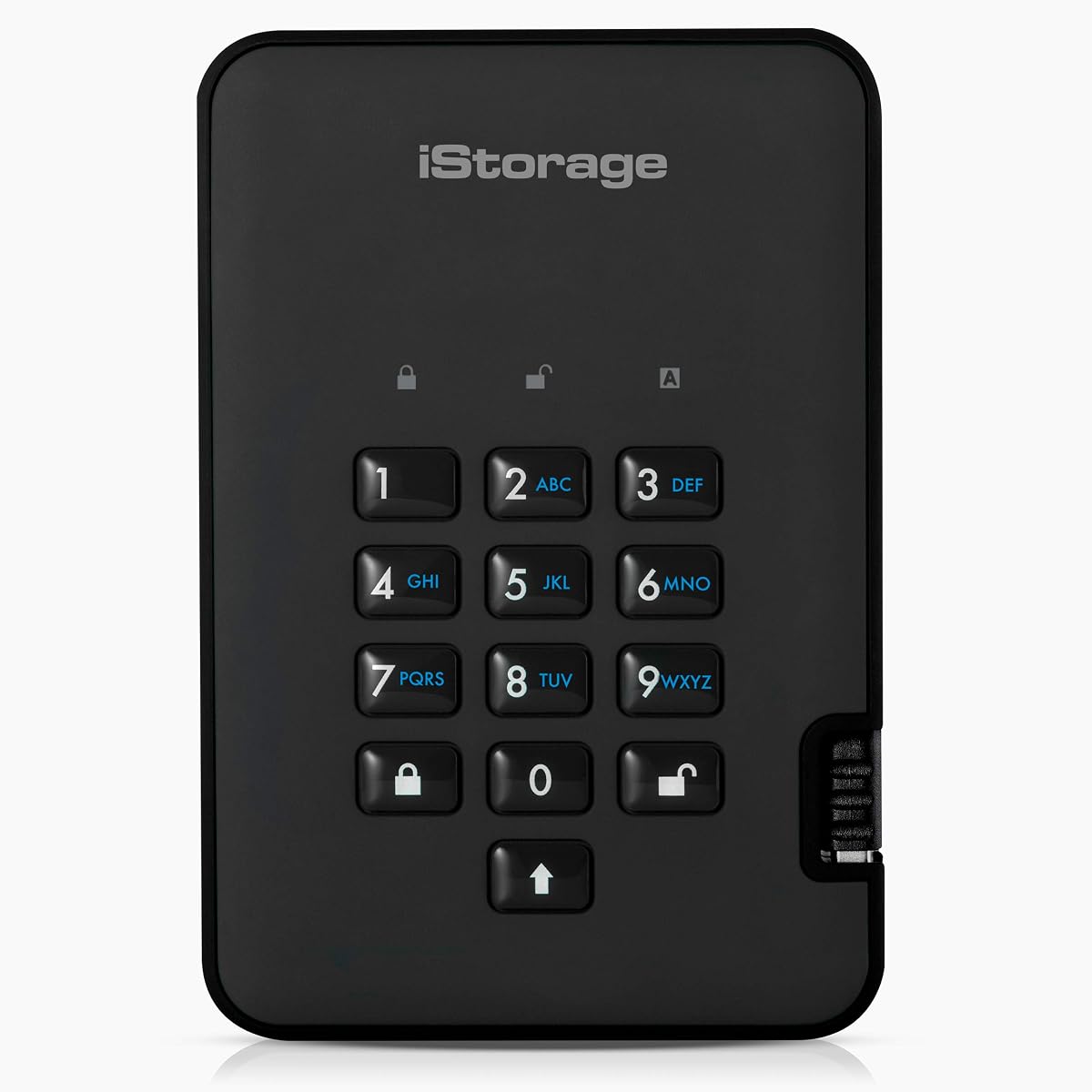
The iStorage diskAshur2 offers robust security combined with a rugged IP56 certified design that resists dust and water. This makes it a strong choice for users who work in harsh environments or travel frequently. The Common Criteria EAL 5+ certification ensures the security microprocessor is verified.
We may earn a commission when you buy through this link, at no additional cost to you.
Data is encrypted in real time using AES-XTS 256-bit hardware encryption which does not require any software installation. It is compatible with almost any operating system or device with a USB port. The transfer speeds are lightning fast with USB 3.2 support.
The rating is slightly lower than some competitors possibly due to the price point or specific usability factors. The keypad might be small for some users which can make entry frustrating. However the hardware security is undeniable.
This drive is perfect for field researchers or military personnel who need protection against both digital and environmental threats. The hardware encryption ensures that data remains safe even if the device is exposed to water or dirt.
The IP56 certification means you can use the drive in dusty or wet conditions without worrying about damage.
No software is required so the drive works on Windows, macOS, Linux, and mobile devices seamlessly.
We may earn a commission when you buy through this link, at no additional cost to you.
The DataLocker DL4 FE is a premium choice offering FIPS 140-3 validation which is one of the highest security standards available. It uses a solid state drive for faster data access and better durability against physical shock. The touchscreen interface makes entering complex passwords much easier.
We may earn a commission when you buy through this link, at no additional cost to you.
It supports remote management via SafeConsole which is ideal for enterprises that need to monitor and audit their devices. The IP64 rating protects the drive from dust and water allowing use in varied conditions. TAA compliance ensures it meets government procurement standards.
The price is significantly higher than standard drives but reflects the advanced technology included. The complexity of the remote management features might be overkill for personal use. However for high security needs it is a top tier option.
Choose this if you need an uncompromising level of security with modern connectivity options. It is a reliable choice for government agencies or large enterprises handling critical data.
As an SSD it offers much faster read and write speeds compared to traditional hard disk drives.
The ability to manage the drive remotely provides IT administrators with powerful control over data security.
We may earn a commission when you buy through this link, at no additional cost to you.
This model combines the speed of a solid state drive with the robust security of the Apricorn Aegis series. It offers a high capacity of 4TB which is great for large media files or enterprise datasets. The 256-bit encryption ensures data remains private without software.
We may earn a commission when you buy through this link, at no additional cost to you.
With read and write speeds up to 350 MBPS this drive is significantly faster than traditional portable hard drives. The separate admin and user modes allow for flexible management of access permissions. It includes a programable brute-force defense to stop attackers.
The price is high reflecting the cost of SSD technology and advanced security features. The need for keypad batteries might be a minor inconvenience for some users. However the speed and reliability are hard to match.
If you need a secure drive that is also fast enough for video editing or large file transfers this is an excellent choice. It is highly recommended for those who prioritize speed as well as encryption.
The SSD provides faster access times and better resistance to physical shock than traditional mechanical hard drives.
Separate admin and user modes ensure that regular users cannot change security settings or access admin data.
We may earn a commission when you buy through this link, at no additional cost to you.
Selecting the right encrypted secure external hard drive requires understanding several key factors that ensure your data remains protected and accessible only to authorized users.
Look for drives that use industry-standard encryption algorithms like 256-bit AES to ensure your data cannot be easily deciphered by unauthorized parties. Hardware encryption is generally preferred over software encryption because it does not rely on the host computer's security which might be compromised.
Choosing a drive with verified encryption standards ensures your data remains private even if the device is lost or stolen.
Certifications such as FIPS 140-2 or FIPS 140-3 indicate that the device has undergone rigorous testing by government agencies to meet specific security requirements. These are essential for government contractors or organizations that must adhere to strict data protection regulations.
Always check for specific validation levels like Level 2 or Level 3 to ensure the drive meets the security protocols required by your industry.
Consider whether you need a portable drive for travel or a larger desktop model for stationary use. Rugged designs with water and dust resistance like IP56 or IP64 ratings are crucial if you plan to use the drive in harsh environments.
A durable build protects the internal components from physical damage which can lead to data loss regardless of the encryption status.
Drives that operate without requiring software installation are often more secure as they reduce the risk of malware on your computer. A built-in keypad allows for PIN entry directly on the drive which is convenient for quick access without logging in to a PC.
User-friendly interfaces such as touchscreens make entering complex passwords easier and more secure than typing on a standard keyboard.
It is important to choose a drive that offers data recovery PINs or administrative override features. This ensures that you do not lose access to your data if you forget your primary password which can happen with any secure system.
Having a clear recovery process in place prevents data loss due to accidental lockout or forgotten credentials.
USB 3.0 or USB 3.1 interfaces provide fast data transfer speeds which are important if you deal with large files frequently. SSD based drives are generally faster and more durable than traditional mechanical hard drives which have moving parts.
Select a connection type that matches the ports available on your devices to ensure optimal performance and compatibility.
Assess how much data you typically need to store and choose a drive with sufficient capacity to avoid constantly transferring files. Higher capacity drives often come at a higher price point so balance your storage needs with your budget.
Ensuring you have enough space prevents the need to buy additional drives which can complicate your security management.
A strong warranty provides peace of mind and ensures that you are covered if the device fails within the specified period. Check if the manufacturer offers responsive customer support which is helpful if you encounter issues with setup or access.
Always verify the warranty terms and the manufacturer's reputation for support to ensure long-term reliability and service.
To use your encrypted drive properly first ensure the battery is charged or connected to a power source if it has a keypad. Enter your PIN directly on the device to unlock it before connecting it to your computer via the USB cable.
Regularly update your PIN and use complex passwords to prevent unauthorized access attempts. Always safely eject the drive from your computer before disconnecting the cable to prevent data corruption or loss.
Store the drive in a safe dry place when not in use to protect it from environmental hazards. If you lose the drive or forget your PIN consult the manufacturer for recovery procedures using your backup PINs if available.
Hardware encryption uses a dedicated processor on the drive to encrypt data meaning the computer does not process the data. Software encryption relies on the computer to do this which can be slower and less secure if the computer is compromised.
Many of the top models like the Apricorn Aegis series are software free and work immediately upon PIN entry. Some budget models may require software for password setup or backup features so check the product details before buying.
Yes most encrypted drives are compatible with both Windows and macOS systems. However it is always good to check the specific compatibility list to ensure full functionality with your operating system.
Most manufacturers provide a recovery PIN or administrative override to prevent permanent data loss. Keep this recovery information in a separate secure location to regain access if you forget your main PIN.
While not strictly necessary for casual users FIPS certified drives offer the highest level of encryption security. If you handle sensitive personal data or financial information a certified drive provides extra peace of mind.
Choose a rugged model with water and dust resistance like an IP rating. Store the drive in a protective case when traveling to prevent drops or scratches that could damage the internal components.
Generally yes because the encryption process does not consume the computer's CPU resources. Hardware encrypted drives often have better transfer speeds since the computer does not need to process the encryption during data transfer.
Yes these drives are excellent for secure backups as they protect your data from unauthorized access. Many models come with backup software that simplifies the process of creating secure copies of your files.
We have reviewed ten top options ranging from budget friendly models to high end enterprise grade devices. Whether you need a portable solution for travel or a secure drive for critical data there is a choice for every need.
Prioritize features like hardware encryption and FIPS validation if you require strict data protection. For casual users a password protected drive with standard encryption might be sufficient to keep your files safe.
Prices and availability change frequently so always check the current listings for the best deals. Investing in a secure drive is a smart move to protect your digital assets in an increasingly connected world.