
DKE Desktop Computer Power Switch
4.7Editor score
2M cable length included
Simple adhesive mounting
Compact lightweight design
Finding the right External PC Power Button can transform how you interact with your desktop computer setup. Whether your tower is hidden under a desk or placed in a hard to reach location, an external switch provides immediate access without needing to crawl around cables.
We evaluated ten top rated products based on compatibility with standard ATX motherboards, cable length, installation ease, and additional features like USB hubs or wireless control. Our analysis ensures you find a reliable solution that fits your specific build needs.
Each selection below highlights key strengths and potential trade offs to help you make an informed decision. Prices and availability can change rapidly on online marketplaces, so checking current listings is recommended before finalizing your purchase today.
4.7Editor score

4.8Editor score

4.5Editor score
As an Amazon Associate we earn from qualifying purchases.
The following table provides a side by side comparison of all ten selected products. Review key specifications like cable length, included accessories, and unique features to determine which model aligns best with your specific computer hardware requirements and usage scenarios.





This PC Power Button Desktop model stands out as a top choice for users needing reliable external switching. With a solid rating of 4.6 stars, it delivers consistent performance for home users and DIY enthusiasts alike.
We may earn a commission when you buy through this link, at no additional cost to you.
The 1.7 meter cable provides ample length to route the switch to a convenient location without stretching. The included 1 to 2 splitter ensures you can use both the original and new button simultaneously, offering maximum flexibility for your setup.
Installation is straightforward using the provided adhesive stickers, though users should ensure the surface is clean for best results. The only minor limitation is that the adhesive might struggle on textured or oily surfaces, requiring double sided tape for some cases.
This model is ideal for anyone wanting a simple, effective solution to relocate their power button. It balances price, features, and ease of use better than many competitors in this category.
The included splitter allows you to keep your original chassis button functional while adding the new external one.
Simply connect the connectors to the motherboard headers and use the adhesive to secure the switch in place.
We may earn a commission when you buy through this link, at no additional cost to you.
The PC Power Button Splitter model offers enhanced functionality by including reset switch and HDD LED capabilities. This makes it a robust choice for users who want more than just power control on their desktop setup.
We may earn a commission when you buy through this link, at no additional cost to you.
With a 2 meter cable, you gain significant reach for placing the button exactly where you need it. The inclusion of a splitter board ensures compatibility with existing chassis buttons, allowing for a seamless transition without losing original functionality.
While the extra features are beneficial, they do introduce more wiring that needs careful management. The splitter board can add some bulk near the connection point, which might be noticeable in compact cases.
This product is best suited for users who need reset functionality or want to retain HDD lighting. It provides a comprehensive solution for managing computer power and status indicators from a single external point.
Beyond power, this switch includes reset and HDD LED connections for a complete front panel experience.
The 2 meter cable ensures you can reach across large desks or to hard to reach areas easily.
We may earn a commission when you buy through this link, at no additional cost to you.
The PC Power Button with 118 inch cable is designed for situations where extreme reach is required. Its rating of 4.6 stars reflects satisfaction with its ability to connect distant setups reliably.
We may earn a commission when you buy through this link, at no additional cost to you.
The 118 inch cable allows you to place the switch almost anywhere in your workspace, making it perfect for under desk mounts or rack installations. It uses a standard 4-pin connector compatible with most motherboards.
One trade-off is the bulkiness of such a long cable, which may require additional management to keep your desk tidy. The adhesive stickers work well on smooth surfaces but may need reinforcement on others over time.
This model is the best choice for users needing maximum flexibility in switch placement. It is particularly useful for test benches or setups where the computer tower is far from the desk.
The extra long cable ensures you can position the switch exactly where it is most convenient for you.
Ideal for open test benches where the motherboard is not inside a standard case.
We may earn a commission when you buy through this link, at no additional cost to you.
The OwlTree Desktop Computer Power Button earns the highest rating of 4.8 stars for its quality build and thoughtful features. It combines practicality with a sleek design that fits well in modern setups.
We may earn a commission when you buy through this link, at no additional cost to you.
Constructed with acrylic material, this switch offers a premium look that many users appreciate. The inclusion of a reset button and hard disk indicator adds utility beyond simple power control.
The cable length is slightly shorter than some competitors at 1.6 meters, which may limit placement options in larger rooms. Some users might prefer metal construction over plastic for long term durability.
This is a top pick for those valuing aesthetics and functionality. If you want a switch that looks good and offers complete control features, this model is a strong contender.
The acrylic body provides a polished look that complements high-end desk setups.
Includes both power and reset buttons along with status lights for full visibility.
We may earn a commission when you buy through this link, at no additional cost to you.
The External PC Power Button with 2M cable distinguishes itself with RGB LED lighting. This feature adds a nice ambient glow to your workspace without needing software configuration.
We may earn a commission when you buy through this link, at no additional cost to you.
It connects reliably to standard ATX headers and uses a safe low voltage design. The 2 meter cable ensures enough reach for most desk setups while maintaining a clean connection.
Users cannot customize the RGB colors as it has a fixed breathing effect. Additionally, it requires a USB header for power if you want the light to stay on, which some motherboards may lack.
This model is perfect for users wanting visual flair alongside power control. It is a simple way to add style to your setup while solving accessibility issues with your computer tower.
The built-in RGB effect provides a clean, breathing light that enhances your desk ambiance.
Designed with low voltage to ensure safe operation without risk to your system components.
We may earn a commission when you buy through this link, at no additional cost to you.
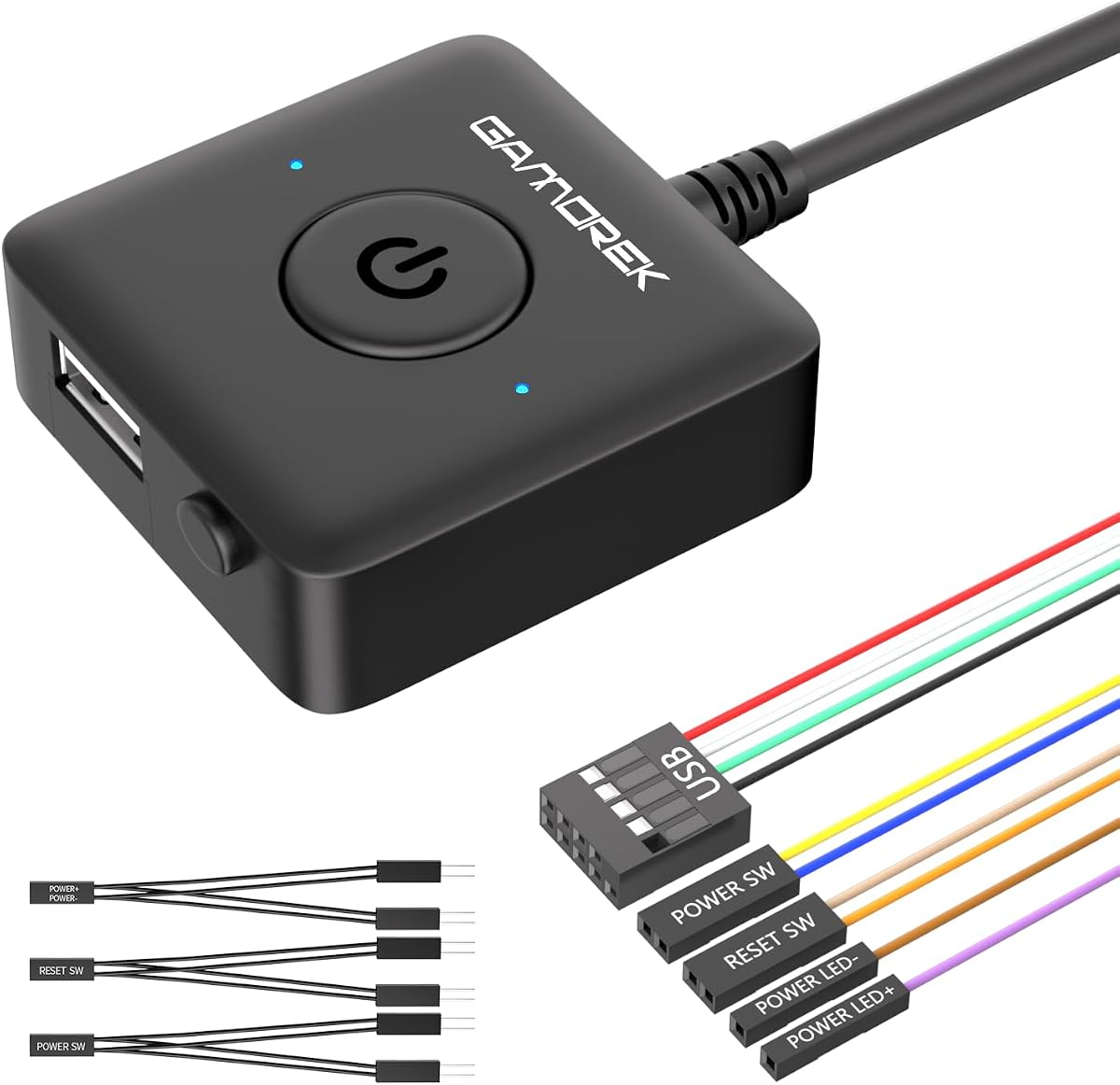
This PC Power Button model stands out by including USB functionality alongside power control. With a rating of 4.7 stars, it offers a robust solution for users needing extra USB access.
We may earn a commission when you buy through this link, at no additional cost to you.
The USB connection allows you to plug in flash drives or other devices directly. The included PCI bracket helps keep your build organized and provides a secure mounting point for the switch.
You must have a 9-pin USB 2.0 header available on your motherboard for this feature to work. This requirement limits compatibility with some older or specific motherboard designs.
This is the best choice for users needing convenient USB access. It effectively combines a power switch with a mini USB hub, reducing the need for additional adapters or extensions.
Access USB devices easily from your desk by connecting a flash drive or card reader to the switch.
The PCI bracket ensures the switch is mounted securely without cluttering the desk surface.
We may earn a commission when you buy through this link, at no additional cost to you.
The Computer PC Power Button with 4 Port USB 3.0 Hub is designed for users needing fast data access. It combines power control with high-speed USB connectivity for efficient workflow.
We may earn a commission when you buy through this link, at no additional cost to you.
With USB 3.0 support, you can transfer files quickly or connect high-demand devices like external drives. The four ports provide ample connectivity for multiple peripherals without additional hubs.
The cable length is shorter at 1.2 meters, which may restrict placement compared to other models. The hub function requires a USB header connection, limiting flexibility if headers are unavailable.
This model is ideal for power users who need fast USB access. It simplifies your desk by combining power and high-speed USB into one accessible switch unit.
USB 3.0 support ensures fast data transfer for external drives and other peripherals.
Four ports allow you to connect multiple devices without needing extra space or adapters.
We may earn a commission when you buy through this link, at no additional cost to you.
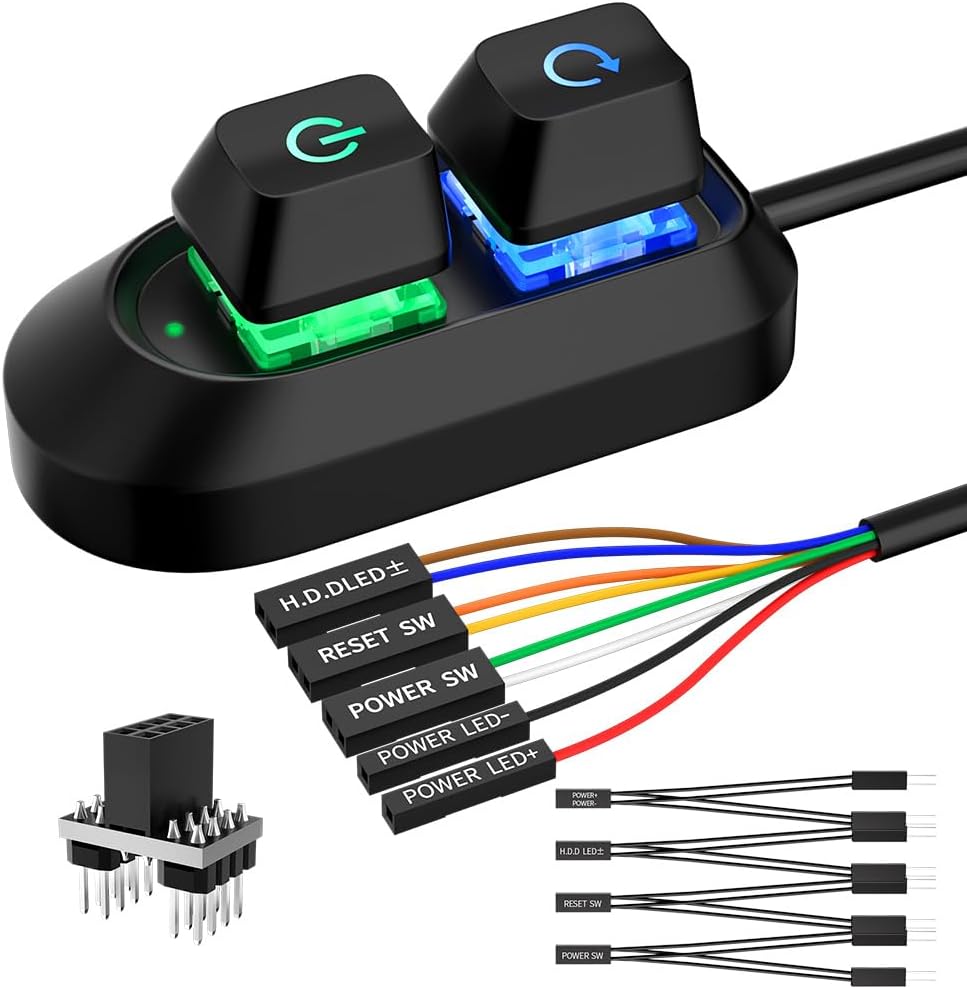
The DKE Desktop Computer Power Switch is an excellent budget option that does not compromise on quality. Its high rating of 4.7 stars shows strong user satisfaction with its reliable performance.
We may earn a commission when you buy through this link, at no additional cost to you.
It features a 2 meter cable for flexible placement and a lightweight design that stays out of the way. The simple adhesive mounting makes installation quick and easy for any user.
The switch lacks extra features like reset or LEDs, focusing purely on power functionality. This simplicity means less to go wrong but fewer options for customization or status indicators.
This is the top pick for users needing a straightforward power switch at a lower price. It is perfect for basic setups where cost and reliability are the primary concerns.
Focused solely on power control, this switch minimizes failure points and ensures consistent operation.
The small footprint ensures it does not clutter your desk space while remaining easy to press.
We may earn a commission when you buy through this link, at no additional cost to you.
The PC Power Button Aluminum model offers a durable metal construction that stands up to daily use. With a rating of 4.6 stars, users appreciate the sturdy build and complete feature set.
We may earn a commission when you buy through this link, at no additional cost to you.
The aluminum casing provides a premium feel and increased durability compared to plastic options. It includes a reset switch and splitter board for full compatibility with existing chassis buttons.
The metal body is heavier than plastic switches, which may require more secure adhesive placement to prevent movement. It is also slightly larger than some alternatives, taking up more desk space.
This model is best for users wanting a rugged, long-lasting switch. If you value build quality and need complete control features, this aluminum switch is a solid investment.
The aluminum casing offers superior durability and a high-quality feel compared to standard plastic switches.
Includes both power and reset buttons with a splitter for seamless integration with your existing setup.
We may earn a commission when you buy through this link, at no additional cost to you.
The External PC Power Button Wireless offers true convenience by eliminating cables entirely. With a rating of 4.5 stars, it delivers reliable wireless control for modern desktop setups.
We may earn a commission when you buy through this link, at no additional cost to you.
You can power on or off from up to 50 feet away using the remote. The receiver connects to a PCIe slot on your motherboard, ensuring a stable connection without external interference.
It requires a free PCIe slot and is priced higher than wired options. You must also disable ErP in BIOS for it to work properly with some systems.
This is the ultimate choice for users wanting maximum convenience. If you value being able to control your PC remotely without any physical wiring, this premium solution is worth the investment.
Eliminate cable mess completely by controlling your power from anywhere in the room.
The PCIe receiver ensures a stable connection that resists interference from other devices.
We may earn a commission when you buy through this link, at no additional cost to you.
Selecting the right external power switch involves considering several key factors to ensure it meets your specific hardware needs and installation constraints.
Cable length determines how far you can place the switch from your computer tower. A standard 2 meter cable is sufficient for most desks, but longer options are needed for floor placements or large rooms.
Measure the distance between your PC and your preferred switch location to select the appropriate cable length.
Ensure the switch connectors match your motherboard headers. Most standard ATX boards use a 4-pin connection for power SW and LED pins.
Check your motherboard manual to confirm pin layout before purchasing to avoid connection issues.
Most switches use adhesive stickers for mounting, which works best on smooth surfaces. Some may require screws or clips depending on the design.
Choose an installation method that suits your desk surface to ensure the switch stays securely in place.
Many switches include extra functions like reset buttons, HDD LEDs, or USB ports. Decide if you need these features for your daily workflow.
Prioritize models that offer features you will actually use rather than paying for unnecessary extras.
Materials range from plastic to acrylic and aluminum. Higher quality materials often feel more durable and look better in modern setups.
Consider the material if you want a switch that withstands heavy use or complements your aesthetic.
Some models include a splitter board to keep the original button functional. This is useful if you want dual control options.
Look for kits that include splitters if you plan to retain your existing chassis functionality.
Wireless options offer convenience but require a PCIe slot and may have higher latency. Wired switches are reliable and simpler to install.
Choose wireless only if you have the slot and want true remote control flexibility.
Prices vary from affordable basic switches to premium wireless models. Determine your budget early to narrow down choices.
You can often find high reliability even in budget models if you prioritize core functionality over extra features.
To install your external power button, locate the front panel header on your motherboard. Match the colored wires to the corresponding pins for power switch and LED connections.
Use the included adhesive to secure the switch to your desk or panel. Ensure the surface is clean and dry before applying to prevent the switch from detaching over time.
Once connected, test the switch to confirm it powers your PC correctly. Keep the switch free from dust and moisture to maintain its responsiveness and longevity.
No, external power buttons are designed for desktop motherboards with specific headers. Laptops use internal power connections that are not compatible with standard extension switches.
No, these switches work on a hardware level. They connect directly to motherboard pins and require no drivers or software installation to function.
Generally no, but you should check your motherboard warranty terms. Connecting external switches typically does not void warranties unless physical damage occurs during installation.
An external switch is a perfect solution for broken buttons. You can connect the new switch directly to the motherboard headers to bypass the damaged chassis button.
Yes, you can route the cable through drive bays or expansion slots. Ensure the cable does not obstruct internal components or fans inside the case.
Yes, these switches are designed for continuous connection. They operate at low voltage and do not pose a risk to your system when installed correctly.
We reviewed ten top External PC Power Button options ranging from basic switches to advanced wireless models. Each offers unique benefits depending on your specific needs and setup constraints.
Prioritize cable length and connector compatibility first to ensure a functional installation. Add features like USB or RGB only if they enhance your daily workflow.
Remember to check current prices and availability as these items fluctuate frequently. Choose the model that balances cost and features to fit your exact requirements.