
10Gb/s SFP+ Fiber Port Ethernet Adapter
4.3Editor score
Intel 82599ES controller
PCIe x4 interface
Low profile bracket
This guide compares the top fiber optic network interface cards for speed and reliability, featuring models from StarTech, Asus, Mellanox, and more for your
Fiber optic network interface cards deliver high-speed connectivity essential for modern data centers and demanding workstations. These adapters replace traditional copper connections to enable faster data transfer and longer cable runs across your network infrastructure.
We evaluated ten top-rated options based on chipset performance, compatibility, and value. Our analysis focuses on real-world throughput, driver support, and physical design to help you choose the right card for your server or desktop environment.
Each product review highlights unique features like 10GbE speeds, SFP+ ports, and cooling solutions. Keep in mind that prices and availability may fluctuate, so check current listings before finalizing your purchase decision today.
4.3Editor score

5.0Editor score

4.9Editor score
The following table provides a quick side-by-side look at key specifications and ratings for each network interface card to simplify your decision process.


The StarTech 2-Port GbE SFP Network Card earns our Editor's Choice for its reliable Intel I350 chipset and dual fiber slots. It delivers consistent gigabit speeds for servers needing flexible cabling options.
We may earn a commission when you buy through this link, at no additional cost to you.
This card supports IPv4 and IPv6 with robust offloading features that reduce CPU load during data transfers. The open SFP design lets you choose compatible optics without vendor restrictions.
Users must buy SFP modules separately which adds to upfront costs. The card operates at 1000BASE speeds so it is not ideal for 10GbE uplinks.
Ideal for IT admins upgrading desktops or small servers, this card offers excellent manageability with PXE boot and VLAN support. Its passive heatsink design keeps temperatures optimal under load.
Both SFP slots accept any MSA-compliant transceivers so you can mix singlemode or multimode optics as needed.
TCP/UDP offloading and link aggregation help maintain high throughput without taxing your main processor resources.
We may earn a commission when you buy through this link, at no additional cost to you.
The LinksTek X520-DA1 provides incredible value as a budget 10GbE adapter using the proven Intel 82599ES controller. It delivers full 10GbE speeds at a fraction of the cost of branded alternatives.
We may earn a commission when you buy through this link, at no additional cost to you.
Its PCIe 2.0 x4 interface ensures compatibility with most motherboards while enabling high bandwidth for storage arrays. The SFP+ cage accepts any compatible DAC or optical module.
Windows 10 users need to install drivers manually while newer Windows 11 systems require careful setup steps. Airflow is essential to keep the passive heatsink from overheating.
For gamers and NAS builders needing fast storage access this card offers the best bang for buck. Ensure your case has adequate cooling before installation.
Achieve desktop or server 10GbE connectivity without spending hundreds on premium branded adapter cards.
Use SFP+ DAC cables for short runs or fiber optics for longer connections using standard LC connectors.
We may earn a commission when you buy through this link, at no additional cost to you.
The CX4121A Dual 25GbE adapter tops our premium picks with dual SFP28 ports and RDMA capabilities. Its Mellanox ConnectX-4 Lx controller delivers unmatched performance for data center storage.
We may earn a commission when you buy through this link, at no additional cost to you.
PCIe 3.0 x8 interface provides 64Gb/s total bandwidth enabling full duplex 25GbE on both ports simultaneously. This supports high-speed virtualization and cloud analytics workloads.
Installation on Linux requires OFED packages which may complicate setup for casual users. The card cost limits it to enterprise environments or high-end home labs.
Data centers and storage builders needing minimal latency will appreciate its RDMA and VXLAN support. Verify driver compatibility with your specific OS before purchase.
Simultaneous 25GbE connections provide massive throughput for clustered storage or virtualized environments.
Direct memory access over Ethernet reduces CPU overhead for faster data processing.
We may earn a commission when you buy through this link, at no additional cost to you.
Asus XG-C100F brings reliable 10GbE speeds to desktops and workstations with a stylish aluminum heatsink. This adapter ensures stable performance during heavy data transfer sessions.
We may earn a commission when you buy through this link, at no additional cost to you.
The PCIe 3.0 x4 interface provides ample bandwidth for 10GbE. QoS prioritization helps prioritize gaming or streaming traffic automatically.
It features only one SFP+ port limiting expansion flexibility. Pricing is higher than no-name brands but Asus quality justifies the cost.
Users needing brand reliability and efficient cooling for sustained loads will find this card suitable. Great for home labs needing stable connectivity.
The aluminum heatsink passively cools the controller reducing risk of throttling during prolonged transfers.
Prioritize critical traffic like gaming to reduce lag without manual configuration.
We may earn a commission when you buy through this link, at no additional cost to you.
The 10Gtek X520-10G-1S is optimized for servers and NAS units with robust Intel 82599EN controller. It delivers consistent 10GbE performance for virtualized environments.
We may earn a commission when you buy through this link, at no additional cost to you.
PCIe x8 lane ensures maximum bandwidth even if the slot is x8 or x16. The card supports ESX and VMware virtualization features like SR-IOV.
Windows 11 users must install specific drivers which can be tricky. Hot-swapping is not supported so plan maintenance windows carefully.
Ideal for IT admins needing long-term warranty support. The 3-year warranty and tech support add peace of mind for business use.
VMDq and SR-IOV features enhance VM performance and reduce CPU overhead.
3-year warranty and lifetime tech support protect your investment.
We may earn a commission when you buy through this link, at no additional cost to you.
The Realtek RTL8127 network card brings PCIe Gen4 speeds to budget builds. It supports Windows 11 out of the box with reliable 10Gb/s performance.
We may earn a commission when you buy through this link, at no additional cost to you.
Wake-on-LAN and PXE boot features make it suitable for IT deployments. The Gen4 x1 interface provides more bandwidth than older PCIe 2.0 designs.
Linux support is limited to Kernel 6.15 and below which might affect users on newer distros. Cooling relies on passive airflow so monitor temperatures.
This card is perfect for small offices or home users needing 10GbE. The RealWoW technology improves stability during low power states.
Gen4 x1 lane provides double the bandwidth of Gen3 enabling stable 10GbE data rates.
Wake-on-LAN lets you power up servers remotely for updates.
We may earn a commission when you buy through this link, at no additional cost to you.
This generic 10Gb PCIe NIC uses the Intel 82599EN controller and unlocks SFP+ cage for any module. It avoids vendor restrictions common with branded cards.
We may earn a commission when you buy through this link, at no additional cost to you.
Proxmox and TrueNAS users will appreciate the plug-and-play detection. The card provides full height and low profile brackets for flexible mounting.
Windows 11 requires Intel Ethernet Adapter driver pack installation. The heatsink runs warm so ensure case airflow is adequate.
Users needing vendor-flexible connectivity should choose this card. It is ideal for budget NAS or server builds wanting 10GbE.
Use any vendor SFP+ transceiver without being locked to Intel branded optics.
Instant detection by TrueNAS and Unraid reduces setup time.
We may earn a commission when you buy through this link, at no additional cost to you.
This 10Gb Fiber Optic Network Card comes with a multimode optical module saving initial cost. It uses the 82599EN chip for stable performance and low latency.
We may earn a commission when you buy through this link, at no additional cost to you.
PCIe x1 slot compatibility makes it easy to install on most motherboards. Gold-plated connectors reduce oxidation and improve contact reliability over time.
It only includes one module so you must buy another for the other end. No user ratings are available so rely on chipset reputation.
Ideal for beginners building fiber connections this starter kit reduces extra purchases. Ensure your case has airflow for the passive heatsink.
One optical module is provided so you can start testing fiber immediately.
Gold-plated contacts ensure better conductivity and resistance to corrosion.
We may earn a commission when you buy through this link, at no additional cost to you.
The TP-Link TX401 offers 10GbE over copper using 10GBase-T technology. It includes a CAT6A cable and low-profile bracket for easy setup.
We may earn a commission when you buy through this link, at no additional cost to you.
Backward compatibility ensures it works with lower speed ports automatically. QoS prioritizes gaming traffic to avoid congestion.
It draws more power than fiber cards and requires heat dissipation. This is not fiber optic but useful if cabling is copper only.
Best for users needing direct copper connections without fiber SFP modules. Great for gaming PCs needing higher speeds.
Use standard Ethernet cables instead of specialized fiber modules for easier wiring.
Adapts to 2.5G or 1G speeds if your switch port does not support 10G.
We may earn a commission when you buy through this link, at no additional cost to you.
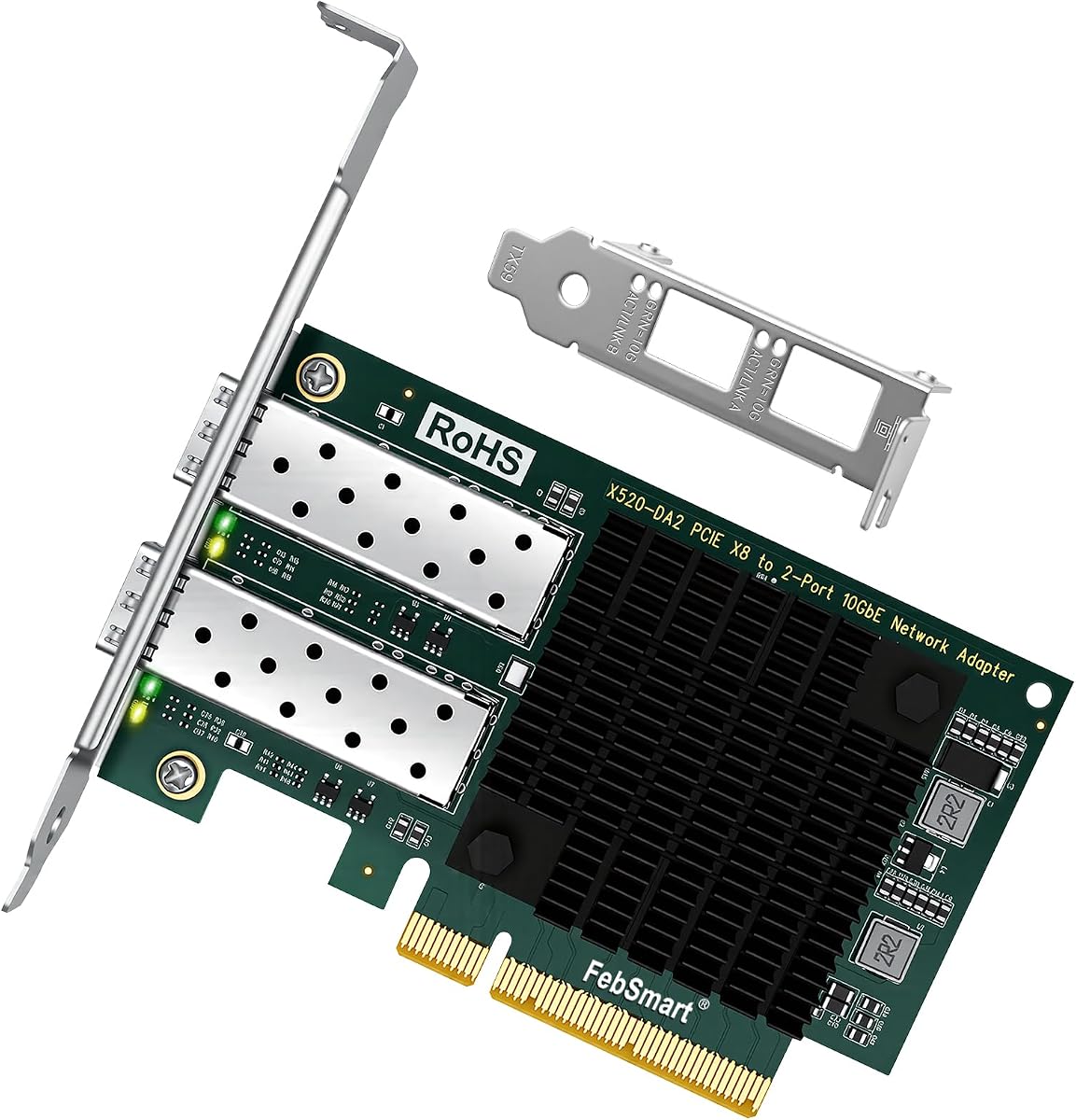
The FebSmart X520-DA2 offers two 10GbE SFP+ ports with Intel 82599ES controller. It delivers stable connectivity for dual-link NAS or virtualization servers.
We may earn a commission when you buy through this link, at no additional cost to you.
PCIe x8 interface ensures 40Gbps total bandwidth supporting full duplex 10GbE on both ports. VMware ESXi support makes it ideal for virtual machines.
Driver installation on Windows 11 requires manual steps. It draws more power than single port cards and needs adequate cooling.
Best for users needing redundant links or two separate 10GbE connections. Verify cooling capacity before installing in a compact case.
Use both ports for link aggregation or failover to improve reliability.
Supports SR-IOV and VMDq features for efficient VM network performance.
We may earn a commission when you buy through this link, at no additional cost to you.
Selecting the right fiber optic network interface card requires balancing speed, compatibility, and budget. Below are key factors to evaluate before buying.
Determine if you need 1GbE or 10GbE speeds. Gigabit cards are cheaper while 10GbE cards future-proof your setup. 25GbE cards are for advanced data centers.
Choose speed based on your switch and existing cabling infrastructure.
Intel chipsets like 82599ES and I350 offer proven stability and wide driver support. Realtek offers budget options but may lack advanced features.
Stick to trusted chipsets to avoid driver issues in Windows or Linux.
Ensure your motherboard slot matches the card interface. PCIe 2.0 x4 supports 10GbE but PCIe 3.0 or 4.0 provides better bandwidth headroom.
Verify available slots and lanes to avoid bottlenecks.
SFP+ cards allow fiber optics for long runs while copper cards use Ethernet. Fiber provides immunity to interference but costs more for modules.
Select based on cable distance and interference in your environment.
Check driver availability for your OS. Windows Server and Linux usually have open drivers while Windows 11 may need manual installs.
Confirm VMware or NAS support if using virtualization.
Ensure the card includes brackets matching your case size. Full height fits standard towers while low profile suits mini-ITX builds.
Most cards include both but verify before purchase.
High-speed cards generate heat. Passive heatsinks need case airflow while active fans reduce noise but add complexity.
Ensure your PC has fans near the PCIe slot.
Look for SR-IOV and VMDq features if running virtual machines. These reduce CPU overhead and improve VM performance.
Check your hypervisor compatibility list.
Turn off your PC and unplug it before installing the card. Ground yourself to prevent static damage. Insert the card firmly into the PCIe slot and secure with screws.
Connect the SFP+ transceiver and fiber cable. Ensure the fiber connector clicks into place without excessive force. Avoid bending the fiber beyond its minimum bend radius.
Install drivers from manufacturer or OS repositories. Reboot your system and verify link status in network settings. Keep the case clean for proper cooling.
SFP ports support up to 1Gbps while SFP+ ports support 10Gbps and higher. SFP+ is backward compatible with SFP modules but speeds are limited to 1Gbps.
Yes you need fiber optic cables with LC connectors compatible with your SFP modules. Singlemode or multimode cables depend on the transceiver type you choose.
Most fiber cards only work with SFP modules and fiber. Copper-based 10GbE cards support Ethernet. Check if the card has SFP+ or RJ45 ports.
Some cards require manual driver installation on Windows 11. Download drivers from the manufacturer website and run them as administrator.
Most cards do not include SFP modules. You must buy compatible modules separately. Some kits include one but check product details.
Yes especially 10GbE cards reduce latency for cloud gaming or local streaming. Ensure your network supports 10GbE speeds end-to-end.
SR-IOV allows virtual machines to access network hardware directly reducing CPU load. It matters for VMware or Proxmox users needing performance.
Check the card requirements like PCIe x1 or x8. Any slot with equal or greater lanes works but x8 provides maximum bandwidth.
We recommend the StarTech 2-Port GbE SFP for its reliability and the LinksTek X520-DA1 for budget 10GbE. The Mellanox CX4121A leads for premium 25GbE needs.
Prioritize chipset reliability and OS compatibility before speed. Ensure your motherboard slot and case airflow support the card thermal design.
Check current prices and availability on Amazon as they change often. Review our product details for exact specs before buying.