
22MP Film & Slide Scanner with 5 LCD LCD
4.3Editor score
Affordable high resolution scan
Built in memory storage
HDMI and USB outputs
Preserving old photographs is essential for keeping family history alive. A dedicated film scanner to digital converter allows you to transform fading slides and negatives into crisp digital files without needing complex software or computers.
We evaluated ten leading models based on resolution, ease of use, format support, and standalone capabilities. Each device was assessed for its ability to handle various film types like 35mm, 126, 110, and Super 8 with minimal effort required.
Every pick showcases unique strengths from budget friendly options to high end professional gear. Keep in mind that availability and pricing can fluctuate over time so always verify the latest details before making your final purchase decision.
4.3Editor score

4.3Editor score

4.3Editor score
As an Amazon Associate we earn from qualifying purchases.
This side by side comparison highlights the key specifications and capabilities of each model to help you find the perfect device for your specific archival needs and budget constraints.


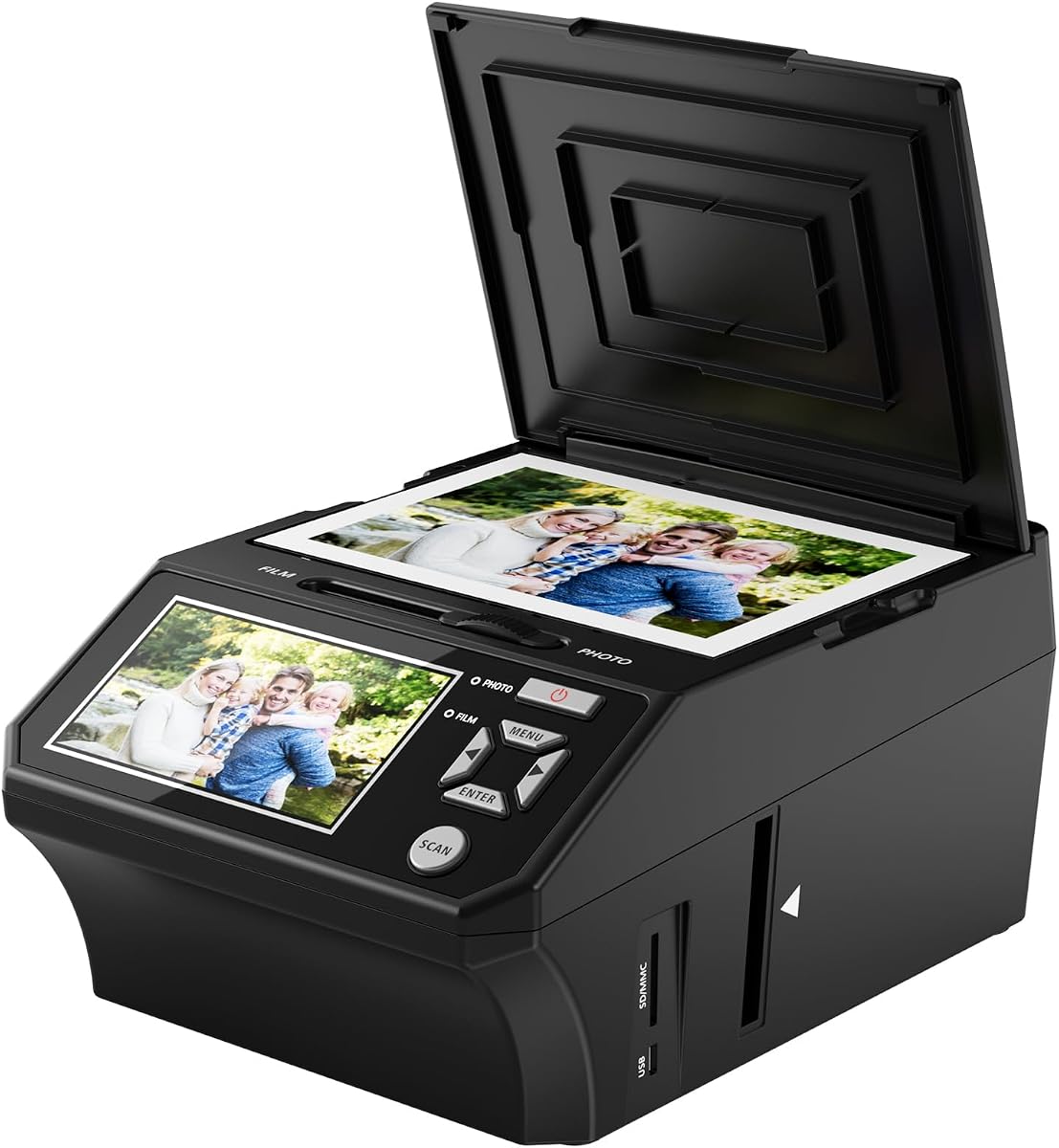


This device stands out as a top choice for preserving old memories with high resolution output. It features a 5 inch LCD that lets you preview and edit images instantly without needing external tools or software.
We may earn a commission when you buy through this link, at no additional cost to you.
The scanner handles a wide variety of formats including 135, 110, and 126mm negatives along with slides. Its quick feeding tray technology allows for continuous loading which speeds up the digitization process significantly.
While it offers excellent versatility, users should note that an SD card is not included in the box. Additionally the unit is somewhat large so it may take up more space than compact alternatives.
Anyone looking to digitize a large family archive without technical complexity will find this model highly suitable. It balances ease of use with strong performance to ensure your photos are saved safely.
The device accommodates multiple film sizes ensuring you can digitize diverse collections without needing multiple machines.
With the large screen you can adjust brightness and color immediately after scanning to get the best results fast.
We may earn a commission when you buy through this link, at no additional cost to you.
This scanner is designed for users who want high resolution digital copies of their old film and slides quickly. The 24MP output ensures that fine details are captured effectively for archival purposes.
We may earn a commission when you buy through this link, at no additional cost to you.
It supports a range of formats including Super 8 which is often hard to find in standalone devices. The interface is straightforward allowing you to adjust settings like flip and mirror directly on the unit.
Although it offers great speed you will need to provide your own HDMI cable if you wish to view images on a TV. Also editing features are basic compared to more advanced models on the market.
Ideal for hobbyists who prioritize speed and resolution this model delivers consistent results without requiring technical expertise. It is a solid option for those wanting to digitize mixed film types efficiently.
Rarely found in standalone scanners this support allows you to preserve moving image memories alongside static photos.
The SD slot supports up to 128GB allowing you to store thousands of images without needing a computer transfer.
We may earn a commission when you buy through this link, at no additional cost to you.
As a premium option this scanner offers a true standalone workflow that simplifies the archival process for serious collectors. The touchscreen allows for intuitive control over scans without needing external interfaces.
We may earn a commission when you buy through this link, at no additional cost to you.
It features a high resolution CMOS sensor that ensures exceptional clarity and detail in your digital conversions. The quick load tray minimizes downtime between scans making it ideal for handling large collections.
While the price is higher than budget models the efficiency and build quality justify the investment for professional users. It does require a constant power source which limits portability compared to battery powered options.
This unit is best suited for users who value precision and speed in their digitization efforts. It provides a robust solution for preserving mixed archives with minimal manual intervention required.
The interactive control panel lets users preview and edit images directly enhancing the overall user experience.
The quick load tray enhances productivity by allowing faster transitions between scans for large volumes.
We may earn a commission when you buy through this link, at no additional cost to you.
This scanner provides a unique advantage by supporting 8mm film which is often overlooked by other devices. It converts negatives and slides into JPEG digital files efficiently for easy sharing and storage.
We may earn a commission when you buy through this link, at no additional cost to you.
The display is tiltable with adjustable brightness which helps in viewing images comfortably under different lighting conditions. It includes a variety of adapters to ensure you can handle your specific film types right out of the box.
A key benefit is that it includes an HDMI cable for TV viewing which many other models exclude from the package. However the screen is smaller than competitors which might make detailed editing slightly more challenging.
It is a strong contender for those who have 8mm reels and want a single solution for all their media. The included accessories make it ready to use immediately without needing extra purchases.
Handling 8mm film allows you to digitize old home movies alongside still images in one convenient device.
The inclusion of HDMI and power cables reduces initial setup costs and time for new users.
We may earn a commission when you buy through this link, at no additional cost to you.
This digitizer is specifically built to handle 8mm and Super 8 film reels turning them into HD MP4 files. It is perfect for those looking to preserve moving images rather than static photographs.
We may earn a commission when you buy through this link, at no additional cost to you.
The device works with a wide range of reel sizes from 3 inches to 9 inches thanks to its universal supply reel system. You can align frames and adjust exposure directly on the large screen for optimal results.
One limitation is that the output does not include audio so you will only get the visual component of your film. It is also specialized for motion pictures so it may not be ideal for slide scanning.
If you have a collection of home movies this is the best option to bring them to a modern screen. It simplifies the process of converting old video reels without needing complex editing software.
Convert motion picture film reel by reel into high definition files that can be played on any device.
Support for various reel sizes ensures you can handle any standard project without extra adapters.
We may earn a commission when you buy through this link, at no additional cost to you.
This device is designed for hassle free digitizing that works entirely offline without complicated software. It converts 35mm slides and negatives as well as printed photos into high quality JPEGs easily.
We may earn a commission when you buy through this link, at no additional cost to you.
Unlike many other models it includes an 8GB SD card in the box so you can start scanning immediately. The 5 inch screen offers wide viewing angles which makes it easy to preview your scans clearly.
The inclusion of a 3 year warranty provides significant peace of mind for long term use. While it does not offer advanced editing features it is straightforward and efficient for basic conversion tasks.
It is an excellent gift for parents or grandparents who want to convert slides without learning new technology. The bundle includes all necessary trays and brushes to ensure a smooth setup process.
Beyond film it can digitize printed photos up to 5R size which adds to its all-in-one appeal.
The included 8GB card means you can start preserving memories right out of the box without extra costs.
We may earn a commission when you buy through this link, at no additional cost to you.
This model features a 7 inch tiltable LCD screen that doubles as a digital picture frame for viewing converted photos. It supports 135mm 110mm and 126mm films making it versatile for mixed collections.
We may earn a commission when you buy through this link, at no additional cost to you.
The quick feeding tray ensures continuous scanning without needing to reposition each frame manually. This feature keeps your workflow smooth and efficient especially when dealing with large numbers of slides.
While the larger screen is a benefit it also contributes to a larger physical footprint in your workspace. It requires a stable power source which means it is best suited for a permanent desk setup.
Ideal for those who want to display their digital archive immediately after scanning this unit combines function with aesthetics. The one touch editing simplifies the process so you can adjust images without menus.
The 7 inch LCD allows you to showcase your scans as a digital picture frame when not in use.
Continuous scanning reduces downtime and allows for faster processing of large batch jobs.
We may earn a commission when you buy through this link, at no additional cost to you.
This scanner offers a very affordable entry into digital film conversion without compromising on essential features. It supports Super 8 film and various negatives allowing for a wide range of use cases.
We may earn a commission when you buy through this link, at no additional cost to you.
The built in memory holds 128MB which is useful for small jobs but you will likely need an SD card for larger archives. The bright 5 inch screen makes it easy to view scans and check quality instantly.
It includes a full accessory kit so you do not need to buy extra items to get started. However internal memory is limited so frequent users should plan to purchase a compatible SD card early.
For those on a budget who still want reliable performance this device is a strong choice. It delivers good value by providing all necessary cables and holders at a lower price point.
The internal memory allows for quick scanning even if you forget your SD card temporarily.
Accessories include HDMI and USB cables ensuring you can connect to TV or PC easily.
We may earn a commission when you buy through this link, at no additional cost to you.
This device delivers high resolution digital files quickly with a single click scanning process. It supports FAT32 or EXFAT SD cards up to 64GB which offers generous storage for most users.
We may earn a commission when you buy through this link, at no additional cost to you.
The included 36 month warranty is one of the longest in its class providing long term reliability. It also includes a gallery mode that transforms the scanner into a stylish desktop photo frame.
It connects via Type C USB which is a modern standard for transfer speed. However it requires a constant power source so you cannot use it portably during travel or power outages.
Perfect for families looking for a robust solution this model balances speed and support well. The extensive adapter set ensures you can handle all your old slide types without extra costs.
A 36 month warranty shows the manufacturer's confidence in the durability of the unit.
The gallery mode feature allows you to showcase your memories even when the scanner is idle.
We may earn a commission when you buy through this link, at no additional cost to you.
The HP FilmScan offers a seamless interface that is suitable for professionals and beginners alike. It features a 7 inch color touch display that allows you to preview and edit photos directly on the unit.
We may earn a commission when you buy through this link, at no additional cost to you.
With a 13 megapixel CMOS sensor it transforms negatives and slides into vivid digital memories while preserving fine details. The quick feed loading tray simplifies scanning of mixed slide collections effectively.
While the sensor resolution is lower than some competitors the large touch screen makes editing intuitive. You can crop and adjust scans without needing additional software which streamlines the workflow significantly.
This model is best for those who value user experience and ease of editing over pure sensor specs. The gallery mode ensures your memories are always on display which adds to its functionality.
The touch screen allows for effortless management of files without needing a computer connection.
Built-in tools let you crop and adjust scans directly on the display to save time.
We may earn a commission when you buy through this link, at no additional cost to you.
Choosing the right scanner depends on your specific needs regarding film types, resolution, and workflow. This guide outlines the key factors to consider to ensure you invest in a device that meets your archival goals.
Resolution determines how clear your digital images will be. Higher megapixel counts like 22MP or 24MP capture finer details which is essential for large prints or cropping. Look for models that interpolate effectively to boost clarity beyond the raw sensor count.
Higher resolution ensures your digitized photos remain sharp when enlarged or edited later.
Different scanners support different types of film. Some handle only 35mm while others support 110, 126, Super 8, or even 8mm reels. Verify that the device includes adapters for all the formats you intend to scan before purchasing.
Ensure the scanner supports every film size you have to avoid buying multiple devices.
Many modern models work without a computer allowing you to save directly to an SD card. This standalone workflow is ideal if you want to set up the scanner in a living room or office without dealing with drivers.
Standalone scanners offer greater convenience and portability for users who prefer no software setup.
A larger screen like 5 or 7 inches makes it easier to preview images and edit them directly. This is helpful for checking alignment or color correction before saving the file permanently.
Larger displays improve usability and reduce the need for external monitors during scanning.
Check if the scanner has HDMI or USB outputs to transfer files to a computer or TV. HDMI lets you view photos on a big screen which is great for family gatherings. USB allows for high speed transfers to your hard drive.
Multiple connectivity options ensure flexibility in how you store and view your digital photos.
Built in tools for brightness, color, and rotation save you time on post processing. One touch editing is particularly useful for those who want quick fixes without installing complex software.
On device editing streamlines your workflow by letting you adjust images instantly after scanning.
If you have a large collection, look for quick loading trays that allow continuous feeding. This reduces the time you spend loading each slide individually and increases productivity over long sessions.
Batch scanning capabilities are crucial for efficiency when handling large volumes of film.
A longer warranty period indicates confidence in the product's durability. Some models offer up to 36 months of support which provides peace of mind for long term use.
Prioritize brands that offer extended warranties to protect your investment against defects.
Begin by inserting the correct film adapter into the scanner tray and loading a slide or negative. Ensure the film is clean using the included brush to remove dust that could appear on your scans.
Use the onboard buttons to select the film type and adjust brightness settings if needed. Press the scan button to capture the image and preview it on the LCD screen before saving.
Store your SD card in a dry safe place after transferring files to your computer. Clean the scanner gently with a soft cloth regularly to maintain image quality and prevent dust buildup.
No most modern standalone film scanners allow you to digitize and save photos directly to an SD card without a computer. This standalone workflow makes it easy to set up anywhere in your home. However you may need a computer for editing files later.
For most users 22MP or higher is recommended to capture fine details in your photos. Higher resolution ensures your scans look sharp when viewed on modern high definition screens. This level of detail helps preserve textures in older film prints.
Some models like the Kodak REELS and SCANZA specifically support Super 8 and 8mm motion pictures. Standard photo scanners usually handle still slides so check the specifications carefully before buying if you have video film.
You can remove the SD card from the scanner and insert it into a card reader or connect the device via USB. Many units also support HDMI for direct TV viewing. This flexibility helps you back up your digital archive easily.
Yes many units include basic editing tools on their LCD screen to adjust brightness and color. These features let you fix common issues like fading or alignment instantly without needing software.
After digitizing keep the original film in a cool dry place to prevent further deterioration. Consider archiving them in protective sleeves since digital copies are not a replacement for physical preservation. This ensures your memories remain accessible.
The Kodak Slide N Scan remains the top choice for its balance of resolution and ease of use. Models like the HP FS500 and the budget friendly 22MP Film Scanner cater to specific needs for premium features or affordability.
Prioritize models that support your specific film formats and offer standalone operation if you dislike computer dependency. A large screen and quick feed tray will significantly enhance your scanning experience over time.
Always verify current availability and warranty details before purchasing to ensure you get the best value. Prices and stock can change so checking the latest offers will help you secure the right tool for your needs.