
Wireless Caregiver Pager
4.7Editor score
Up to 1500FT range
58 ringtones included
IP55 waterproof design
Finding the right gadgets for elderly parents can significantly improve their safety and independence at home. These devices range from simple alert systems to advanced monitoring cameras that keep families connected.
We compared ten highly rated products based on ease of use, range, durability, and specific features tailored to senior needs. Our selection focuses on reliability and user-friendly designs.
Each pick highlights key benefits and potential limitations to help you make an informed decision. Please note that product availability and prices may change over time.
4.7Editor score

4.6Editor score

4.4Editor score
As an Amazon Associate we earn from qualifying purchases.
The following table provides a side-by-side comparison of all ten selected gadgets to help you quickly identify the best fit for your specific needs.
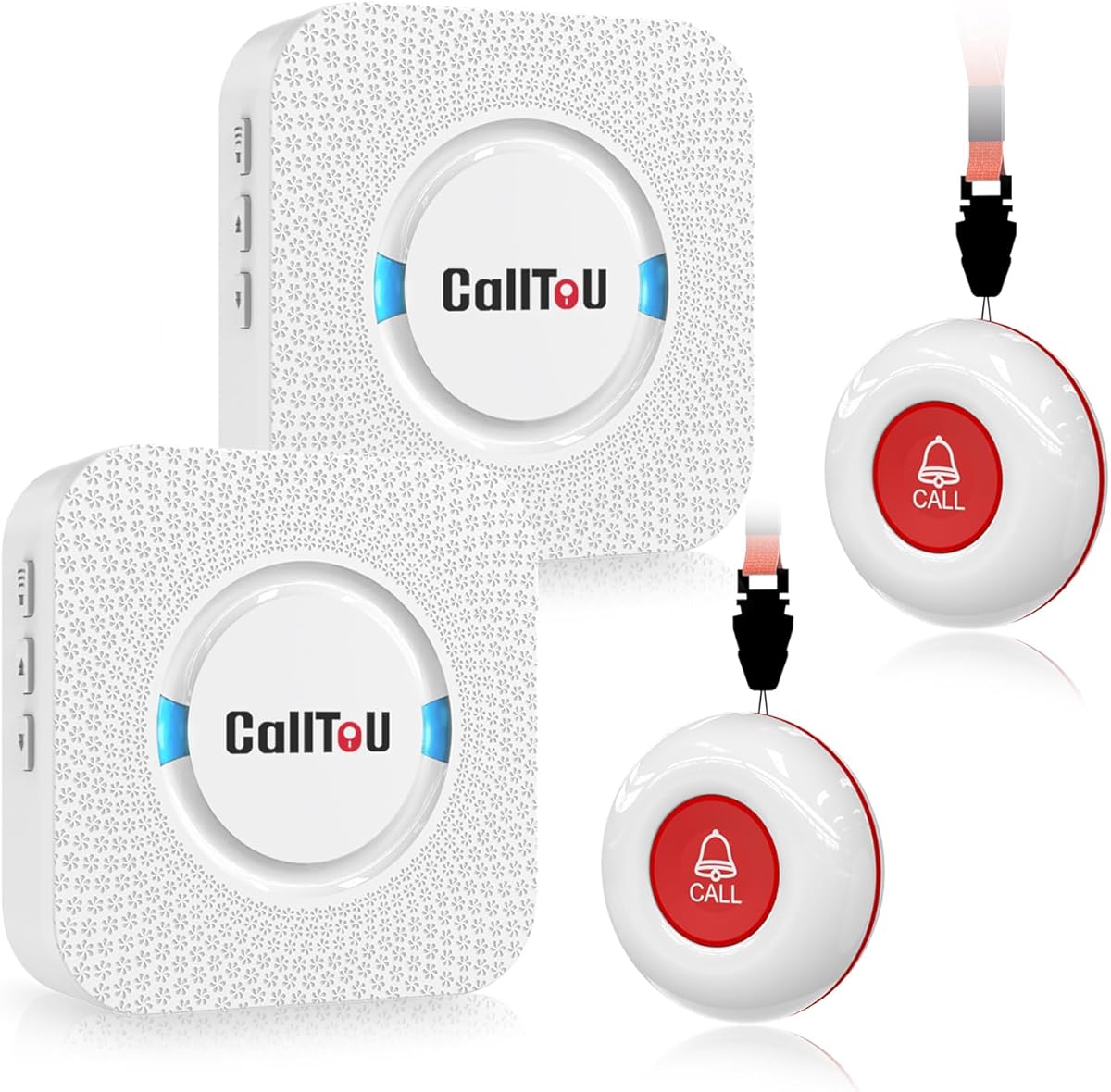


This wireless pager system is designed to bridge the gap between seniors and caregivers through reliable communication. With a solid 4.6 rating it stands out for its simplicity and effectiveness in home care settings.
We may earn a commission when you buy through this link, at no additional cost to you.
The system includes two receivers and two call buttons allowing for flexible placement throughout the house. The open area working range of 500 plus feet ensures caregivers stay connected even when moving between rooms or floors.
While the receiver needs to be plugged into an outlet it offers great stability without battery anxiety. The waterproof and dustproof construction makes it suitable for bathrooms or outdoor use without worrying about damage.
This device is ideal for families needing a straightforward emergency communication solution. It provides peace of mind without complex monthly fees or subscriptions making it a practical choice for everyday safety.
The 500 plus foot range ensures caregivers can move freely while maintaining contact with the senior.
Waterproof and dustproof features allow the device to function reliably even in humid or wet environments.
We may earn a commission when you buy through this link, at no additional cost to you.
The FullHouse Caregiver Pager extends the reach of home communication systems with up to 1000 feet in open air. This makes it suitable for larger homes or properties where distance is a concern.
We may earn a commission when you buy through this link, at no additional cost to you.
It features a silent mode with LED flash for caregivers who need alerts without disturbing others during quiet hours. The inclusion of a wristband provides a convenient wearable option for seniors who need quick access.
The call button is splash proof but should be removed before bathing to avoid water damage. This trade-off ensures durability while keeping the device safe from prolonged immersion.
Families with expansive living spaces will appreciate the extended range capabilities. It offers reliable assistance without requiring constant supervision or expensive monitoring services.
Up to 1000 feet of range allows seniors to call for help from virtually anywhere on the property.
LED flash alerts provide visibility without noise for late night emergencies or quiet environments.
We may earn a commission when you buy through this link, at no additional cost to you.
This digital clock is specifically designed to assist seniors with dementia or memory loss by showing time in a clear non-abbreviated format. It spells out morning afternoon and night to reduce confusion about the time of day.
We may earn a commission when you buy through this link, at no additional cost to you.
The 7 inch HD LCD display ensures that all information is easy to read even for those with vision challenges. It also supports eight languages making it versatile for diverse households or multilingual families.
Auto night dimming protects sleep quality by reducing brightness at 7:00 pm and brightening in the morning. This feature helps maintain natural circadian rhythms without manual adjustment by the user.
It serves as an essential tool for daily routines and medication schedules. The combination of date day and time provides a comprehensive overview that helps seniors stay oriented independently.
Spelled out time periods help seniors understand day and night cycles without needing to interpret AM or PM.
Alarms can be tagged for meals or medicine ensuring seniors never miss important daily tasks.
We may earn a commission when you buy through this link, at no additional cost to you.
This system combines traditional pager functionality with modern app connectivity to notify family members remotely. The app notifications allow caregivers to be alerted instantly regardless of their physical location.
We may earn a commission when you buy through this link, at no additional cost to you.
It supports shared notifications so multiple family members can receive alerts simultaneously. This collaborative approach ensures that someone is always available to respond to an emergency call.
The waterproof call button offers versatile placement options from the bathroom to outdoor areas. Its robust design ensures reliable operation even in high humidity or splash prone environments.
Seniors and families benefit from the seamless blend of safety and technology. It provides peace of mind through instant communication without recurring monthly costs for basic alerts.
App notifications keep distant family members informed instantly when a button is pressed at home.
Multiple users can be notified to ensure rapid response times during emergencies.
We may earn a commission when you buy through this link, at no additional cost to you.
This digital clock is built with seniors who have weak vision in mind. It features a voice announcement function that speaks the time when the back is pressed allowing users to hear rather than read.
We may earn a commission when you buy through this link, at no additional cost to you.
The 7 inch large display uses bold letters to show the week month and date without complex abbreviations. This clarity helps individuals with dementia or memory loss stay grounded in daily reality.
Multiple alarm settings allow for medication reminders or appointment notifications. The simple interface ensures that even elderly people can get started without needing help from others.
Auto dimming keeps the screen soft at night while remaining bright enough during the day. This feature promotes better sleep hygiene while ensuring visibility when needed.
Voice announcements help those with poor vision confirm the time without straining their eyes.
Simple one click setup ensures seniors can operate the device independently without confusion.
We may earn a commission when you buy through this link, at no additional cost to you.
This wireless pager system offers exceptional value with up to 1500 feet of wireless transmission range. It is an affordable choice for those needing basic but reliable emergency alert capabilities.
We may earn a commission when you buy through this link, at no additional cost to you.
The system supports expansion with up to 30 call buttons and multiple receivers. This scalability makes it suitable for multi-room homes or even small care facilities.
With 58 ringtones and 5 adjustable volume levels the receiver can be customized to suit different listening preferences. The IP55 waterproof and dustproof design ensures durability across various environments.
It provides a comprehensive warranty and easy access to support. This combination of affordability and quality makes it a top choice for budget conscious buyers.
Adding more buttons or receivers allows the system to grow with your caregiving needs.
1500 feet of transmission ensures signals reach the receiver even from distant rooms or outdoor areas.
We may earn a commission when you buy through this link, at no additional cost to you.
This WiFi enabled pager allows users to customize button sounds and volume levels directly through a mobile app. It brings a modern touch to traditional caregiving systems by adding digital control.
We may earn a commission when you buy through this link, at no additional cost to you.
You can set up shared alerts so any family member can receive emergency notifications. This ensures that help is always close by regardless of who is currently available.
The app allows you to choose from 20 ringtone options to distinguish between different types of calls. This helps caregivers react quickly by identifying where the call is coming from.
Lifetime service support from the manufacturer adds to the reliability of the product. It is a strong option for tech savvy households comfortable with app based management.
Customizable ringtones help users identify specific alerts without having to check the device.
Shared user alerts ensure multiple family members are informed and can respond to emergencies.
We may earn a commission when you buy through this link, at no additional cost to you.
This device is more than a camera it is a communication hub designed to combat loneliness among elderly parents. One press on the button connects them to a family member without needing apps or smartphones.
We may earn a commission when you buy through this link, at no additional cost to you.
The 1080P PTZ auto-tracking keeps the parent in view without manual panning. It also detects loud crashes or cries for help to provide instant phone alerts for emergencies.
Privacy mode mechanically rotates the lens backward to ensure dignity and security. This allows parents to have private moments while still enjoying peace of mind for their families.
It includes a family photo screen to show smiling faces when not on a call. This visual connection helps reduce isolation and strengthens family bonds without complex technology.
One-touch calling removes the barrier of smartphone apps making it accessible for all seniors.
Mechanical lens rotation ensures parents have private space when needed without feeling watched.
We may earn a commission when you buy through this link, at no additional cost to you.
This clock offers significant customization with 12 display themes and color options to suit different visual needs. It helps users with vision impairment or color blindness choose a clear interface.
We may earn a commission when you buy through this link, at no additional cost to you.
You can set up to 20 normal alarms and 20 custom reminders. This allows for a detailed daily schedule that includes medication times appointments and special events.
The 10-level brightness control ensures the screen is visible without glare. Sleep mode turns the display off instantly for undisturbed rest at night.
It also functions as a photo frame with SD card playback. This dual purpose makes it a practical and decorative gift for home or office settings.
Themes and color options help match the display to user preferences or room decor.
Multiple alarms and reminders support complex routines for those needing more structure.
We may earn a commission when you buy through this link, at no additional cost to you.
This simple alert call system is compact and easy to use for basic home care needs. It includes two wireless call buttons and one portable pager for immediate assistance.
We may earn a commission when you buy through this link, at no additional cost to you.
The pager unit is lightweight and includes a belt clip for easy transport. Caregivers can clip it to their waist or place it on a flat surface to stay connected.
It offers dual alert modes with a chime or continuous alarm siren. This flexibility ensures the signal is noticeable whether the caregiver is nearby or in another room.
Ultra long lasting battery life on both pagers and call buttons minimizes maintenance. It is a reliable choice for those seeking simplicity and functionality without extra features.
Belt clip and lightweight design allow caregivers to keep the pager close at all times.
Switching between chime and siren adapts to different environments and urgency levels.
We may earn a commission when you buy through this link, at no additional cost to you.
Selecting the right gadget depends on the specific needs of your loved ones and your home environment. Consider these factors to make the best choice.
Ensure the device covers your entire home or property. Some pagers offer up to 1500 feet while others are limited to 500 feet. Larger homes may need a system with expanded range to avoid signal drops.
Look for devices with expandable options if you anticipate needing more coverage over time.
Interfaces should be simple and intuitive. Large buttons and clear displays are essential for those with vision or dexterity challenges. Avoid complex setups that require technical knowledge.
Choose products that offer plug and play functionality or minimal setup steps for best results.
If the device will be used in bathrooms or outdoor areas ensure it is waterproof or water resistant. Dustproof features add longevity in environments with debris or pets.
Check specific ratings like IP55 to confirm protection against splashes or immersion.
Consider whether the device requires constant outlet power or runs on batteries. Battery powered units offer mobility but need recharging while outlet powered units stay on without interruption.
Look for models with backup power options to maintain functionality during outages.
The ability to change ringtones or volumes helps distinguish between different alerts. This ensures that caregivers recognize the urgency of a call without confusion.
Select devices that allow adjustable volume levels to match hearing abilities.
App enabled devices allow remote notifications which is crucial for caregivers away from home. Ensure your home network supports the required connection frequency such as 2.4GHz Wi-Fi.
Check if additional fees are needed for SMS or phone call alerts beyond basic app notifications.
Flexible mounting options like wall brackets belt clips or adhesive patches improve versatility. This allows seniors to keep the call button accessible wherever they spend their time.
Ensure the mounting method does not damage walls or furniture during installation.
For monitoring devices ensure there are physical privacy modes to rotate the lens. This respects the dignity of seniors while allowing optional observation when needed.
Look for encrypted streaming and secure local storage options to protect personal data.
Read the user manual carefully before first use to understand setup requirements. Most devices require plugging into an outlet or inserting batteries to power on.
Test the system regularly by pressing the call button to ensure the receiver responds. Check battery levels or outlet connections periodically to avoid unexpected failures.
Keep the devices clean with a soft dry cloth to prevent dust buildup. Avoid exposing them to extreme temperatures or direct sunlight for long periods to maintain durability.
Most of the gadgets listed do not require a monthly subscription fee for basic functionality. However some WiFi enabled models may charge for advanced features like SMS alerts or phone call notifications. Always check the product description for specific details on recurring costs.
Yes many wireless pagers offer ranges up to 1500 feet which can cover backyards or driveways. Just ensure the call button is waterproof if it will be exposed to rain or moisture. Keep the receiver within the supported range to avoid signal loss.
Devices with backup batteries will continue to function during an outage. However those requiring constant AC power may stop working until electricity is restored. It is a a good idea to have a backup power bank or battery powered option available.
Many models come with wristbands neck straps or lanyards to wear the call button. Others can be mounted on walls or placed in accessible areas like bedside tables. Choose a method that fits the daily habits of the user.
Most digital clocks are plug and play with simple button interfaces. Follow the included manual to set the time and date using the provided buttons. Some models may require pressing the OK button to confirm each setting.
Yes app enabled systems allow you to share alerts with multiple family members. This ensures that at least one person is notified when an emergency call is made. Set up the shared users in the app settings before an incident occurs.
The gadgets reviewed provide reliable ways to support safety and communication for seniors at home. Whether you need a simple pager or a camera with video calling there is an option for every budget.
Prioritize ease of use and range when making your decision. Devices that are intuitive to operate reduce frustration for both seniors and caregivers.
Always check current product availability and reviews before purchasing to ensure you get the latest version. Investing in the right gadget today can offer significant peace of mind for tomorrow.