
2×2 4k Video Wall Controller
4.6Editor score
Affordable price point
Supports HDMI and DVI input
Eleven splicing modes available
180-degree screen rotation
This guide compares the top 10 HDMI Video Wall Controllers for seamless multi-screen displays, evaluating features, resolution support, and control options.
Choosing the right HDMI Video Wall Controller is essential for creating seamless multi-screen displays in commercial and home settings. These devices allow you to split a single video source across multiple monitors or TVs to form one cohesive visual wall for presentations or entertainment.
We compared ten leading models based on their input versatility, resolution support, and ease of configuration. Our analysis covers key features like bezel adjustment, audio extraction, and remote control options to help you find the perfect match for your specific setup requirements.
Each pick below highlights unique strengths such as budget-friendly pricing or advanced 4K support. Please note that product prices and availability change frequently, so verify current details on the retailer site before making your final purchase decision for your installation.
4.6Editor score

4.8Editor score

4.2Editor score
The following table provides a side-by-side comparison of all ten featured HDMI Video Wall Controllers. It outlines their primary specifications including input types, output configurations, and unique features to help you quickly identify the best fit for your needs.



This J-Tech Digital HDMI Video Wall Controller stands out as a top choice for users needing a reliable 4K 2×2 solution. With an impressive 4.8 rating, it offers seamless integration of four displays into one unified wall for professional presentations.
We may earn a commission when you buy through this link, at no additional cost to you.
The device supports 4K input at 30Hz while delivering 1080P outputs to each screen. It includes versatile audio extraction via SPDIF Optical and 3.5mm ports, allowing you to route sound to external systems easily without extra adapters.
Users may find the output resolution limited to 1080P despite the 4K input capability. However, the edge masking function helps minimize bezel gaps, ensuring a clean look that makes this trade-off acceptable for most commercial setups.
It is an excellent choice for businesses or home theaters needing a sturdy controller. The lifetime technical support provides peace of mind, making it a strong recommendation for anyone prioritizing long-term reliability and ease of use.
The built-in audio extraction lets you connect speakers directly to the controller rather than individual screens for better sound quality.
Edge masking and rotation options help you fine-tune the display to hide bezels and create a more immersive viewing experience.
We may earn a commission when you buy through this link, at no additional cost to you.
This budget-friendly 2×2 4k Video Wall Controller delivers impressive performance for a low price. It transforms four TV screens into a single dynamic image wall, making it perfect for small businesses or home entertainment setups with tight budgets.
We may earn a commission when you buy through this link, at no additional cost to you.
It supports both HDMI and DVI inputs, which adds flexibility for older devices. The memory function remembers your last settings when plugged in, ensuring a seamless experience without needing reconfiguration every time you power on.
The main limitation is that DVI input does not carry audio signals, requiring separate audio cables for sound. However, the HDMI inputs handle audio correctly, and the variety of control options makes it easy to operate daily.
It is the best choice for cost-conscious buyers who need basic video wall functionality. The ease of use and versatility of input types make it a solid value proposition for simple multi-screen projects.
Support for both HDMI and DVI means you can connect a wide range of older and newer devices without extra converters.
The device automatically restores your previous layout settings upon reboot, saving time and effort during daily operations.
We may earn a commission when you buy through this link, at no additional cost to you.
This premium controller offers true 4K60Hz input support, which is rare in this category. It allows for high-quality signal routing with seamless switching, ensuring no picture loss when changing sources on your video wall setup.
We may earn a commission when you buy through this link, at no additional cost to you.
The web control and LAN integration provide advanced management options for larger installations. You can upscale or downscale output resolution to suit various display needs, making it a versatile tool for professional AV environments.
The higher price reflects the advanced feature set which may be overkill for simple home projects. However, if you require true 4K60Hz performance and remote management capabilities, this model offers unmatched capabilities in this price range.
It is ideal for professional AV integrators and high-end commercial displays. The seamless switching and robust connectivity options make it a top recommendation for users who demand the highest quality video performance.
Web control allows you to manage the video wall from any device on your network, perfect for large or remote setups.
The ability to upscale or downscale outputs ensures compatibility with monitors of varying resolutions without visual distortion.
We may earn a commission when you buy through this link, at no additional cost to you.
This OREI video wall controller is an excellent entry-level option that supports both HDMI and USB-C inputs. It allows you to display content across four screens simultaneously, making it suitable for digital signage and home theater environments.
We may earn a commission when you buy through this link, at no additional cost to you.
The inclusion of USB-C input is a significant advantage for modern laptops and devices. It supports up to 4K 60Hz input, which ensures sharp visuals even if the output is slightly lower due to bandwidth limitations on the display panels.
Users should note that HDR10 and Dolby Vision are not supported, which might limit high-end media playback. However, for standard content and business presentations, the audio extraction and bezel adjustment features provide a solid user experience.
It is a great starting point for users needing basic video wall functionality without breaking the bank. The inclusion of a full warranty and support from OREI adds confidence to the purchase for small to medium setups.
The USB-C input port ensures compatibility with the latest laptops and media players without needing extra adapters.
Bezel adjustment features allow you to customize the display layout to account for physical screen borders effectively.
We may earn a commission when you buy through this link, at no additional cost to you.
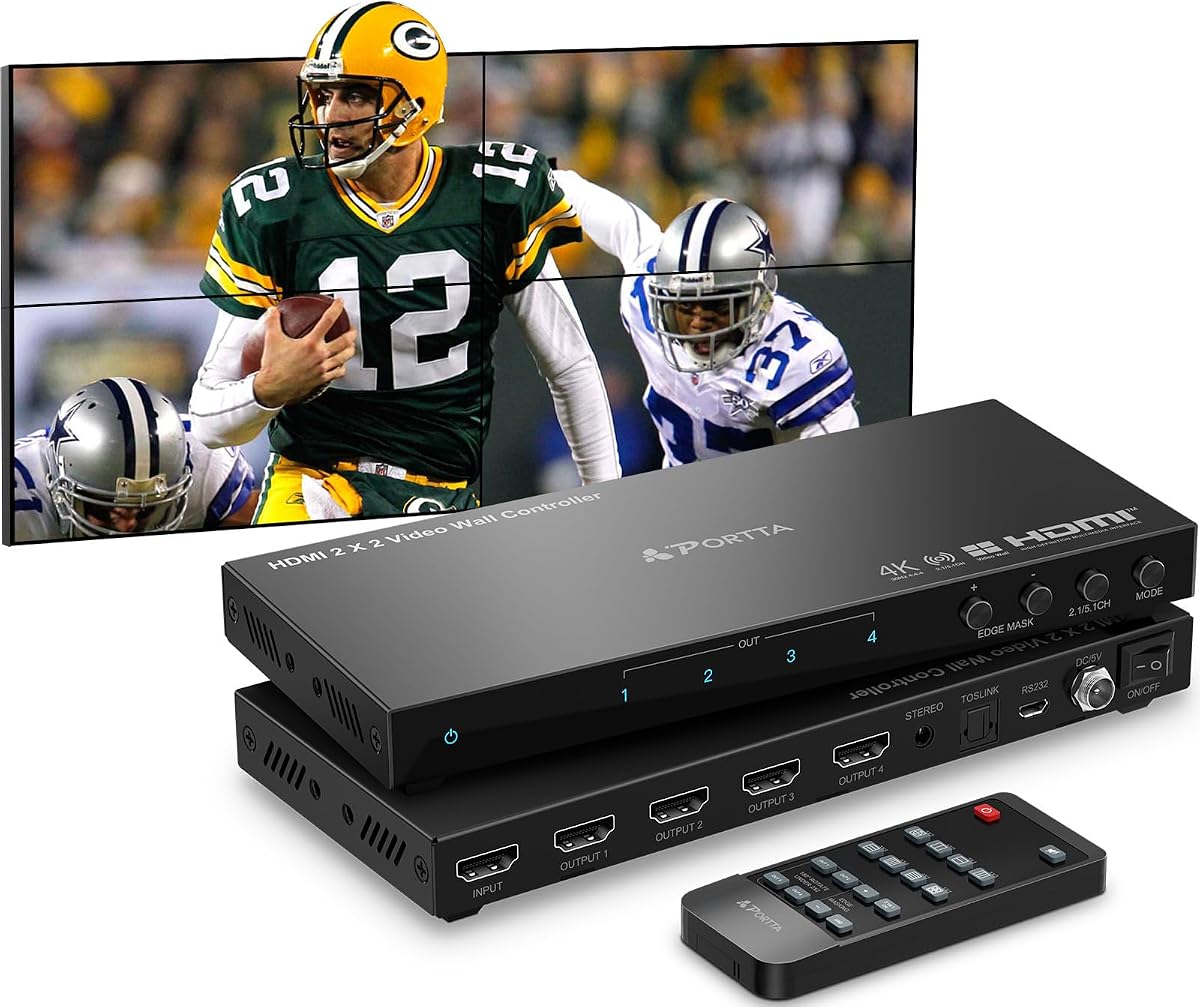
The PORTTA HDMI Video Wall Controller is known for its versatile mode selection, supporting up to 11 different splicing modes. This makes it highly adaptable for various display configurations, from single row displays to complex grids.
We may earn a commission when you buy through this link, at no additional cost to you.
Edge Masking helps prevent image distortion by trimming unwanted pixels from the output picture. This feature is particularly useful for ensuring that your content looks professional and avoids awkward cropping at the edges of the video wall.
While the output is fixed at 1080p, the Toslink audio output provides high-quality sound extraction. The two-year warranty and lifetime technical support add significant value, ensuring you have assistance if you encounter setup issues.
It is an ideal choice for businesses that require flexible display configurations. The combination of robust mode support and audio extraction makes it a reliable tool for dynamic visual communication needs.
With 11 modes, you can easily switch between layouts like 2×2 or 1×4 to match your presentation or content needs.
The Toslink audio output ensures you get rich sound extraction to connect your external speakers or audio systems.
We may earn a commission when you buy through this link, at no additional cost to you.
This OREI controller is designed to handle high-resolution inputs up to 4K@60Hz. It is excellent for users who need to accept high-quality sources but are working with displays that output at 1080p for a smoother experience.
We may earn a commission when you buy through this link, at no additional cost to you.
The inclusion of both HDMI and USB-C inputs ensures broad compatibility with modern devices. The optical audio output allows you to connect to high-end sound systems without signal degradation for a better audio-visual experience.
The bezel adjustment feature helps you tweak the display to account for screen borders and create a seamless look. However, the lack of HDR support means this is best suited for standard dynamic range content rather than high-end streaming media.
It is a great choice for professionals who need high input fidelity. The dual voltage power supply also makes it travel-friendly for temporary installations at different locations around the world.
Supporting 4K@60Hz input ensures that high-resolution sources like modern PCs are handled without resolution drops at the input.
The dual voltage power supply with adapters means you can use this controller in various countries without worrying about power compatibility.
We may earn a commission when you buy through this link, at no additional cost to you.
This OREI matrix offers advanced functionality by combining a 4×4 switcher with video wall capabilities. It allows you to switch between four sources to four displays, providing immense flexibility for control rooms or media centers.
We may earn a commission when you buy through this link, at no additional cost to you.
Web control allows you to manage the matrix from a browser, which is ideal for remote management. The seamless switching ensures that there is no delay or picture loss when changing sources, keeping your displays looking professional at all times.
The setup can be complex due to the advanced features which require careful configuration. However, for users needing multiple inputs and outputs, this device provides a centralized solution that eliminates the need for multiple separate switches.
It is best for professional environments with multiple signal sources. The combination of switching and video wall processing makes it a versatile tool for complex AV installations.
Web control allows you to manage inputs and outputs without physical access, which is critical for large or remote installations.
Advanced EDID management ensures that devices communicate correctly to avoid resolution mismatches during switching.
We may earn a commission when you buy through this link, at no additional cost to you.
The ISEEVY controller is one of the few that supports 4K outputs on all HDMI ports. This ensures that if your displays are 4K, they will receive the full resolution without being downscaled to 1080p.
We may earn a commission when you buy through this link, at no additional cost to you.
It features HDMI and USB-C inputs with true 4K throughput. The plug and play design makes installation straightforward without needing to install drivers or complex software on your computer.
The device lacks dedicated audio extraction ports, which means audio will only be available through the HDMI connections. However, the robust 4K support makes it a great choice for high-resolution content delivery in professional environments.
It is suitable for users who need full 4K resolution for their video wall. The stability and ease of use make it a reliable option for business applications that demand high fidelity visuals.
Supporting 4K outputs on all ports ensures your displays get the maximum detail possible without any resolution loss.
Designed for 24×7 operation, this controller ensures stable performance even during long hours of continuous playback.
We may earn a commission when you buy through this link, at no additional cost to you.
This controller stands out for its USB media playback capability, allowing you to play video directly from a USB drive. It supports high-resolution video up to 4096×2160@60Hz, making it ideal for digital signage that does not need a PC.
We may earn a commission when you buy through this link, at no additional cost to you.
The image adjustment settings allow you to tweak brightness and contrast directly on the device. This is useful for calibrating the video wall to match ambient lighting conditions in the room where it is installed.
While it lacks a USB-C input, the HDMI and USB 2.0 support cover most use cases. The inclusion of an IR extension for remote control ensures you can manage the device from a distance easily.
It is a strong choice for digital signage applications. The ability to play media from USB and adjust image settings locally makes it a self-contained solution for displays.
USB playback allows you to run content without needing a connected computer, reducing hardware costs and points of failure.
Built-in image adjustments let you fine-tune brightness and sharpness to suit your specific viewing environment.
We may earn a commission when you buy through this link, at no additional cost to you.
This controller supports six HDMI outputs, allowing for larger video walls than standard four-screen options. It supports 2X3 and 3X2 modes, which are perfect for creating expansive visual displays in large venues or conference rooms.
We may earn a commission when you buy through this link, at no additional cost to you.
Like other models in its class, it offers true 4K resolution and USB-C input. This ensures that high-quality content can be delivered to a large number of screens without compromising on visual fidelity or connectivity options.
The higher price point and setup complexity are expected for a controller with six outputs. However, the ability to scale to six screens provides significant value for projects that require more than the standard four-panel setup.
It is the right choice for larger installations needing more screens. The support for true 4K across six outputs makes it a powerful tool for expansive professional displays.
Support for six outputs allows you to expand your video wall without needing multiple separate controllers.
True 4K support across all six ports ensures your content remains sharp and detailed on every screen.
We may earn a commission when you buy through this link, at no additional cost to you.
Selecting the right controller involves evaluating resolution, connectivity, and ease of use to ensure it meets your specific display requirements.
Ensure the controller supports the resolution of your source devices and displays. True 4K input is important for high-quality sources, even if outputs are limited to 1080p for budget-friendly setups.
Check if the device offers true 4K outputs or just supports 4K input to avoid unexpected resolution drops.
Look for HDMI and USB-C inputs to connect modern laptops and devices easily. Some models also support DVI, which adds flexibility for older hardware.
Having versatile inputs prevents the need for extra adapters and ensures compatibility with your existing equipment.
If your video wall requires separate sound systems, check for audio extraction ports like optical or 3.5mm jacks. This allows you to route sound to external speakers without relying on TV speakers.
Audio extraction is critical for installations where sound quality is as important as the visual display.
Verify that the controller supports the layouts you need, such as 2×2 or 1×4. Some models offer advanced splicing modes for unique configurations.
A wide range of modes ensures the device can adapt to different content types and room layouts.
Remote control, RS-232, and web control options determine how easy the device is to manage. Web control is useful for large installations needing remote access.
Choose a control method that fits your technical expertise and maintenance requirements.
Look for edge masking or bezel adjustment features to minimize the gap between screens. These tools help create a seamless visual experience by hiding physical bezels.
Proper bezel adjustment improves the professional look of your video wall significantly.
If screens are mounted upside down or rotated, ensure the controller supports image rotation. This allows you to flip the image 180 degrees for correct display orientation.
Rotation support is essential for unique mounting setups to ensure content is viewable correctly.
Check the warranty period and availability of technical support. Good support ensures you can resolve issues quickly and minimize downtime.
A solid warranty provides peace of mind for long-term investments in AV equipment.
Connect your source device to the input port and the display screens to the output ports using high-speed HDMI cables. Ensure all connections are secure to prevent signal loss or flickering during operation.
Use the included remote control to select the desired display mode and adjust settings like rotation and bezel alignment. Refer to the user manual for specific instructions on configuring audio extraction and advanced features.
Keep the controller in a well-ventilated area to prevent overheating and avoid using it in environments with high dust or humidity. Regularly check cables for wear and replace them as needed to maintain a stable signal.
A Video Wall Controller is a device that allows you to split a single video source across multiple displays to create a unified visual wall. It manages signal distribution and allows for various display configurations like 2×2 or 1×4 to meet different presentation needs.
Yes, most modern controllers support 4K inputs. However, you should check if the outputs are true 4K or if they downscale to 1080p to ensure your TVs display the content at their maximum resolution.
Many controllers include audio extraction ports such as optical or 3.5mm jacks. This allows you to route sound to external speakers or soundbars instead of relying on individual TV speakers.
Look for controllers with bezel adjustment or edge masking features. These tools allow you to crop or adjust the image slightly so that the content appears seamless across the gaps created by the TV bezels.
A switcher simply toggles between different input sources on a single screen. A Video Wall Controller splits one input across multiple screens to form a large display, which is a distinct function from simple switching.
Standard HDMI cables are sufficient for most setups, but high-speed cables are recommended for 4K content. Ensure the cables are of high quality to maintain signal stability over longer distances.
Some models offer web control or RS-232 connectivity, which allows you to manage settings from a computer. This is useful for advanced installations where remote management is needed for efficiency.
Many brands offer technical support and warranties. Check the product description for details on support availability and warranty periods to ensure you have assistance if issues arise during setup or use.
The J-Tech Digital HDMI Video Wall Controller remains our top pick for its balance of features and reliability. Its support for 4K input and audio extraction makes it a versatile choice for various professional and home setups.
For budget-conscious buyers, the 2×2 4k Video Wall Controller offers excellent value with essential features. If you require high-end performance, the J-Tech Digital 4K60Hz model provides the advanced capabilities needed for critical displays.
Remember that product prices and availability change frequently. Always verify the current price and specifications on the retailer site before purchasing to ensure you are getting the best deal for your specific installation needs.