
SABRENT 74 in 1 3.5 Inch Internal Flash Media Card Reader/Writer with USB Port (CR-USNT)
4.0Editor score
Supports 74 card types
Includes USB 2.0 port
Internal power connector
Explore our expert guide comparing the top ten internal media card readers for desktop PCs, featuring speed, compatibility, and value for professionals and
An internal media card reader provides reliable access to various memory cards without needing external USB dongles that clutter your workspace. These devices mount directly into your PC case offering stable connectivity and consistent power for transferring photos videos and large data files efficiently.
We evaluated ten different models based on their supported card formats transfer speeds build quality and ease of installation. Our analysis considers real-world performance across Windows macOS and Linux systems ensuring you find a reader that integrates seamlessly into your existing desktop setup.
Each pick below highlights key strengths such as multi-card simultaneous access high-speed USB 3.0 interfaces or versatile bay compatibility. Please note that product availability and pricing can change frequently so verify current details before making your final purchase decision.
4.0Editor score

4.5Editor score
4.3Editor score
The following table provides a side-by-side comparison of all ten internal media card readers analyzed in this guide highlighting their key specifications and unique features to help you make an informed decision.


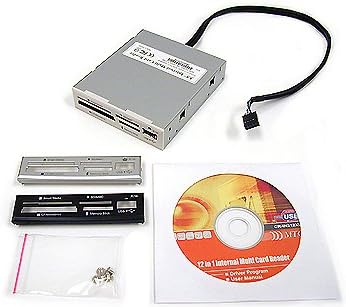
The SABRENT 74 in 1 internal card reader offers extensive compatibility for under ten dollars making it ideal for users who need to read many card types. It supports 74 different formats including M2 XD SD CF and more ensuring you rarely need an adapter. The internal power connector ensures stable operation without drawing power from the motherboard USB header.
We may earn a commission when you buy through this link, at no additional cost to you.
Its standout feature is the sheer variety of supported cards which includes older formats like CompactFlash and Memory Stick alongside modern SDXC variants. The built-in USB 2.0 port adds extra connectivity for flash drives or peripherals without occupying a rear port. This makes it a versatile addition to older systems or media editing workstations.
The main trade-off is the use of USB 2.0 which limits data transfer speeds compared to USB 3.0 models. Additionally there are no activity LEDs to indicate when data is being read or written. For large file transfers this might cause uncertainty but for occasional use the price point justifies the slower performance.
Buy this reader if you need maximum card format support on a tight budget and do not require high-speed transfers. It is perfect for IT departments managing legacy equipment or hobbyists who occasionally need to access various memory card types without cluttering their desk with external adapters.
Supports 74 different memory card types including older formats that are no longer common in consumer devices.
Includes an extra USB 2.0 port on the front panel for convenient access to flash drives or other USB devices.
We may earn a commission when you buy through this link, at no additional cost to you.
The StarTech Internal Card Reader is designed for IT professionals and creators who need fast reliable access to multiple card types simultaneously. It features USB 3.0 speeds allowing for efficient transfer of large video files and high-resolution images. The TAA compliant status ensures it meets government procurement requirements for secure computing environments.
We may earn a commission when you buy through this link, at no additional cost to you.
One of its most powerful features is the ability to access four different card slots at the same time which significantly speeds up workflows when managing footage from multiple cameras. The built-in power and activity LEDs provide clear visual feedback during data operations. It supports Windows macOS and Linux ensuring flexibility across different operating systems.
The higher price reflects its professional grade construction and the convenience of simultaneous access which saves time in busy production environments. The requirement for a 20-pin motherboard header may be a limitation for older systems that lack this connector. However for modern desktops this is standard and ensures robust power delivery.
Choose this reader if you work in photography videography or IT and need a reliable fast solution for frequent card access. The 2-year warranty and lifetime support make it a safe investment for businesses where uptime and performance are critical priorities for daily operations.
Allows copying files between or from different media cards at the same time to streamline editing workflows.
Built for IT professionals with TAA compliance and backed by a two-year warranty with multi-lingual assistance.
We may earn a commission when you buy through this link, at no additional cost to you.
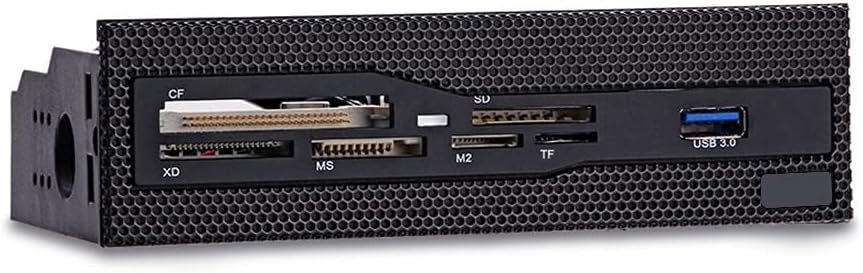
This 5.25 inch internal card reader combines high-speed USB 3.0 connectivity with a durable design optimized for modern PC cases. The copper-plated card slots ensure stable signal transmission reducing errors during large file transfers. Its grid panel design integrates perfectly with cases that feature a front mesh panel maintaining a clean aesthetic.
We may earn a commission when you buy through this link, at no additional cost to you.
The high-speed front USB 3.0 interface enables efficient data transmission for photographers and editors who need quick access to media files. Six card slots cover the most commonly used formats including CF XD MS M2 and TF which eliminates the need for multiple external readers. Installation is straightforward into any standard 5.25 drive bay on your desktop.
The main limitation is the requirement for a 5.25 inch drive bay which may not be available in smaller form factor cases. Additionally the supported formats while common may not cover every legacy card type like some older Sony formats. However for modern workflows the speed and build quality are significant advantages over cheaper alternatives.
Opt for this dashboard if you have a mid-tower case with a 5.25 bay and prioritize build quality alongside speed. The copper-plated slots and mesh integration make it an excellent choice for custom PC builds where aesthetics and reliability are equally important for long-term daily use.
Copper-plated card slots ensure stable transmission during high-speed data transfers to prevent read errors.
Durable grid panel design allows perfect integration with cases featuring front mesh panels for a seamless look.
We may earn a commission when you buy through this link, at no additional cost to you.
This dashboard combines a built-in USB 3.0 hub eSATA port and a multi-format card reader into one front panel unit. It is designed for PC builders who need multiple connectivity options at their fingertips without reaching behind the chassis. The audio jacks for speakers and microphone eliminate the need to plug devices at the back of your system.
We may earn a commission when you buy through this link, at no additional cost to you.
With USB 3.0 bandwidth and eSATA support this panel accelerates file transfers for creative professionals working with large media files. The card reader supports simultaneous multi-card access allowing you to manage files across different types efficiently. LED indicators for power and drive activity status enhance usability in low-light environments during late-night editing sessions.
The unit is constructed from durable ABS plastic but the weight and number of cables required can make installation complex. It requires multiple connectors including 20-pin USB 3.0 4-pin power and audio cables which may clutter the internal case. Additionally the 3.8 rating suggests some users may experience connectivity inconsistencies over time.
Consider this if you need extensive front panel connectivity including audio and eSATA in addition to card reading. The all-in-one nature saves space but ensure your case has enough internal routing space for the various cables before purchase to maintain a clean build.
Combines USB 3.0 hub eSATA and audio jacks with a card reader for a complete front I/O solution.
Simultaneous card access and high-speed transfers cater to photographers and content creators with large files.
We may earn a commission when you buy through this link, at no additional cost to you.
The Vantec Link USB 3.0 internal card reader stands out for its robust Multi-LUN memory support which allows simultaneous access to multiple cards without conflict. It supports SDXC up to 2TB and CompactFlash up to 144PB ensuring compatibility with the highest capacity storage media available. The quad data access feature enhances transmission rates for Memory Stick Pro-HG cards.
We may earn a commission when you buy through this link, at no additional cost to you.
This device connects internally via a USB 20 pin header ensuring a stable power and data connection. It supports a vast range of formats including CompactFlash Secure Digital MultiMediaCard eMMC and Memory Stick series. The five-star rating indicates high customer satisfaction regarding reliability and performance over extended periods of use.
The lack of activity LEDs makes it harder to visually confirm when data is being written which can be a minor inconvenience for some users. Installation requires a 20 pin USB header which might not be present on older motherboards without an adapter. Despite this the high capacity support is a unique selling point for professionals.
Buy this reader if you regularly work with high-capacity SDXC or CompactFlash cards and need stable internal connectivity. The Multi-LUN support is particularly valuable for users who need to copy files between multiple cards simultaneously without swapping them in and out.
Supports SDXC cards up to 2TB and CompactFlash up to 144PB for future-proof storage compatibility.
Full Multi-LUN support allows accessing multiple memory cards at once without connection conflicts.
We may earn a commission when you buy through this link, at no additional cost to you.
This multifunction dashboard provides a comprehensive array of ports including USB 3.0 USB 2.0 eSATA and audio jacks on the front of your PC. The five-in-one card reader supports SD MMC CF MS TF and M2 which covers the most frequently used formats for general consumers and light professionals. LED indicators show power and hard disk read/write status.
We may earn a commission when you buy through this link, at no additional cost to you.
The USB 3.0 port offers transfer speeds up to 5Gbps while USB 2.0 provides additional compatibility for older devices. The eSATA ports improve work efficiency by allowing high-speed external storage connections directly from the front panel. All necessary cables are included to connect to the motherboard including 20PIN USB 3.0 and SATA data cables.
The lack of user reviews makes it difficult to gauge long-term reliability or potential installation issues in specific cases. The large number of cables required for installation might complicate cable management inside the PC case. It is a solid choice if you need front-access for audio and external storage beyond just card reading.
Choose this panel if you want a single solution for front audio USB hubs and card reading in one unit. Ensure your case supports a 5.25 bay and has enough internal space to route the multiple data and power cables neatly.
Includes USB 3.0 USB 2.0 eSATA and audio ports to provide versatile front connectivity options.
Five-in-one reader supports SD MMC CF MS TF and M2 formats for common memory card needs.
We may earn a commission when you buy through this link, at no additional cost to you.
The Sony MRW620 is a classic internal card reader offering 17-in-1 support for a wide variety of memory card formats. It comes with both black and ivory colored faceplates allowing you to match your PC case finish. The Drive Letter Recognition Software helps manage drive assignments which can be useful for specific legacy applications.
We may earn a commission when you buy through this link, at no additional cost to you.
This device is compatible with Microsoft Vista Windows XP Home and Professional making it suitable for older systems that still rely on these operating systems. The 17-in-1 support covers most common formats ensuring you can access content from older cameras and devices without adapters. It connects via standard USB 2.0 internally.
Being an older model its performance is limited by USB 2.0 speeds which are slower than modern USB 3.0 or 3.1 options. The faceplates are a nice touch but the physical design is basic compared to modern dashboard style readers. It remains a reliable option for maintaining legacy systems where brand trust matters.
Opt for this reader if you need to support legacy hardware or prefer a trusted brand with simple software integration. It is best suited for systems running older Windows versions where newer USB 3.0 controllers might not be fully supported or necessary.
Includes both black and ivory faceplates to match different PC case colors and finishes effectively.
Designed for compatibility with Microsoft Vista and Windows XP to keep older systems functional.
We may earn a commission when you buy through this link, at no additional cost to you.
This compact internal card reader is designed to fit into a 2.5 inch drive bay offering a smaller footprint than traditional 3.5 or 5.25 inch units. It comes with retail packaging including black silver and white bezels so you can choose a color that matches your PC case. The build quality is noted as reliable and high quality for the price.
We may earn a commission when you buy through this link, at no additional cost to you.
The device supports multiple card formats through a single slot often requiring adapters for microSD or other small formats. It is a simple plug and play solution that provides easy access to memory cards without taking up external USB ports. Its compact design makes it ideal for small form factor builds where space is limited.
The product data does not specify exact supported formats or transfer speeds which may require further research before purchase. Since it uses 2.5 inch bay mounting ensure your case has this specific slot type as it is less common than 3.5 inch bays. The lack of detailed specs makes it a riskier choice for power users.
Buy this if you have a 2.5 inch bay available and need a simple inexpensive card reader for basic tasks. The multiple bezel options allow for aesthetic customization but verify the supported card types against your needs before buying to avoid compatibility issues.
Designed for 2.5 inch drive bays to save space in smaller desktop cases effectively.
Includes black silver and white bezels in retail packaging for easy color matching.
We may earn a commission when you buy through this link, at no additional cost to you.
The Akasa AK-ICR-07 is a 6-port media card reader that fits conveniently into a 3.5 inch PC bay. It supports high-capacity SDHC memory cards and includes dedicated ports for adapters which eliminates the need for separate microSD or M2 inserts. An additional USB port provides extra connectivity for flash drives or mobile phones.
We may earn a commission when you buy through this link, at no additional cost to you.
Two LEDs indicate power on card in and data transfer status which helps users know when a card is safely connected. The package contains two front fascia panels in black and classic white allowing you to match your case color. This attention to detail makes it a user-friendly option for general desktop users.
While it supports high-capacity cards it does not offer the advanced speed features of USB 3.0 models found in more expensive options. The build is functional but standard compared to premium metal constructions. For basic card access and a convenient extra USB port it offers good value at its price point.
Select this reader if you need a straightforward 3.5 inch bay solution with built-in adapter ports and visual status LEDs. The dual panel options and extra USB port make it a convenient addition for casual users who need quick access to various media cards.
Ports for adapters eliminate the need for separate inserts for smaller cards like microSD and M2.
LED indicators show power card presence and data transfer status for clear operational feedback.
We may earn a commission when you buy through this link, at no additional cost to you.
This MTG internal card reader supports 22-in-1 formats including CompactFlash IBM Microdrive and SD cards. It features a metal case that fits 3.5 inch drive bay installation offering a durable feel. The device is hot swappable and plug and play so you can insert and remove cards without restarting your system.
We may earn a commission when you buy through this link, at no additional cost to you.
It includes beige black and silver color bezels for swapping giving you flexibility on how the panel looks on your PC. The four slots can be used simultaneously for data exchange which is helpful for managing multiple cards at once. It is bus powered so no external power supply is required for operation.
The USB 2.0 specification limits transfer speeds to up to 4.5 MB per second which is slower than USB 3.0 models. Metal case is a positive trait for durability but the speed limitation may be a drawback for large file transfers. It is a solid budget option for general data exchange tasks.
Choose this reader if you need a durable metal unit with broad format support and do not require high-speed transfers. The multiple bezel colors and simultaneous slot usage make it a practical choice for users managing diverse media types in a desktop environment.
Metal case construction provides a durable and sturdy build compared to plastic alternatives.
Four slots can be used at the same time for efficient data exchange across multiple cards.
We may earn a commission when you buy through this link, at no additional cost to you.
Selecting the right internal media card reader depends on your specific workflow compatibility needs and system capabilities.
Different readers support varying formats such as SD CF MS and M2. Check which cards you regularly use and ensure the reader supports those specific types directly or via included adapters.
Look for models that list all your required formats to avoid buying extra adapters later.
USB 3.0 readers offer significantly faster transfer rates than USB 2.0 which matters for large video files or bulk photo transfers. High-speed UHS-II support is ideal for professional photography workflows.
Prioritize USB 3.0 interfaces if you frequently move large files to save time.
Internal readers typically fit 3.5 inch or 5.25 inch drive bays. Verify your PC case has the appropriate empty slot before purchasing to ensure proper installation.
Check your case specifications for available drive bay sizes to confirm fit.
Some readers require a 20-pin motherboard USB header while others use SATA power or standard SATA data connections. Ensure your motherboard has the necessary connectors for stable internal operation.
Confirm you have the required internal USB or SATA connectors before installation.
Most modern readers are OS independent but verify compatibility with your specific version of Windows macOS or Linux to avoid driver issues.
Check the product specs for explicit OS compatibility to guarantee seamless integration.
Metal cases generally offer better durability and heat dissipation than plastic ones. Look for features like copper-plated slots for stable signal transmission over time.
Prefer metal or reinforced plastic builds for long-term reliability in daily use.
Many dashboard style readers include extra USB ports audio jacks or eSATA connections which add value to your front panel setup beyond just card reading.
Consider if you need these extra ports to justify a multifunction dashboard unit.
Professional grade readers often come with longer warranties and better support options. For business use prioritize models with at least a two-year warranty and reliable customer service.
Check warranty terms to ensure protection against early hardware failures.
To install your internal card reader turn off your PC and open the case. Connect the USB header or SATA cables to the motherboard and secure the unit in the drive bay using screws. Close the case and power on your system.
Insert memory cards into the correct slots until they click into place. The OS will mount the card automatically allowing you to copy files via file explorer. Eject the card safely before removal to prevent data corruption.
Keep the slots clean and free of dust to maintain connection quality. Avoid inserting cards at an angle which can damage the internal mechanism. Use a dry cloth to gently clean the exterior if needed.
Internal card readers provide stable power and consistent connectivity without cluttering your desk with cables. They free up external USB ports and offer a cleaner setup for professional workstations.
No most support a wide range but not every single format. Always check the supported types list to ensure compatibility with your specific CF SD or other card models.
USB 3.0 readers offer up to ten times the transfer speed of USB 2.0 models. This difference is significant when moving large video files or high-resolution photo sets.
Generally internal card readers are designed for desktop cases. Laptops usually require external USB card readers due to their compact form factor and limited internal space.
Most modern internal readers are plug and play and do not require manual driver installation. They are recognized automatically by Windows macOS and Linux systems upon connection.
Not all but many high-speed USB 3.0 internal readers require a 20-pin header for stable power. Check the product manual to confirm your motherboard has the right connector.
Our top picks include the SABRENT 74 in 1 for value the StarTech USB 3.0 UHS-II for professional performance and the 5.25 Internal Card Reader for build quality. Each offers distinct advantages depending on your priorities and budget constraints.
Prioritize USB 3.0 speeds and card format compatibility that match your workflow to ensure efficiency. A stable internal connection is key for professional environments where reliability is non-negotiable for daily tasks.
Always check current availability and pricing before purchasing as product details may change over time. Choose the reader that best balances speed durability and ease of use for your specific setup.