
NIMO 15.6 AI Ready Laptop
4.8Editor score
Intel N150 Processor
2 Year Warranty Included
Lightweight Portable Design
Finding the right laptop for karaoke gear is essential for smooth performances. You need a machine that handles music software, video streams, and audio interfaces without lag or crashes during events.
We compared ten top models based on processing power, display quality, and connectivity options. Each pick supports diverse karaoke needs from home parties to professional mobile DJ setups with reliable performance.
Every section highlights key specs, pros, and cons to help you decide quickly. Prices and availability change often so check current offers before buying to ensure you get the best value for your budget.
4.8Editor score

4.5Editor score

4.5Editor score
As an Amazon Associate we earn from qualifying purchases.
This side by side comparison covers all ten products to help you weigh pros and cons quickly. We focus on specs that matter for karaoke like audio drivers, ports, and screen real estate.






This HP laptop ranks first for its robust specs and large screen perfect for karaoke. It handles multiple apps smoothly with an AMD Ryzen 5 CPU and 16GB RAM ensuring no stutter during live performances.
We may earn a commission when you buy through this link, at no additional cost to you.
The 17.3 inch FHD display offers sharp visuals for lyrics and music videos. Preloaded with Windows 11 and Office 365 for Web it supports file management and cloud access easily during events.
Battery life is strong with fast charge support to keep going longer without outlets. The brushed keyboard with numeric keypad helps navigate playlists or settings quickly with precision.
Ideal for users needing reliability and screen real estate. Its durable design and ample ports make it a solid choice for home setups or semi professional karaoke sessions.
The 17.3 inch FHD anti glare screen provides vivid colors and sharp details essential for reading lyrics in varying lighting conditions.
With 16GB RAM you can run karaoke software browsers and streaming apps simultaneously without slowdowns during important performances.
We may earn a commission when you buy through this link, at no additional cost to you.
This Dell model excels with a 120Hz display making visuals fluid for karaoke videos. The Intel Core 3 100U processor handles daily tasks efficiently while DDR5 RAM ensures fast app switching.
We may earn a commission when you buy through this link, at no additional cost to you.
Its Carbon Black chassis is durable yet portable at 4.19 lbs. The versatile connectivity includes HDMI USB-C and an SD card slot for quick media transfers from cameras or external drives.
While storage is limited at 256GB SSD the speed is excellent for booting apps quickly. The dual speakers provide clear audio for calls or light entertainment without external gear.
A strong pick for those valuing screen refresh rates. It suits students or professionals who need a reliable device for presentations alongside karaoke entertainment at home.
The 120Hz refresh rate delivers smooth motion rendering reducing blur during fast moving music videos or dynamic karaoke screens.
Ports like USB-C HDMI and SD card slot allow flexible connections to projectors speakers or external storage devices easily.
We may earn a commission when you buy through this link, at no additional cost to you.
This HP OmniBook delivers strong battery life up to 14 hours ideal for long events. The AMD Ryzen 3 30 processor handles streaming and multitasking well with responsive performance.
We may earn a commission when you buy through this link, at no additional cost to you.
Advanced AI noise reduction ensures clearer voice calls or recordings during karaoke prep. The FHD camera with HDR auto switch adapts to lighting for better video call quality.
Storage is generous at 512GB SSD allowing plenty of space for songs and media. Fast charge restores 50 percent in about 45 minutes if you need power quickly.
Great for users needing reliability without a heavy cost. It balances specs and portability making it a practical choice for casual performers and home entertainment setups.
The AI noise reduction tracks your voice and filters background noise for clearer communications during conference calls or audio recordings.
Up to 14 hours of battery life with fast charge support keeps you going all day without frequent outlet access.
We may earn a commission when you buy through this link, at no additional cost to you.
This NIMO laptop stands out with a quiet efficient Intel N150 processor ideal for library or home use. It supports light games and note taking with AI Copilot tools.
We may earn a commission when you buy through this link, at no additional cost to you.
A 2 year warranty plus dedicated US support offers peace of mind for long term use. The physical webcam shutter and fingerprint reader enhance security for public spaces.
Weighing 3.7 lbs with a slim profile it fits easily in backpacks for portability. Fast 65W PD charging gives two hours of use in just 15 minutes.
Perfect for students or professionals on a budget. It balances affordability with reliable features and security tools for everyday computing and light entertainment needs.
The Intel N150 processor runs silently reducing fan noise during quiet sessions like studying or focused work.
Lightweight at 3.7 lbs it slips easily into backpacks for commutes or travel without adding bulk.
We may earn a commission when you buy through this link, at no additional cost to you.
This HP Ultrabook delivers Windows 11 Pro with lifetime Office and 16GB RAM for productivity. The Intel N150 supports smooth multitasking across apps and tabs.
We may earn a commission when you buy through this link, at no additional cost to you.
It includes a bundle of accessories like earbuds a mouse and HDMI cable. The 14 inch anti glare display keeps visuals clear even in bright rooms.
Total storage is 628GB split between UFS and external drive which suits varied needs. True Vision HD camera and dual mics ensure quality for online classes or meetings.
A strong option for home office or study. Its balance of features and accessory support makes it a versatile tool for work and casual entertainment.
Free Lifetime Microsoft Office 2024 access allows document creation and editing without extra subscription costs.
Wireless earbuds mouse and extension cords included save extra purchases for a ready to use setup.
We may earn a commission when you buy through this link, at no additional cost to you.
This HP 255 G10 features an AMD Ryzen 3 7330U processor with 16GB RAM for smooth multitasking. Radeon Graphics deliver solid visuals for work and casual entertainment.
We may earn a commission when you buy through this link, at no additional cost to you.
Its thin light design keeps it mobile with big screen to body ratio. The 15.6 inch Full HD LED backlit display offers crisp visuals for media viewing.
Storage is 256GB SSD which is fast but limited. You can upgrade RAM up to 64GB or storage to 2TB for expanded capacity if needed.
A budget friendly pick for everyday tasks and light gaming. It suits users wanting a large screen and decent performance without overspending on features.
AMD Radeon Graphics provide impressive performance for visual tasks and light gaming on this model.
RAM up to 64GB is supported allowing future upgrades for heavier multitasking or professional apps.
We may earn a commission when you buy through this link, at no additional cost to you.
This HP OmniBook offers a stunning 2K touchscreen for interactive browsing. The AMD Ryzen 3 30 ensures everyday performance with smooth streaming and multitasking.
We may earn a commission when you buy through this link, at no additional cost to you.
Battery life reaches up to 14 hours and 15 minutes with fast charge support. AI noise reduction filters background noise for clearer voice calls during work or entertainment.
The 256GB SSD provides fast speed with 8GB LPDDR5 RAM boosting bandwidth. Advanced camera with HDR auto switch adapts to lighting for detailed video calls.
A premium pick for interactive displays. It suits users needing a vibrant screen and robust features for creative work or high quality presentations.
The 1920 x 1200 resolution touchscreen offers incredible detail and lifelike color reproduction for interactive use.
Battery restores from 0 to 50 percent in about 45 minutes for quick top ups during busy schedules.
We may earn a commission when you buy through this link, at no additional cost to you.
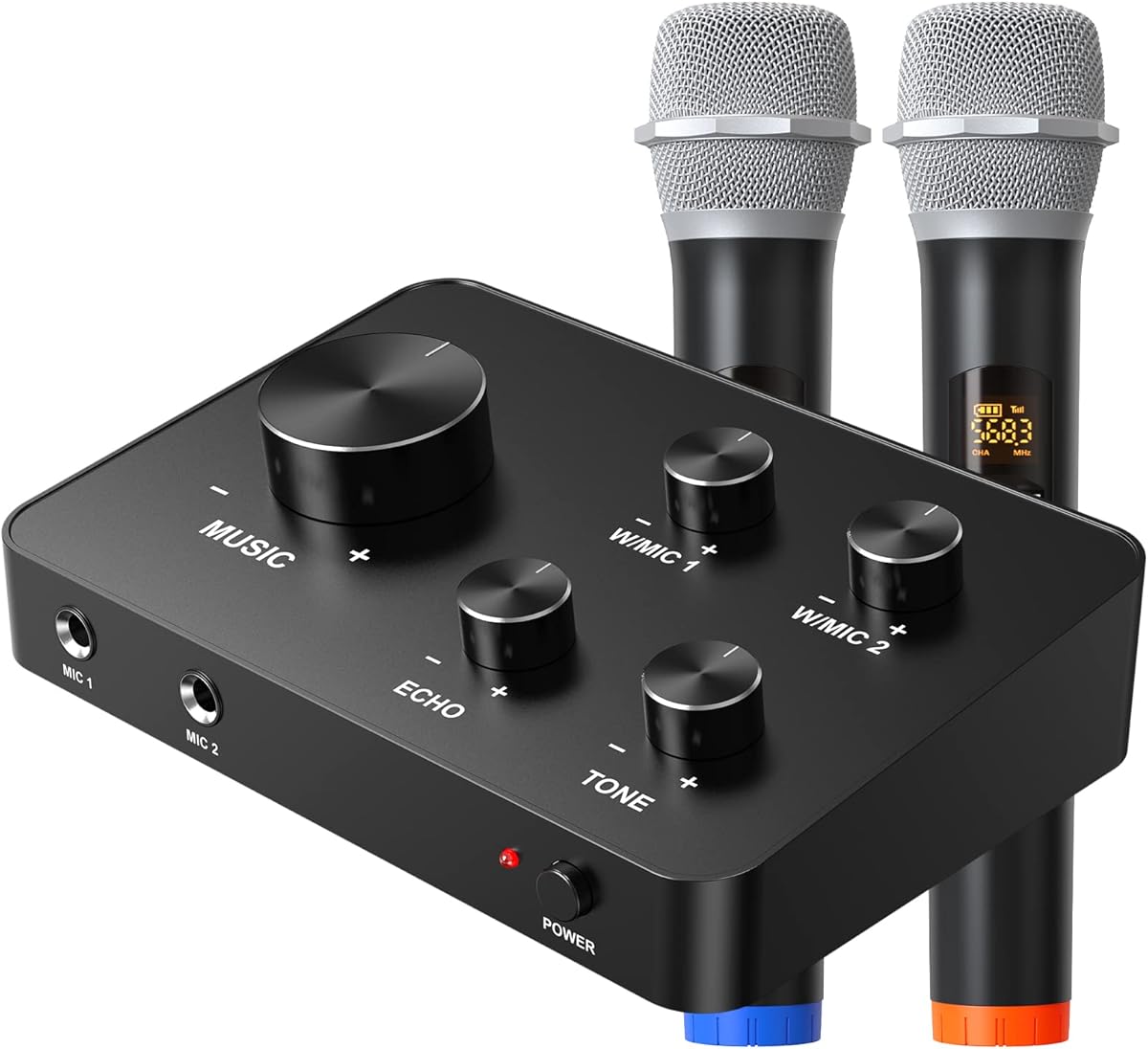
This Rybozen system offers dual wireless mics and a mixer for home karaoke. It connects via HDMI or 3.5mm Aux to TVs speakers or amplifiers.
We may earn a commission when you buy through this link, at no additional cost to you.
Each mic has separate volume control and the receiver includes rotatable dials for tone echo and music. The UHF range reaches up to 100 feet for movement.
Plug and play design ensures easy setup with PCs TVs or smart devices. Anti interference frequencies help maintain clear signals during events.
A practical kit for home parties or small events. It balances affordability with enough controls to customize sound for different venues.
The 100Ft wireless operating range allows singers to move freely without losing connection to the mixer.
Rotatable dials let you adjust volume echo and tone for desired sound output.
We may earn a commission when you buy through this link, at no additional cost to you.
This Sound Town mixer supports HD ARC optical and Bluetooth for flexible audio. It works with smart TVs soundbars and receivers for enhanced home entertainment.
We may earn a commission when you buy through this link, at no additional cost to you.
The vocal cut mode enables karaoke on TV audio streams. Independent volume controls help balance music and mic levels for clearer vocals.
Setup involves enabling CEC and external speakers on the TV. It offers 16 frequency selections to minimize interference in crowded wireless environments.
Ideal for users wanting advanced audio routing. Its feature set supports versatile setups for events or home theater integration.
HD Audio Return Channel extracts audio from TVs for blending with mic inputs.
Vocal cut mode enables karaoke singing on compatible TV audio streams.
We may earn a commission when you buy through this link, at no additional cost to you.
This handheld mic includes dynamic lights and voice effects for fun performances. It connects to smartphones or smart TVs via Bluetooth for seamless duets.
We may earn a commission when you buy through this link, at no additional cost to you.
Six voice FX modes and a 360 degree light show entertain kids and adults. The fabric covered top minimizes feedback for clear vocals during singing.
Battery lasts up to 10 hours on a single charge. Fast USB C charging ensures minimal downtime between events or play sessions.
Perfect for casual singing or gifts. Its portability and built-in speaker make it a fun all-in-one entertainment tool.
Five dynamic light modes enhance the visual experience for parties and performances.
Voice FX like chipmunk or alien modes add variety to singing and entertainment.
We may earn a commission when you buy through this link, at no additional cost to you.
Selecting the right laptop requires balancing specs with your karaoke needs. Focus on audio drivers, ports, and performance to ensure smooth playback and minimal lag.
A capable CPU handles audio processing and video streaming without lag. Look for Intel Core or AMD Ryzen models that manage multiple apps simultaneously during events.
Prioritize processors with multi-core architectures to prevent stuttering during live performances.
RAM affects how many programs you can run at once. Aim for 16GB for smooth multitasking between karaoke software and browsers.
More memory ensures reliable performance during complex setups with background processes.
A larger screen makes reading lyrics easier. High resolution FHD or QHD panels with anti glare coatings improve visibility in various lighting.
Choose displays with good color accuracy for vibrant visuals during music videos.
Ports like HDMI USB-C and audio jacks connect to speakers or mixers. Ensure enough slots for all your gear without needing hubs.
Versatile connectivity saves time and simplifies setup for mobile performances.
Long battery life is essential for events away from outlets. Aim for 8 hours or more with fast charge support for quick top ups.
A robust battery ensures uninterrupted performance during extended sessions.
Built-in audio drivers impact sound clarity. Check if your laptop supports high quality audio codecs or external sound cards for best output.
Good audio support prevents latency and ensures clear vocal reproduction.
Windows offers broad compatibility with karaoke apps. Ensure your OS version supports latest features like AI tools or cloud integration.
Modern systems provide better security and seamless software updates.
Weight and size matter if you move setups often. Lighter laptops under 5 lbs are easier to transport without sacrificing screen real estate.
Compact designs fit easily into backpacks for travel convenience.
Start by installing your preferred karaoke software and updating drivers for optimal performance. Connect external speakers or mixers using available HDMI or USB ports before launching any songs.
Adjust audio settings in the control panel to reduce latency and balance levels. Use the noise reduction features if available to clean up microphone input during recordings.
Keep your laptop cool by using a stand or cooling pad during long sessions. Regularly clean the screen and vents to maintain efficiency and extend device lifespan.
Processor speed and RAM are key for smooth audio and video playback. A decent screen size and multiple ports also help with connectivity to speakers or mixers.
Yes, many laptops work if they support audio codecs and have enough ports. Check compatibility with your karaoke app before purchase for best results.
Most laptops lack powerful speakers so external ones are recommended for quality sound. Use HDMI or AUX connections to integrate with home audio systems.
Update audio drivers and use dedicated settings to minimize latency. Choosing a laptop with high performance hardware helps prevent delays during live performances.
Windows offers the widest compatibility with most karaoke software. Ensure your system has the latest updates to run apps smoothly without crashes.
Use a protective sleeve or padded backpack to avoid bumps. Keep cables organized and separate from the device to prevent scratches or port damage.
We reviewed ten top models ranging from budget to premium options. Each pick offers unique strengths for different karaoke needs whether you are a casual singer or a DJ.
Prioritize memory and display size for smooth operation and easy lyrics reading. Ensure your laptop has enough ports to connect all your gear without adapters.
Prices change frequently so verify current offers before buying. Use this guide to find the best balance of performance and value for your setup.