
MokerLink 8 Port 10G Managed Ethernet Switch
4.3Editor score
10G Auto-Adaptive Ports
Web CLI L3 Managed
Metal Desktop Rackmount
Explore the top Layer 3 Network Switch options for modern networks. This guide compares performance, routing, and port features to help you choose.
A Layer 3 Network Switch provides intelligent routing and switching capabilities essential for scalable network infrastructures. These devices manage traffic efficiently by analyzing IP addresses rather than just MAC addresses, enabling better segmentation and performance across complex environments.
We evaluated ten leading models based on port speed, routing protocols, manageability, and build quality. Each product was assessed for its suitability in enterprise, small business, or advanced home lab settings to ensure you find the right fit for your needs.
Every selection includes detailed insights into features, pros, cons, and specific use cases. Keep in mind that pricing and availability fluctuate over time. We recommend checking current listings before making a final purchasing decision for your network upgrade.
4.3Editor score

4.7Editor score

4.6Editor score
The following table provides a side-by-side comparison of all ten selected Layer 3 Network Switch models. Review key specifications such as port types, management features, and physical design to identify the device that aligns with your specific network architecture requirements.
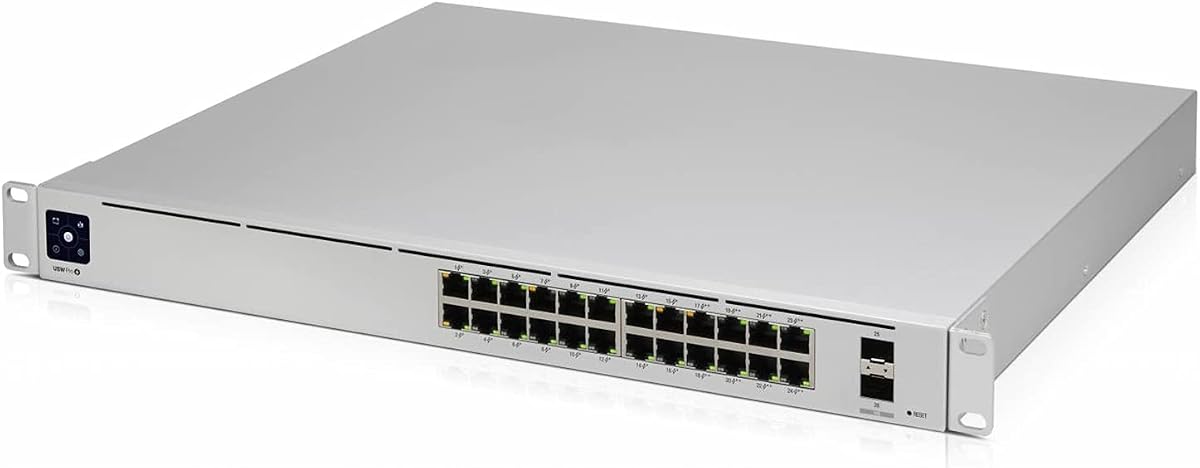



This Ubiquiti UniFi switch combines solid Layer 3 routing with essential PoE functionality. With a strong 4.7 rating from users, it stands out for its robust build and comprehensive feature set tailored for modern enterprise networks.
We may earn a commission when you buy through this link, at no additional cost to you.
The device offers 24 ports for flexible connectivity while handling IP routing internally to reduce load on your main router. Its Layer 3 capabilities ensure efficient traffic management and segmentation across your LAN environment seamlessly.
While it commands a higher investment compared to unmanaged alternatives, the integration of PoE and routing features makes it a cost-effective solution long-term. The trade-off lies in its reliance on the Ubiquiti ecosystem for advanced management options.
This switch is ideal for businesses or advanced home users already invested in UniFi products who need scalable routing. It delivers professional-grade performance and stability, making it a top recommendation for reliable network infrastructure.
Internal routing reduces dependency on external routers for inter-VLAN traffic.
Power for access points and cameras is delivered directly through the switch ports.
We may earn a commission when you buy through this link, at no additional cost to you.
The MokerLink switch offers incredible value for those needing 10G throughput without enterprise pricing. Rated 4.3 stars, it brings Layer 3 management capabilities to smaller setups including home labs and compact office environments effectively.
We may earn a commission when you buy through this link, at no additional cost to you.
Each of its eight ports adapts to various speeds ensuring compatibility with legacy and modern devices. The web and CLI interfaces provide necessary control over routing and security settings without requiring complex hardware.
It does lack the advanced ecosystem integrations found in higher-priced units but delivers core functionality reliably. The metal chassis and fan design ensure it runs cool even under sustained high-speed data transfers efficiently.
Buy this if you require fast wired connectivity and basic routing controls at a lower cost. It is a pragmatic choice for enthusiasts upgrading their network backbone on a tight budget.
Ports support 10G down to 100M ensuring broad device compatibility.
Configure via browser or command line to suit different skill levels.
We may earn a commission when you buy through this link, at no additional cost to you.
This switch excels with its massive PoE++ budget and future-proof 2.5G ports ideal for high-performance devices. Users rate it 4.6 stars for its reliability in demanding environments like studios and tech labs needing robust power.
We may earn a commission when you buy through this link, at no additional cost to you.
It handles complex routing tasks through its Layer 3 management system allowing segmentation and secure traffic control. The inclusion of a physical console port gives IT professionals direct access for troubleshooting and configuration flexibility.
The investment reflects its enterprise-grade build and advanced power delivery features that simplify device management. While not unlimited in ports, it covers critical nodes requiring high bandwidth and power simultaneously without issues.
Choose this for setups requiring powerful PoE delivery and secure routing in a compact form. It is best suited for professional environments needing reliable performance and comprehensive control over network resources.
Delivers up to 90W per port to support heavy devices like Wi-Fi 7 APs.
Physical console port enables direct command line configuration for experts.
We may earn a commission when you buy through this link, at no additional cost to you.
Designed specifically for routing performance this model drops PoE to focus on speed and connectivity. With a 4.4 rating, it serves well in environments where separate power injection is preferred over switch-based power delivery methods.
We may earn a commission when you buy through this link, at no additional cost to you.
It supports optical fiber media enabling efficient and reliable connections over longer distances than standard copper. This makes it valuable for backbone links connecting multiple buildings or remote racks within a network infrastructure.
The trade-off is the lack of PoE requiring external injectors for connected devices like cameras. However, this can be advantageous for specialized power management or separating traffic from power loads effectively.
Buy this if you need robust routing and fiber support without PoE complexity. It is perfect for network architects prioritizing pure data performance and clean cable management in professional setups.
Optical support extends range and improves reliability for critical links.
Dedicated Layer 3 features ensure fast internal traffic handling.
We may earn a commission when you buy through this link, at no additional cost to you.
MikroTik is known for deep control and this unit brings that expertise to a compact 1U form. With 4.3 stars it offers high performance for those willing to invest time in learning its powerful RouterOS software ecosystem.
We may earn a commission when you buy through this link, at no additional cost to you.
The mix of copper and SFP+ ports ensures flexible uplinks for diverse network topologies. It supports full Layer 3 routing making it ideal for users needing granular control over packet flow and security rules.
While the interface may be less intuitive than consumer brands it rewards technical users with unparalleled flexibility. The learning curve is the main trade-off but provides a powerful tool for network professionals and enthusiasts.
Select this switch if you need serious control and are comfortable with advanced configuration tools. It delivers professional-grade routing performance suitable for complex networks needing precise traffic management.
Deep configuration options allow custom routing and firewall rules.
Combines copper Ethernet and SFP+ for versatile connection options.
We may earn a commission when you buy through this link, at no additional cost to you.
This model is a powerhouse for fiber connections offering sixteen SFP+ ports in a compact chassis. Rated 4.4 stars it excels in aggregation scenarios where high-density optical links are required for efficient data transport.
We may earn a commission when you buy through this link, at no additional cost to you.
It integrates Layer 3 management directly enabling routing capabilities without needing separate hardware. The inclusion of a standard console port ensures easy configuration and troubleshooting for IT staff managing network core nodes.
The lack of copper ports is a specific constraint meaning transceivers are mandatory for all connections. However, for environments needing pure fiber throughput this design simplifies cabling and enhances signal integrity effectively.
Purchase this for backbone aggregation or high-density server room deployments requiring fiber. It is best for technical teams needing reliable high-speed connectivity and advanced routing features.
Sixteen ports allow massive optical aggregation for data centers.
RJ-45 console provides standard physical access for initial setup.
We may earn a commission when you buy through this link, at no additional cost to you.
Ideal for larger networks this switch offers 48 gigabit ports alongside high-speed SFP+ uplinks for scalability. With a 3.7 rating it balances high density with useful features like an integrated touchscreen for real-time status monitoring.
We may earn a commission when you buy through this link, at no additional cost to you.
It supports Layer 3 functions allowing for efficient inter-VLAN routing and traffic control across a large LAN. The touchscreen display simplifies basic checks without needing to log into the web interface constantly.
Its size and lower rating suggest it may be better suited for established UniFi deployments than small setups. Consider the physical space and network scale required before committing to this larger model for your office.
Choose this for offices needing high port counts and reliable UniFi integration. It is a strong candidate for expanding networks where physical connections and visual monitoring are top priorities.
Visual display provides quick access to port status and network health.
Forty-eight ports support large numbers of wired devices easily.
We may earn a commission when you buy through this link, at no additional cost to you.
This switch is engineered for silence making it perfect for noise-sensitive environments like studios or quiet offices. Rated 4.7 stars it delivers top-tier 10G performance without the hum of cooling fans thanks to its passive design.
We may earn a commission when you buy through this link, at no additional cost to you.
Layer 3 routing ensures traffic is managed efficiently reducing latency for real-time editing or gaming. Security features like ACLs and DAI protect against internal threats ensuring a stable and safe network environment.
The passive cooling requires careful thermal management but keeps noise to zero. If your priority is silence and high speed in a compact box this is a highly effective solution for professional or home setups.
Buy this for creative workspaces or home labs requiring quiet operation and fiber speed. It is a fantastic choice for those who value performance and silence over copper port flexibility.
Silent operation eliminates noise disturbance in quiet creative spaces.
Eight SFP+ ports ensure lag-free transfers for high-intensity workflows.
We may earn a commission when you buy through this link, at no additional cost to you.
This Pro Max model brings high-density connectivity with a mix of 2.5G and 1G ports for varied speeds. With a 4.5 rating it offers robust management features tailored for UniFi users looking to expand their network capabilities.
We may earn a commission when you buy through this link, at no additional cost to you.
The managed capabilities allow VLANs and QoS settings to optimize traffic flow across your LAN. It integrates seamlessly into UniFi networks making deployment and monitoring simple for existing users.
While it offers excellent flexibility the number of 2.5G ports is a limiting factor for full speed deployment. However, it balances well for environments needing mixed device speeds in a reliable managed unit.
Select this if you are expanding a UniFi network needing flexible port speeds. It is best for offices requiring high density and integrated management without complex standalone configurations.
Mix of 2.5G and 1G suits diverse device requirements effectively.
Seamless integration simplifies management within UniFi ecosystems.
We may earn a commission when you buy through this link, at no additional cost to you.
This switch stands out with Etherlighting that illuminates ports for easy identification during troubleshooting. Rated 4.7 stars it offers 180W PoE and silent fanless operation perfect for professional offices and clean installations.
We may earn a commission when you buy through this link, at no additional cost to you.
It combines Layer 3 capabilities with advanced PoE delivery supporting powerful devices like high-end access points. The mounting options and fanless design ensure it fits discreetly in various environments without noise.
The Etherlighting feature is a unique convenience but comes with a higher cost. If you need visual status feedback and solid PoE support this model provides a premium experience.
Purchase this for clean installations needing high PoE and visual diagnostics. It is an excellent choice for professional networks valuing ease of maintenance and silent operation.
Ports light up to indicate status making cable management easier.
Silent design ensures no noise disruption in quiet offices.
We may earn a commission when you buy through this link, at no additional cost to you.
Selecting a Layer 3 Network Switch requires evaluating port count, speed, power delivery, and management features against your specific infrastructure needs.
Determine the data rates your devices require. Ensure the switch supports 1G, 2.5G, or 10G speeds as needed and provides the correct physical connectors like RJ45 or SFP+.
Verify that port speed matches your internet bandwidth and internal server transfer requirements.
Check if the switch supports the routing protocols you need such as Static Routing, OSPF, or VLAN routing. This ensures traffic between networks is managed efficiently without overloading your main router.
Prioritize switches with clear and robust routing tools for segmentation.
If you connect devices like cameras or access points, check the PoE budget and standard. Ensure the total wattage per port and overall switch meets your connected devices power demands.
Select a model with sufficient PoE headroom to avoid underpowering your equipment.
Consider whether you prefer web interfaces, command line interfaces (CLI), or mobile apps. Access methods like console ports are also vital for advanced configuration and troubleshooting tasks.
Choose a management style that matches your technical skill level and daily workflow.
Evaluate if the switch fits in your space. Desktop, wall mount, or rackmount options vary in size and mounting hardware requirements to suit different environments.
Confirm dimensions and mounting style match your server room or office layout.
Look for fanless designs in quiet spaces or robust cooling for high heat areas. Fanless units are silent but may require careful placement to ensure airflow.
Ensure the thermal design aligns with your room temperature and noise tolerance.
Check compatibility with existing network gear like routers and controllers. Some brands offer unified management tools that simplify administration if you already use their products.
Stick to a compatible brand to ensure seamless integration and management.
Review built-in security features like Access Control Lists (ACLs), Port Security, and Loop Protection. These tools help protect your network from unauthorized access and broadcast storms.
Select a switch with security protocols relevant to your risk profile.
Connect your switch to a reliable power source and link your network router to an uplink port. Ensure you use high-quality cables that match the speed of the ports you are using for optimal performance.
Access the switch management interface via a web browser or console cable to configure routing rules and VLANs. Save your configuration regularly to prevent data loss during unexpected power outages.
Regularly clean the vents and fans to prevent dust buildup which can cause overheating. Monitor the status lights periodically to ensure all ports and connections are functioning as expected.
A Layer 3 Network Switch is a device that combines traditional switching capabilities with routing functions. It uses IP addresses to forward traffic between different network segments, allowing for better management and performance than standard Layer 2 switches.
Generally, home networks can rely on standard Layer 2 switches and routers. However, if you have a large home lab, multiple VLANs, or need advanced segmentation, a Layer 3 switch can provide better control and efficiency for traffic management.
Yes, Layer 3 switches are excellent for VoIP traffic because they support Quality of Service (QoS) features. These features prioritize voice packets to ensure clear calls by reducing jitter and latency across the network.
Layer 2 switches forward data based on MAC addresses within a local network, while Layer 3 switches use IP addresses to route traffic between different subnets. Layer 3 switches offer more advanced routing and segmentation capabilities for complex networks.
To configure Layer 3 routing, access the switch CLI or web interface and define VLAN interfaces with IP addresses. Enable IP routing and add static routes or configure dynamic routing protocols like OSPF to connect different network segments.
Yes, Layer 3 switches typically cost more due to their advanced hardware and routing software. However, the cost is justified for businesses needing efficient traffic control and reduced load on dedicated routers.
Many Layer 3 switches include SFP+ slots for high-speed fiber connections. These slots allow you to connect to servers or other switches at 10Gbps speeds for efficient high-bandwidth network links.
A console port is highly recommended for initial setup and emergency recovery. It allows direct physical access to configure the device without needing network connectivity ensuring you can manage the switch even if the network fails.
We reviewed ten top models ranging from budget options like MokerLink to premium choices like Ubiquiti. Each switch offers unique benefits for routing, PoE delivery, and port speed depending on your specific infrastructure requirements.
Prioritize your needs for port speed, PoE budget, and management features before purchasing. A switch that matches your current traffic patterns and future expansion plans will provide the best long-term value.
Remember to check current listings for availability and pricing as these can change frequently. Ensure you select a model that fits your physical space and integrates well with your existing network ecosystem.