
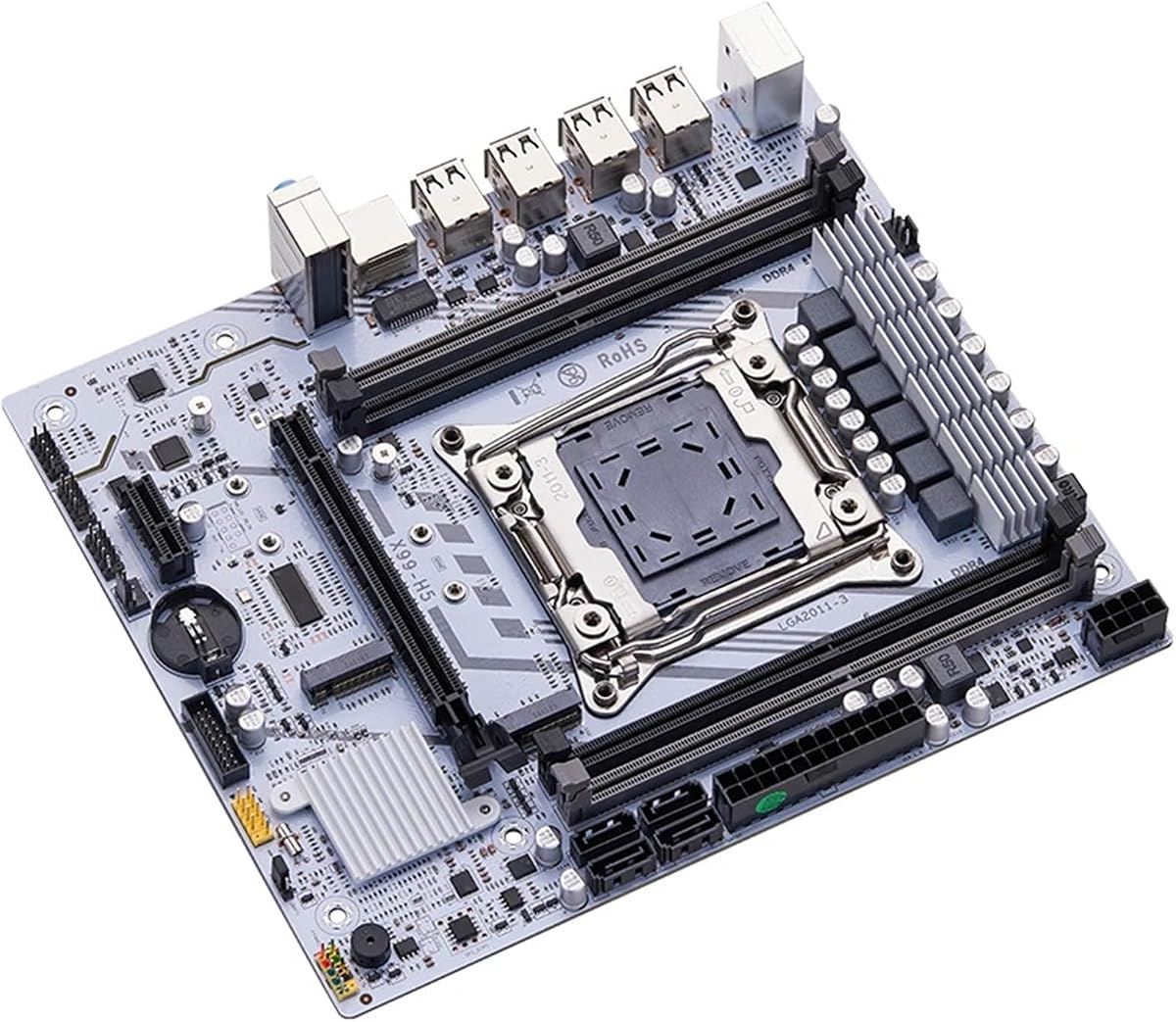
X99 LGA 2011-3 Motherboard for Intel Xeon E5 V3/V4
3.9Editor score
Supports Dual Channel DDR4 Memory
Includes M.2 NVME Slot
Realtek Gigabit LAN Port
Discover the top Lga 3 X99 Motherboard options for 2026. This guide compares ten boards for CPUs, memory, and expansion to help you build a powerful workstation
Choosing the right Lga 3 X99 Motherboard is crucial for building a high-performance workstation or gaming rig. These boards support powerful Intel Xeon and Core i7 processors, offering extensive memory and expansion options for demanding tasks.
We have carefully selected and compared ten top models based on their socket compatibility, memory support, expansion slots, and build quality. Our analysis focuses on features that matter most for server, workstation, and enthusiast desktop builds.
Each pick highlights key strengths and potential trade-offs to help you make an informed decision. Please note that availability and pricing can change frequently, so verify current stock before making your final purchase decision today.
3.9Editor score

4.1Editor score

3.7Editor score
This table provides a side-by-side overview of all ten selected motherboards. Compare key specifications like socket type, memory support, and expansion slots to find the best fit for your specific system requirements and budget constraints.



The ASUS EATX DDR4 motherboard stands out as a top choice for workstation builders seeking reliability and performance. With a strong rating, it delivers premium features like USB 3.1 and extensive GPU expansion options.
We may earn a commission when you buy through this link, at no additional cost to you.
Its quad-way PCI-E support allows for multiple graphics cards, making it ideal for rendering or scientific computing. The 5-Way Optimization simplifies tuning, while the Dr. Power LED aids in quick troubleshooting.
While it costs more than budget options, the durability and advanced connectivity justify the investment. The large size requires a spacious case, which may be a consideration for smaller builds.
This board is best suited for professionals who need stable, high-performance computing power. If you prioritize expandability and brand trust, this ASUS model is a highly recommended choice.
Supports up to four graphics cards for massive parallel processing power.
USB 3.1 offers twice the speed of older USB 3.0 ports for faster transfers.
We may earn a commission when you buy through this link, at no additional cost to you.
This X99 model offers exceptional value for budget-conscious builders needing Xeon or i7 support. It provides essential server features like ECC memory support and fast NVME storage at a low cost.
We may earn a commission when you buy through this link, at no additional cost to you.
The white PCB design adds a unique aesthetic touch while maintaining solid build quality with a 6-layer PCB. It supports dual channel DDR4 and includes a realtek LAN port for reliable networking.
Users should note that the manual is not included and must be requested online. Also, a CR2032 battery needs to be purchased separately, which adds a minor step to setup.
Ideal for entry-level workstations or home servers, this board balances cost and functionality well. It is a strong pick if you need basic reliability without breaking the bank.
Supports ECC and RECC memory for improved stability in server environments.
The M.2 NVME slot enables high-speed boot drives and quick file access.
We may earn a commission when you buy through this link, at no additional cost to you.
The MACHINIST X99 V9S delivers premium features like triple NVME slots and dedicated cooling for stable performance. Its robust power supply supports demanding Xeon processors effectively for heavy workloads.
We may earn a commission when you buy through this link, at no additional cost to you.
This board includes essential components like VRM fans and heat dissipation armor to maintain low temperatures. The layout supports up to 128GB of DDR4 and features multiple PCIe slots for expansion needs.
While it offers great specs, users may need to clear CMOS or check connections if issues arise. The battery is also not included, requiring a quick separate purchase for initial boot.
For users wanting extensive storage options without spending flagship prices, this board is a solid premium option. It is recommended for those who value M.2 speed and thermal management.
Features three M.2 slots for multiple high-speed SSDs in a single board.
Includes a VRM cooling fan to reduce heat under heavy processing loads.
We may earn a commission when you buy through this link, at no additional cost to you.
The ASUS X99-A offers a classic ATX experience with features like OC Socket for enhanced performance tuning. It is a dependable choice for users seeking stable support for Intel Xeon or i7 CPUs.
We may earn a commission when you buy through this link, at no additional cost to you.
Its Dual Intelligent Processors 5 allow for easy system optimization with a single click. The board supports SATA Express and offers solid audio through Crystal Sound 2 for gaming and media.
While it lacks newer USB 3.1 standards, it provides sufficient connectivity for most legacy and current peripherals. The build quality ensures longevity, making it a good choice for mid-range builds.
This board is best for those prioritizing ASUS reliability and straightforward tuning tools. It serves well as a standard workstation board without unnecessary extra frills.
Push CPU and memory performance beyond expectations with specialized socket design.
Crystal Sound 2 provides clear, noise-free audio for entertainment and calls.
We may earn a commission when you buy through this link, at no additional cost to you.
This X99 model distinguishes itself with dual CPU support and eight DDR4 slots for massive memory expansion. It is designed for heavy-duty tasks needing significant parallel processing power.
We may earn a commission when you buy through this link, at no additional cost to you.
The layout supports two processors, effectively doubling the core count for virtualization or rendering. It includes standard USB and SATA ports alongside integrated audio and network connectivity for peripherals.
As a generic option, documentation may be sparse, requiring careful setup of dual processors. However, the sheer capacity for cores and memory makes it a unique value for specific workloads.
It is best suited for specialized workstations requiring maximum CPU core density. Users should verify CPU compatibility carefully before purchasing this dual-processor solution.
Allows installation of two CPUs to drastically increase total thread count.
Eight slots permit up to 256GB of total RAM for heavy multitasking.
We may earn a commission when you buy through this link, at no additional cost to you.
The Tangxi X99 Gaming motherboard fits into smaller cases with its M-ATX footprint. It maintains robust power delivery with solid capacitors and an 8-layer PCB for stability.
We may earn a commission when you buy through this link, at no additional cost to you.
This board supports 4-channel DDR4 memory up to 128GB and includes a fast NVME slot for modern storage needs. It provides essential I/O options like USB 3.0 and RJ45 ports for connectivity.
While ratings suggest mixed experiences, the design focuses on durability and thermal stability. Users may need to ensure careful installation to avoid potential boot issues common with budget boards.
It is a decent choice for compact builds needing workstation performance. Those with tighter cases can benefit from its smaller size without sacrificing core expansion capabilities.
M-ATX size allows installation in mid-tower cases without bulky dimensions.
Full solid capacitors and multi-layer PCB ensure reliable power distribution.
We may earn a commission when you buy through this link, at no additional cost to you.
This board is similar to the previous dual CPU option, offering massive expansion for memory and cores. It is designed for users needing extreme throughput for virtualization or data processing.
We may earn a commission when you buy through this link, at no additional cost to you.
With eight DDR4 slots, the system can be upgraded to very high memory counts. The layout provides standard headers for USB and SATA, ensuring compatibility with many peripheral devices.
User feedback is varied, suggesting potential variability in quality control. However, for specialized needs, the capacity offers a cost-effective path to high-end workstation specs.
It remains a viable option for specific dual-processor workloads. Users should verify component compatibility and prepare for a straightforward but technical setup process.
Enables systems with 32+ threads for heavy multi-tasking applications.
Eight slots allow for large RAM configurations suitable for big data.
We may earn a commission when you buy through this link, at no additional cost to you.
This motherboard stands out for supporting both DDR3 and DDR4 memory types, offering flexibility for upgrades. Dual M.2 NVME slots provide plenty of room for high-speed storage solutions.
We may earn a commission when you buy through this link, at no additional cost to you.
It features optimized trace routing for better signal integrity and overclocking potential. The thermal design includes passive heatsinks for the chipset and aluminum heatsinks for stable operation under load.
While pricing is higher than budget options, the versatility in memory types justifies the cost for some users. It is a strong choice if you have existing DDR3 parts or need specific memory mixes.
Ideal for enthusiasts who want dual storage speed and memory flexibility. The board aims to deliver stable performance for diverse hardware configurations.
Supports both DDR3 and DDR4 to save costs on existing memory kits.
Passive chipset heatsinks and aluminum blocks keep temperatures low.
We may earn a commission when you buy through this link, at no additional cost to you.
This X99 board offers a compact M-ATX layout with essential support for NVME storage and Xeon CPUs. It targets budget users needing basic workstation features in a small form factor.
We may earn a commission when you buy through this link, at no additional cost to you.
With PCI3.0 and SATA support, it handles common storage and expansion needs effectively. The layout supports V3 V4 CPUs which are popular for cost-effective server builds.
While specific reviews are scarce, the general specs align with standard expectations for this class. It provides an entry point into X99 territory without high-end costs.
It is best for small office PCs or home labs. Users looking for a simple, functional board for older CPUs will find it suitable for daily tasks.
Provides essential X99 features at an accessible price for entry users.
NVME M.2 slot allows fast boot and application loading speeds.
We may earn a commission when you buy through this link, at no additional cost to you.
This ATX model delivers a standard layout with solid cooling and protection features. It is suited for general office, building, and gaming needs with reliable Xeon CPU support.
We may earn a commission when you buy through this link, at no additional cost to you.
The motherboard supports high-frequency memory and includes safety protections for stable operation. It features NVME M.2 and USB 3.0 for modern peripheral and storage connectivity options.
While basic, the board covers essential requirements for a stable workstation environment. It balances cost and functionality well for standard home or office use cases.
It is a practical pick for users needing a no-frills ATX board. If you need standard reliability with some speed features, this model fits the bill.
Multiple safety protections help maintain system stability under load.
USB 3.0 and NVME slots offer fast data transfer for common devices.
We may earn a commission when you buy through this link, at no additional cost to you.
Choosing the right motherboard requires understanding your CPU, memory, and expansion needs. This guide helps you compare features to find the best fit for your budget.
Ensure the motherboard supports your chosen Intel Xeon or Core i7 processor. Most boards here use the LGA 2011-3 socket, which is standard for V3 and V4 series CPUs.
Check specific lists of supported CPUs to avoid compatibility issues before buying.
Look for DDR4 support as it is the standard for X99 boards. Decide if you need ECC memory for stability or non-ECC for cost savings.
Verify the maximum supported RAM capacity and the number of slots available for future upgrades.
NVME M.2 slots are essential for fast boot and application loading. Boards with multiple M.2 slots offer better flexibility for high-speed storage.
Check SATA port counts and types if you plan to use traditional hard drives or SSDs.
Count the PCIe slots based on your graphics card or expansion card needs. Look for x16 and x4 slots for GPUs, capture cards, or network adapters.
Ensure the bandwidth meets your multi-GPU requirements if you plan to use SLI or Crossfire.
Decide between ATX or M-ATX based on your case size and expansion desires. ATX offers more slots while M-ATX fits smaller enclosures.
Verify your case dimensions and stand-off positions to ensure the board fits securely.
A good VRM ensures stable power to your CPU, especially during heavy loads. Look for solid capacitors and adequate cooling for the power delivery system.
Higher phase counts often indicate better stability for overclocking or multi-core CPUs.
Check the rear I/O panel for USB, audio, and LAN ports. USB 3.0 or 3.1 is recommended for faster external drive connections.
Ensure the board has necessary headers for front panel USB and audio for your case.
Reputable brands often provide better BIOS updates and customer support. Consider warranty terms and the availability of manuals or drivers.
Read user reviews to gauge reliability and any common boot or compatibility issues.
When installing the motherboard, ground yourself to prevent static discharge. Align the board with the case standoffs and secure it with screws. Connect the 24-pin and CPU power cables firmly to ensure stable operation.
After installation, enter the BIOS to check if your memory and CPU are detected. Update the BIOS to the latest version for better stability and CPU compatibility. Configure boot order to prioritize your main drive.
Regularly clean dust from fans and heatsinks to maintain cooling efficiency. Monitor temperatures using software to ensure the CPU and VRMs stay within safe limits. Avoid overclocking beyond recommended settings to prolong hardware lifespan.
Most X99 motherboards support DDR4 memory. However, some specific models may offer dual support for DDR3 and DDR4. Always check the product specifications carefully to confirm supported memory types before purchasing.
Yes, most X99 boards listed support Intel Xeon E5 V3 and V4 series processors. These CPUs are often used in workstation builds for their high core count. Verify specific model support lists for compatibility.
Not all X99 boards include native NVME M.2 support. Many modern listings include it, but older models might require adapters. Look for boards explicitly listing M.2 slots for high-speed storage.
ATX boards are larger and offer more PCIe slots and connectors. M-ATX boards are smaller and fit in smaller cases but may have fewer expansion slots. Choose based on your case and expansion needs.
ECC memory is required for server stability but is not mandatory for all uses. Desktop builds typically use non-ECC RAM. Check if the motherboard explicitly supports ECC if you need it.
Yes, boards with multiple full-length PCIe x16 slots support multi-GPU setups. This is useful for rendering or GPU computing. Ensure your PSU has enough wattage for multiple graphics cards.
Many motherboard packages exclude the CR2032 CMOS battery to save costs. You can buy this standard battery locally. Without it, the board may not retain BIOS settings.
Check CPU and memory connections first. Clear the CMOS using the jumper or button. Verify your CPU is supported. Contact the seller if issues persist after troubleshooting basic connections.
We highlighted top picks ranging from budget-friendly to premium models. The ASUS and MACHINIST options offer strong performance for serious builds while budget boards provide entry-level reliability.
Prioritize features like M.2 support and memory capacity based on your specific needs. A stable power design is crucial for long-term use with high-end processors.
Always verify current prices and stock before purchasing since these change frequently. Review your build requirements carefully to ensure the selected board matches your expectations.