
Coral M.2 Accelerator B+M Key
5.0Editor score
4 TOPS peak performance
Low power 0.5W per TOPS
Supports TensorFlow Lite models
Compare the top M2 accelerator cards for AI and ML workloads. This guide reviews performance, compatibility, power efficiency, and software support to help you
M2 accelerator cards are essential for enhancing artificial intelligence and machine learning tasks on edge devices. These compact modules deliver high throughput while maintaining low power consumption for efficient processing.
We evaluated ten leading models based on raw performance metrics, software ecosystem support, and hardware compatibility. Our analysis covers diverse form factors and use cases ranging from Raspberry Pi to enterprise servers.
Each pick highlights specific strengths like thermal management or SDK maturity. Note that availability and pricing fluctuate frequently so verify current details before purchasing your preferred model.
5.0Editor score

4.3Editor score

4.6Editor score
This side-by-side comparison highlights key specifications across all ten selected accelerator cards to help you identify the best fit for your specific AI or computing requirements.


The MX3 M.2 AI Accelerator stands out as a powerful option for demanding computer vision tasks. With a solid rating and focus on efficiency it balances performance with power use effectively.
We may earn a commission when you buy through this link, at no additional cost to you.
Its design prioritizes high performance AI processing while minimizing power consumption making it ideal for energy conscious deployments. The M.2 M-key form factor allows seamless integration into Linux based systems or Raspberry Pi setups.
While it offers robust capabilities the reliance on Linux limits broader compatibility compared to universal adapters. Additionally accessing full documentation requires visiting the developer site which may delay setup for some users.
Developers needing fast inference on edge devices should consider this card for its balanced approach to power and compute power. It remains a top choice for those focused on vision based AI projects.
This module delivers exceptional throughput for demanding AI vision applications ensuring rapid response times.
A comprehensive SDK simplifies deployment workflows allowing teams to iterate quickly on new models.
We may earn a commission when you buy through this link, at no additional cost to you.
This dual Edge TPU adapter offers an affordable entry point for users needing significant machine learning capacity. It combines two TPUs into one card delivering high aggregate performance for modest cost.
We may earn a commission when you buy through this link, at no additional cost to you.
The hardware delivers eight TOPS of peak performance with two TOPS per watt efficiency ensuring energy conscious operation. Using a standard PCIe Gen2 interface it fits many common laptop and laptop configurations easily.
Constraints include the specific E-key requirement which excludes some slots and the Gen2 interface limiting bandwidth compared to newer standards. However for lightweight inference tasks these limits are rarely hit.
Budget conscious hobbyists and startups building scalable edge inference systems will find this module provides excellent value. It is an ideal choice for prototyping multi model pipelines without heavy infrastructure costs.
Two integrated Edge TPU modules allow parallel processing of complex models or simultaneous inference streams.
High performance per watt ensures the card runs cool and consumes minimal power during sustained workloads.
We may earn a commission when you buy through this link, at no additional cost to you.
The waveshare Hailo-8 module delivers massive raw performance with twenty six TOPS of processing power in a compact form factor. It supports a wide range of frameworks and operating systems for flexible integration.
We may earn a commission when you buy through this link, at no additional cost to you.
Engineered for real time low latency tasks it handles multiple streams and models simultaneously without significant slowdowns. Operating at only two point five watts typical consumption it is surprisingly efficient for its compute density.
Users must consider thermal requirements since high performance generates heat needing proper airflow or active cooling. The premium price point may also deter casual users who only need modest inference capabilities.
Enterprise developers and heavy duty robotics teams needing scalable multi-model pipelines should prioritize this module. Its flexibility across OS environments ensures it adapts well to changing project requirements over time.
Support for TensorFlow ONNX Pytorch and others allows teams to use existing models without extensive rewriting.
Full compatibility with both Linux and Windows ensures seamless deployment across different infrastructure environments.
We may earn a commission when you buy through this link, at no additional cost to you.
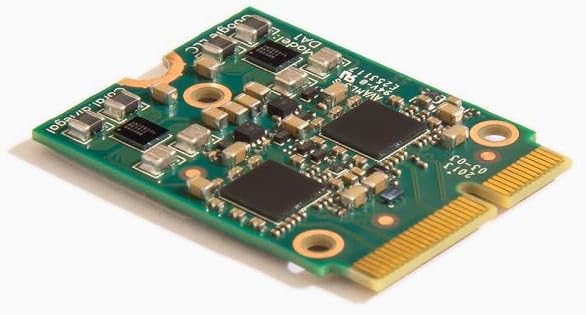
This Coral accelerator module excels at delivering high-speed ML inferencing with a dedicated Edge TPU coprocessor. It achieves perfect ratings due to its reliable performance and straightforward integration with Debian systems.
We may earn a commission when you buy through this link, at no additional cost to you.
The card executes state-of-the-art vision models like MobileNet v2 at high frame rates using minimal power. It works seamlessly with TensorFlow Lite models allowing developers to deploy trained models quickly without building from scratch.
Users not using Debian or TensorFlow will face compatibility hurdles. Also the hardware requires a B+M key slot which may not be present in all devices limiting physical installation options.
Debian users seeking a plug-and-play edge inference solution will find this Coral module highly effective. Its reliability and ease of use make it a standard reference for embedded machine learning projects.
The onboard Edge TPU enables execution of complex vision models at hundreds of frames per second.
AutoML Vision Edge support allows easy creation and deployment of custom image classification models.
We may earn a commission when you buy through this link, at no additional cost to you.
While primarily a storage expansion card this QNAP model offers significant utility for AI workstations needing high bandwidth data access. It provides two PCIe Gen3 M.2 slots alongside a powerful Ethernet port for rapid data transfer.
We may earn a commission when you buy through this link, at no additional cost to you.
The Marvell Ethernet controller enables connections to high speed networking devices ensuring quick dataset loading. It supports various operating systems including Windows and Linux making it versatile for mixed environments.
It does not process AI tasks directly but supports the infrastructure required for efficient model training and inference. Users requiring pure AI acceleration should pair this with a dedicated AI accelerator card.
Server administrators building robust data pipelines will appreciate this card ability to expand storage and network speed simultaneously. It complements AI accelerators by ensuring data movement never bottlenecks performance.
A dedicated 10GbE port ensures quick communication with remote storage or high bandwidth devices.
Two Gen3 M.2 slots allow for caching or fast storage expansion to accelerate data loading.
We may earn a commission when you buy through this link, at no additional cost to you.
This Rocket adapter focuses on delivering maximum bandwidth for storage expansion through four dedicated M.2 ports. It leverages the latest PCIe 5.0 standard to support high throughput requirements for intensive tasks.
We may earn a commission when you buy through this link, at no additional cost to you.
Each port gets dedicated x4 lanes ensuring full speed operation for all connected devices simultaneously. Native support for mainstream operating systems simplifies configuration across Intel AMD and ARM platforms.
Without built-in AI compute capabilities this card serves as infrastructure rather than an accelerator itself. It is best paired with dedicated AI chips that can utilize the data bandwidth it provides.
Enthusiasts and professionals requiring multi-disk setups for data intensive AI training should consider this expansion card. It ensures storage bottlenecks do not limit the performance of downstream AI accelerators.
Each M.2 port enjoys dedicated x4 lanes ensuring all attached devices operate at maximum speeds.
Support for Intel AMD and ARM platforms ensures flexibility in choosing host systems.
We may earn a commission when you buy through this link, at no additional cost to you.
This PCIe adapter transforms your system into a dual-TPU machine learning workstation allowing two Coral accelerators to function together. It is designed for developers requiring enhanced object detection and real-time video analytics.
We may earn a commission when you buy through this link, at no additional cost to you.
The card includes a dedicated heatsink to manage thermal output from the two TPU modules during sustained workloads. It offers a space efficient solution for achieving dual performance without consuming multiple PCIe slots.
Users must purchase separate Coral cards to utilize this adapter which adds to overall costs. The adapter is specialized for these specific modules limiting its utility for other M.2 AI solutions.
System builders needing scalable AI inference capacity will find this adapter provides an efficient path forward. It maximizes existing hardware investments while delivering substantial gains in processing throughput.
Combining two TPU modules allows for higher inference throughput without needing a full workstation rebuild.
An included heatsink ensures stable performance by dissipating heat from the dual TPU configuration.
We may earn a commission when you buy through this link, at no additional cost to you.
This ASUS adapter supports up to four PCIe 5.0/4.0 M.2 drives delivering massive bandwidth for data intensive tasks. It is adapted for server-grade reliability with robust power and cooling solutions.
We may earn a commission when you buy through this link, at no additional cost to you.
The active fan and thermal pads reduce SSD temperatures ensuring unthrottled transfer speeds even under heavy loads. It supports RAID functions across platforms allowing bootable arrays with up to four drives for redundancy.
Installation requires an external six-pin PCIe power connector which might complicate setups with limited power options. The large heatsink also demands adequate physical clearance inside the computer chassis.
Power users and workstation builders needing maximum storage performance for AI datasets should prioritize this card. It provides enterprise-level reliability and cooling for high-speed NVMe storage configurations.
An active fan solution keeps drives cool preventing throttling during prolonged high-speed data transfers.
Support for RAID arrays ensures data redundancy and improved performance through parallel access.
We may earn a commission when you buy through this link, at no additional cost to you.
This Coral module delivers four TOPS of peak performance in a compact A+E key form factor for embedded systems. It is engineered for industrial environments with a wide operating temperature range.
We may earn a commission when you buy through this link, at no additional cost to you.
It supports Linux and Windows operating systems increasing flexibility for developers who need cross-platform compatibility. The low power design offers two TOPS per watt efficiency making it suitable for energy-sensitive applications.
Users must ensure their slot supports the A+E key interface or use an adapter board to fit it properly. It also relies on the Edge TPU ecosystem which may limit model compatibility compared to others.
Industrial engineers building ruggedized AI solutions will appreciate its durability and thermal resilience. It is ideal for deployments in variable environments where consistent performance is critical.
Operating temperatures from negative twenty to eighty five degrees Celsius ensure reliable function in harsh conditions.
With two TOPS per watt it delivers reliable inference without excessive power draw or heat.
We may earn a commission when you buy through this link, at no additional cost to you.
This adapter is designed exclusively for Coral M.2 Accelerator with Dual Edge TPU modules to maximize AI inference performance. It fits standard M.2 2280 B or M-key slots for broad compatibility.
We may earn a commission when you buy through this link, at no additional cost to you.
It offers bidirectional Gen2 bandwidth ensuring efficient data flow between the CPU and the connected TPUs. A stainless steel mounting screw is included to secure the board against vibration for robust deployments.
Users must avoid using it with SATA M.2 slots or Raspberry Pi CM4 enclosures as incompatibility may occur. It requires careful attention to host slot types to ensure successful installation.
Builders needing a compact solution for dual TPU setups will find this adapter reliable and efficient. It is a specialized tool for those committed to the Coral ecosystem.
The included stainless steel screw provides vibration-resistant fixation for stable operation in mobile systems.
Bidirectional Gen2 lanes ensure data moves efficiently to support parallel TPU operations.
We may earn a commission when you buy through this link, at no additional cost to you.
Selecting the right accelerator card requires balancing performance needs with hardware constraints. This guide outlines the critical factors to consider before purchasing.
Evaluate the total TOPS needed for your model. Higher TOPS ensure smoother inference for complex vision tasks.
Prioritize peak performance specs that match your throughput demands to avoid latency issues.
Check your host system for specific M.2 slots such as 2280 or 2230 and B/M/E keys.
Ensure the physical dimensions and key type match your motherboard or enclosure exactly.
Verify that the card provides drivers and SDKs for your OS like Linux or Windows.
Limited OS support may restrict deployment flexibility in mixed or server environments.
Look for high TOPS per watt ratings to reduce heat and energy costs during long runs.
Low power designs are essential for battery-powered or heat-sensitive edge devices.
Choose models with support for your preferred frameworks such as TensorFlow Lite or ONNX.
A strong SDK reduces development time by simplifying model compilation and deployment tasks.
Ensure the system has airflow or active cooling if the card runs hot under load.
Thermal throttling can degrade performance so verify cooling solutions are sufficient.
If you need to scale, consider cards with slots for multiple accelerators or storage expansion.
Dual TPU setups or PCIe adapters allow growth without replacing the main host system.
Select industrial-grade components for environments with vibration or temperature fluctuations.
Robust PCB designs ensure longevity and reliability in demanding deployment scenarios.
Begin by identifying the correct M.2 slot and key type on your motherboard before purchasing any hardware.
Install the card carefully ensuring the notch aligns perfectly to avoid damaging the connector pins.
Use the official SDK tools to compile models and deploy them efficiently without building from scratch.
M2 accelerator cards are used to offload machine learning inference tasks from the main CPU. They deliver high throughput for AI vision and other compute intensive workloads with low latency.
Many cards specifically support Raspberry Pi models like the Pi 5 with correct adapters. Always verify the physical form factor and key type match the board before buying.
Most accelerators require models to be compiled to a specific format like TFLite for the TPU. This process optimizes the model for the specific hardware acceleration architecture.
Use the provided heatsinks and ensure the system case has adequate airflow. Some cards require active cooling for sustained high-performance operation.
Linux and Windows are the most common supported systems. Specific cards like the Hailo8 or Coral TPU provide detailed driver documentation for setup.
Yes PCIe adapters or split boards allow multiple TPU modules to function together. This increases total inference capacity for larger model pipelines.
M-key is typically for storage while E-key is for WiFi or AI cards. Mismatching keys will physically prevent installation or cause compatibility issues.
Most M.2 cards draw power directly from the motherboard slot. However expansion cards may require an external PCIe power connector for full functionality.
The MX3 M.2 AI Accelerator Coral M.2 Accelerator B+M Key and waveshare Hailo-8 module stand out as top choices for varied needs.
Prioritize OS compatibility and form factor alignment to ensure a smooth integration into your existing hardware setup.
Always verify current availability and specifications on the product page before finalizing your purchase.