
Hyperkin Trooper 2 Premium USB Game Controller
4.1Editor score
Compatible with macOS systems
Ergonomic design comfort
Durable construction materials
This guide compares the top Mac game joysticks for flight sim, arcade, and general gaming on macOS to help you choose the right controller for your setup.
Finding the right game controller for your Mac can be tricky because compatibility varies wildly across different titles and system versions. A good joystick offers precise inputs and ergonomic comfort which are essential for long gaming sessions without fatigue or frustration.
We compared ten top-rated joysticks based on build quality, macOS support, and specific use cases like flight simulation or arcade fighting. Each product was evaluated for connectivity options, button mapping capabilities, and overall value for money for Mac users.
Each pick in this list highlights unique strengths whether you need a budget option or a premium flight stick. Prices and availability change frequently so check the current links for the most up-to-date information before making your purchase decision today.
4.1Editor score

4.5Editor score

4.0Editor score
This table provides a side-by-side comparison of all ten selected joysticks to help you quickly identify the best match for your specific gaming needs and Mac configuration.




The Hyperkin Trooper 2 offers a straightforward gaming experience for Mac users seeking a reliable and affordable controller. With a solid 4.1 rating it stands out for its durable construction and ergonomic design that reduces hand fatigue during extended play.
We may earn a commission when you buy through this link, at no additional cost to you.
Its classic Atari style feel is complemented by modern upgrades like a ten foot USB cable and six mappable buttons. The chamfered corners and soft rubber grommets ensure a comfortable grip while the quiet movement joystick provides precise inputs for various game genres.
While it lacks wireless connectivity or advanced programmability the controller delivers consistent performance for retro gaming and general play. The trade-off in features is acceptable given its budget friendly price and focus on longevity through high quality materials.
This controller is ideal for casual gamers or those interested in emulation on macOS who do not need complex flight or arcade controls. We recommend it as a solid entry level option that balances comfort and cost effectively.
The chamfered corners and rubber grips are specifically designed to provide increased comfort during long gaming sessions reducing strain on the hands and wrists.
Designed for PC Mac and Linux this controller ensures seamless integration with various systems making it a flexible choice for multi-platform gamers.
We may earn a commission when you buy through this link, at no additional cost to you.
The Thrustmaster T-Flight Stick X is a dedicated flight simulation joystick designed to offer precise control and ease of use for aviation enthusiasts. It features an ergonomic design with a weighted base that ensures stability during intense maneuvers without unwanted movement on your desk.
We may earn a commission when you buy through this link, at no additional cost to you.
Key strengths include the adjustable resistance control which allows you to fine tune stick tension to match your flying style. The built-in throttle and rudder twist handle eliminate the need for extra peripherals saving desk space while delivering flawless flight control experience.
The only downside is its specialization for flight sims which may not appeal to general gamers. However for those focused on aviation titles the integrated features and programmable buttons provide a comprehensive control solution that enhances immersion significantly.
We recommend this joystick to Mac users dedicated to flight simulation who want a reliable plug and play experience. Its robust build and thoughtful design make it a top choice for realistic aerial gaming sessions.
Feel total command over every maneuver with an extremely precise flight joystick featuring adjustable resistance that lets you fine tune stick tension to match your flying style.
Enjoy a complete flight control system in one device with an ergonomic integrated throttle lever for smooth speed management and a rotating handle with built-in locking system for rudder control.
We may earn a commission when you buy through this link, at no additional cost to you.
The abxylute C6 Wireless controller is a versatile option that supports a wide range of devices including Mac iOS and Switch. With a 4.3 rating it impresses with its Hall Effect joysticks that prevent drift and offer precise control for competitive gaming.
We may earn a commission when you buy through this link, at no additional cost to you.
Its ultra sensitive response is ensured by a 1000Hz polling rate in wired and Bluetooth dongle modes minimizing input lag for seamless gameplay. The rechargeable battery delivers up to 18 hours of continuous use which is excellent for extended sessions without frequent recharging.
Users should note that the USB dongle mode is recommended for the lowest latency which adds a small accessory to the setup. However the Bluetooth option offers convenience for casual play making this controller a flexible choice for many gaming scenarios.
This controller is perfect for Mac gamers who need a reliable wireless option without breaking the bank. Its combination of durability performance and compatibility makes it a standout value in the current market for versatile controllers.
Experience unparalleled precision and durability with Hall Effect controller joysticks and triggers that offer no drifting and no dead zones for an extended lifespan.
Wide compatibility includes PC Mac and Switch with multiple connectivity modes ensuring seamless gaming across all your devices without hassle.
We may earn a commission when you buy through this link, at no additional cost to you.
The MAYFLASH F300 is an arcade fight stick that brings console quality fighting controls to your Mac setup. With a 4.5 rating it is highly regarded for its compatibility with multiple platforms including Switch and PC making it ideal for fighting game fans.
We may earn a commission when you buy through this link, at no additional cost to you.
It supports Sanwa Denshi buttons and joystick components which are the industry standard for responsive and precise inputs. The stick supports both XINPUT and DINPUT on PC ensuring broad software compatibility and includes turbo functions for enhanced gameplay variety.
While it requires an adapter to work with PS5 the F300 is solid and ready for customization by enthusiasts. The only trade-off is its basic button layout which may not suit everyone but the quality and versatility compensate for this limitation.
We recommend this stick to Mac users who play fighting games and want a reliable and customizable solution. Its strong ratings and flexible design make it a top choice for those seeking an authentic arcade experience at home.
Compatible with Sanwa Denshi buttons and joystick that is perfect for customization to suit your specific playstyle and preferences.
Compatible with Switch and PS and Xbox and macOS and Windows and Steam Deck and Android ensuring broad support across platforms.
We may earn a commission when you buy through this link, at no additional cost to you.
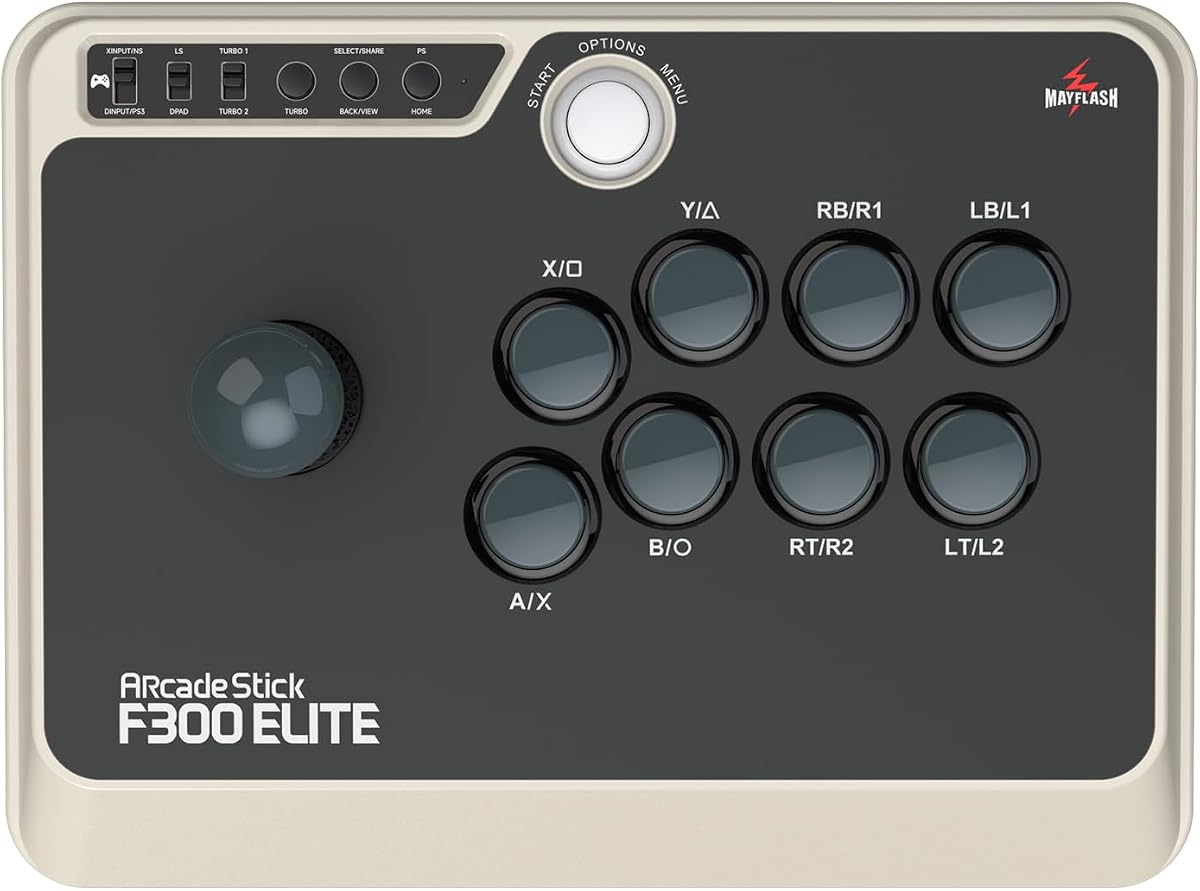
The MAYFLASH F300 Elite elevates the arcade experience with premium Sanwa components designed for peak performance and durability. With a 4.6 rating it delivers instant button strikes and precise joystick movements that are essential for competitive fighting game play.
We may earn a commission when you buy through this link, at no additional cost to you.
Its interior is accessible for further customization allowing modding enthusiasts to swap parts and tailor the controller to their exact preferences. The platform includes nine highly responsive buttons and a precision 4-way joystick that maintain reliability game after game.
While the price is higher than the standard F300 the investment pays off in build quality and performance. The only trade-off is the need for an adapter on PS5 but for Mac and PC users the included support and warranty make it a safe choice.
This stick is recommended for serious Mac gamers who demand the best tactile feedback and customization options. Its high ratings and quality components make it a leader in the premium arcade controller category for dedicated players.
By using premium quality Sanwa components including highly responsive buttons and a precision 4-way joystick you can reliably strike instantly and surely game after game.
The F300 Elite was built for modding enthusiasts so the inside of the platform is accessible for further customization of buttons and joystick to suit your playstyle.
We may earn a commission when you buy through this link, at no additional cost to you.
The Thrustmaster SimTask FarmStick is a specialized controller built for players of Farming Simulator 25 on PS5 and PC. With a 3.7 rating it provides a realistic and immersive experience for heavy machinery simulation and farming gameplay.
We may earn a commission when you buy through this link, at no additional cost to you.
It features a realistic 3-axis joystick and Hall Effect magnetic sensors that eliminate drift and wear ensuring long term precision. The joystick offers up to 33 programmable inputs allowing you to manage complex functions without relying on a keyboard.
The main trade-off is its narrow focus which limits its utility outside of farming games. Additionally it is designed to be used in conjunction with a steering wheel which may increase the overall cost of your setup significantly.
We recommend this joystick to serious farming simulator players who value immersion and realistic control. Its specialized features and sensor technology make it a top choice for those dedicated to this specific genre of simulation.
Experience precise smooth control when operating tractors loaders and construction equipment giving you a more immersive and lifelike farming simulator setup.
H.E.A.R.T technology eliminates drift and wear ensuring long-term precision and reliable control for demanding farming and construction simulation gameplay.
We may earn a commission when you buy through this link, at no additional cost to you.
The 8Bitdo Ultimate 2 is a versatile wireless controller that excels with its TMR Joysticks and ultra-low latency connection. With a 4.5 rating it offers a high performance gaming experience on PC Apple and Steam making it a top choice for many gamers.
We may earn a commission when you buy through this link, at no additional cost to you.
Its exclusive wireless technology delivers a stable 2.4G connection with ultra-low latency under 1ms ensuring rock-solid reliability. The Trigger Mode Switch allows you to switch between linear Hall Effect triggers and non-linear tactile triggers for optimal control in different scenarios.
The controller includes a multifunctional charging dock and supports customizable 6-Axis Motion Control and turbo functions. The only downside is the white color which may show dirt over time but the performance and features outweigh this minor aesthetic concern.
We recommend this controller to Mac users seeking a reliable wireless option with premium features. Its strong build quality and extensive connectivity make it an ideal pick for both casual and competitive gaming sessions.
8BitDo Exclusive Wireless Technology delivers an exceptionally stable 2.4G connection with ultra-low latency under 1ms engineered for rock-solid reliability.
Easily switch between linear Hall Effect triggers and non-linear tactile triggers for optimal control across different gaming scenarios.
We may earn a commission when you buy through this link, at no additional cost to you.
The Moonag Wireless PC Controller combines performance with style through its Hall Effect joysticks and dynamic RGB lighting. With a 4.3 rating it offers an ergonomic design and anti-drift features ensuring smooth control and long lifespan for Mac and PC users.
We may earn a commission when you buy through this link, at no additional cost to you.
It supports a 1000Hz polling rate in wireless and wired modes providing ultra-fast response time ideal for competitive games. The dual vibration feedback and turbo function enhance gameplay immersion while the 800mAh battery supports long playtime on a single charge.
The controller does not work with Xbox or PS consoles which limits its utility for multi-system gamers. However for PC and Switch users the combination of features and price makes it a compelling wireless option for daily gaming.
We recommend this controller to Mac and PC gamers who want a stylish and reliable wireless setup. Its balanced weight and responsive buttons make it a great choice for long sessions without fatigue or drift issues.
This PC controller equipped with Hall effect sensor joysticks that effectively prevent stick drift and wear delivering smoother control and longer durability than traditional analog joysticks.
Designed with an ergonomic shape and textured non-slip grip to fit comfortably in your hands reducing fatigue during extended gameplay sessions.
We may earn a commission when you buy through this link, at no additional cost to you.
The Logitech G X56 H.O.T.A.S provides military-grade precision for flight and space sim enthusiasts. With a 4.0 rating it stands out for its extensive programmable controls and adjustable stick force that cater to professional level simulation needs.
We may earn a commission when you buy through this link, at no additional cost to you.
It features two analog sticks for control surfaces and twin throttles with friction adjusters for realistic operation. The RGB backlighting adds visual flair while the advanced spring system allows customization of stick force to match your flying style.
The setup can be complex and it requires specific system requirements which may limit its use for casual Mac users. However for VR and PC flight sim players the immersive control and customization options are unmatched in this category.
We recommend this controller to serious flight sim gamers who demand top-tier performance and customization. Its build quality and extensive features make it a premium choice for those ready to invest in a comprehensive cockpit setup.
Military-grade Space and Flight Sim Precision offers customizable options including all the control surface options required to achieve the exact level of performance that aspiring combat pilots demand.
Adjustable Stick Force via Advanced 4-Spring System allows you to customize the resistance for different aircraft and game requirements.
We may earn a commission when you buy through this link, at no additional cost to you.
The SPEEDLINK Competition PRO Anniversary Edition brings a nostalgic touch to modern gaming with its retro arcade design. With a 3.9 rating it is a fun option for players who enjoy classic arcade games and want a controller that reflects that spirit.
We may earn a commission when you buy through this link, at no additional cost to you.
It includes a games collection with 20 retro games for download adding immediate value for enthusiasts. The digital USB joystick is designed for PCs and Android devices ensuring easy setup without complex drivers or configurations.
While it lacks advanced features the simple design and nostalgic appeal make it a charming addition to any retro gaming collection. The main limitation is its basic functionality which may not suit modern complex game requirements or controllers.
We recommend this joystick to retro gamers and collectors who value style and nostalgia. Its affordability and included game collection make it a great gift or secondary controller for classic arcade sessions at home.
Nostalgic design taken from the original Competition Pro's arcade machine stick offering a classic look and feel for vintage gaming.
Anniversary Edition includes games collection with 20 retro games for download adding value and instant entertainment for users.
We may earn a commission when you buy through this link, at no additional cost to you.
Selecting the right joystick for your Mac requires understanding your specific gaming needs and compatibility requirements. This section outlines the key factors to consider before making your purchase.
Always verify that the joystick explicitly supports macOS versions you are running. Many controllers are designed primarily for Windows or consoles and may not function properly without additional software or adapters on Mac.
Check the product specifications for confirmed macOS support and compatibility with your system version to ensure a hassle-free setup experience.
Decide between wired and wireless based on your preference for latency and convenience. Wired options offer consistent performance while wireless provide flexibility but may need battery management and occasional charging.
Choose wired for competitive gaming and wireless for casual play to match your typical gaming session needs effectively.
Identify whether you primarily play arcade fighting games or flight simulations as different joysticks cater to these niches. General controllers offer versatility whereas specialized sticks provide precise inputs for their specific genres.
Match the joystick design to your preferred genre to maximize immersion and performance during gameplay.
Look for controllers that allow you to map and program buttons to suit your playstyle. Advanced customization can significantly enhance your gaming experience by reducing the need for manual keyboard input.
Prioritize programmable buttons if you play complex games that require quick and custom input combinations.
Consider the materials and construction quality to ensure longevity and reliable performance. High quality materials prevent wear and tear over time maintaining consistent functionality during extended use.
Invest in a durable model to avoid frequent replacements and ensure a steady gaming experience.
Choose a joystick with an ergonomic design that supports long gaming sessions without causing hand fatigue. Features like textured grips and balanced weight contribute to comfort during extended play.
Prioritize comfort features to prevent strain and enjoy longer gaming sessions comfortably.
Evaluate extra features such as RGB lighting vibration feedback and turbo functions that can enhance your gaming immersion. These additions may be important depending on your personal preferences and gaming setup.
Consider these extras if they align with your desired aesthetic or performance benefits.
Balance the cost with the features offered to ensure you get good value for your investment. Compare prices across models to find one that meets your needs without unnecessary expense.
Select a model that offers the best combination of features and affordability for your budget.
Connect your joystick to your Mac using the appropriate cable or Bluetooth pairing process. Follow any manufacturer instructions for software installation if required to ensure all functions work correctly.
Calibrate your joystick settings in the system preferences or gaming software to match your gameplay preferences. This helps in achieving precise control and responsiveness during your gaming sessions.
Maintain your joystick by keeping it clean and storing it properly when not in use. Regularly check connections and clean the sticks and buttons to ensure long-term performance.
While most listed controllers support macOS compatibility varies by model and macOS version. Always check the product specifications or official documentation to confirm that your specific Mac system is supported before purchasing.
Yes many flight joysticks work for general gaming but they may lack the ergonomics and layout for action or fighting games. They excel in simulation titles but might feel awkward in other genres without careful configuration.
Some joysticks work plug and play while others require additional drivers or mapping software on macOS. Check the product description to see if software is included or available for download for your Mac system.
Wireless controllers offer freedom of movement but may have higher latency or battery concerns. Wired options provide consistent performance ideal for competitive gaming. Your preference depends on whether mobility or performance is more important.
Use a soft dry cloth to wipe down surfaces and avoid liquid cleaners. Regularly inspect for wear and replace parts if necessary. Store in a cool dry place to extend the lifespan of your joystick.
Many arcade sticks like the MAYFLASH models are designed for modding so you can swap buttons and sticks easily. Check the model to ensure it supports customization before purchasing replacement parts for your setup.
The ten selected joysticks offer diverse options for Mac gamers ranging from budget-friendly retro controls to premium flight sticks. Each choice brings unique features suited to different play styles and gaming preferences.
When making your decision prioritize compatibility and comfort to ensure a satisfying experience. Consider your most played genres to find a controller that enhances your gaming sessions effectively.
Always verify current availability and prices before purchasing since details may change over time. Check the official product pages for the latest updates and support information.