
Lenovo V15 Gen 4 Business Laptop
4.7Editor score
AMD Ryzen 5 7520U
16GB DDR5 RAM
MIL-SPEC tested
Finding a laptop that lasts for years requires careful consideration of build quality and performance. A durable machine withstands daily wear while maintaining speed and reliability over time.
We analyzed ten models focusing on durability certifications, component quality, and user ratings. Each selection offers unique strengths for different needs and budgets.
Each pick highlights key features and potential trade-offs. Prices fluctuate regularly so verify current offers before purchasing to ensure the best deal available.
4.7Editor score

4.5Editor score

4.2Editor score
As an Amazon Associate we earn from qualifying purchases.
This side-by-side comparison highlights key specifications and features across all ten selected models to help you find the perfect fit.






The HP 17 inch Business Laptop ranks highly for longevity with robust features and a large display ideal for productivity. Its rating reflects user satisfaction with performance and durability over time.
We may earn a commission when you buy through this link, at no additional cost to you.
This laptop combines an AMD Ryzen 5 CPU with 16GB RAM to handle multitasking efficiently. The 17.3 inch FHD display offers a spacious workspace for documents and spreadsheets.
While the size adds weight, the long battery life and fast charge feature offset portability concerns for office users. The full-size keyboard with numeric keypad enhances typing speed.
Ideal for professionals seeking a durable machine for daily tasks this model balances performance with cost. It remains a top choice for those prioritizing screen real estate and battery endurance.
The 17.3 inch anti-glare display provides sharp details and vivid colors perfect for extended work sessions without eye strain.
Preloaded with Windows 11 and Office 365 for Web ensures you can create and share documents seamlessly right out of the box.
We may earn a commission when you buy through this link, at no additional cost to you.
The Dell 16 Laptop DC16251 stands out for its visual comfort features and professional grade thermal management. Users appreciate the clarity and eye comfort during long work hours.
We may earn a commission when you buy through this link, at no additional cost to you.
Equipped with Intel Core 7 150U processor it delivers smooth performance for productivity tasks. The 16 inch FHD+ screen with 16:10 aspect ratio offers more vertical space than standard displays.
ComfortView Plus reduces blue light emissions which helps maintain eye comfort. Adaptive thermals ensure the device runs efficiently based on surface stability and workload.
This model is suited for office workers who value screen comfort and service support. The onsite service warranty adds value for business users needing reliable uptime.
ComfortView Plus helps reduce harmful blue light emissions while preserving true-to-life color to keep your eyes comfortable during prolonged screen time.
Dell provides 1 Year Onsite Service allowing technicians to resolve issues at your home or office minimizing downtime significantly.
We may earn a commission when you buy through this link, at no additional cost to you.
The Lenovo V15 Gen 4 Business Laptop delivers strong performance with an Intel Core i5-13420H processor. It is designed for business use with practical ports and operating system features.
We may earn a commission when you buy through this link, at no additional cost to you.
High-speed RAM allows smooth multitasking across multiple browser tabs and applications. The 512GB PCIe NVMe SSD ensures fast boot times and efficient data transfers for daily workflows.
While the design is straightforward it includes essential ports like HDMI and RJ45 for connectivity. Windows 11 Pro enhances collaboration with pre-configured layouts and intuitive navigation.
This laptop is a solid choice for students and professionals needing a reliable workhorse without overspending. It offers a balanced mix of speed and functionality for common business tasks.
16GB high-bandwidth RAM runs multiple applications smoothly while 512GB SSD allows fast bootup and efficient data transfer speeds.
Includes USB 3.0, USB-C, HDMI, RJ45 and headphone/mic ports providing flexible connectivity for peripherals and external displays.
We may earn a commission when you buy through this link, at no additional cost to you.
The Lenovo V15 Gen 4 Business Laptop is rated highly for its durability and efficient performance features. It meets MIL-SPEC requirements making it suitable for varied environments.
We may earn a commission when you buy through this link, at no additional cost to you.
Powered by AMD Ryzen 5 7520U processor it handles everyday computing tasks with ease. Paired with 16GB DDR5 memory it provides smooth multitasking and responsive application performance.
The TÜV Low Blue Light display reduces eye strain during extended sessions. Privacy shutter on the webcam adds a layer of security for remote work users.
This model is ideal for users seeking a robust laptop at a competitive price point. The combination of build standards and modern memory makes it a smart long-term investment.
Military Grade MIL-SPEC tested to 810H requirements ensures a sturdy built and reliable business security for demanding conditions.
Enjoy crisp visuals on the 15.6 FHD display with TÜV Low Blue Light certification and a privacy shutter for secure video calls.
We may earn a commission when you buy through this link, at no additional cost to you.
The Lenovo ThinkBook 16 Gen 8 Laptop is designed for professionals needing advanced capabilities and premium build quality. Its Intel Core Ultra 7 processor offers exceptional AI capabilities for demanding tasks.
We may earn a commission when you buy through this link, at no additional cost to you.
With 32GB DDR5 RAM and 1TB SSD it handles large datasets and multimedia content effortlessly. The 16 inch WUXGA display provides ample workspace with a modern aspect ratio.
Thunderbolt 4 ensures ultra-fast data transfer and external display support. Enterprise security features like TPM 2.0 and BitLocker encryption protect sensitive business data.
This model is best suited for power users and business professionals who require top-tier performance. The premium features justify the cost for those needing maximum productivity and security.
Intel Core Ultra 7 255H AI Processor delivers exceptional AI-powered performance optimizing workloads for demanding business applications efficiently.
32GB DDR5 RAM and 1TB SSD provide lightning-fast boot times seamless multitasking and ample space for large files and projects.
We may earn a commission when you buy through this link, at no additional cost to you.
The Lenovo V15 Gen 4 Business Laptop offers long-term reliability with essential features for everyday tasks. It is built to withstand harsh conditions while maintaining performance efficiency.
We may earn a commission when you buy through this link, at no additional cost to you.
AMD Ryzen CPU optimizes performance for high-demand workdays ensuring seamless multitasking. The 15.6 FHD IPS display with anti-glare coating helps you work comfortably in different environments.
Features like TPM 2.0 encryption and camera privacy shutter enhance security for business use. The nature-friendly build reflects a commitment to sustainability and responsible sourcing.
This model is suitable for users needing a reliable and secure laptop at a lower price point. While RAM is limited, it remains capable for standard office applications and web browsing.
Military-grade toughness means the V15 Gen 4 withstands harsh temperatures pressure humidity and vibrations ensuring reliability everywhere you work.
Reduce energy consumption and environmental impact as it is made and packaged with responsibly sourced materials and sustainability certifications.
We may earn a commission when you buy through this link, at no additional cost to you.
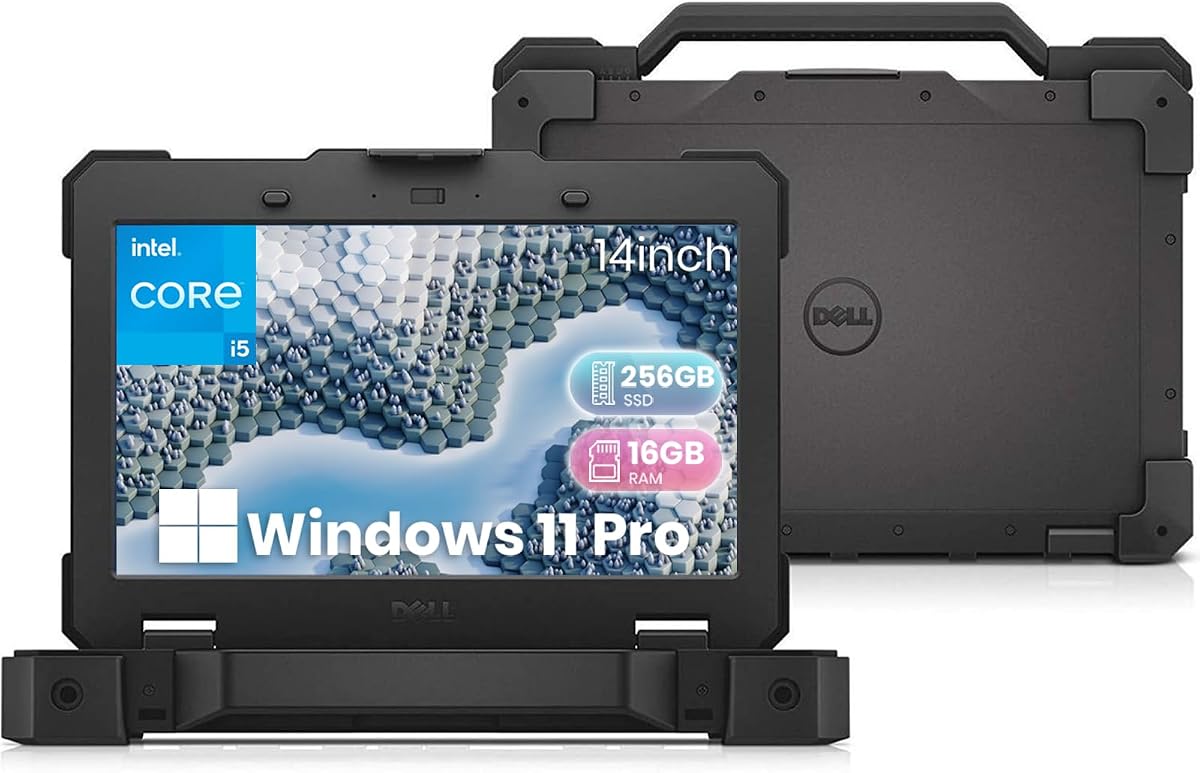
The Dell Latitude Rugged 5420 is engineered for extreme environments and field work durability. It offers a reinforced chassis capable of withstanding construction sites and harsh conditions.
We may earn a commission when you buy through this link, at no additional cost to you.
A 14 Full HD touchscreen ensures visibility in bright sunlight for outdoor workers. The combination of 16GB RAM and 256GB SSD ensures responsive multitasking and reliable storage.
This laptop is built for professionals who need a device that survives drops and environmental stress. The complete connectivity options support various tools and diagnostic equipment.
For users operating in challenging environments this model provides unmatched reliability. The renewed condition offers a cost-effective way to access rugged technology without sacrificing quality.
Features a reinforced chassis designed to withstand construction sites warehouses automotive diagnostics and demanding mobile work environments effectively.
A 14 inch Full HD touchscreen with outdoor-viewable technology provides clear sharp visuals even in bright sunlight and harsh conditions.
We may earn a commission when you buy through this link, at no additional cost to you.
The Dell Latitude 5414 Rugged Laptop is engineered to military-grade durability standards for tough conditions. It is a certified refurbished option that ensures reliable performance at a lower price.
We may earn a commission when you buy through this link, at no additional cost to you.
Powered by an Intel Core i5 processor it handles multiple applications with ease. The 256GB solid-state drive ensures near-instant boot-up and application launches for streamlined workflows.
This laptop features a rich array of ports including legacy options for industrial equipment. The 90-day service provides confidence in the purchase quality and reliability.
Ideal for organizations needing rugged devices on a budget this model delivers robust features. The refurbished status offers significant savings while maintaining essential business capabilities.
Engineered to military-grade durability standards ready to withstand drops spills dust and extreme temperatures for reliable field work.
Professionally inspected and restored to full working condition with minimal wear and a 90-day service for purchase confidence.
We may earn a commission when you buy through this link, at no additional cost to you.
The Lenovo V-Series V15 Business Laptop offers exceptional memory capacity for heavy multitasking. Its 40GB RAM allows you to run multiple applications and browser tabs simultaneously without lag.
We may earn a commission when you buy through this link, at no additional cost to you.
Powered by AMD Ryzen 7 5825U processor it delivers solid performance for daily workloads. The 1TB SSD provides fast bootup and ample space for large data storage needs.
Windows 11 Pro optimizes productivity with pre-configured layouts and intuitive navigation features. This configuration suits power users who need significant memory for complex tasks.
This model is best for users who prioritize RAM and storage over graphics performance. The high-speed RAM ensures smooth operation across demanding business applications and virtual machines.
40GB high-bandwidth RAM smoothly runs multiple applications and browser tabs all at once for maximum productivity.
1TB PCIe NVMe SSD allows fast bootup and rapid data transfer ensuring ample storage for large files and projects.
We may earn a commission when you buy through this link, at no additional cost to you.
The Lenovo ThinkPad L16 delivers dependable performance and durable design for business professionals. Its customizable configuration allows users to select the exact RAM and storage needed.
We may earn a commission when you buy through this link, at no additional cost to you.
Powered by Intel Core Ultra 5 225U processor it offers power-efficient performance for demanding workloads. The 16 inch WUXGA display ensures peak productivity even in sunlit offices.
With Thunderbolt 4 ports it supports high-speed data transfer and multiple external displays. Enterprise-grade security features like BitLocker protect sensitive data effectively.
This model is ideal for businesses needing flexible and secure computing solutions. The combination of performance and customization makes it a versatile choice for diverse work environments.
MIL-STD-810H certified to withstand demanding fieldwork and travel delivering up to 10 hours of battery life with fast charging.
Equipped with 2x Thunderbolt 4 2x USB-A and Ethernet providing ultra-fast stable wireless and flexible connectivity for any setup.
We may earn a commission when you buy through this link, at no additional cost to you.
Selecting a laptop for longevity requires attention to build quality and component reliability. Here are key factors to consider before making your purchase.
Look for laptops made with durable materials like aluminum or magnesium alloys. Military-grade certifications such as MIL-STD-810H indicate resistance to shocks and environmental stress.
Choose a chassis that feels solid and resists flexing to ensure long-term durability and physical protection.
A powerful processor ensures the laptop remains fast over time as software demands increase. Look for models with at least 6 cores to handle multitasking and future updates effectively.
Opt for newer generations like Intel Core Ultra or AMD Ryzen 7 to ensure longevity in processing speed.
Sufficient RAM is critical for smooth performance. A minimum of 16GB allows you to run multiple applications without slowdowns extending the usable life of the machine.
Ensure the RAM is upgradeable or choose a model with enough memory to last for years of heavy use.
Solid State Drives (SSDs) are faster and more durable than traditional hard drives. NVMe SSDs offer high-speed data transfer which improves boot times and application performance.
Select a storage capacity of at least 512GB to store files and system updates without needing external drives.
Long battery life reduces wear on the charging port and allows for all-day productivity. Look for batteries that promise 8 hours or more of active use on a single charge.
Fast charge support is beneficial for keeping the device operational during travel or power outages.
A wide variety of ports ensures compatibility with peripherals without needing dongles. USB-C, HDMI, and Ethernet ports provide versatile connectivity options for workstations.
Choose a model with Thunderbolt support for future-proofing high-speed data transfer and display capabilities.
A solid warranty protects your investment against defects. Look for at least one year of onsite service to minimize downtime if issues arise.
Extended warranty options can further ensure longevity by covering accidental damage or hardware failures beyond the standard period.
High-quality displays reduce eye strain during long hours. Features like anti-glare coatings and Low Blue Light certification help maintain eye health over time.
Select a screen with good brightness and color accuracy to ensure visibility in different lighting conditions.
Keep your laptop in a cool and dry place to prevent overheating and moisture damage. Use a sleeve or protective case when transporting to shield it from physical impacts.
Regularly update your operating system and drivers to maintain security and performance. Avoid installing unnecessary software that can slow down the system over time.
Use a surge protector to guard against power spikes. Clean the keyboard and screen gently with a microfiber cloth to remove dust and debris that can damage components.
A durable laptop has a solid chassis often made of metal or reinforced plastic. It should have high-quality hinges and ports that withstand frequent use. Certifications like MIL-STD-810H provide extra assurance of ruggedness.
Yes, 16GB RAM is generally sufficient for smooth multitasking and future needs. It allows for efficient performance without slowdowns. Users can also upgrade RAM in some models to extend the laptop's life.
Most laptops last between 4 to 6 years with proper care. Regular maintenance like cleaning and software updates can extend this timeframe. Replace only when performance significantly lags behind current needs.
Ideally, look for a laptop offering at least 8 hours of battery life. This ensures you can work through a full day without finding a power outlet. Fast charging adds convenience for quick top-ups.
Business laptops often have better build quality and durability testing. They are designed for heavy daily use and typically include stronger warranties. This makes them more reliable for long-term professional needs.
Many laptops allow upgrades of RAM and storage. Check the specific model specifications to confirm upgradeability. Upgrading these components can refresh performance and extend the device's usable life.
Seek a warranty that covers hardware defects and accidental damage. Onsite service options save time by fixing issues without shipping. A longer warranty period adds value and peace of mind.
We have highlighted ten reliable laptops that offer a range of features for longevity. From rugged designs to high-performance configurations these models meet diverse needs.
Prioritize build quality and component capacity to ensure your investment lasts. Focus on processors and RAM that can handle future software demands.
Check current prices and availability as these vary often. Verify warranties and return policies to secure the best value for your specific use case.