
Thermalright Trofeo Vision
4.3Editor score
9.16 inch wide LCD
USB-C plug and play
Compact stylish build
Adding an LCD screen for PC case transforms a standard build into a dynamic display hub. These panels show real-time system stats like CPU temperature, GPU usage, and RAM load while playing custom animations or media clips.
We evaluated ten leading models based on screen resolution, mounting flexibility, software support, and connectivity options. Our analysis covers USB powered displays, HDMI compatible units, and dedicated sensor panels designed for specific chassis.
Each pick highlights unique features such as touchscreen input, magnetic attachment, or integrated speakers. Prices and availability change frequently so check current listings before purchasing to ensure compatibility with your specific setup requirements.
4.3Editor score

4.4Editor score

4.2Editor score
As an Amazon Associate we earn from qualifying purchases.
This side-by-side comparison details the key specifications of all ten LCD screens for PC case options to help you quickly identify the model that fits your hardware and aesthetic needs.




The Lian Li SM088X stands out as the top choice for enthusiasts seeking a premium LCD screen for PC case integration. With a 4.4 rating users praise its versatile mounting and robust software support.
We may earn a commission when you buy through this link, at no additional cost to you.
Its 8.8 inch screen functions independently via USB allowing you to display stats without consuming GPU ports. The L-Connect 3 software offers extensive customization including modular information and video uploads.
The ARGB lighting strip adds aesthetic value and syncs with your system. However installation requires careful attention to screw types. Some users find the software interface requires time to master all features.
Buy this if you want a reliable secondary display with strong build quality. It suits gaming setups needing clear visibility and personalization. Its compact design fits seamlessly into most modern chassis.
Versatile mounting brackets support height and tilt adjustments for optimal visibility from any angle.
The screen connects via USB or 9-pin port allowing it to function without needing HDMI or GPU output.
We may earn a commission when you buy through this link, at no additional cost to you.
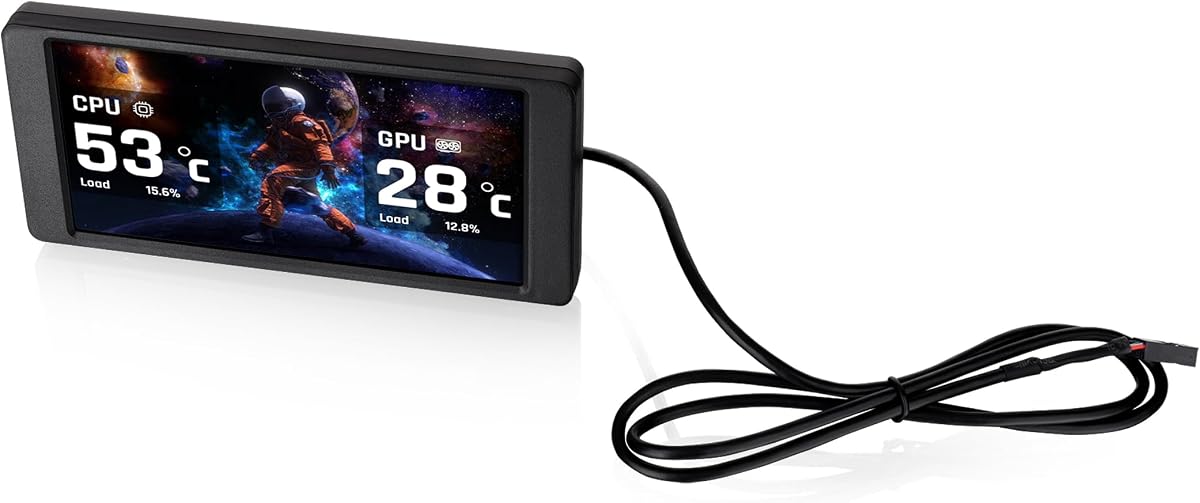
The Thermalright Trofeo Vision offers an accessible entry point for those wanting an LCD screen for PC case monitoring. It delivers crisp visuals and simple setup at a lower price point than competitors.
We may earn a commission when you buy through this link, at no additional cost to you.
Its 9.16 inch wide screen provides ample space for real-time stats. The TRCC software includes preset themes and DIY options. Connection uses a simple Type-C interface ensuring quick setup.
While features are basic the display is sharp and the build is compact. The price reflects fewer advanced customization options. It may lack depth for power users needing complex layouts.
Choose this if you prioritize value and ease of use. It fits well in slim cases and provides essential monitoring. For most users it balances cost and performance effectively.
Type-C interface ensures quick setup and compatibility with most Windows systems without drivers.
At only 251x68x17 mm this slim display fits seamlessly inside or outside your PC case.
We may earn a commission when you buy through this link, at no additional cost to you.
The wisecoco 12.6 Inch screen delivers premium visual quality with a massive 1920×515 resolution. It is ideal for users seeking high definition stats and media playback alongside their primary monitor.
We may earn a commission when you buy through this link, at no additional cost to you.
Features like built-in dual speakers and Mini HDMI input make it versatile for both PC and gaming setups. The kit includes mounting hardware for Hyte Y60 cases making installation straightforward.
Users appreciate the vibrant IPS panel and fast response time. However power needs may require a separate 5V source. Compatibility relies on having an available HDMI port.
This is perfect for those wanting a standalone entertainment hub. It excels in media playback and detailed monitoring. If you need audio and screen in one package this is the top pick.
Dual built-in speakers provide audio output without the need for external speakers.
Mini HDMI interface works with various devices and makes it an extra display on your desk.
We may earn a commission when you buy through this link, at no additional cost to you.
The darkFlash V92 is a dedicated sensor panel designed specifically for PC case builds. It offers a wide 9.2 inch screen for clear display of hardware stats and weather widgets.
We may earn a commission when you buy through this link, at no additional cost to you.
Its ultra-wide IPS panel delivers sharp visuals through tempered glass. The Station Space software allows customization with themes and plugins. It requires Windows 10 or 11 and software must remain running.
The slim aluminum body fits well in compact cases. Mounting options include fan frames or rear holes. It avoids using GPU ports with its USB or 9-pin connection.
Buy this if you need a dedicated sensor panel without external cables. It suits users who want clean aesthetics and real-time stats. Ensure your case has the required clearance.
The V92 shows CPU GPU temperatures usage RAM and clocks without being a standard extended monitor.
Install horizontally or vertically using included case fan mounting bracket and rear threaded holes.
We may earn a commission when you buy through this link, at no additional cost to you.
WOWNOVA 8 Inch LCD screen offers unique desktop mode support allowing it to function as an extended screen. This flexibility makes it stand out among standard sensor panels.
We may earn a commission when you buy through this link, at no additional cost to you.
Its IPS full view ensures brightness from any angle. Dynamic video themes let you add animations. Setup uses a single USB-C or 9pin cable simplifying routing inside the case.
The visual theme editor allows drag-and-drop creativity. Energy saving features auto-off the screen. While software is brand specific it is intuitive. Linux or macOS are not supported.
Choose this for creative freedom with dynamic content. It is perfect for tech enthusiasts wanting extra space. The white finish also adds a unique aesthetic to your build.
Our screen support switching to desktop mode as a EXTENDED SCREEN.
Supports customizing your own dynamic video theme for personalization.
We may earn a commission when you buy through this link, at no additional cost to you.
The Hosyond 8.8 Inch LCD screen features a responsive capacitive touchscreen for interactive control. This is rare in PC case displays which typically lack direct input.
We may earn a commission when you buy through this link, at no additional cost to you.
It offers 520 cd/m² brightness for crisp visuals. HDMI input allows connection to various devices. Multi-system support covers Windows Linux and Raspberry Pi.
Power usage is low at 3.8W. However AIDA64 must be purchased separately. Drivers are free but options are limited. This suits DIY builders needing versatile input.
Buy this if you need touch control for media or stats. It is ideal for hobbyists using Raspberry Pi. The high brightness ensures visibility in bright rooms.
Featuring a responsive capacitive touchscreen for smooth control without external mice.
Works with Raspbian Ubuntu Kali Linux Kodi Win10 IoT and Windows 7/8/10/11.
We may earn a commission when you buy through this link, at no additional cost to you.
The Thermalright TV 9.16 LCD features a magnetic suction design eliminating the need for screws. This makes installation and removal easy without tools.
We may earn a commission when you buy through this link, at no additional cost to you.
It includes TRCC software for monitoring and theme customization. The metal frame adds durability. Power and data come via 9-pin USB interface.
Auto start feature keeps it in taskbar background. Ensure wiring is complete before software install. Magnetic strength may vary by surface material.
Choose this for hassle-free installation. It is great for frequent modders or those avoiding screws. The 9.16 inch size offers wide viewing and detailed stats.
The screen adopts metal frame technology and the magnetic screen does not require screws.
Monitoring and on/off functions are controlled by software and auto start with computer.
We may earn a commission when you buy through this link, at no additional cost to you.
The Thermaltake 6.0 Inch LCD kit is designed for View 370 and 390 series. It offers a compact screen to show customizable graphics and monitoring data.
We may earn a commission when you buy through this link, at no additional cost to you.
Its 1480x720p resolution delivers sharp visuals. TT RGB PLUS 3.0 provides a new UI for customization. Supports JPG GIF PNG and MP4 formats.
Real-time data covers CPU GPU RAM. However compatibility is limited. Ratings reflect mixed user experiences. It is best for existing Thermaltake owners.
Buy this if you have a compatible chassis. It adds a unique aesthetic touch. Ensure your case is supported to avoid installation issues.
Compatible with Thermaltake View 370 and View 390 series chassis only.
Upload up to 20 custom graphics with various formats supported.
We may earn a commission when you buy through this link, at no additional cost to you.
The GeeekPi 12.6 Inch IPS LCD features 10-point multi-touch for interactive control. It is designed specifically to fit Hyte Y60 case panels perfectly.
We may earn a commission when you buy through this link, at no additional cost to you.
With 1920×515 resolution and built-in speakers it functions as a media hub. Plug and play compatibility works with Windows and macOS. Adjustable display settings allow orientation changes.
Users love the immersive size and audio. However calibration may be needed. Ensure case clearance before purchase. It is ideal for content creation setups.
Choose this for large touch capability in your build. It is perfect for Y60 owners needing extra screen real estate. The audio and screen combo saves space.
Up to 10-Points of Multi-Touch provides excellent touch experience with tempered glass.
Designed to fit the Y60 case panel perfectly with included screwdriver.
We may earn a commission when you buy through this link, at no additional cost to you.
The Thermalright Trofeo 6.86 offers a small magnetic panel for tight spaces. It is a budget option for basic monitoring without large screens.
We may earn a commission when you buy through this link, at no additional cost to you.
Its 1280×480 resolution is sufficient for stats. Magnetic attraction allows free movement inside the chassis. TRCC software manages the display.
It suits liquid cooler panels where space is limited. Lower ratings reflect limited features compared to larger models. Ensure software compatibility before purchase.
Buy this if you need a compact display. It works for minimal setups needing temp readings. The magnetic feature simplifies placement on metal surfaces.
The 6.86 inch size is perfect for compact cases or cooler panels.
Supports magnetic chassis fixed screen panel and can move freely in various positions.
We may earn a commission when you buy through this link, at no additional cost to you.
Selecting the right display depends on screen size, software support, and mounting needs. Follow these factors to ensure compatibility.
Measure your case interior to fit 6 to 12 inch screens. Higher resolutions ensure text clarity.
Choose sizes that fit without blocking airflow.
USB-C and 9-pin headers avoid using HDMI ports. Check motherboard availability.
Ensure power source matches voltage requirements.
Look for apps allowing stats, themes, and video uploads. Verify OS support.
Check if AIDA64 is required or built-in.
Brackets with tilt and height adjustment improve visibility. Magnetic options help modders.
Confirm clearance and screw types included.
ARGB lighting matches case RGB. Colors should blend with chassis.
Choose black or white frames to fit style.
Built-in speakers simplify media playback. Avoid separate audio cables.
Check HDMI audio support if needed.
Capacitive touch adds interactivity. Drivers must be compatible.
Ensure touch area is usable from angles.
Confirm clearance for vertical/horizontal installs. Hyte Y60 models need specific fit.
Check motherboard headers for connection.
Install the display using the provided bracket ensuring no cables block fans. Use software to customize themes.
Connect via USB-C or 9-pin header avoiding extra HDMI cables for power.
Clean with microfiber cloth and avoid moisture. Keep software updated.
Most support secondary display mode but require specific software. Some only show hardware stats. Check for desktop mode support before purchase.
Many connect via USB or 9-pin headers saving GPU ports. Some require HDMI if using as a monitor. Check connectivity options for your setup.
Most work with Windows 10 and 11. Linux and macOS support varies. Confirm OS compatibility in product descriptions.
Power usage ranges from 3 to 5W. Most use USB power. Ensure your source provides required voltage.
Yes many models include brackets for external mounting. Ensure it is protected from dust. Check mounting brackets.
Some use custom apps like L-Connect or TRCC. Others need AIDA64. Verify software needs before buying.
Use the provided software to upload images or videos. Most apps have preset themes. Check software features.
They generate minimal heat but ensure airflow. Do not block case fans. Use recommended mounting.
The Lian Li SM088X stands out as the top overall choice with versatile mounting. The Thermalright Trofeo Vision offers the best value for budget buyers.
Prioritize software support and connectivity options matching your motherboard. Ensure physical clearance before purchase.
Check current prices and availability. Prices and availability change frequently and models may update soon.