Rii RK907
4.5Editor score
Plug And Play USB
Low Profile Quiet Keys
Budget Friendly Price Point
This guide compares the top lightweight keyboards for portability and performance, helping you choose the best option for travel, office, or gaming setups in
Finding the right lightweight keyboard can transform your daily computing experience. Whether you are traveling or working from a small desk, a portable typing solution saves space and reduces strain on your wrists and shoulders.
We evaluated ten leading models based on build quality, connectivity options, battery life, and typing comfort. Each product was selected for its ability to deliver reliable performance without the bulk of traditional desktop peripherals.
Every entry in this list highlights key features, pros, and cons to help you decide quickly. Please note that prices and availability change frequently, so check current listings before making your final purchase decision today.
4.5Editor score

4.4Editor score

4.3Editor score
The following table provides a side-by-side overview of the ten selected models. Compare specs like connectivity, battery life, and layout to find the perfect match for your specific workflow needs.



The GEODMAER 65% Gaming Keyboard offers a compelling option for users seeking a lightweight solution without breaking the bank. With a rating of 4.3 stars, it stands out for its compact design and impressive feature set relative to its price. It is particularly well-suited for gamers or office workers who need a portable setup that retains essential functionality.
We may earn a commission when you buy through this link, at no additional cost to you.
This keyboard features a 65% layout with 68 keys, including separate arrow keys but no numpad, which significantly reduces its footprint. The detachable Type-C cable ensures a stable connection with ultra-low latency, making it reliable for gaming. The membrane keys are designed to mimic a mechanical feel, providing tactile feedback while remaining quiet enough for shared environments.
One trade-off is the membrane switch type, which lacks the distinct click and travel of true mechanical switches. However, the anti-ghosting and 26-key no-conflict support ensure accurate input during intense sessions. The LED backlighting adds visual appeal and utility in low-light conditions, adjustable via function keys.
If you need a budget-friendly, portable keyboard for a laptop or small desk, this model delivers strong value. Its ergonomic keycap height and durable construction make it a practical choice for daily use. Consider this if you prioritize cost and portability over wireless flexibility.
The 65% form factor saves desktop space while keeping essential keys like arrows and function row intact for efficient workflow.
With over 10 million keystrokes lifespan and UV-coated keycaps, this keyboard resists fading and wear for long-term reliability.
We may earn a commission when you buy through this link, at no additional cost to you.
The Logitech Pebble Keys 2 K380s is a top contender for those valuing premium design and mobility. Rated 4.3 stars, it combines a slim profile with robust wireless performance. Its ability to connect to three devices simultaneously makes it ideal for users juggling a laptop, tablet, and phone throughout the day.
We may earn a commission when you buy through this link, at no additional cost to you.
Key strengths include a three-year battery life, which reduces waste and hassle compared to frequent charging. The scooped round keys mimic a familiar laptop typing experience, ensuring comfort during long writing sessions. The keyboard supports Windows, macOS, iPadOS, and ChromeOS, offering broad versatility across platforms.
While it lacks backlighting, which might limit use in dark rooms, the minimalist design and recycled plastic construction appeal to eco-conscious buyers. The quiet operation ensures it fits well in cafes or open offices. The Easy-Switch buttons allow instant transitions between devices without disrupting workflow.
Choose this if you need a reliable, lightweight keyboard for mobile work across multiple devices. Its durability and battery efficiency make it a long-term investment. Prioritize this model if style and sustainability are as important as functionality.
Switch between up to three devices with a single click, streamlining your workflow without reconnecting cables or settings.
Built with at least 49% recycled post-consumer plastic, reducing environmental impact without compromising on quality.
We may earn a commission when you buy through this link, at no additional cost to you.
The Arteck 2.4G USB Wireless Keyboard is designed for users who need a full layout but still want portability. With a 4.4-star rating, it balances size and weight effectively. The inclusion of a numeric keypad makes it superior for data entry tasks, while its rechargeable battery eliminates the need for disposables.
We may earn a commission when you buy through this link, at no additional cost to you.
Its stainless steel construction provides a premium feel and durability, protecting it from daily wear. The low-profile keys offer quiet typing, which is beneficial for office environments. The nano USB receiver ensures a stable connection, though it does require a USB-A port on your device.
A drawback is its weight compared to ultra-slim models, as steel adds bulk. Additionally, users without USB-A ports may need an adapter. However, the 6-month battery life per charge is impressive for a full-size keyboard, reducing maintenance frequency significantly.
This is the best pick if you need a number pad but don't want a bulky wired setup. It fits well in travel bags or small desks. Consider it for professionals who need precision typing and durability in a wireless format.
The full-size layout with a number pad ensures accuracy for spreadsheets and data tasks without needing a separate device.
Low-profile keys and a steel chassis provide a stable, quiet typing experience that reduces fatigue during long sessions.
We may earn a commission when you buy through this link, at no additional cost to you.
The ProtoArc XK01 stands out as a rare solution for those wanting a full-size keyboard in a travel form. Rated 4.3 stars, it offers 105 keys in a tri-fold design that folds down significantly. This makes it perfect for remote workers who need the productivity of a desktop layout on the go.
We may earn a commission when you buy through this link, at no additional cost to you.
It connects via Bluetooth 5.1 to three devices, allowing seamless switching between a laptop, tablet, and phone. The scissor switches ensure quiet, controlled keystrokes, ideal for coffee shops. The USB-C rechargeable battery offers up to 150 days of standby, ensuring it is ready when needed.
While it weighs more than ultra-slim keyboards, the full-size benefits often outweigh the minor bulk. The aluminum hinges are tested for thousands of folds, ensuring durability. However, setting up the fold requires a bit of attention compared to flat keyboards.
Choose this if you need a complete layout for productivity while traveling. It bridges the gap between portability and performance. This is the ideal solution for digital nomads or frequent travelers who cannot compromise on typing experience.
A full 105-key layout packed into a foldable frame, giving you navigation keys and a number pad anywhere.
Switch between three Bluetooth devices with a button press, maintaining productivity across different screens and tasks.
We may earn a commission when you buy through this link, at no additional cost to you.
The TECKNET 2.4G Wireless Keyboard is a compact option designed for easy transport and daily office use. With a 4.4 rating, it balances size with functionality. Its small footprint makes it ideal for travel, while dedicated media keys add convenience for entertainment and workflow tasks.
We may earn a commission when you buy through this link, at no additional cost to you.
The keyboard uses a 2.4GHz USB connection for stable performance within 32 feet. It offers a 12-month battery life, reducing maintenance. The chocolate keycap design ensures quiet, smooth typing, which is beneficial for shared workspaces. It is compatible with multiple operating systems including Windows and Mac.
One consideration is the non-standard Enter key layout, which may require an adjustment period for some users. Also, it uses disposable batteries instead of rechargeable options. However, the portability and media controls make it a strong contender for light users.
Buy this if you need a small, reliable keyboard for general use. It fits well in small spaces or laptops bags. If you value convenience and quiet typing, this model offers a practical, efficient solution.
The mini layout saves significant desk space while maintaining essential keys for daily typing and navigation tasks.
Dedicated hotkeys allow quick access to volume and media functions, enhancing your experience without extra apps.
We may earn a commission when you buy through this link, at no additional cost to you.
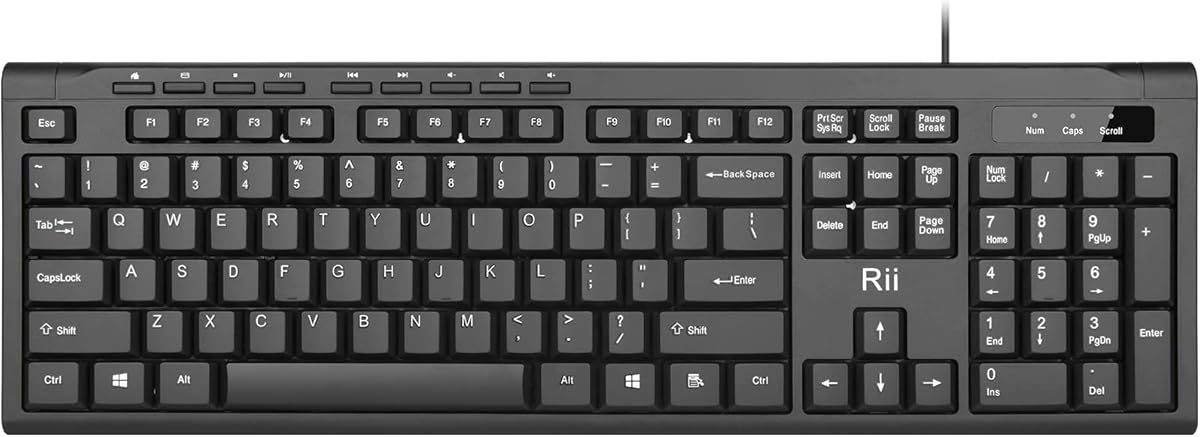
The Rii RK907 Ultra-Slim is an exceptional value for users needing a reliable, no-frills keyboard. With a 4.5-star rating, it impresses with its simplicity and durability. The low-profile keys provide a quiet, comfortable typing experience, making it suitable for office environments where noise is a concern.
We may earn a commission when you buy through this link, at no additional cost to you.
It connects via a simple USB wired connection, ensuring stability without pairing issues. The splash-resistant design protects against minor spills, adding to its longevity. Despite its budget-friendly nature, it maintains solid build quality and compatibility across Windows and Mac systems.
While it lacks wireless freedom, the wired connection ensures consistent performance. The design is basic, but functionally complete for standard typing. If you prioritize cost and reliability over features, this model meets all essential needs without complexity.
Choose this if you are on a strict budget but need a quality typing tool. It is perfect for temporary setups or as a spare. Consider it if you want a lightweight, straightforward option that works immediately.
Plug and play functionality ensures immediate use without drivers or configuration, ideal for quick setups.
The splash-resistant design protects against accidental spills, extending the keyboard life in busy work environments.
We may earn a commission when you buy through this link, at no additional cost to you.
The Logitech MX Keys Mini is a premium wireless keyboard designed for minimalists who demand high performance. Rated 4.4 stars, it features smart keys shaped for fingertip comfort. The illuminated backlight adapts to lighting conditions, ensuring visibility in any environment while preserving battery life.
We may earn a commission when you buy through this link, at no additional cost to you.
It connects to up to three devices via Bluetooth Low Energy and switches seamlessly. The USB-C rechargeable battery lasts up to 10 days on a full charge or five months with backlight off. This makes it ideal for professionals who value both aesthetics and utility.
The premium price is a consideration, but the build quality and features justify the cost. It supports multiple operating systems, offering broad compatibility. While it requires a USB-C cable for charging, the long battery life minimizes this inconvenience.
Buy this if you want a sleek, high-performance keyboard for a modern setup. Its ergonomics and smart features elevate daily typing. Consider it if you prioritize a refined experience and seamless device integration.
Backlights turn on as hands approach and adjust to ambient light, saving power while ensuring visibility.
Sculpted keycaps match fingertip curvature, increasing accuracy and comfort during long typing sessions.
We may earn a commission when you buy through this link, at no additional cost to you.
The ProtoArc XK04 is tailored for mobile users who need physical typing on phones and tablets. With a 4.4 rating, it combines portability with premium materials. The two-fold design allows it to fit in pockets, and the integrated PU leather cover adds protection against scratches.
We may earn a commission when you buy through this link, at no additional cost to you.
Bluetooth 5.1 ensures stable connectivity up to 33 feet. The layout is optimized for smaller screens, making it ideal for on-the-go messaging. The rechargeable battery offers 150 days of standby, ensuring it is ready when you need to type notes.
While the keys are smaller than full-size options, they remain comfortable for short bursts. The fold mechanism requires care to ensure a flat surface. However, for travel enthusiasts, the convenience outweighs the minor compromises.
Choose this if you frequently use mobile devices for work. It transforms your phone into a productivity station. Consider it if you want a reliable, lightweight solution for travel and casual typing.
Folds into a small form factor, fitting easily into bags or pockets for immediate access anywhere.
The PU leather cover protects the keys from damage, reducing the need for extra cases during travel.
We may earn a commission when you buy through this link, at no additional cost to you.
The Arteck 2.4G Wireless Steel Keyboard is designed for professionals who want a sleek, durable option. With a 4.4 rating, it features a stainless steel body that looks elegant and resists wear. The ultra-slim profile makes it easy to slide into laptop bags for travel.
We may earn a commission when you buy through this link, at no additional cost to you.
It supports full-size layouts with a rechargeable battery that lasts up to six months. The quiet keys ensure minimal disruption in open offices. Compatibility spans from older Windows versions to newer systems, ensuring broad usability.
Lacking backlighting means limited night use. Additionally, it requires a USB receiver, not Bluetooth. However, the steel build gives a premium feel that outperforms plastic competitors. It is a strong choice for desk setups where aesthetics matter.
Buy this if you value durability and style in a slim package. It is suitable for work or home environments. Consider it if you prefer a wired-like stability via wireless with a premium look.
Stainless steel material provides a heavy-duty feel and a sleek look that complements modern office setups.
Low-profile keys ensure quiet and comfortable typing for extended sessions without causing finger fatigue.
We may earn a commission when you buy through this link, at no additional cost to you.
The Logitech K400 Plus is a specialized keyboard designed for controlling media centers and PCs from the couch. Rated 4.4 stars, it features a built-in touchpad for navigation, eliminating the need for a separate mouse. The media-friendly layout includes dedicated keys for common tasks.
We may earn a commission when you buy through this link, at no additional cost to you.
Battery life reaches up to 18 months, thanks to an on/off switch. It works with Windows, Android, and Chrome OS systems. The 33-foot wireless range ensures you can control devices from a distance. The spill-resistant design adds durability for daily living room use.
This keyboard is not intended for heavy writing tasks due to its layout. However, for entertainment and light browsing, it excels. The ergonomic design fits well in hands, reducing fatigue during extended viewing sessions.
Choose this if you want a simple way to control your smart TV setup. It is perfect for living rooms where comfort is key. Consider it if you prefer a unified solution for navigation and typing.
Integrated touchpad allows navigation without needing a mouse, simplifying your entertainment setup.
Up to 33 feet wireless range and a long battery life ensure consistent performance without constant maintenance.
We may earn a commission when you buy through this link, at no additional cost to you.
Selecting the right lightweight keyboard depends on your specific needs, including portability, typing style, and device compatibility.
When choosing a lightweight keyboard, consider the physical dimensions and weight. Compact models like 60% or 65% layouts save desk space and fit easily into backpacks. However, ensure you still have essential keys like arrows and function rows if you rely on them.
Decide between wired and wireless connectivity. Wireless models using Bluetooth or 2.4GHz offer freedom from cables but require batteries or charging. Wired models provide stable connections but may limit mobility. Check device compatibility to avoid adapter needs.
For wireless keyboards, battery life is critical. Rechargeable models offer long-term savings, while disposable battery models might last longer without charging. Check for power-saving features like auto-sleep to extend usage between charges.
Key switch type affects comfort and noise. Mechanical switches offer tactile feedback but may be heavier. Membrane or scissor switches are quieter and lighter, often found in portable designs. Consider your noise tolerance and typing frequency.
Durable materials like aluminum or steel enhance longevity but add weight. Plastic builds are lighter and often more affordable. Look for splash resistance or robust hinges if you plan to use the keyboard frequently in travel environments.
Ensure the keyboard supports your specific OS like Windows, macOS, or Android. Multi-device keyboards allow switching between platforms, which is vital for users with multiple gadgets. Verify layout keys like command or windows compatibility.
Extra features like backlighting, media keys, or touchpads enhance usability. Backlighting aids dark environments, while media keys streamline entertainment. Decide which extras add genuine value versus those that add unnecessary cost.
Set a budget based on your needs. Entry-level options offer basic functionality at low costs, while premium models provide better materials and features. Prioritize features that impact your daily workflow to ensure the investment is worthwhile.
To maximize battery life, enable auto-sleep modes or power off the keyboard when not in use. For wireless models, keep the USB receiver stored safely inside the battery compartment or a labeled case to prevent loss.
Clean the keys regularly using compressed air or a soft brush to remove dust and debris. Avoid using liquid cleaners directly on the surface to prevent damage to electronic components.
For foldable keyboards, ensure the hinges are fully flat before typing to avoid uneven wear. Store them in a protective case when traveling to prevent scratches and pressure on the keycaps.
Many lightweight keyboards are designed with travel in mind, using reinforced materials and compact layouts. Look for models with spill resistance or sturdy hinges to ensure longevity during transit.
Most lightweight keyboards are plug-and-play and work without installing additional software. Some advanced models may offer customization via apps, but basic typing functionality is standard.
Battery life varies by model, ranging from 6 months to 3 years on a single charge. Rechargeable options typically last longer with efficient power management features.
Yes, most models support multiple operating systems. Ensure the keyboard has the correct layout or function keys to match your system preferences.
Wireless keyboards usually offer a range of 30 to 50 feet. Bluetooth models may vary slightly, but generally provide stable connections within a typical room.
Yes, most lightweight options use low-profile keys that reduce typing noise significantly. They are suitable for shared workspaces and quiet environments.
The ten options listed cover a wide range of needs, from budget-friendly travel companions to premium multi-device solutions. Each model offers unique advantages depending on your priority for portability, battery, or typing feel.
When making your choice, prioritize the factors that matter most to your workflow. If you travel often, focus on weight and foldable designs. For office use, consider battery life and comfort.
Always check current prices and availability as they fluctuate frequently. With the right selection, a lightweight keyboard can enhance your productivity and comfort wherever you work.