
SCRIB3D P1 3D Printing Pen with Display
4.4Editor score
Adjustable temperature control
Includes starter filament
Stepless speed slider
Discover the top 3D printing pens for kids in October 2026. This expert guide compares safety, ease of use, and creative potential across ten leading models.
Finding the right 3D printing pen for kids can transform how children approach art and engineering. These innovative tools allow young creators to build three-dimensional objects using heated plastic filament. The best options prioritize safety, ease of use, and engaging project ideas to keep learning fun.
We compared ten top-rated 3D pens based on safety features, filament compatibility, and user feedback. Our analysis focuses on models designed specifically for children or those with kid-friendly adjustments. Each product offers unique benefits ranging from cool nozzles to advanced temperature controls for growing artists.
Each pick below highlights key features, pros, and cons to help you choose wisely. Prices and availability change frequently so check current listings before purchasing. We aim to provide clear, honest insights so you can find the perfect creative tool for your child.
4.4Editor score
4.4Editor score

4.4Editor score
This table offers a quick side-by-side comparison of all ten featured 3D printing pens. Review key specifications like safety features, filament types, and included accessories to find the best fit for your young creator.




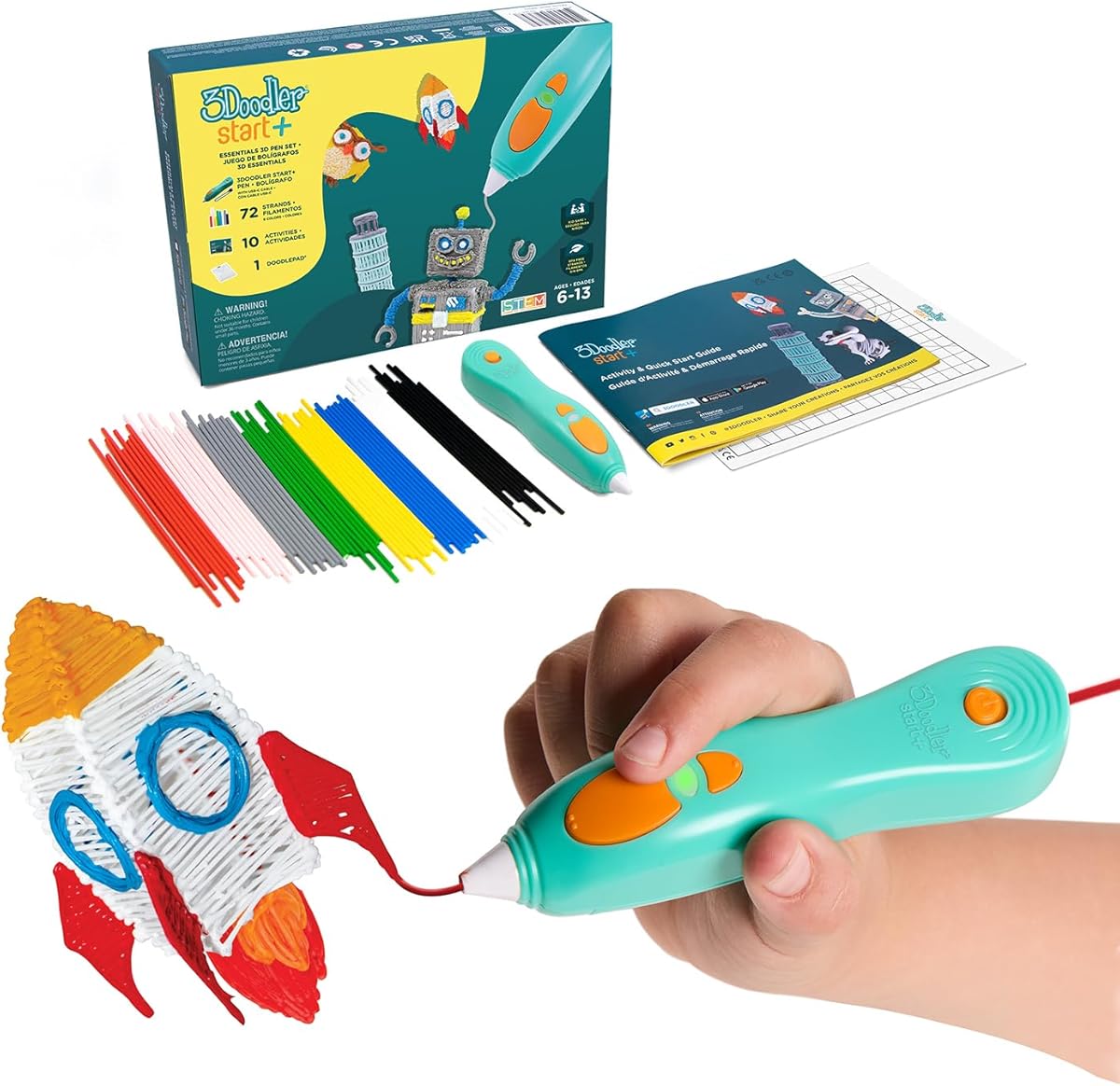
The 3Doodler Start+ Essentials set stands out as the top choice for families prioritizing safety and educational value. With a 4.4 star rating, it is praised for its cool nozzle technology that eliminates burn risks for children aged 6 and up. This pen set transforms screen time into creative, hands-on learning experiences.
We may earn a commission when you buy through this link, at no additional cost to you.
Its key strength lies in the complete kit approach. Parents receive not just the pen but also a DoodlePad mat, USB-C cable, and over 70 strands of mixed color filament. The inclusion of 10 new stencils helps beginners get started quickly with guided projects. The upgraded battery charges 50% faster than previous models ensuring less downtime.
However, the pen requires proprietary Start+ filaments which can limit long term affordability. While the initial bundle offers plenty of plastic the need to buy specific refills may be a drawback compared to pens using standard PLA. The price is also higher than basic models but the safety features justify the investment for younger users.
This pen is ideal for parents seeking a safe introduction to 3D art for young children. It encourages STEM learning through tactile play and includes resources that guide kids through creative projects. If safety and ease of use are your top priorities this is the recommended starting point.
The nozzle remains cool to the touch even during extended use allowing children to handle the pen and plastic safely without adult intervention.
Beyond the pen the package includes a comprehensive activity guide and stencils that help children connect drawing skills to STEM concepts immediately.
We may earn a commission when you buy through this link, at no additional cost to you.
The SCRIB3D P1 offers an excellent entry point into 3D pen printing at a very competitive price. With a 4.4 star rating it balances functionality with affordability. It includes three starter colors of PLA filament making it ready to use right out of the box. The display provides visual feedback on heating status which helps beginners manage expectations.
We may earn a commission when you buy through this link, at no additional cost to you.
Its standout feature is the stepless speed slider which allows for precise control over filament flow. This is crucial for intricate designs where constant flow might cause messes. The ceramic nozzle ensures safe performance without clogging and the auto sleep function adds convenience. The included stencil book guides kids through their first projects effectively.
The main trade off is the warm up time of roughly two to three minutes which requires patience from younger users. Additionally the plastic build is functional but lacks the premium feel of higher end models. However for the price this is a minor compromise given the robust feature set.
Choose this pen if you need a reliable tool that grows with your child without breaking the budget. It supports both novice and advanced users through adjustable speed settings. It is a practical choice for casual creative time or educational home projects.
The stepless speed slider offers more granular control than typical fixed speed pens allowing users to adapt flow to complex or simple tasks.
Unlike some metal tips the ceramic nozzle maintains a safer temperature profile reducing burn risk for curious young hands touching the pen.
We may earn a commission when you buy through this link, at no additional cost to you.
The MYNT3D Professional pen delivers advanced features typically found in industrial tools but sized for personal use. Its OLED display provides real-time temperature monitoring which is rare in consumer pens. This allows users to fine-tune settings for different filament types and desired effects. The pen receives high marks for build quality and user interface.
We may earn a commission when you buy through this link, at no additional cost to you.
Key strengths include adjustable feed speeds and temperature adjustments in one-degree increments. This level of control enables complex projects like detailed sculptures or precise repairs. The slim ergonomic design ensures it fits comfortably in hand during long sessions reducing fatigue. It appeals to older kids or adults looking for professional results.
The primary trade-off is the higher price point and the relatively small amount of included filament. Users may need to purchase refills sooner than with bulk kits. Additionally the digital interface adds complexity that might intimidate younger beginners who prefer simpler controls. It is better suited for those ready to experiment.
This pen is best for serious hobbyists or older teens wanting precision control. The ability to monitor temperature ensures consistent results regardless of material. If you value accuracy and design versatility this model offers a premium experience that justifies the investment.
The OLED display allows users to see exact temperatures ensuring consistent melting and flow which is vital for detailed structural integrity.
Temperature changes in single degree increments let users adapt the pen quickly to different filaments or environmental conditions effectively.
We may earn a commission when you buy through this link, at no additional cost to you.
The MYNT3D Super pen distinguishes itself by supporting both ABS and PLA filaments. This versatility allows users to choose materials based on strength and flexibility needs. The ultrasonic sealed nozzle is a notable engineering feature that minimizes clogs which is a common frustration. It maintains a strong reputation among users for durability.
We may earn a commission when you buy through this link, at no additional cost to you.
Its strength lies in compatibility and durability. The stepless speed slider ensures smooth extrusion and the ergonomic touch pen makes it comfortable to hold. The included filament gives users a chance to try the pen immediately. It bridges the gap between simple toys and professional tools effectively.
However it lacks a digital temperature display which means users must rely on trial and error for settings. ABS filament when used can emit a distinct smell requiring ventilation. These factors make it less ideal for very young children but still excellent for older kids or adults.
Choose this pen if you want flexibility in materials and reliable performance. It is well suited for engineering projects or repairs where stronger filaments are needed. The durability and nozzle design make it a trustworthy choice for regular use.
Being compatible with both ABS and PLA lets users select the right plastic for strength or ease of use depending on the specific project.
The ultrasonic sealed nozzle is designed to prevent jams and clogs ensuring smooth continuous flow during detailed or lengthy 3D drawing tasks.
We may earn a commission when you buy through this link, at no additional cost to you.
The SCRIB3D Advanced pen is built with beginners in mind. It features a large LCD screen that displays settings clearly helping users understand heat and speed adjustments easily. The soft touch surface ensures a comfortable grip reducing hand fatigue during use. It is designed to make the transition to 3D printing seamless.
We may earn a commission when you buy through this link, at no additional cost to you.
Its standout features include eight different speed options providing granular control for various tasks. The generous inclusion of fifty feet of PLA filament means users can practice extensively without immediate refills. The included project guide and stencil book offer structure for new users to follow.
On the downside the pen is slightly heavier than sleeker models which might tire smaller hands. The filament included is mostly standard colors limiting creative diversity initially. However the focus on usability and included materials makes it a strong choice for those new to the hobby.
This pen is ideal for families starting their 3D printing journey. The large screen and soft grip make it approachable for children and adults alike. With enough plastic included to explore freely it offers a complete learning package.
The large LCD screen simplifies settings adjustments making it easier for younger users to understand how temperature and speed affect their work.
The soft touch surface on the pen body ensures a comfortable grip allowing for longer drawing sessions without causing hand strain or discomfort.
We may earn a commission when you buy through this link, at no additional cost to you.
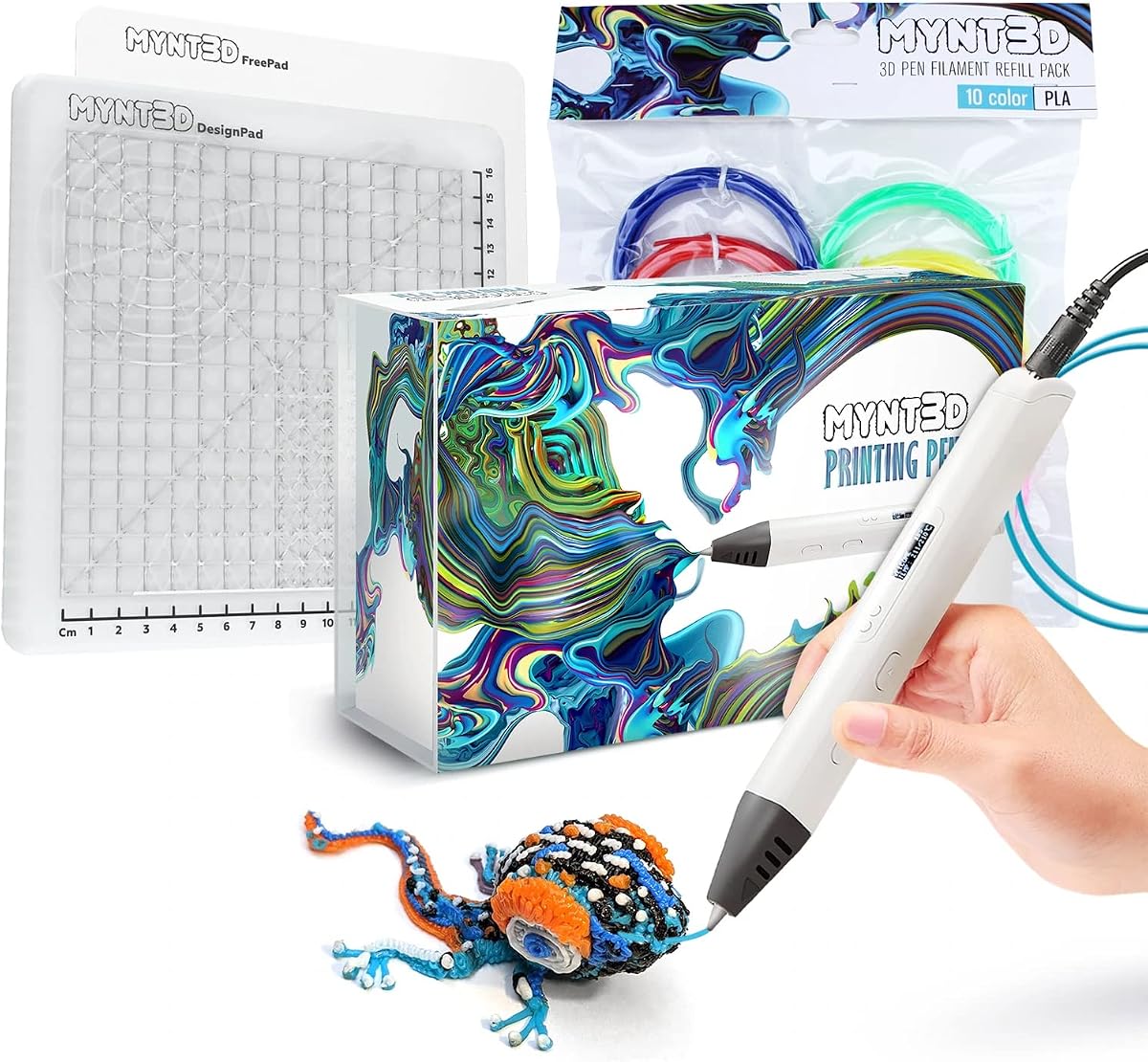
The MYNT3D Pro Bundle is a comprehensive kit designed for creative freedom. It includes a high quality pen with stepless speed control and a DesignPad mat to help with geometric shapes. The 10 color PLA refills offer a wide palette for projects right away. It appeals to users wanting variety and precision.
We may earn a commission when you buy through this link, at no additional cost to you.
Its main strength is the thoughtful inclusion of accessories like the DesignPad mat which aids alignment and design accuracy. The vacuum sealed filament ensures freshness and the replaceable nozzle extends the pen's lifespan. The bundle provides a professional setup without needing separate purchases.
However the Pro pen requires more skill to operate effectively which might challenge very young users. The bundle price is higher than standalone pens but the value of included accessories offsets this. It is better suited for committed hobbyists than casual users.
Choose this bundle if you want a complete creative station. The variety of colors and precision tools allow for detailed and structured projects. It is an excellent option for those ready to invest in a long term creative hobby.
Having ten different colors included means users can mix and match materials easily to create vibrant and detailed artwork without needing extra purchases.
The DesignPad mat provides channels and channels that help guide hands to create perfect geometric shapes and consistent structures reliably.
We may earn a commission when you buy through this link, at no additional cost to you.
The MYNT3D Super Bundle combines the versatility of the Super pen with a robust accessory kit. It includes 10 color PLA refills and a DesignPad mat ensuring users have everything needed for creative work. The pen supports both ABS and PLA offering material flexibility. It has a strong rating for build quality.
We may earn a commission when you buy through this link, at no additional cost to you.
Its strength lies in the balance between versatility and included extras. The DesignPad mat aids in clean project creation while the sealed nozzle ensures reliable operation. The inclusion of multiple colors encourages experimentation. This bundle is perfect for families wanting a complete set in one package.
The higher price point compared to basic pens may be a hurdle for some buyers. Assembly and setup require attention to ensure everything is connected correctly. However the added value of the mat and refills usually justifies the cost for regular use.
This bundle is ideal for households looking for a comprehensive creative solution. The flexibility in materials and included accessories support both simple and complex projects. It offers a great balance of features and ease of use for many users.
The ability to use both ABS and PLA gives users the option to choose between durable rigid structures or flexible and easy to print parts.
The DesignPad mat provides guided channels that help users create precise geometric shapes making the process easier for kids of all ages.
We may earn a commission when you buy through this link, at no additional cost to you.
The 3Doodler Flow is designed for teens and creators seeking advanced capabilities. It supports multiple materials including PLA ABS and wood expanding creative possibilities significantly. The LCD provides real-time temperature monitoring ensuring smooth operation. It is lightweight and portable making it easy to take on projects.
We may earn a commission when you buy through this link, at no additional cost to you.
Its main benefit is the material diversity which allows for richer artistic expression. The included filament provides plenty of material to work with right away. The compact design fits comfortably in hand for long sessions. It bridges the gap between hobby tools and professional equipment.
However it lacks the safety features designed for younger children such as cool nozzles. The setup may require more technical understanding than entry level pens. It is best suited for older users who can handle higher temperatures safely and effectively.
Choose this pen if you are a teen or adult looking for advanced creative tools. The material versatility and monitoring features support professional quality results. It is an excellent step up for those ready for more challenging projects.
Supporting wood PLA and ABS filaments opens up diverse textural options for artistic expression that other pens cannot easily provide.
The lightweight and compact build makes it easy to carry around for creative sessions at school or home without feeling heavy.
We may earn a commission when you buy through this link, at no additional cost to you.
The SCRIB3D P1 Bundle focuses on providing a complete setup for consistent practice. It includes the P1 pen along with a two-sided silicone mat designed for tracing and practice. The mat is heat resistant and durable ensuring it can withstand repeated use. It simplifies the setup process for new users.
We may earn a commission when you buy through this link, at no additional cost to you.
Its strength lies in the practical accessories included. The silicone mat provides a clean surface for projects which keeps workspaces tidy. The included guides help users learn quickly and the starter PLA ensures immediate usage. It is a thoughtful kit for beginners wanting structure.
The bundle is slightly bulkier due to the mat which may require more storage space. The pen itself offers standard features without advanced digital controls. However the included mat value often outweighs the pen limitations for those focused on learning basics.
Choose this bundle if you want a complete and tidy workspace setup. The mat and guides provide a supportive foundation for new users. It is an excellent option for home education or casual creative sessions.
The included silicone mat provides a clean heat resistant surface for projects keeping workspaces tidy and safe during active 3D drawing sessions.
Stencils and project guides help beginners learn techniques step by step ensuring they get the most out of the creative process quickly.
We may earn a commission when you buy through this link, at no additional cost to you.
The 3Doodler Start+ Bundle is designed for long-term creative engagement. It includes the safe Start+ pen plus over 1250 feet of additional filament ensuring years of use. The no hot parts design ensures safety for kids aged 6 and up. It supports screen-free learning effectively.
We may earn a commission when you buy through this link, at no additional cost to you.
Its main benefit is the massive amount of included plastic reducing the need for frequent refills. The compatibility with the free 3Doodler app adds digital guidance for projects. The safety features are unmatched allowing kids to use independently with confidence. It provides a robust ecosystem for learning.
The high price is a significant barrier but the value of the filament justifies it for dedicated users. App compatibility requires a smartphone which may not be ideal for all homes. However the peace of mind regarding safety and plastic supply makes it a strong investment.
This bundle is ideal for families wanting a sustainable creative solution. The amount of plastic and safety features ensure long-term enjoyment without constant purchases. It is the ultimate package for households prioritizing safety and volume.
The bundle includes over 1250 feet of plastic which reduces the need for frequent refills and supports extended creative use over several years.
Compatibility with the free 3Doodler app provides additional templates and instructions enhancing the creative process with digital guidance.
We may earn a commission when you buy through this link, at no additional cost to you.
Selecting the right 3D pen requires considering safety, materials, and ease of use. This guide outlines key factors to help you match a pen to your child's skill level and your budget.
Safety is the most critical factor for pens used by children. Look for pens with cool or insulated nozzles to prevent burns. Many models designed for young kids use low-temperature plastics that are safe to touch even while drawing. Always check the age rating and review safety mechanisms like auto-shutdown.
Prioritize pens with child-safe designs if your child is under 10 to ensure a risk-free creative experience.
Some pens use proprietary filaments which can be expensive in the long run. Others use standard PLA or ABS that are widely available. Consider the cost and availability of refills before purchasing. Versatility in materials allows your child to experiment with different textures and strengths.
Standard filament options offer better long-term value and creative flexibility for growing artists.
A pen that is too complicated can frustrate young beginners. Look for intuitive controls such as simple buttons or sliders for speed. Digital displays should be easy to read and understand. Pens that heat up quickly reduce waiting time and keep engagement high.
Choose a pen with straightforward controls to ensure your child can focus on creativity rather than technical setup.
Many bundles include mats stencils and guides that add significant value. A good mat protects surfaces and helps with alignment. Stencils guide beginners through their first projects and reduce the learning curve. Check what is included in the box to avoid extra purchases.
Accessories like mats and guides make the initial experience smoother and more structured for new users.
Pens are subject to wear and tear especially with frequent use. Look for durable materials and well-sealed nozzles to prevent clogs. A warranty indicates the manufacturer stands behind their product. Read reviews to ensure the motor and heating elements remain reliable over time.
A solid warranty and durable construction ensure the pen lasts through years of creative exploration.
Some pens are corded while others use rechargeable batteries. Corded pens offer unlimited use but restrict movement. Battery-powered pens offer portability but need charging. Consider where your child will use the pen most often to make the right choice.
For stationary projects corded pens are practical while portable ones suit travel or flexible workspaces.
Adjustable speed and flow allow for better detail and precision. Pens with stepless sliders offer finer control than fixed settings. This feature is essential for older kids or teens looking to build complex structures. Simpler pens are adequate for basic doodling.
Variable flow settings help users match the pen's output to their specific project complexity.
Budget-friendly pens often lack advanced features but are great for testing interest. Premium models offer better temperature control and build. Assess how often the pen will be used to decide on price point. The cost of refills should also factor into total ownership cost.
Balancing initial price with long-term accessory costs ensures you get the best overall value for your family.
Start by plugging in the pen and waiting for it to heat up. Most pens have a light indicator that signals when the nozzle is ready. Insert a strand of filament into the back of the pen. It will begin to extrude once the plastic melts. Start drawing on a protected surface like the included mat.
To stop drawing release the forward button or press stop. To retract filament use the reverse button to pull unused plastic back into the pen. This prevents waste and clogging. If you change colors wait for the pen to heat up again and run a short strand of the new color through the nozzle.
Store the pen on a stand when not in use to protect the tip. Clean the nozzle periodically to remove any hardened plastic residue. For battery models charge fully before each use. If you notice clogs use a cleaning tool to clear the tip gently to maintain performance.
Yes but safety depends on the specific model. Pens like the 3Doodler Start+ have no hot parts and are safe for children aged 6+. Standard pens have heated nozzles so supervision is recommended for young users. Always check age ratings and look for insulated tips.
Most pens use PLA or ABS filament. PLA is biodegradable and safer for kids. ABS is stronger but emits fumes. Always check compatibility with your specific pen model. Some pens only work with branded filaments while others accept standard brands.
It depends on the usage. A standard spool might last a few hours of continuous drawing. Bundles often include more plastic. Larger bundles like the Start+ offer over 1200 feet which can last years for casual use. Estimate based on your child's project size.
Some models are corded while others are rechargeable. Corded pens stay hot as long as they are plugged in. Battery models offer portability but may cool down faster. Choose based on where you plan to use the pen most often.
This usually means the nozzle is clogged. Try pushing the filament through manually or using the reverse button. Sometimes you may need to clean the nozzle with a tool. Ensure the pen is fully heated before trying to extrude again.
Yes some brands like 3Doodler have companion apps that offer templates and stencils. These can be very helpful for beginners to learn techniques. Check if the pen is compatible with any digital resources before purchasing.
Yes 3D pens are great for quick fixes on broken plastic items. They can glue together pieces or fill gaps. Just ensure the surfaces are clean and the pen is at the right temperature. However for structural repairs standard adhesives may be better.
Yes most pens have heated nozzles. However models designed for kids often have insulated or cool tips. Always supervise children to prevent accidental burns. Let the pen cool down completely before storing it away.
Choosing the best 3D printing pen for kids depends on age, safety needs, and creative goals. The 3Doodler Start+ set offers unmatched safety for young children. The SCRIB3D P1 provides excellent value for those on a budget. More advanced users may prefer the MYNT3D Professional for precision.
Prioritize pens with included accessories like mats and stencils to make the learning process smoother. Safety features such as cool nozzles are essential for families with younger children. Ensure the pen supports standard filaments for long-term affordability and variety.
Prices and availability change frequently so always check current listings before purchasing. We recommend comparing bundle contents to ensure you get the best value for your family. With the right pen, your child can explore endless creative possibilities safely and happily.