
SSK Portable SSD 1TB External Solid State Hard Drive
4.5Editor score
Affordable price point for 1TB
1050MB/s transfer capabilities
Includes USB-C and USB-A cables
This guide compares the top external SSDs for Linux users, covering speed, compatibility, durability, and encryption features to help you choose the right
Linux users often require reliable external storage that integrates seamlessly with their workflow. A good external SSD offers speed, durability, and compatibility with various file systems used across different distributions.
We evaluated ten top-rated portable drives based on performance, build quality, and Linux support. Each product was assessed for transfer speeds, encryption options, and physical resilience under real-world conditions.
Every selection highlights key strengths and potential limitations for open-source environments. Please note that pricing and availability fluctuate frequently, so verify current details before purchasing your preferred model.
4.5Editor score

4.7Editor score

4.6Editor score
The following table provides a side-by-side overview of all ten selected drives, highlighting their key specifications to help you quickly identify the best match for your Linux setup.



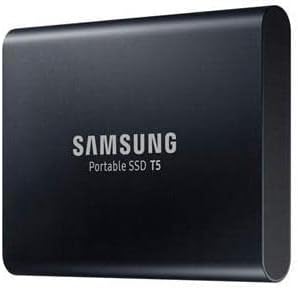


This Samsung T7 Portable SSD stands out as a top choice for Linux users seeking high performance and reliability. With a rating of 4.7 stars, it consistently delivers fast data transfers and durable construction suitable for daily professional workflows.
We may earn a commission when you buy through this link, at no additional cost to you.
The drive features PCIe NVMe technology enabling speeds up to 1050MB/s read and 1000MB/s write which significantly outperforms traditional hard drives. Its compact aluminum unibody design not only looks sleek but also helps dissipate heat effectively during heavy usage tasks.
While the price point is higher than some budget alternatives, the reliability and speed justify the investment for critical data storage. The lack of an official IP rating means it should be kept away from moisture or extreme elements.
Anyone needing a robust drive for editing large files or backing up system images on Linux will appreciate its performance. It balances speed durability and compatibility making it a versatile tool for diverse computing environments.
NVMe technology ensures that large files move quickly between your Linux system and external storage reducing wait times significantly.
The aluminum casing protects internal components from physical shocks while also keeping temperatures stable under load.
We may earn a commission when you buy through this link, at no additional cost to you.
The SSK Portable SSD offers an excellent entry point for Linux users who need substantial storage without breaking the bank. With a rating of 4.5 stars it delivers impressive speeds and features typically found in more expensive drives.
We may earn a commission when you buy through this link, at no additional cost to you.
Its 1050MB/s read speeds allow quick access to files while SLC caching helps maintain performance during large transfers. The inclusion of both USB-C and USB-A cables ensures connectivity with older and newer systems seamlessly.
Though the casing is aluminum it feels lighter than premium competitors which might raise durability concerns over years of heavy travel. Limited software tools mean users rely mostly on native Linux file management.
This drive is ideal for students or hobbyists needing reliable backup storage for documents and media. It balances cost and performance effectively making it a strong budget recommendation.
You get substantial capacity at a fraction of the cost of top tier brands while maintaining solid speed standards.
Having both USB types included means you can connect to almost any device without purchasing extra adapters.
We may earn a commission when you buy through this link, at no additional cost to you.
The Samsung T9 Portable SSD is designed for professionals who demand the absolute fastest external storage available. With a 4.6 rating it excels in performance and thermal control making it suitable for intensive Linux workstation tasks.
We may earn a commission when you buy through this link, at no additional cost to you.
Its read speeds reach up to 2000MB/s nearly double that of many competitors enabling rapid file transfers and editing directly from the drive. The Dynamic Thermal Guard ensures performance remains consistent even during long continuous sessions.
While it delivers top tier performance it requires specific ports to unlock full speeds which may not be available on all machines. The premium pricing reflects these advanced capabilities and build quality standards.
Creative professionals and power users will find this drive indispensable for managing large datasets. It represents the pinnacle of portable storage performance available today.
The Gen 2×2 interface provides bandwidth that significantly reduces time spent waiting for large file operations to complete.
Maintaining optimal temperatures prevents throttling ensuring you get consistent performance throughout long work sessions.
We may earn a commission when you buy through this link, at no additional cost to you.
The SanDisk 2TB Extreme Portable SSD is built for environments where durability and capacity are paramount. With a 4.6 rating it offers robust protection against elements and large storage for Linux users working outdoors or in harsh conditions.
We may earn a commission when you buy through this link, at no additional cost to you.
Its IP65 rating ensures resistance against water and dust which protects data integrity in less than ideal environments. The included hardware encryption keeps sensitive files secure while the carabiner loop allows easy attachment to gear.
The 2TB capacity is generous but comes at a price point higher than some competitors offering similar speeds. Weight is also slightly higher due to the reinforced rugged build casing design.
Field researchers and outdoor enthusiasts will find this drive reliable for capturing and storing large volumes of data. It prioritizes physical protection without sacrificing too much performance.
The IP65 rating gives peace of mind when using the drive in dusty or rainy conditions without worrying about damage.
Built-in AES encryption provides an extra layer of security ensuring that private files remain confidential at all times.
We may earn a commission when you buy through this link, at no additional cost to you.
The Lexar ES3 1TB Portable SSD stands out for its incredibly slim profile making it easy to carry in a pocket or notebook bag. With a 4.4 rating it balances portability with decent performance for everyday Linux file transfers.
We may earn a commission when you buy through this link, at no additional cost to you.
At only 10.5mm thick it is smaller than many standard cards offering unmatched convenience for travel. The included DataShield encryption software helps protect files while the USB 3.2 Gen 2 interface ensures quick transfers.
However the extremely thin casing may be less durable under rough handling compared to bulkier alternatives. Capacity is limited to 1TB which might not suffice for heavy media storage needs.
Professionals who need a discreet backup drive for documents or light media will appreciate its size. It prioritizes minimalism while maintaining reliable connectivity.
Its thin profile allows it to fit easily into tight spaces ensuring you always have storage available on the go.
DataShield software adds essential security features out of the box without needing third party applications to secure data.
We may earn a commission when you buy through this link, at no additional cost to you.
The Samsung T7 Shield Portable SSD 2TB combines robust protection with substantial storage making it a versatile choice for Linux users needing resilience and space. With a 4.7 rating it is highly regarded for reliability and durability in challenging conditions.
We may earn a commission when you buy through this link, at no additional cost to you.
Its IP65 rating and 9.8ft drop protection ensure the drive survives accidental drops and exposure to elements. The 2TB capacity offers ample room for large projects while Magician software helps manage drive health and firmware.
The rugged design adds a bit of bulk and weight compared to slim models which might be a consideration for those seeking minimalism. It is also priced higher due to the combination of capacity and rugged features.
Users requiring both durability and large capacity will find this drive an excellent all-in-one solution. It is built to handle the demands of heavy usage and travel without failure.
The combination of water dust resistance and drop protection ensures data safety even in demanding outdoor environments.
With 2TB of space you can store extensive libraries of files without needing multiple drives for organization.
We may earn a commission when you buy through this link, at no additional cost to you.
The Western Digital 1TB My Passport SSD is a dependable option for users seeking secure and fast storage. With a 4.5 rating it offers balanced performance and sturdy build quality suitable for consistent daily use.
We may earn a commission when you buy through this link, at no additional cost to you.
Hardware encryption ensures data privacy without relying on software which is beneficial for Linux environments seeking lightweight security. The compact design fits easily in a pocket while maintaining sturdy resistance against accidental drops.
Although it lacks an IP rating for water resistance it handles everyday physical shocks well. The software ecosystem is straightforward but offers fewer advanced management tools compared to top tier competitors.
This drive is ideal for professionals who prioritize security and reliability over rugged outdoor features. It provides a stable and secure foundation for external storage needs.
Password protected AES encryption safeguards your data effectively without needing additional software installation or overhead.
NVMe technology ensures that file transfers remain fast and reliable for daily work and backup operations.
We may earn a commission when you buy through this link, at no additional cost to you.
The SAMSUNG T5 Portable SSD 2TB is a classic choice offering substantial storage with a reliable metal build. With a 4.8 rating it remains popular for its durability and simplicity though speeds are lower than newer generations.
We may earn a commission when you buy through this link, at no additional cost to you.
Its metal casing protects the drive well during travel and the dual cable inclusion ensures easy connection across many devices. The encryption features provide peace of mind for sensitive data storage needs.
Performance is capped by USB 3.1 standards making it slower than modern Gen 2 models. This might be a drawback for users needing rapid data access for large video files.
It is best suited for users prioritizing capacity and durability over raw speed. It remains a solid option for general backup and archive storage tasks.
The all metal construction provides robust protection against physical damage ensuring longevity for daily use.
Having both USB C to C and A cables means you can connect to almost any computer without extra purchases.
We may earn a commission when you buy through this link, at no additional cost to you.
The Samsung T7 500GB Red offers high performance in a smaller package ideal for users with lighter storage needs. With a 4.7 rating it delivers fast speeds and thermal protection comparable to its larger sibling.
We may earn a commission when you buy through this link, at no additional cost to you.
Dynamic thermal guard technology ensures the drive stays cool during heavy tasks preventing slowdowns due to heat. The compact size makes it easy to carry in a bag or pocket while maintaining durable drop resistance.
The 500GB capacity may not be enough for large media libraries requiring external management of files. The vibrant red color stands out but may show signs of use over time.
Students and professionals needing quick access to specific projects will find this drive efficient. It balances speed and size effectively for targeted storage tasks.
Advanced thermal control prevents overheating ensuring the drive maintains performance speeds during continuous use cycles.
Available in vibrant colors this drive adds a touch of style while maintaining the professional performance expected.
We may earn a commission when you buy through this link, at no additional cost to you.
The SAMSUNG T5 Portable SSD 500GB offers a reliable entry into portable storage with a focus on security and durability. With a 4.8 rating it is well regarded for its sturdy build and ease of use across systems.
We may earn a commission when you buy through this link, at no additional cost to you.
Its metal body resists shocks and the dual cable inclusion ensures easy connectivity. Encryption features help keep private data safe while the compact design allows for convenient carrying anywhere.
Speeds are lower than newer models due to USB 3.1 standards which may impact large file transfers. Capacity is limited making it better for documents than extensive video archives.
This drive is a great option for casual users needing secure backup for personal files. It provides essential performance at a budget friendly price point.
The all metal construction provides essential protection against physical damage ensuring long term reliability and performance.
Having both connection types included means you can use the drive immediately with most devices out of the box.
We may earn a commission when you buy through this link, at no additional cost to you.
Selecting the right external SSD for Linux involves evaluating several key factors that impact performance compatibility and durability. This section breaks down the most important considerations to help you make an informed decision.
USB 3.2 Gen 2 interfaces offer up to 1000MB/s which significantly reduces file transfer times compared to older USB 3.0 standards. For large datasets video editing or system backups higher speeds are essential to maintain workflow efficiency without delays.
Look for drives supporting USB-C connectors and UASP protocols to ensure maximum throughput on modern Linux systems.
Determine how much space you need based on your typical file sizes. 1TB is often sufficient for documents and light media but video professionals may require 2TB or more to avoid constant file management and migration.
Consider future growth when selecting capacity to prevent running out of space prematurely which could hinder productivity.
Ensure the drive supports Linux file systems or can be formatted easily to EXT4 or similar. Most modern drives work plug and play but checking specific OS support avoids potential mounting or permission issues.
Opt for drives with open firmware or documented drivers to prevent compatibility hurdles in specialized Linux environments.
Rugged drives with shock resistance and metal casings protect data from physical damage during transport. IP ratings for water and dust resistance are valuable if you work in variable or outdoor environments regularly.
A sturdy build ensures longevity and reliability which is critical for storing important data without unexpected failures.
Hardware based AES encryption protects data even if the drive is lost or stolen. This is vital for sensitive work or personal information stored externally.
Choose drives with easy to manage password protection that integrate well with Linux security tools to ensure access control.
Sustained data transfers can generate heat which may throttle performance. Drives with active thermal control systems maintain consistent speeds without overheating issues.
Aluminum casings and internal heat sinks help dissipate heat effectively ensuring reliable operation over long periods.
Manufacturer software can help monitor drive health and update firmware though open source compatibility is preferred. Good customer support ensures assistance if technical issues arise during setup.
Check if the vendor provides Linux specific guides or tools to simplify maintenance and management tasks.
Compare price per GB across different models to find the best value for your budget. Higher performance drives cost more but may save time and increase productivity over the long term.
Balance features with actual needs to avoid overpaying for capabilities you may not use frequently in your workflow.
Connect the SSD to a compatible USB port and wait for your system to recognize it automatically. Most drives mount instantly allowing immediate file access through your file manager without extra software installation.
Regularly update firmware using vendor tools to ensure optimal performance and security patches. Monitor drive health to detect potential issues early and backup important data to multiple locations for redundancy.
Avoid exposing the drive to extreme temperatures moisture or direct impact during storage and transport. Always use proper ejection procedures to prevent data corruption during active file operations on Linux.
Yes most modern external SSDs work seamlessly with major Linux distributions like Ubuntu and Fedora. They use standard USB protocols that are well supported by the kernel for plug and play functionality.
Absolutely you can format external SSDs to EXT4 using standard tools like GParted. This improves performance and compatibility with Linux systems though it may limit cross platform usage.
USB 3.2 Gen 2 supports higher data transfer speeds up to 1000MB/s compared to 3.0. This results in faster file operations which is crucial for large datasets on Linux systems.
Most external SSDs do not require drivers as they are supported natively by the Linux kernel. You can use them directly once connected without downloading extra software packages.
Use the file manager eject option or run a sync and umount command in the terminal. This ensures all pending writes complete preventing data corruption or loss.
Manufacturers use decimal measurement while Linux uses binary calculation causing a slight difference. This is normal and does not affect actual physical storage performance.
Hardware encryption is generally more secure and faster since it uses dedicated circuitry. It reduces CPU load and ensures protection even if the system software is compromised.
Use tools like smartmontools or GSmartControl to monitor drive health via S.M.A.R.T data. These utilities help predict failures so you can backup data proactively before issues occur.
We highlighted ten top drives with the Samsung T7 leading as the best overall choice for balance of speed and durability. Budget options like SSK and premium picks like T9 offer tailored solutions depending on specific requirements.
Prioritize interface speed and capacity that match your workflow needs. Security features and build quality should also be weighed based on how sensitive your data is and where you use the drive.
Prices fluctuate regularly so check current listings before purchasing to ensure you get the best deal. Investing in a reliable external SSD enhances productivity and protects your valuable data effectively.