
8Bitdo M30 Wired Controller
4.2Editor score
USB-C wired connection
Officially Licensed by Xbox
3 profiles switch on fly
This guide compares the top ten fightpads for PC to help gamers find the perfect controller for competitive play and casual sessions.
Finding the right fightpad for your PC can transform your gaming experience from frustrating to flawless. A quality controller ensures precise inputs, durability, and comfort during long sessions. Whether you play Street Fighter or Tekken, the right hardware matters.
We evaluated ten top-rated fightpads based on build quality, button responsiveness, and platform compatibility. Our analysis focuses on wired and wireless options designed specifically for fighting games. Each product offers unique features to suit different playstyles and budgets.
Each pick highlights key strengths, real-world performance, and potential trade-offs for serious players. Prices and availability can change frequently, so always check the latest details before purchasing. Use this guide to make an informed decision for your setup.
4.2Editor score

4.1Editor score

4.2Editor score
This side-by-side comparison highlights the key specifications and features of each top-rated fightpad to help you choose the right one for your PC setup.


The HORI Fighting Commander OCTA stands out as a top choice for PC gamers seeking tournament-grade performance. With a 4.1 rating, it delivers accuracy and durability that competitive players demand. Its Micro Switch buttons ensure crisp inputs every time you press.
We may earn a commission when you buy through this link, at no additional cost to you.
Key strengths include the Short Throw Analog Stick with an 8-way gate, which boosts execution speed significantly. The adjustable D-Pad sensitivity lets you fine-tune responses to your liking. Official licensing from Sony ensures broad compatibility with modern systems.
Trade-offs include the wired connection, which may limit seating options compared to wireless models. The companion app is necessary for deeper customization, adding a small setup step. However, these are minor compromises for the performance gains offered.
This fightpad is ideal for serious players who prioritize precision and reliability. Its robust build and thoughtful design make it a long-term investment. For most PC fighting game enthusiasts, this is the most balanced choice available today.
The use of Micro Switch buttons provides a tactile feel that reduces fatigue during extended sessions while maintaining consistent input recognition.
With the companion app, you can adjust D-Pad sensitivity and save settings, ensuring the controller adapts to your unique preferences.
We may earn a commission when you buy through this link, at no additional cost to you.
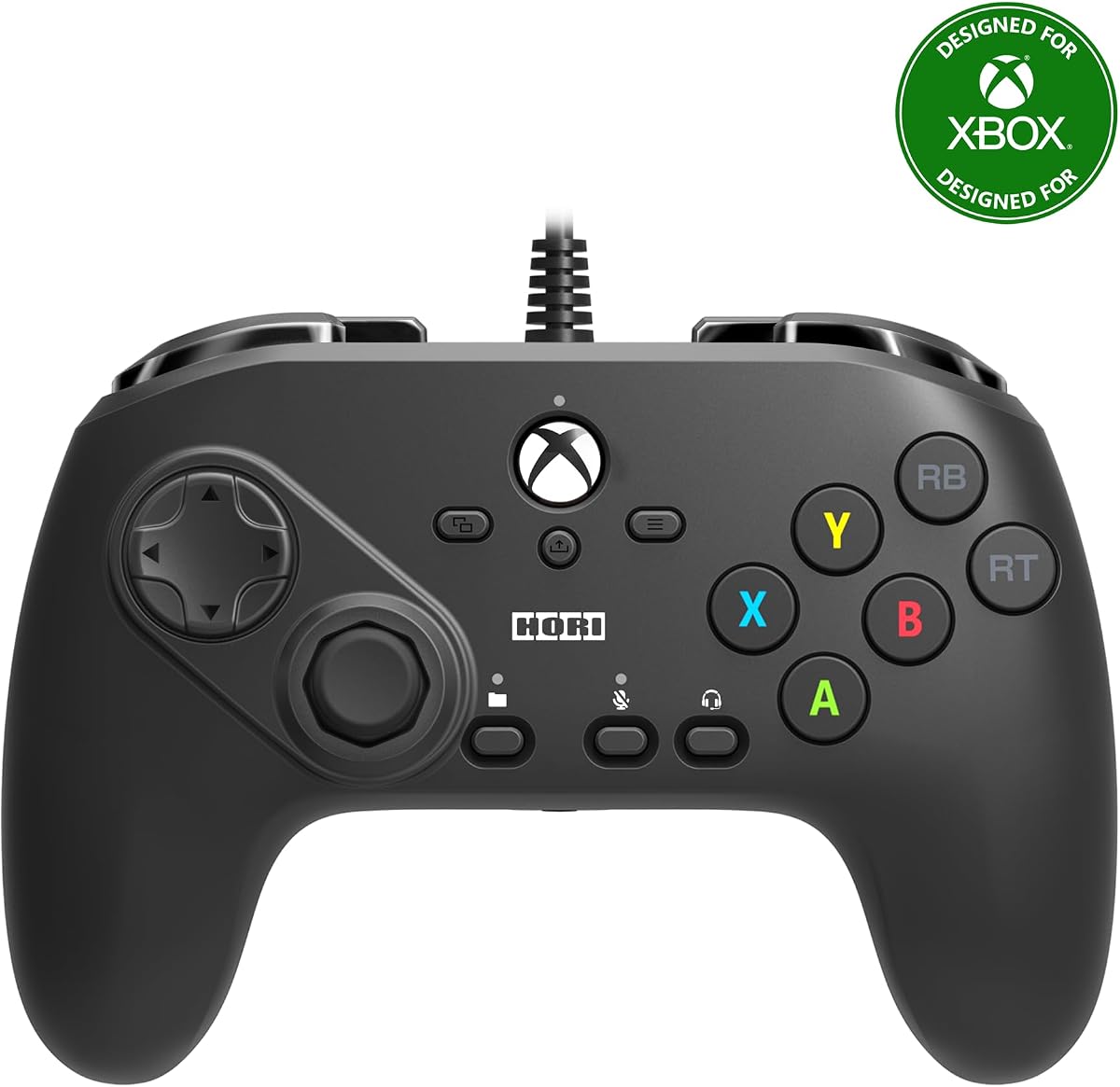
The HORI Fighting Commander Octa for Xbox offers a familiar design adapted for PC users on Windows 10. With a 3.5 rating, it provides reliable performance for fighting games. The six-button layout is standard for competitive play.
We may earn a commission when you buy through this link, at no additional cost to you.
Strengths include the Micro Switch Buttons that allow rapid execution of combos. You can save up to four profiles using the companion app, switching easily via a profile button. Official Microsoft licensing ensures stable connectivity on Xbox Series X.
The lower rating reflects some users finding the build less premium than other options. It is primarily designed for Xbox, so PC compatibility is secondary. These factors limit its appeal for pure PC-focused gamers.
This controller suits players invested in the Xbox ecosystem who want a fightpad feel. It works well for casual competitive play. For dedicated PC users, other models might offer better value or features.
Saving multiple profiles allows you to adapt to different games or friend setups quickly without resetting controls each time.
The Micro Switch Buttons reduce actuation force, enabling faster repeated inputs that are critical in high-speed fighting titles.
We may earn a commission when you buy through this link, at no additional cost to you.
The 8Bitdo M30 Wired Controller delivers exceptional value for budget-conscious PC gamers. With a 4.2 rating, it offers reliable performance without breaking the bank. The six-button layout is perfect for fighting games.
We may earn a commission when you buy through this link, at no additional cost to you.
Its USB-C wired connection ensures virtually lag-free input, crucial for precise timing. You can switch between three custom profiles instantly on the fly. Official Xbox licensing guarantees compatibility with modern systems.
The main trade-off is the lack of wireless options, requiring a cable for use. The build is functional but lacks premium features like Micro Switches. However, the price makes it accessible to beginners.
This controller is perfect for newcomers or those testing the genre. It provides a solid foundation for learning fighting games. If you seek high-end customization, you might upgrade later.
The dedicated profile button lets you toggle between setups quickly, which is useful when playing multiple titles with different controls.
The USB-C port ensures a stable, low-latency link that is often preferred for competitive play over wireless alternatives.
We may earn a commission when you buy through this link, at no additional cost to you.
The DOYOKY Leverless Controller offers a unique hitbox-style design for PC enthusiasts seeking depth. With a 4.4 rating, it balances performance and customization. The reinforced USB-C port ensures lasting durability.
We may earn a commission when you buy through this link, at no additional cost to you.
Key features include hot-swappable switches that let you change tactile feel without soldering. The OLED Display shows input mode and settings instantly. Web-based customization simplifies configuration without extra software.
Transitioning to a leverless layout takes time compared to traditional sticks. Some users may find the five input modes initially confusing. However, these challenges fade as you master the controller.
This is best for players who value modularity and precise control. It supports many platforms, making it a versatile investment. For dedicated PC fighters, the customization options are highly appealing.
Swapping switches in seconds allows you to experiment with different weights and feedback without technical expertise.
The OLED screen keeps track of your current mode and SOCD settings, so you never lose your configuration mid-match.
We may earn a commission when you buy through this link, at no additional cost to you.
The Akko FUNBOX Leverless Controller represents the pinnacle of PC fightpad technology. With a 4.2 rating, it delivers next-generation features like Hall Effect switches. The Rapid Trigger function adjusts from 0.1mm to 2.8mm for precision.
We may earn a commission when you buy through this link, at no additional cost to you.
Its Full-Color LCD acts as a control hub for mode switching and animations. The Aluminum Multi-Function Dial provides intuitive tactile access to settings. Tournament Lock mode ensures compliance with competition rules.
The high cost reflects its advanced components and premium build. The browser-based setup requires some technical comfort. However, these features are justified for competitive players seeking an edge.
This controller is ideal for serious tournament participants. Its responsiveness and customization set a high standard. If you want top-tier performance, the investment is worthwhile for long-term use.
Hall Effect switches eliminate physical friction, ensuring they never wear out over time and maintain consistent performance forever.
The satin-finished aluminum dial lets you adjust parameters instantly without navigating complex button combinations during a match.
We may earn a commission when you buy through this link, at no additional cost to you.
The HORI Fighting Commander OCTA TEKKEN 8 Edition provides a specialized option for Windows PC users. With a 3.8 rating, it matches the general model's performance. It is designed specifically for fighting game enthusiasts.
We may earn a commission when you buy through this link, at no additional cost to you.
It features top-quality components including Microswitch buttons for accuracy. The six-button layout includes an analog slide pad for in-game navigation. Official licensing by Bandai Namco ensures thematic authenticity.
The main limitation is its specific theme, which may not suit all tastes. Otherwise, it shares identical specs with the standard OCTA. This limits its unique value for non-fans of the series.
This controller is great for dedicated Tekken players or collectors. It offers reliable performance for competitive play. If you prefer a neutral design, the general model may be better.
The accurate D-Pad ensures precise directional inputs, reducing missteps during complex combos and special move executions.
The analog slide pad helps with menu navigation in games, adding convenience beyond standard combat functions.
We may earn a commission when you buy through this link, at no additional cost to you.
The HORI Wireless Fighting Commander OCTA Pro brings wireless convenience to PC gamers. With a 3.6 rating, it offers the same core features as wired versions. It supports PlayStation 5 and Windows 11/10.
We may earn a commission when you buy through this link, at no additional cost to you.
Key features include programmable rear buttons for extra inputs. Swappable D-pad options let you choose the shape you prefer. The 8-gate analog stick ensures accuracy during fast movements.
The higher cost reflects the wireless hardware. Battery management is necessary to avoid interruptions. While convenient, wired options often remain more reliable for competitive play.
This is ideal for players who value mobility and desk flexibility. It works well for casual competitive sessions. If you prioritize raw reliability, a wired model might suit better.
Rear buttons allow quick access to macros or additional commands without taking hands off the primary controls.
Swapping the D-pad lets you adapt to different game styles, offering a level of customization rare in standard pads.
We may earn a commission when you buy through this link, at no additional cost to you.
The HORI PlayStation 5 Fighting Commander offers a renewed choice for cost-conscious buyers. With no rating available, it promises the same tournament grade performance. The eight-button layout is standard for fighting games.
We may earn a commission when you buy through this link, at no additional cost to you.
It features programmable macros to simplify complex moves. Official licensing from Sony ensures quality and compatibility with PS5. The build is durable enough for regular training sessions.
Without a rating, verifying condition can be challenging. Warranty limitations may apply to renewed items. You should check seller policies carefully before buying.
This option is for those seeking a trusted brand at lower risk. It works well for casual or practice play. If certainty matters most, a new unit might be safer.
Macros allow you to execute complex sequences with a single press, saving time during intense matches.
Built to withstand rigorous use, this pad maintains performance over time without losing button feel.
We may earn a commission when you buy through this link, at no additional cost to you.
The Logitech G F310 Wired Gamepad offers a familiar layout for general PC gamers. With a 4.4 rating, it works with many titles. The floating D-pad allows quick direction changes.
We may earn a commission when you buy through this link, at no additional cost to you.
Strengths include broad game support and plug-and-play USB. Ten programmable buttons offer basic customization. However, it lacks specialized features like Micro Switches or short throws.
It is not optimized specifically for fighting games. The D-pad may not match precision of dedicated pads. This limits its appeal for competitive play.
This controller is best for casual players who game variety. It provides a cost-effective solution for general gaming. Serious fighters may prefer dedicated models.
Support for old standbys to new titles ensures versatility across genres beyond fighting games.
The unique floating D-pad rests on four switches for responsive direction changes without a single pivot point.
We may earn a commission when you buy through this link, at no additional cost to you.
The HORI Fighting Stick Mini offers a compact alternative to full fightpads. With a 4.2 rating, it delivers arcade-style performance. The small form factor makes it easy to carry.
We may earn a commission when you buy through this link, at no additional cost to you.
It features a classic 8-button layout and V-cut housing joystick. Official licensing ensures reliability. The lightweight build supports portable tournament play.
Joysticks feel different than pad layouts, requiring adaptation. Some may find the size too small for extended use. However, its portability is a strong asset.
This is perfect for travelers or small desk setups. It bridges the gap between arcade and home play. For dedicated PC fighters, it's a unique choice.
The classic joystick provides a nostalgic feel that many arcade veterans prefer over modern digital pads.
Its lightweight nature makes it easy to transport to local events without heavy setup demands.
We may earn a commission when you buy through this link, at no additional cost to you.
Selecting the right fightpad involves considering connection type, button layout, and build quality. Here are the key factors to evaluate.
Wired controllers offer zero latency and reliable connectivity, essential for competitive play. Wireless models provide convenience but may introduce lag or require charging management.
For strict competitive environments, wired is preferred. For casual play, wireless offers more flexibility.
Traditional pads use analog sticks and D-pads, while leverless options use hitbox-style keys. Each suits different playstyles and preferences.
Choose based on what feels natural for your fingers and game mechanics.
Micro Switches and Hall Effect switches provide better responsiveness and durability. Traditional rubber domes may wear out faster.
Look for high-quality switches if you plan on intense daily use.
Software or hardware options for remapping buttons and D-pads allow personalization. Profiles let you switch between setups easily.
Choose models with customization if you play multiple games with different controls.
Reinforced cables and quality materials ensure long-term use. Look for warranties and replaceable parts.
A durable controller protects your investment over years of gaming.
Ensure the controller works with PC or Windows 10/11. Some models are console-focused, so check explicitly.
Official licensing often guarantees better support on supported platforms.
Comfort during long sessions matters. Look for rubber feet, balanced weight, and comfortable button placement.
Ergonomic designs reduce fatigue and improve overall performance.
Some pads include tournament locks or compliant SOCD settings for official events. These features ensure legal play.
If you compete, verify that the model meets tournament standards.
Connect your controller via USB or proprietary receiver. Install any required companion apps to update firmware and configure settings.
Customize button mapping and D-pad sensitivity to match your playstyle. Save profiles if you switch between games frequently.
Keep the controller clean and store it safely. Avoid liquid exposure and check cables regularly for wear.
Wired fightpads are generally better for competitive play due to zero latency and reliable connectivity. Wireless options offer convenience but may lag.
Yes, many fightpads licensed for Xbox or PlayStation are compatible with PC. Check for Windows support and drivers if needed.
Hall Effect switches use magnetic technology for durability and zero wear. They offer faster response times than mechanical switches.
Some models require companion apps for remapping, while others use onboard profiles. Check product details for setup requirements.
Use a soft, dry cloth to wipe surfaces. Avoid liquids directly on buttons. Check manuals for specific cleaning guidelines.
SOCD cleaning ensures simultaneous opposing direction inputs are resolved correctly. It prevents invalid inputs during rapid directional changes.
Hitbox controllers offer faster directional inputs but require learning. Sticks feel more traditional. Choice depends on preference.
We reviewed ten top fightpads, with the HORI Fighting Commander OCTA leading for precision and durability. The 8Bitdo M30 offers excellent value for budget seekers. The Akko FUNBOX delivers premium features for competitors.
Prioritize connection type, button quality, and platform compatibility based on your needs. Durability and customization also play major roles in long-term satisfaction.
Remember to check current availability and features before purchasing. Your ideal fightpad depends on balancing performance with personal preferences and budget.