
V-one Wired USB Gaming Controller
4.2Editor score
Supports Windows 11 easily
Includes vibration feedback function
Multi-mode compatibility available
Discover the top joysticks for Windows 11 including flight sticks and gamepads. This guide compares specs features and compatibility to help you pick the right
Finding the right joystick for Windows 11 can transform your gaming experience significantly. Whether you fly virtual aircraft or play strategy games, a quality controller offers precision that keyboards cannot match. This guide helps you navigate the options available.
We evaluated ten top models based on compatibility ease of use and build quality. Each product supports Windows 11 directly ensuring seamless integration with your current setup. Our comparison covers various price points and specialized uses like flight simulation.
Each pick highlights key features and potential trade-offs to inform your decision. Please note that prices and availability change frequently so check the links for current details. We aim to provide clear insights for both beginners and seasoned sim pilots.
4.2Editor score

4.4Editor score

4.0Editor score
This side-by-side comparison highlights key specifications and features across all ten products. We focus on connectivity design and specialized functions to help you understand the differences at a glance.






The PXN 2113PRO is a cost effective option for flight simulation enthusiasts. It rates moderately but offers many features at an accessible price. Its design focuses on comfort and ease of use for new pilots.
We may earn a commission when you buy through this link, at no additional cost to you.
This stick includes a rapid fire trigger and 8 way hat switch. The vibration function adds immersion when set correctly in the driver. It supports many titles like Microsoft Flight Simulator and War Thunder effectively.
Users should note that vibration is weak below 20 percent strength. The unit works only on PC and not with consoles or Mac. Ensure you set the drive strength high for best results.
Ideal for beginners wanting a dedicated flight stick without high costs. It provides basic control and comfort for long sessions. If you fly often this stick delivers decent value for the money.
The smooth feeling and suction cups keep the stick steady on desks.
Works well with popular titles including World of Warplanes and Assault Horizon.
We may earn a commission when you buy through this link, at no additional cost to you.
The Thrustmaster T-Flight Hotas One combines a joystick and throttle in one. It has a high rating and suits many simulation types. The modular design allows flexible setups for different environments.
We may earn a commission when you buy through this link, at no additional cost to you.
Its detachable throttle lets you use the stick on your lap. The adjustable resistance and responsive trigger improve control precision. It works seamlessly with Windows and Xbox Series X and S.
While expandable with rudder pedals it lacks included force feedback. Beginners may find the learning curve easy but pros might want more buttons. It remains a solid choice for mixed platform users.
Perfect for those who want a complete HOTAS without breaking the bank. It fits casual and serious sim setups well. Consider adding rudders for full immersion if you fly frequently.
Separating the throttle allows comfort on desks or laps without clutter.
Supports both Windows PC and Xbox ensuring wider game compatibility.
We may earn a commission when you buy through this link, at no additional cost to you.
The V-one Wired USB is a simple gamepad that works across many systems. It carries a strong rating and fits budget needs well. This controller uses standard input modes for easy setup.
We may earn a commission when you buy through this link, at no additional cost to you.
It supports Windows versions from XP up to 11 without issues. The Android compatibility via OTG adds versatility for mobile games. Vibration feedback and turbo functions enhance basic gameplay moments.
Be aware it does not work with Xbox One or Mac. The build is functional but may not last as long as premium sticks. It suits those needing a universal pad for varied use.
Buy this if you need one controller for PC and Android devices. It offers solid value for casual play and simulation. Ensure your device supports OTG for full mobile functionality.
Works on Windows and Android plus PS3 via wired USB link.
Plug and play setup means no driver hassle for most systems.
We may earn a commission when you buy through this link, at no additional cost to you.
The Thrustmaster USB Joystick is designed for simple control tasks. It rates decently and offers a POV button for camera control. The handle design focuses on comfort during short sessions.
We may earn a commission when you buy through this link, at no additional cost to you.
It provides three axes and four buttons for basic commands. This makes it suitable for entry level games or older titles. The trigger is responsive and the build feels solid enough.
The lack of extra buttons limits complex mapping options. Users wanting more axes may find it restrictive for deep sims. It remains a good starter option for light use.
Choose this if you need a reliable simple stick for basic games. It suits those new to flight controls or older PCs. Check software updates for best driver performance.
The dedicated POV button allows quick view changes without mouse input.
The enlarged rest supports your hand for comfortable handling.
We may earn a commission when you buy through this link, at no additional cost to you.
The Microsoft Sidewinder Precision 2 brings classic design to modern USB. It rates well among fans of older control schemes. The rotating handle provides precise rudder control for pilots.
We may earn a commission when you buy through this link, at no additional cost to you.
Its 146 degree throttle sits on the stick for easy reach. You can save game specific profiles for quick switching. This reduces setup time when playing multiple titles.
The unit is larger than some modern sticks which affects desk space. It is also older so find drivers may take care. Still the build quality and feel remain impressive.
Ideal for players who prefer traditional stick layouts. It works well for flight games needing rudder input. If you like classic ergonomics this is a reliable pick.
A full 146 degree throttle on the stick saves space.
Download and save commands for specific games for speed.
We may earn a commission when you buy through this link, at no additional cost to you.
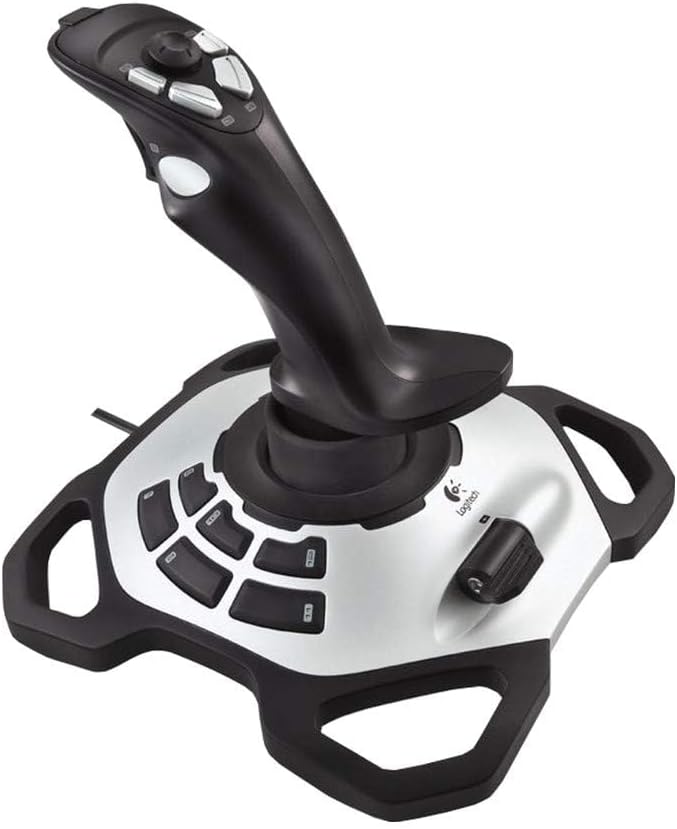
The Logitech Extreme 3D Pro is a trusted choice for sim users. It rates highly for build and precision. The shape fits most hands well during long use.
We may earn a commission when you buy through this link, at no additional cost to you.
It offers multiple axes and buttons for varied control. The USB connection works easily with Windows 11 systems. This makes it a solid pick for daily flight sessions.
Though it lacks a full throttle lever the stick quality is good. Some users may wish for more buttons for complex mapping. It remains a standard in the category.
Buy this if you want a reliable stick without extra bells. It suits mixed gaming and sim needs. Check for firmware updates to maintain performance.
The stick provides accurate axis movement for tight control.
Logitech is known for durable products that last years.
We may earn a commission when you buy through this link, at no additional cost to you.
The VOYEE PC Controller is a gamepad suited for general play. It rates well for value and comfort. The design focuses on long hold sessions without fatigue.
We may earn a commission when you buy through this link, at no additional cost to you.
It includes rumble control that matches game actions automatically. The 7.2 foot cord gives room to move freely. Buttons are sensitive and respond quickly to commands.
Note that it is not ideal for FPS games as stated. It works best with racing or action sims needing pads. The build is lightweight which some may prefer.
Pick this if you need a wired pad for mixed titles. It suits budget gamers wanting comfort. Check the cable length fits your setup before buying.
The ergonomic grips fit hands better for long play.
Rumble adds immersion during key game moments.
We may earn a commission when you buy through this link, at no additional cost to you.
The Thrustmaster SimTask FarmStick targets farming sim players specifically. It rates highly for precision and controls. The design handles heavy machinery tasks with ease.
We may earn a commission when you buy through this link, at no additional cost to you.
It has up to 33 inputs for total management. Hall Effect sensors ensure long term precision without drift. This makes it reliable for repeated farming sessions.
Note that a racing wheel is required for full use. It is built for Xbox Series X S and PC with FS25. If you do not play that game this may not fit.
Ideal for serious farming sim fans wanting a dedicated tool. It brings cockpit feel to agricultural games. Pair it with a wheel for best immersion.
Hall Effect sensors remove wear and drift over time.
Up to 33 inputs cover every machine function.
We may earn a commission when you buy through this link, at no additional cost to you.
The Logitech G X56 is a high end flight controller. It offers extensive controls and custom options. The RGB lighting adds style to your setup.
We may earn a commission when you buy through this link, at no additional cost to you.
It features twin throttles with friction adjusters for accuracy. The 189 controls allow deep mapping for complex sims. Hall effect sensors ensure precision in movement.
The price is high and it requires two USB ports. It is best for those with full cockpit rigs. Beginners may find it overwhelming but pros will love it.
Choose this if you want top tier realism and control. It suits serious simmers with space. Check your USB ports before buying.
RGB allows color match to your gaming rig.
Controls are placed for easy use in VR.
We may earn a commission when you buy through this link, at no additional cost to you.
The Thrustmaster T.16000M FCS is a top pick for precision. It rates highly for tech and build. H.E.A.R.T tech ensures accuracy stays high over time.
We may earn a commission when you buy through this link, at no additional cost to you.
It includes 16 buttons plus a POV hat switch. The design is fully ambidextrous with three removable parts. This suits left and right handed users well.
It lacks a separate throttle which limits flight sim use. You need software to map profiles for each game. Still the build quality is a leader.
Ideal for those needing a pure stick with many buttons. It fits well in cockpits and desks. Check if you want a separate throttle later.
This tech prevents drift and maintains precision.
Adjustable parts allow left or right handed use.
We may earn a commission when you buy through this link, at no additional cost to you.
Choosing the right joystick requires looking at key features. We list factors to help you compare models based on your needs.
Ensure the joystick lists support for Windows 11 to avoid driver issues. Most models work but verify this before buying. Older units may lack drivers for this OS.
More buttons allow deeper mapping for complex games. Check if you need extra inputs for your sim. This reduces reliance on keyboard keys.
Axes determine movement precision. Some sticks include a throttle which saves space. Decide if a separate throttle is needed.
Durability matters for long sessions. Look for solid materials and comfortable grips. This reduces fatigue during play.
Comfort is key for extended use. Check the shape and weight. Ambidextrous designs help left handed users.
Set a budget that fits your needs. Higher prices bring better tech but entry models work too. Match features to how often you play.
Connect your joystick to a free USB port before launching the game. Windows will detect it and install drivers if needed. Check settings to map controls for each title.
Most models listed support Windows 11 directly. However check the product specs before buying. Some older units may need driver updates.
Some models support Xbox while others are PC only. Check the compatibility list on the product page. This prevents issues with console setups.
Many support plug and play but software helps mapping. Install drivers if the joystick needs calibration. This ensures smooth performance.
A HOTAS combines hands on throttle and stick. This allows flight control without taking hands off. It is ideal for aviation games.
Use Windows Control Panel to access game controllers. Run the calibration wizard to test axes. This fixes drift or offset issues.
Many budget models include vibration. Higher end sticks focus on precision. Check specs if you want feedback in games.
We reviewed ten joysticks with unique features. Each model suits different play styles and budgets. Select based on your main games and comfort.