
WFB Mouse Jiggler Undetectable 2 Pack
4.5Editor score
Two units included
Tiny movement range
No driver needed
This guide compares the top laptop jiggler devices for remote work and office use, evaluating features like undetectability, silence, and ease of use to help
Keeping your computer active during long work sessions is essential for remote professionals. A laptop jiggler helps prevent your system from going to sleep or showing away status on communication platforms like Teams or Zoom.
We compared ten leading laptop jiggler models based on their design, undetectability, and ease of use. Our analysis covers both physical mouse movers and digital simulators to find the most reliable options for your setup.
Each pick highlights specific strengths like silent operation or plug-and-play functionality. Prices and availability can change quickly, so always verify the latest details before making your final purchase decision today.
4.5Editor score

4.7Editor score
4.1Editor score
The following table provides a side-by-side comparison of all ten laptop jiggler models analyzed in this guide. It highlights key specifications and features to help you quickly identify the right fit for your needs.


The TECH8 USA Mouse Mover Jiggler stands out as a top choice for remote workers seeking reliability and style. With a high user rating, this device combines practical functionality with a unique aesthetic that complements modern workspaces.
We may earn a commission when you buy through this link, at no additional cost to you.
Its standout feature is the 3D holographic disc, which not only adds a cool visual element but also supports various mouse sizes. The device requires no software, meaning it simulates physical mouse movements naturally without triggering IT security scans.
While the design is impressive, the disc surface might limit how freely some mice can slide. Additionally, the cost is higher than basic competitors, though the build quality and added features justify the investment for many users.
This model is ideal for professionals who value both performance and desk aesthetics. If you want a device that keeps you online without compromising on design, the TECH8 USA Mover is a strong recommendation.
The ambient glow ring allows you to customize the look to match your setup while keeping the device functional.
Plug-and-play simplicity ensures you can start using the device immediately without configuring settings or installing drivers.
We may earn a commission when you buy through this link, at no additional cost to you.
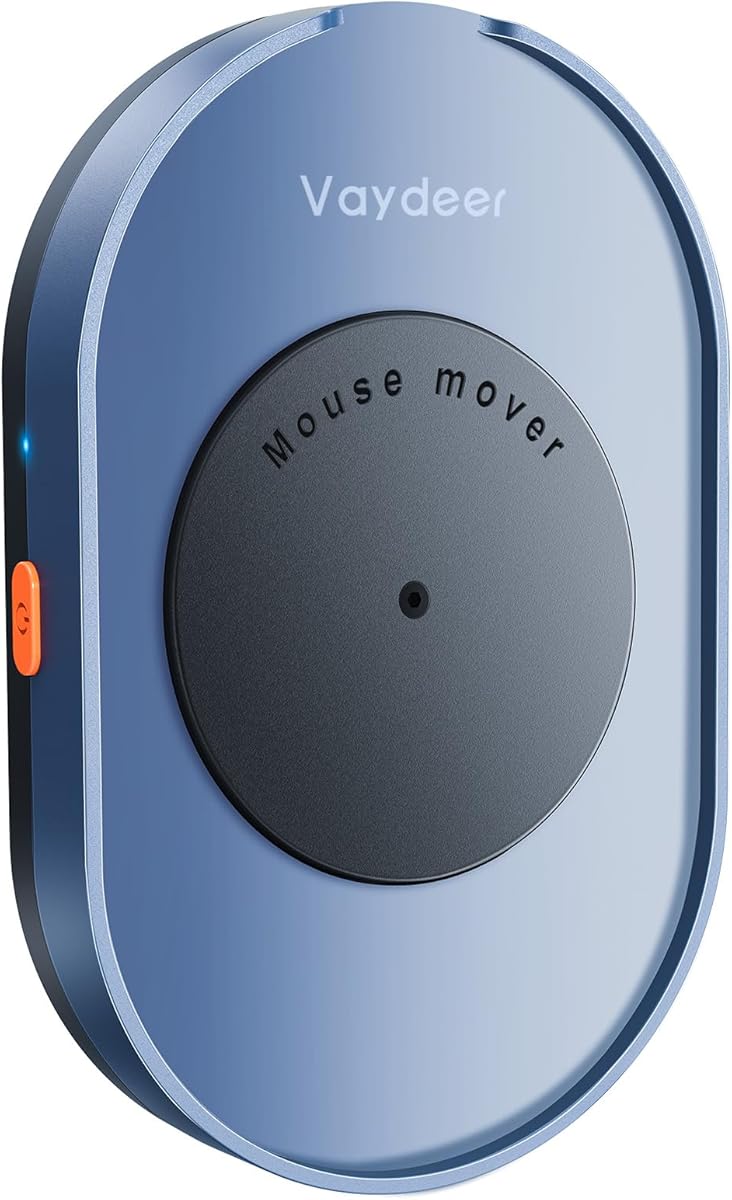
The Vaydeer Undetectable Mouse Jiggler is designed for users who prioritize silence and security in their workspace. It features an ultra-silent motor that operates below 45dB, making it nearly inaudible during meetings.
We may earn a commission when you buy through this link, at no additional cost to you.
One of its strongest points is the ISO/IEC27001:2013 security certification, which adds a layer of trust for corporate environments. The device is driver-free and undetectable by IT hardware scans, ensuring safe usage at work.
However, it requires either an external power adapter or a USB connection, which can add some cable clutter. The unit is also larger than some compact alternatives, which might be a consideration for smaller desks.
If you need a discreet device that won't interrupt your workflow with noise, the Vaydeer model is an excellent choice. It is particularly suitable for quiet home offices or shared workspaces.
The ISO certification ensures that the device meets high standards for information security management.
A dedicated on/off switch makes it easy to toggle the device without unplugging it repeatedly.
We may earn a commission when you buy through this link, at no additional cost to you.
The WFB Mouse Jiggler offers incredible value by providing two units for a single low price. This makes it an accessible entry point for anyone looking to keep their computer active without spending much money.
We may earn a commission when you buy through this link, at no additional cost to you.
It functions as a standard 2.4G mouse, meaning it is recognized as a regular peripheral by your system. The movement is slight, moving the cursor only 1-2 pixels, which ensures it remains invisible during normal work tasks.
The design is basic and functional, lacking some of the premium features found in higher-end models. There is no on/off switch, so you may need to plug and unplug the device to control it.
For those on a tight budget or needing backup units, the WFB pack is highly recommended. It gets the job done effectively without breaking the bank, making it a smart choice for cost-conscious buyers.
Buying two units allows you to have one at home and one at the office for flexible usage.
The minimal cursor shift ensures your screen activity remains active without disrupting your current task.
We may earn a commission when you buy through this link, at no additional cost to you.
The AUEDROT Mouse Jiggler is specifically designed for modern laptops with USB-C ports, offering a direct and efficient connection. This feature makes it ideal for users who have phased out traditional USB-A ports.
We may earn a commission when you buy through this link, at no additional cost to you.
It includes two jiggle modes, allowing you to switch between slight movements and random movements using a dedicated switch. This flexibility helps you adapt the device to different situations, such as meetings or downloads.
While it is highly practical for USB-C devices, the reliance on this port type might limit compatibility with older systems. Additionally, user ratings are slightly lower than some competitors, suggesting mixed experiences with reliability.
If you own a newer laptop and want a simple, compact solution, the AUEDROT Jiggler is a solid option. It delivers essential functionality without requiring any software or complex setup.
The USB-C connector ensures a secure fit on modern devices that lack legacy ports.
A single button press allows you to toggle between modes instantly without removing the device.
We may earn a commission when you buy through this link, at no additional cost to you.
The Yonktoo Mouse Jiggler is engineered with a slim profile, allowing it to fit neatly under your mouse without taking up extra desk space. This design makes it an ideal choice for compact workspaces.
We may earn a commission when you buy through this link, at no additional cost to you.
It features an on/off switch, which gives you control over when the device is active without needing to disconnect it. The included 4.9-foot USB cable provides flexibility for positioning the device optimally on your desk.
While the long cable offers flexibility, it might be excessive for smaller desks where clutter is a concern. The build quality is basic, focusing more on functionality than premium aesthetics or advanced features.
If you need a discreet and portable solution that doesn't clutter your desk, the Yonktoo Jiggler is a good fit. It offers straightforward control and ease of use for everyday tasks.
The slim profile ensures that your mouse has ample room to move without obstruction.
The extended cable length allows for flexible placement of the device relative to your computer.
We may earn a commission when you buy through this link, at no additional cost to you.
The Meatanty Mouse Mover offers advanced customization with its adjustable interval timer, allowing you to set exactly how often the mouse moves. This feature provides precise control over the device's activity to suit your needs.
We may earn a commission when you buy through this link, at no additional cost to you.
The device features a visual LED display that shows your settings, making it easy to adjust the frequency without guesswork. The turntable is large enough to accommodate most mouse sizes, ensuring stability during operation.
However, the physical size is larger than many competitors, which might be an issue for smaller desks. Additionally, users sometimes need to calibrate the mouse position for optimal movement, adding a small setup step.
If you need specific control over movement frequency and don't mind the size, the Meatanty Mover is a powerful tool. It is well-suited for users who require a tailored approach to keeping their PC active.
You can set the movement interval from 5 to 60 seconds to match your workflow patterns.
The LED display ensures you always know the current settings without checking the manual.
We may earn a commission when you buy through this link, at no additional cost to you.
This USB Mouse Mover stands out due to its aluminum alloy construction, offering a more durable and premium feel than plastic alternatives. The sturdy build ensures it can withstand daily use without wear and tear.
We may earn a commission when you buy through this link, at no additional cost to you.
It supports two jiggle modes and includes a USB-C adapter, making it versatile for different laptop ports. The switch button simplifies operation, allowing you to turn the device on and off without touching the cable.
While the metal build is a plus, the design remains functionally similar to other budget options. The USB-C adapter can add some bulk, which might reduce portability compared to devices with built-in connectors.
For users who value durability and a professional look, this model is a great choice. It combines essential features with a robust build that feels like a long-term investment for your workspace.
Aluminum alloy provides a sturdy foundation that resists scratches and impacts better than plastic.
The included USB-C adapter ensures compatibility with both legacy and modern laptop ports.
We may earn a commission when you buy through this link, at no additional cost to you.
The TECKNET Mouse Jiggler offers three smart modes that cater to different usage scenarios, from slight movements to random screen coverage. A color LED indicator provides discreet visual feedback on which mode is currently active.
We may earn a commission when you buy through this link, at no additional cost to you.
With a single button control, switching between modes is simple and efficient. The compact design makes it easy to carry in a laptop bag, ideal for professionals who work from multiple locations.
While the indicator is discreet, it may be hard to see in bright lighting conditions. However, the high user rating suggests that most customers find the device reliable and easy to operate for daily tasks.
If you need a portable and versatile device with clear feedback, the TECKNET Jiggler is a strong contender. It balances functionality and convenience effectively for remote workers.
Three different movement patterns allow you to choose how active your cursor should appear.
The lightweight design makes it easy to transport for use at coffee shops or co-working spaces.
We may earn a commission when you buy through this link, at no additional cost to you.
This Mouse Jiggler Mover is defined by its extremely compact size, making it one of the smallest options available. It plugs directly into the USB port and starts working automatically, keeping your PC awake without interference.
We may earn a commission when you buy through this link, at no additional cost to you.
The device is compatible with a wide range of systems including Windows, Mac, and Linux. With no drivers required, it is incredibly easy to set up for immediate use across different operating environments.
It lacks any manual controls, relying on automatic behavior once plugged in. While this simplicity is a plus for some, others might miss the ability to adjust settings or pause the movement manually.
For those who need a simple, small device that works out of the box, this model is excellent. It is particularly effective for keeping systems active during downloads or brief breaks.
The tiny design ensures it fits easily without blocking other ports or taking up desk space.
No setup is required; simply plug it in to begin your cursor movement.
We may earn a commission when you buy through this link, at no additional cost to you.
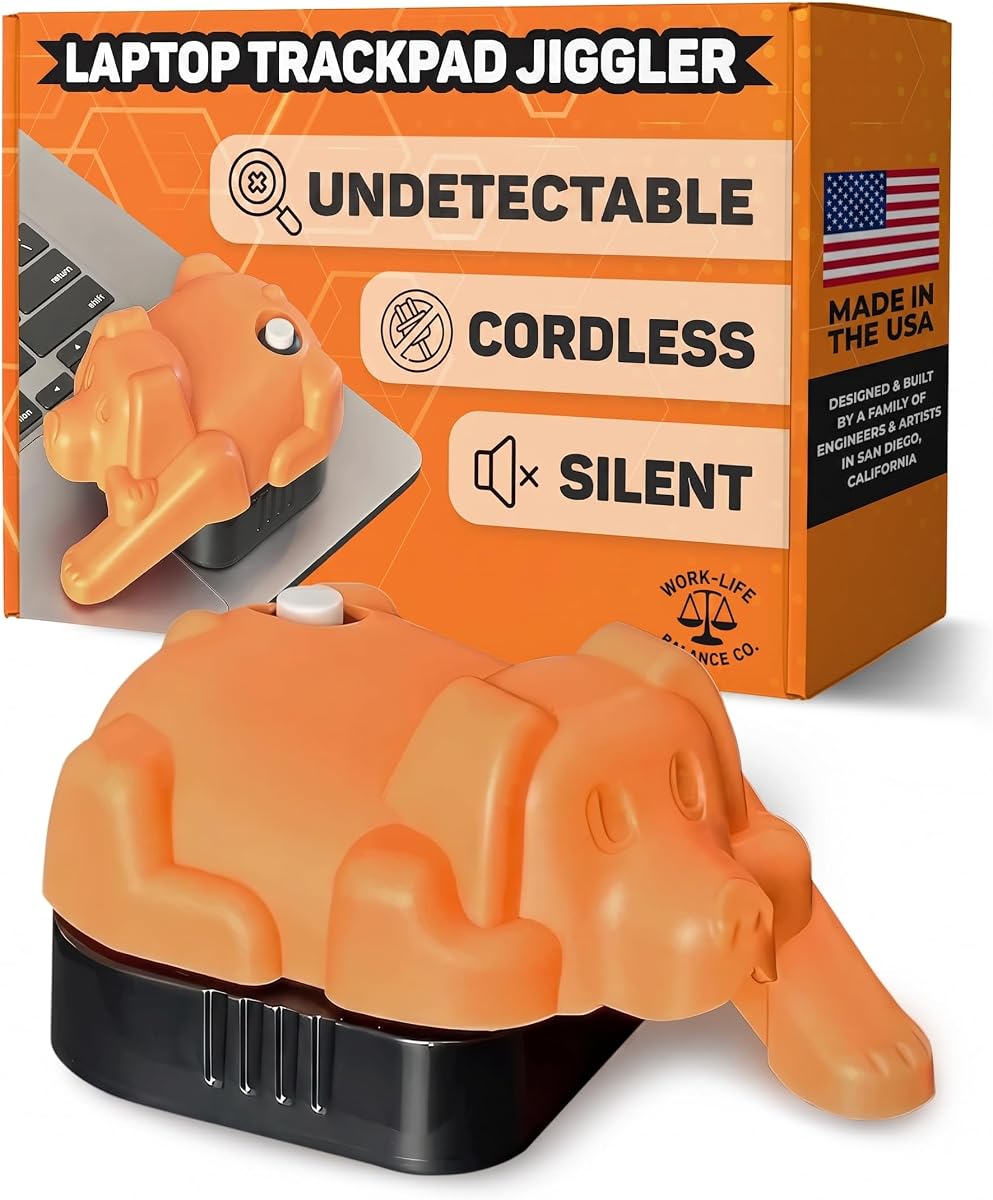
The Trackpad Mouse Jiggler is a unique cordless device that simulates movement directly on your laptop's touchpad. It eliminates the need for USB connections, offering a completely clean and wireless solution for keeping your screen awake.
We may earn a commission when you buy through this link, at no additional cost to you.
It runs on a single AA battery that can last for months, providing long-term utility without frequent replacements. The silent operation ensures that the device remains invisible to both audio and IT scans.
However, it requires specific touchpad settings to function optimally, which can be tricky for some users. The price is also higher than many wired competitors, though the convenience of no wires justifies the cost for some.
If you want a wireless and discreet device that integrates directly with your touchpad, this model is a premium choice. It is ideal for users who prefer minimal cable clutter in their workspace.
No cords are required, allowing you to place the device anywhere on your touchpad.
With a lifespan of up to six months, you can rely on it for long periods without charging.
We may earn a commission when you buy through this link, at no additional cost to you.
Choosing the right laptop jiggler depends on your specific needs regarding workspace, device compatibility, and desired features. This guide outlines key factors to consider before making a purchase.
Decide whether you prefer a USB-A, USB-C, or cordless model based on your laptop ports. USB-C is increasingly standard on modern laptops, while cordless options offer maximum flexibility for touchpad use.
Check your laptop specifications to ensure the chosen connection type matches your available ports without needing extra adapters.
Physical mouse movers use a rotating platform to move your mouse, while digital simulators mimic mouse signals directly. Physical movers are often more undetectable, whereas digital ones are more compact.
Consider whether you want the device to move your mouse cursor physically or virtually based on your IT policy and comfort level.
Look for devices with on/off switches and adjustable modes. Having control over when the jiggler is active prevents unwanted cursor movement during work hours.
Prioritize models with manual controls if you need frequent pausing or changing of movement patterns.
If you work in a quiet environment, ensure the device has an ultra-silent motor. Noise can be distracting during meetings or calls, so look for low decibel ratings.
Check product descriptions for noise ratings to ensure the device won't interrupt your workflow.
Measure your desk space to find a jiggler that fits comfortably. Some models are compact and hidden under the mouse, while others are larger platforms that require more room.
Select a design that complements your workspace and does not obstruct your other peripherals.
Verify that the device supports your operating system, such as Windows, Mac, or Linux. Most modern devices are broadly compatible, but it is best to confirm specific requirements.
Ensure the jiggler works seamlessly with your current software stack to avoid conflicts.
Set a budget that aligns with the features you need. Basic models are affordable but lack advanced controls, while premium options offer more customization and durability.
Balance cost with the necessary features to get the best value for your specific use case.
Check the build quality and warranty length before buying. A longer warranty often indicates better reliability and manufacturer confidence.
Choose a durable model that can withstand daily use without wearing out quickly.
To use your jiggler effectively, place your mouse on the device or plug it into a USB port. Ensure it is connected securely so that movements are registered consistently by your system.
For devices with settings, adjust the movement frequency to suit your needs. This helps keep your system active without appearing too obvious during regular tasks.
Clean the device regularly with a soft cloth to prevent dust buildup. Proper maintenance ensures the mechanism continues to function smoothly over time.
Yes, most physical jigglers are safe because they simulate natural mouse movements without software. However, you should check your company's IT policies before using any device that keeps your system active.
A jiggler simulates mouse activity, which tells your operating system that you are still present. This typically prevents the computer from going into sleep or idle mode automatically.
Most USB jigglers are compatible with Windows, macOS, and Linux. Some specific models may have limitations, so it is best to check the compatibility details for your OS.
Use the on/off switch if your device has one. Alternatively, you can unplug the USB cable to stop the movement immediately if there is no switch.
Physical jigglers usually do not trigger antivirus software since they do not install drivers. However, digital simulators might be flagged depending on your security settings.
Most jigglers are designed for external mice. There are specific touchpad models that sit directly on the pad, but standard USB units typically require an external mouse.
We highlighted the TECH8 USA Mouse Mover as the top choice for its unique design and reliability. It balances style and functionality well for most users needing a dependable jiggler.
Prioritize features like silence and ease of use when selecting a device. Your choice should match your specific workspace constraints and workflow needs.
Always verify current availability and pricing before purchasing. Prices fluctuate often, so checking the latest offers ensures you get the best deal possible.